Table of Contents >> Show >> Hide
- Why Packing a TV the Right Way Matters
- Step 1: Gather the Right Packing Supplies
- Step 2: Prep Your TV Before Packing
- Step 3: Protect the Screen and Frame
- Step 4: Box It Up (With or Without the Original Packaging)
- Step 5: Loading the TV for Transport
- Step 6: Special Considerations for Different TV Types
- Step 7: Unpacking and Setting Up at Your New Place
- Common Mistakes to Avoid When Packing a TV
- Real-World Experiences: What Actually Works When Moving a TV
- Final Thoughts: A Little Care Now, a Lot Less Stress Later
If you’ve just realized your giant flat-screen has to survive a bumpy ride in a moving truck, you’re not alone. TVs are one of the most stressful items to move: they’re thin, fragile, oddly shaped, and suspiciously expensive. The good news? With the right packing strategy, you can get your TV from Point A to Point B without cracks, scratches, or a post-move meltdown.
This complete guide walks you step by step through how to pack a TV for moving like a pro, whether you have the original box, a specialty TV moving box, or you’re improvising with blankets and cardboard. We’ll cover flat-screen, OLED, QLED, and even older models, plus real-world tips that movers and homeowners swear by.
Why Packing a TV the Right Way Matters
Modern TVs are deceptively fragile. They’re lighter than the chunky models of years past, but the ultra-thin screens and bezels are much easier to crack, warp, or scratch. OLED and QLED displays in particular are more sensitive to pressure and flexing. A small bend or impact that wouldn’t faze an old tube TV can permanently damage a modern screen.
On top of that, internal components don’t love vibration and shock. A TV that was working perfectly before the move can arrive with vertical lines, dead pixels, or power issues if it’s not packed and transported correctly.
Translation: spending 30–45 minutes to pack your TV properly is a lot cheaper than buying a new one.
Step 1: Gather the Right Packing Supplies
Before you touch the TV, collect your materials. Having everything in one place keeps you from balancing a half-wrapped TV while hunting for tape.
Essential supplies
- Original TV box and foam inserts (best option if you still have them).
- Flat-screen TV moving box (available at moving companies and home improvement stores).
- Bubble wrap or foam sheets for padding the screen and back.
- Soft microfiber cloth or thin blanket to cover the screen before wrapping.
- Corner protectors (foam or cardboard) to shield the most vulnerable edges.
- Moving blankets for extra cushioning and protection in the truck.
- Stretch wrap (shrink wrap) to keep padding and blankets in place.
- Packing tape (high-quality, not old brittle rolls from your last move).
- Cable ties or Velcro straps to bundle cords.
- Zip-top bags for remotes, screws, and small parts.
- Marker and labels for “FRAGILE” and “THIS SIDE UP” warnings.
If you own a large TV (65" or bigger), a dedicated TV box with foam corners is worth the investment. It’s designed to fit flat-screens snugly and reduce movement, which is crucial during bumps and turns.
Step 2: Prep Your TV Before Packing
Rushing to wrap your TV without prepping it is like shoving a tangled bundle of chargers into a drawer and hoping for the best. Spend a few minutes here and you’ll thank yourself later.
1. Power down and unplug everything
- Turn the TV off and unplug the power cord.
- Disconnect HDMI cables, streaming devices, gaming consoles, soundbars, and antenna cables.
- Gently pull cords straight out rather than yanking at an angle.
Leaving cables attached can stress the ports or scratch the screen during transit. Plus, you reduce the risk of someone tripping over a cable while you’re lifting the TV.
2. Take a photo of the cable setup
Before you pull anything out, snap a clear photo of the back of your TV with all the cables plugged in. That way, when you’re exhausted at your new place, you can just match the picture instead of guessing where everything goes.
3. Organize and label accessories
- Bundle cables with Velcro straps or twist ties.
- Label cables if you have a more complex setup (e.g., "living room soundbar HDMI", "game console HDMI").
- Put remotes, screws from the wall mount or stand, and small parts into a labeled zip-top bag.
4. Clean the screen and frame
Dust and grit trapped under your packing materials can scratch the screen. Use a dry microfiber cloth (or a screen-safe cleaner if needed) to gently wipe down the screen and bezel. Let everything dry completely before wrapping.
Step 3: Protect the Screen and Frame
This is the most critical step. Think of your TV as a giant, very expensive smartphone screen: pressure, sharp objects, or hard corners are not its friends.
1. Cover the screen with a soft layer
- Lay a clean microfiber cloth, foam sheet, or thin blanket flat over the screen.
- Make sure there are no crumbs, grit, or debris on the cloth.
This first layer prevents direct contact between the screen and bubble wrap and helps avoid tiny scratches.
2. Wrap with bubble wrap or foam
- Wrap the TV in at least one full layer of bubble wrap, covering the front, back, and sides.
- For flat-screens, make sure the bubbles face out (away from the screen) if there isn’t a soft cloth underneath, or follow the wrap’s instructions.
- Pay special attention to the corners and edges; add extra padding there.
- Secure the bubble wrap with packing tapebut never put tape directly on the TV’s surface.
3. Add corner protectors
The corners are usually the first thing to bump into door frames, railings, or other boxes. Foam corner guards or folded cardboard protect these impact points and reduce the risk of chips and cracks.
4. Add a moving blanket (optional but highly recommended)
For larger TVs or longer moves, wrap the bubble-wrapped TV in a moving blanket and hold it in place with stretch wrap. This adds impact protection and cushions the TV if something slides into it in the truck.
Step 4: Box It Up (With or Without the Original Packaging)
Option A: Using the original TV box
If you kept the original box and foam inserts, congratulationsyou just unlocked "easy mode."
- Reinstall the original foam or molded inserts according to how the TV was packaged when new.
- Slide the wrapped TV into the box in an upright position.
- Fill any tiny gaps with additional foam or crumpled packing paper so the TV doesn’t move.
- Seal the box thoroughly with tape, especially along the bottom seam.
Option B: Using a flat-screen TV moving box
Specialty TV moving boxes are designed to fit a range of sizes. Many are adjustable and include foam corners.
- Assemble the box according to the instructions and tape the bottom generously.
- Place a thin layer of bubble wrap or foam at the bottom for extra cushioning.
- Carefully slide the wrapped TV in uprightdon’t shove or bend it.
- Insert foam corners or additional padding around all sides.
- Close and tape the box securely.
Option C: No box? Use a DIY protection setup
If you absolutely don’t have a box, you can still give your TV decent protection:
- Wrap the screen in a microfiber cloth or foam sheet.
- Add multiple layers of bubble wrap (front, back, and sides).
- Wrap the entire TV in a thick moving blanket and secure it with stretch wrap, straps, or tape (never directly on the screen).
- For extra security, tape cardboard panels to the front and back over the bubble wrap before adding the blanket.
This method is less ideal than using a box, but if the TV is transported upright and tightly secured, many moves go just fine with this approach.
Step 5: Loading the TV for Transport
You’ve packed the TV like a champ. Now you need to load it correctly so that all your hard work doesn’t get undone in one sharp turn.
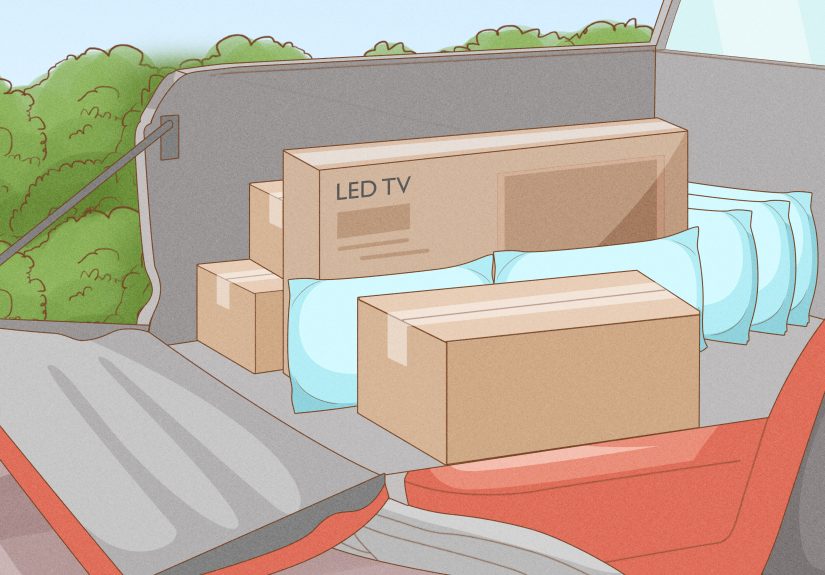
Always keep the TV upright
Flat-screens are engineered to sit upright, not flat. Laying them on their front or back can lead to pressure points, bending, or shock damageespecially for large OLED and QLED models. When loading:
- Stand the TV box upright, just like it would be on a stand.
- Never lay it flat on the floor of the truck.
- Don’t stack heavy items on top of the TV box.
Secure the TV so it can’t tip or slide
- Place the TV between stable, soft items (like mattresses, couches, or large cushions), not between random boxes.
- Use ratchet straps or bungee cords to secure the TV box to the side of the truck if possible.
- Avoid leaving it where it can topple over if someone opens the door quickly.
Protect it from extremes
Try not to leave your TV in a freezing truck overnight or baking in direct sun for hours. Extreme temperatures and humidity aren’t ideal for electronics, especially high-end displays.
Step 6: Special Considerations for Different TV Types
OLED and QLED TVs
These premium TVs deliver stunning picture quality, but they’re more delicate:
- Never press directly on the screen; even light pressure can cause damage.
- Use extra padding (foam sheets, blankets, corner protectors).
- Double-check that nothing inside the box can shift and press against the screen.
Older plasma or LCD TVs
Heavier TVs need more lifting help and careful handling, but the packing steps are similar. Just make sure you have enough people to support the weight and size.
Projector TVs or short-throw projectors
If you’re moving a projector instead of a traditional TV:
- Remove and protect the lens cap.
- Wrap the body with bubble wrap and a blanket.
- Use a snug box with plenty of padding on all sides.
Step 7: Unpacking and Setting Up at Your New Place
Once you arrive at your new home, resist the urge to rip everything open at once.
- Let the TV sit at room temperature for a bit if it was in the cold or heat.
- Open the box carefully from the top, avoiding sharp knives near the screen.
- Lift the TV out with two people, keeping it upright.
- Inspect the screen and frame for any obvious damage before mounting or setting it up.
- Use the photo you took earlier to reconnect cables to the right ports.
- Power it on and test basic functions and inputs.
If you notice visible cracks, severe lines, or the TV won’t power on, document the damage with photos as soon as possible in case you need to make a claim with movers or insurance.
Common Mistakes to Avoid When Packing a TV
- Laying the TV flat: Increases the risk of bending or pressure-related damage.
- Using low-quality, thin boxes: A flimsy box can buckle or tear under the TV’s weight.
- Skipping padding on the corners: Corners take the brunt of impacts when turning or bumping into things.
- Letting cables loose in the box: They can rub against the screen or internal components.
- Taping directly on the TV: Adhesive can leave residue or damage finishes.
- Not labeling the box: If movers don’t know it’s fragile, they won’t treat it like glass.
Real-World Experiences: What Actually Works When Moving a TV
Professional movers and homeowners who’ve survived multiple relocations tend to agree on a few big lessons when it comes to packing TVs. Here are some lived-in, real-world tips to make your move smoother.
1. Treat your TV like it’s already cracked
One mover’s rule of thumb: act as if your TV is already broken and you’re trying not to make it worse. That mindset keeps you from doing lazy things like balancing it on a pile of boxes or sliding it across the truck. Lift carefully, plan your path through doorways, and always ask for help with larger screens.
2. Keeping the original box is almost always worth it
If you’ve ever debated whether to keep that giant TV box "just in case"this is the moment it pays off. Many frequent movers now make it a habit to flatten and store TV boxes in a closet, attic, or garage. The custom-fit foam and structure are hard to beat, and you won’t have to hunt down a specialty box or improvise with blankets.
Even if you don’t plan to move soon, keeping the box is handy if you ever need to ship the TV for repair or decide to sell it. Buyers love original packaging because it signals the TV was likely well cared for.
3. Extra padding is cheaper than a replacement
People who regret how they moved their TV tend to have one thing in common: they skimped on padding. Maybe they wrapped it once with bubble wrap and called it a day, or wedged it between boxes without a blanket. The TVs that arrive safely usually have layers: soft cloth on the screen, full bubble wrap coverage, corner protectors, and a blanket or foam panels on top.
Once you’ve bought or borrowed blankets and bubble wrap, use them generously. A couple more layers cost very little but dramatically reduce the chance of damage.
4. Don’t underestimate movement in the truck
Driving conditions aren’t always friendly. Sudden stops, potholes, and sharp turns create more force on your TV than you might expect. That’s why so many experienced movers emphasize securing the TV in place, not just packing it well.
In practice, that means:
- Strapping the TV box to the side of the truck when possible.
- Avoiding open spaces where the box can tip over or slide.
- Positioning it near stable, heavy furniture that won’t move around.
Think like gravity and momentum: if you slam on the brakes, where will the TV go? If the answer is "into that stack of random boxes," you still have work to do.
5. Two people really are better than one
It’s tempting to tell yourself, "I can handle it, it’s not that heavy." But with a TV, the risk isn’t just dropping itit’s also twisting or flexing the frame as you maneuver through tight spaces. That flexing can stress the screen and internal components.
One person carries the load on each side, keeping the TV upright and level. You can still be careful solo, but two sets of hands make a huge difference, especially when navigating stairs, hallways, or doorways.
6. Don’t rush the unpacking
After a long move, it’s completely normal to want to plug in the TV immediately and collapse on the couch. Still, people who’ve done this a few times know it’s smarter to slow down:
- Let the TV adjust to room temperature, especially if it was in a very hot or cold environment.
- Carefully peel back each layer of padding instead of slicing them with a knife.
- Inspect the screen in good lighting before mounting it on the wall again.
This doesn’t take long, but it helps catch damage early and avoid accidental scratches during over-enthusiastic unboxing.
7. When in doubt, let the pros handle it
If you’re moving a very large or expensive TVlike a 77" OLED, a custom home theater setup, or multiple screensmany homeowners choose to let professional movers pack and transport them. Reputable moving companies have specialized boxes, crates, and padding systems specifically designed for fragile electronics.
It’s an added cost, but when you compare it to the price of replacing a premium TV, it can be an easy decision. You can even ask them to walk you through their process so you learn how the pros do it.
Final Thoughts: A Little Care Now, a Lot Less Stress Later
Learning how to pack a TV for moving isn’t complicated, but it does require patience and the right materials. If you protect the screen, cushion the corners, keep it upright, and secure it well in the truck, your TV is very likely to arrive in the same condition it left.
Think of this guide as your moving-day insurance policy. By treating your TV like the fragile, high-value item it is, you can relax at your new place knowing movie nights, game days, and streaming sessions are just a power button away.