Table of Contents >> Show >> Hide
- Quick Cheat Sheet: The “Addressing” Pieces You Actually Need
- What Makes a Letter “Formal,” Anyway?
- Step 1: Build the Inside Address (The Recipient Block)
- Step 2: Choose the Right Title (This Is Where Most People Panic)
- Step 3: Write the Salutation (Greeting) Like a Professional
- Step 4: Addressing a Formal Letter When You Don’t Have a Name
- Step 5: Format the Address Block for Mailing (USPS-Friendly Basics)
- Step 6: Don’t Forget the “Closing Address” (Complimentary Close + Signature)
- Formal Letter Addressing for Email (Yes, It Still Matters)
- Three Copy-and-Paste Formal Letter Templates (Addressing Done for You)
- Common Addressing Mistakes (And How to Avoid Them)
- A Simple Final Checklist Before You Send
- Conclusion
- Experiences That Make You Better at Addressing Formal Letters (Real-World Lessons)
Addressing a formal letter sounds simpleuntil you’re staring at a blank page thinking,
“Is it Dear Dr. Taylor or Dear Taylor? Do I put a comma? A colon? A tiny flag?”
(Spoiler: please don’t add a tiny flag.)
The good news: formal letter addressing is a system. Once you learn the moving partsinside address,
titles, greetings, and envelope rulesyou can write to a CEO, a hiring manager, a government office,
or a professor with the calm confidence of someone who alphabetizes their spice rack.
Quick Cheat Sheet: The “Addressing” Pieces You Actually Need
- Sender info (your address and contact details)
- Date
- Inside address (recipient name/title + organization + mailing address)
- Salutation (the greeting line)
- Subject line (optional but useful in business/official letters)
- Professional closing + signature block
- Envelope address (if mailing)
What Makes a Letter “Formal,” Anyway?
A formal letter is less about fancy words and more about clarity, respect, and correct formatting.
You usually write formal letters when:
- You don’t know the recipient personally (job applications, complaints, requests)
- You’re writing on behalf of a business or organization
- You’re contacting an official office (schools, courts, agencies, government)
- The situation has stakes: money, contracts, policies, or professional reputation
The addressing matters because it signals you took time to get the details rightand that’s often the
first impression before anyone reads your actual message.
Step 1: Build the Inside Address (The Recipient Block)
The inside address appears near the top of the letter and includes the recipient’s mailing details.
Even if you’re emailing a “letter-style” document, you’ll often still include this block because it reads as
professional and complete.
Inside Address Order (Most Common U.S. Business Format)
- Recipient’s full name (with the correct title)
- Recipient’s job title (optional but recommended)
- Company/organization
- Street address (include suite, unit, etc.)
- City, state ZIP (or ZIP+4)
Example: Inside Address (Named Recipient)
Notice what’s happening here:
title + name first, then role + organization, then a complete mailing address.
If you know a person’s professional title (like Dr.), use itgetting titles right is a small detail that reads
as big respect.
Attention Lines (When Your Letter Needs to Reach a Specific Person)
If you’re sending a letter to an organization but you want it routed to a particular person or department,
use an Attention line above the recipient/company line.
This is especially helpful for large companies, universities, hospitals, or government offices where mail
needs an internal “sorting hint.”
Secondary Address Details: Suites, Apartments, Floors, and the “#” Symbol
If the address includes a suite/apartment/unit, include it on the delivery address line when possible.
Prefer known designators like APT or STE instead of a pound sign when you know the correct label.
(The “#” can still be used, but it’s not the first choice if the proper designator is available.)
Step 2: Choose the Right Title (This Is Where Most People Panic)
Titles are less about being fancy and more about being accurate. When in doubt, choose the option that’s
most respectful and least presumptive.
Common Titles for Formal Letters
- Mr. + last name (traditional male honorific)
- Ms. + last name (standard for women unless they specify otherwise)
- Dr. + last name (medical doctors and many PhDs use Dr.)
- Professor + last name (for faculty; don’t abbreviate “Professor”)
When You Don’t Know the Person’s Gender or Preferred Title
The safest move is to address the person by full name or role:
- Dear Jordan Taylor:
- Dear Hiring Manager:
- Dear Customer Support Team:
- Dear Admissions Committee:
Avoid dated greetings like “Dear Sir/Madam” or “To Whom It May Concern” in most modern professional contexts
especially for job applicationsunless you truly have no better option and the situation is highly general.
Titles for Officials (Use Extra Care)
When writing to government officials or judges, formatting becomes more specific. If you’re unsure,
use the official’s website or office contact page to confirm preferred forms. When you do know the role,
you can use formal role-based salutations such as:
- Dear Senator Last Name:
- Dear Judge Last Name:
- Dear Chief Justice: (for that specific role)
- Dear Mr./Madam President: (rare, but yes, it’s a thing)
Step 3: Write the Salutation (Greeting) Like a Professional
In a formal letter, the salutation usually follows the pattern:
Dear + Title/Name + :
The colon is the classic formal punctuation, especially in business letters.
Best-Practice Salutations (With Examples)
- Dear Ms. Ramirez: (formal, standard)
- Dear Dr. Nguyen: (professional/academic)
- Dear Professor Lee: (faculty)
- Dear Jordan Ramirez: (gender-neutral, still formal)
- Dear Hiring Manager: (formal when name is unavailable)
- Dear Customer Service Team: (department-based)
One Name Mistake That Can Ruin the Mood Instantly
Don’t guess at spelling. If the recipient’s name appears on a website, email signature, business card,
or directory listingcopy it exactly. Misspelling a name in the greeting is like showing up to an interview
wearing two different shoes. People notice.
Step 4: Addressing a Formal Letter When You Don’t Have a Name
Sometimes you can’t find a person’s name. That’s finejust don’t make it weird.
Use a role-based or team-based greeting that feels intentional.
Better Alternatives to “To Whom It May Concern”
- Dear Hiring Manager:
- Dear Human Resources Team:
- Dear Accounts Payable Department:
- Dear Admissions Office:
- Dear [Company Name] Support Team:
If you’re applying for a job, try a quick search: company site, LinkedIn, the job listing, or a polite call to
the front desk asking who handles the role. If you still come up empty, “Dear Hiring Manager” is a strong,
modern fallback.
Step 5: Format the Address Block for Mailing (USPS-Friendly Basics)
If you’re mailing your letter, the envelope address matters. A beautifully written letter won’t help much if it
takes a scenic tour of three states before arriving.
Envelope Address Basics
- Use a complete delivery address (street + any unit/suite + city/state/ZIP).
- Punctuation is optional in the delivery address block (many businesses omit it).
- Use a two-letter state abbreviation and include ZIP or ZIP+4 when available.
Last Line Format (City/State/ZIP)
A clean format uses spacing between the city name, the two-character state abbreviation, and the ZIP or ZIP+4.
(If you’ve ever seen addresses that look oddly “spaced out,” that’s not a typoit’s a standard.)
Example: Proper Envelope Address
Pro tip: If you’re using a window envelope, format your inside address so it aligns with the window
when the letter is folded (common for business mail).
Step 6: Don’t Forget the “Closing Address” (Complimentary Close + Signature)
Addressing isn’t only about the top of the letter. The bottom matters tooyour closing should match the tone of
your greeting. If you opened formally, close formally.
Strong Formal Closings
- Sincerely,
- Respectfully,
- Best regards,
- Kind regards,
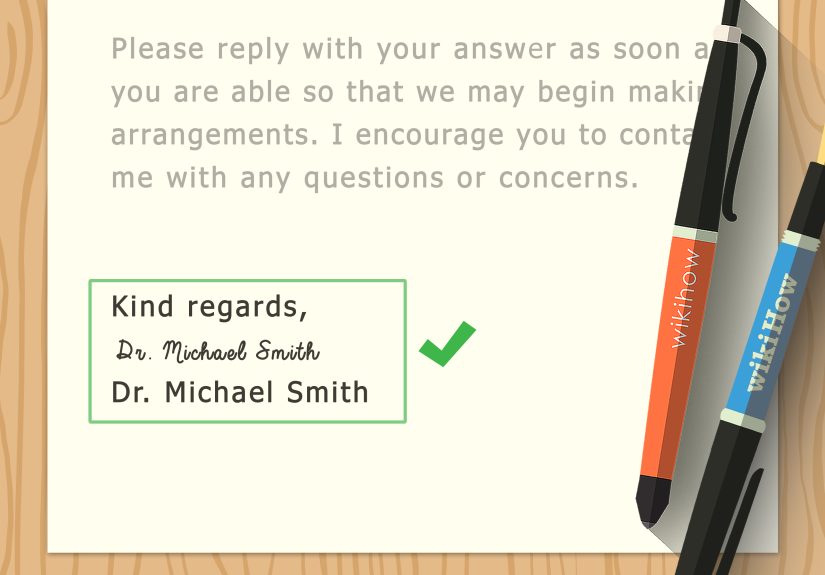
In standard U.S. formatting, your closing is followed by a comma, then space for your signature, then your typed name:
Formal Letter Addressing for Email (Yes, It Still Matters)
Email is faster, but professionalism doesn’t evaporate just because you clicked “Send.”
If you’re writing an email that functions as a formal letter:
- Use a clear subject line (e.g., “Request for Meeting – February 2026”).
- Use a formal salutation (Dear…)
- Keep paragraphs short and scannable.
- Use a professional signature block with your contact information.
Email Greeting Examples
- Dear Ms. Patel,
- Dear Dr. Green,
- Dear Hiring Manager,
- Hello Professor Chen,
If your email is to someone you’ve already been emailing casually, you can dial it down slightly. But if it’s your first
messageor it’s about something officialstick with “Dear” and a professional name/title.
Three Copy-and-Paste Formal Letter Templates (Addressing Done for You)
Template 1: Standard Business Letter (Named Recipient)
Template 2: Formal Letter When You Don’t Have a Name
Template 3: Letter to a Department With an Attention Line
Common Addressing Mistakes (And How to Avoid Them)
- Using the wrong title: If someone is “Dr.” or “Professor,” use it.
- Guessing marital status: “Ms.” is usually the safest choice unless told otherwise.
- Being overly casual too soon: “Hey” works in textsnot first-contact formal letters.
- Forgetting the inside address: Especially important for printed letters and formal PDFs.
- Messy or incomplete mailing address: Missing suite/unit details can delay delivery.
- Generic greetings that feel copy-pasted: Use role-based greetings that sound intentional.
A Simple Final Checklist Before You Send
- Is the recipient’s name spelled correctly?
- Did you use the most accurate title (Dr., Professor, etc.)?
- Is the inside address complete and properly ordered?
- Does your salutation match your level of formality (and end with a colon if formal)?
- If mailing: did you include any apartment/suite/unit information and the correct ZIP/ZIP+4?
- Is your closing professional and consistent with your greeting?
Conclusion
Knowing how to address a formal letter is a professional superpower: it helps your message land in the right hands,
sets the right tone immediately, and shows attention to detail before the reader finishes the first line.
Use accurate titles, a clean inside address, a respectful salutation, and (if mailing) a USPS-friendly envelope format.
Then let your actual message do its jobbecause now the packaging is flawless.
Experiences That Make You Better at Addressing Formal Letters (Real-World Lessons)
If formal letter addressing feels fussy, it’s because it’s solving a real-world problem: humans and organizations are busy,
and your letter has to survive multiple “handoffs” before it reaches the person who can act on it. Over time, people who write
formal letters regularly pick up patternslittle lessons that don’t always show up in templates.
Lesson 1: The greeting is a trust test. In professional settings, readers often use the salutation as a quick signal:
“Did this person take the time to figure out who I am?” A letter that starts with “To Whom It May Concern” can read like a mass email,
even if the content is thoughtful. When a name truly isn’t available, role-based greetings like “Dear Hiring Manager” or
“Dear Accounts Payable Team” feel far more deliberatelike you aimed at a real destination instead of tossing your words into the wind.
Lesson 2: Titles aren’t decoration; they’re identity. Calling someone “Ms.” when they prefer “Dr.” doesn’t just look
like a formatting mistakeit can look like you didn’t respect their work. In academic and medical environments, titles are closely tied
to professional role and earned credentials. People don’t expect you to memorize every protocol on earth, but they do appreciate when
you check the basics (email signatures and staff directories are gold).
Lesson 3: Organizations route mail like a relay race. Your letter might move from a mailroom to a receptionist to an
admin assistant to an internal mailbox. Each step is an opportunity for delay if your addressing is vague. Adding a job title,
department name, or attention line can shorten the trip. Think of it as giving your letter a map instead of telling it,
“Good luck, buddyhope you find Jordan somewhere in this 12-story building.”
Lesson 4: The address block is where small errors cause big delays. People who mail formal letters learn quickly that
missing unit numbers, incorrect ZIP codes, or sloppy formatting can mean returns, reroutes, or long delivery times.
Even when punctuation is optional, clarity is not. Clean lines, complete information, and recognizable unit designators (APT, STE, FL)
help your letter get processed correctlyand help humans read it without squinting like they’re decoding ancient runes.
Lesson 5: Consistency makes you look confident. If you open with “Dear Dr. Smith:” and close with “Thx!!!” you’ve created
a tone mismatch that feels accidental. Strong communicators keep the formality level consistent end to end. That doesn’t mean stiff or
robotic; it means aligned. “Sincerely” pairs nicely with formal salutations. “Best regards” works well for professional-but-warm messages.
“Respectfully” is excellent when writing to officials, supervisors, or offices where deference is appropriate.
Lesson 6: “Formal” doesn’t mean wordy. In many workplaces, the most appreciated formal letters are the ones that are
direct, organized, and reader-focused. Addressing is part of that: it helps the reader immediately understand who you are writing to,
why you’re writing, and what action you need. A precise inside address and a clean salutation are like a good subject linethey reduce
friction and make the next steps easier.
Lesson 7: Keep a personal “addressing playbook.” People who write lots of formal letters often keep a small list of their
most-used greetings and inside address formats (job application, billing issue, complaint, request, recommendation). This doesn’t turn
your writing into a templateit just saves you from reinventing the wheel every time. The goal is to make the mechanics effortless so you
can focus your energy on the message itself.
If you take one experience-driven takeaway, let it be this: formal addressing is a kindness to your reader. You’re making it easy to know
who the letter is for, how it should be handled, and what level of professionalism you’re bringing to the conversation. In a world where
everyone is juggling too much, that kind of clarity stands outin the best possible way.