Table of Contents >> Show >> Hide
- The quick answer: what the green dot usually means
- Where you’ll see the green dot (and why location matters)
- Green dot vs. “Active X minutes ago”: what’s the difference?
- How Facebook decides you’re “active” (and why it’s not always literal)
- Can the green dot be wrong? (Short answer: it can be misleading)
- How to turn Active Status on or off (Facebook and Messenger)
- Privacy etiquette: how to use the green dot without starting drama
- Troubleshooting: “Why does Facebook say I’m active when I’m not?”
- FAQ: common questions about the green dot
- Conclusion: the green dot is a hint, not a headline
- Extra: of real-world experiences with the Facebook green dot
You’re scrolling Facebook, minding your business, when you spot it: a tiny green dot next to someone’s profile photo.
Suddenly your brain turns into a detective with a badge made of anxiety. Are they online right now?
Are they ignoring me? Are they online but pretending to be “busy”?
Relax. The green dot is not a courtroom verdict, a relationship lie detector, or a universal sign that someone is staring at your message
while eating popcorn. It’s Facebook’s shorthand for Active Statusa feature that tries to show when a person (or sometimes a Page)
is active now or was active recently.
In this guide, we’ll decode what that green dot actually means, where it shows up, why it can be misleading, and how to turn Active Status on or off
without accidentally starting a “Why were you online at 2:03 a.m.?” group chat.
The quick answer: what the green dot usually means
In most places on Facebook and Messenger, a green dot means the person is active now or recently active
on Facebook, Messenger, or bothas long as Active Status is enabled for you and for them.
Facebook may show activity in a couple of ways:
- Green dot: typically indicates “active now” (currently online or recently active).
- Timestamp (like “Active 10m ago”): indicates recent activity, even if they’re not active this second.
- “Active now” label: a more explicit version of the same idea in Messenger.
There’s also a lesser-known twist: in some Messenger screens, a green dot can appear near the camera icon,
suggesting someone is available for a video call. So yessometimes the dot is saying “They’re around,” and sometimes it’s saying
“They might pick up a video call,” which is basically the same message with more pressure.
Where you’ll see the green dot (and why location matters)
The green dot can show up in different corners of Facebook’s universe, and the context changes what it implies.
Here are the most common places you’ll spot it:
1) Messenger (mobile app and Messenger.com)
This is the green dot’s home turf. You’ll see it in your chat list, in the “Active”/“People” area (depending on your version),
and sometimes at the top of a conversation thread. In Messenger, the dot generally points to real-time availability: “This person is likely around.”
2) Facebook app (Chats / Messenger bubble / sidebar equivalents)
Facebook often surfaces Messenger-style presence indicators inside the Facebook app itselfespecially where chat is involved.
If you see a dot near someone’s name in a chat-related area, Facebook is borrowing Messenger’s “presence” idea.
3) Facebook on desktop (chat sidebar)
On desktop, Facebook’s chat sidebar has long used green dots to show who appears online.
The desktop experience can also be one reason “active” looks confusingmore on that soon.
4) Facebook Pages (yes, Pages can have a green dot too)
Sometimes you’ll see a green dot on a Facebook Page. This can be related to messaging availability or responsiveness signals.
Translation: it may be indicating the Page is “reachable” rather than that a specific human is staring at Facebook with unblinking eyes.
Green dot vs. “Active X minutes ago”: what’s the difference?
Think of Facebook’s presence indicators like weather forecastsuseful, but not something you should bet your emotional stability on.
Here’s how to read the most common signals:
Green dot (typically “Active now”)
Usually means Facebook believes the person is currently active or has been active very recently. “Very recently” can still be a few minutes,
depending on device, connection, and whether the app is running in the background.
Timestamp (like “Active 5m ago”)
Indicates the person was active recently, but not necessarily this second. This can be more informative than the green dot because it at least tries
to put a number on the situation.
Other icons you might confuse with the green dot
- Blue dot in Messenger: often means an unread message in a thread (not someone being online).
- Check marks in Messenger: message status (sent, delivered, read) and not the same thing as presence.
- Notification dots on tabs: those little attention-grabbers mean “something happened,” not “someone is online.”
Bottom line: the green dot is about availability, while check marks and read indicators are about message delivery and viewing.
Don’t cross the streams. That’s how misunderstandings are born.
How Facebook decides you’re “active” (and why it’s not always literal)
Facebook doesn’t publish every technical detail of its presence detection (and honestly, it would read like a sci-fi novel written by a router).
But the general concept is straightforward: if you’re using Facebook or Messenger in a way that suggests you’re reachableopening the app,
being online on the web, interacting with messagesActive Status may display you as active.
The key phrase is “suggests you’re reachable.” That’s why the green dot can sometimes feel like it’s playing fast and loose with the truth.
Here are common reasons someone may appear active even if they’re not actively chatting:
- Multiple devices: they might have Facebook open on a laptop, tablet, or second phone.
- Browser tabs: a logged-in Facebook tab on desktop can keep someone looking “around.”
- Background activity: apps can refresh, sync notifications, or maintain a connection briefly.
- Recent activity lag: the status may not update instantlyespecially with spotty connections.
- Cross-app behavior: Facebook and Messenger are tightly integrated, so activity in one can influence signals in the other.
So, if you see a green dot at a weird hour, it might mean they’re awake… or it might mean their laptop is awake, their app refreshed,
and the internet is doing its little background-cha-cha.
Can the green dot be wrong? (Short answer: it can be misleading)
“Wrong” is a strong word. Let’s call it “optimistically interpretive.”
The green dot is an indicator of likely availability, not a sworn statement.
Here are scenarios that commonly cause confusion:
Scenario A: “They’re active, but they didn’t reply!”
Being active doesn’t mean they saw your message, and seeing your message doesn’t mean they’re obligated to reply immediately.
They may be scrolling their feed, responding to a family group chat, or accidentally opening Messenger and immediately regretting it (we’ve all been there).
Scenario B: “It says ‘Active now,’ but they swear they weren’t online.”
This can happen if the app was running in the background, if they were logged in on another device, or if the status simply updated late.
Technology is wonderfuluntil it starts narrating your life inaccurately.
Scenario C: “The green dot disappeared the moment I opened the chat.”
Presence updates can change quickly. Someone could have gone idle, lost connection, or turned off Active Status.
Or they could have seen your name and performed the digital equivalent of diving behind a couch. The dot alone can’t tell you which.
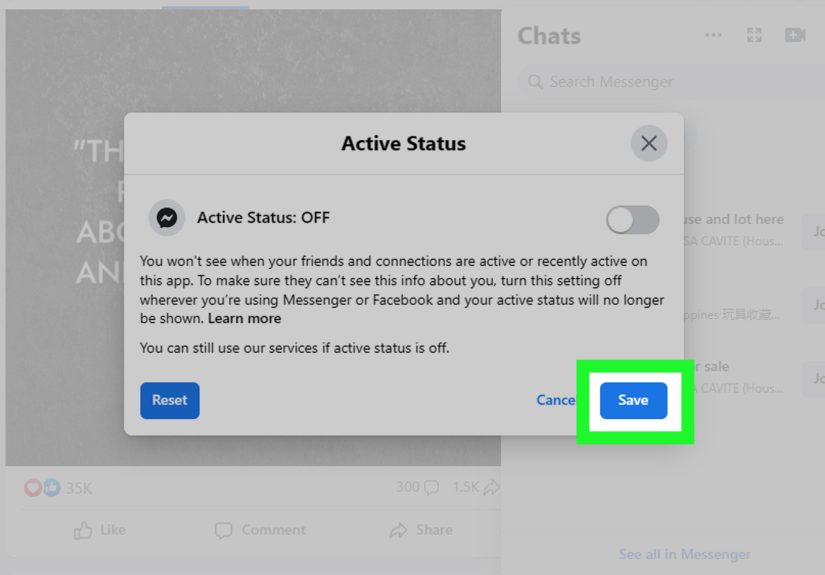
How to turn Active Status on or off (Facebook and Messenger)
If you’d prefer Facebook to stop announcing your availability like a neon “OPEN” sign, you can disable Active Status.
Keep in mind one major tradeoff: when you turn off your Active Status, you typically won’t be able to see other people’s Active Status either.
It’s a privacy two-for-one.
Turn off Active Status in the Facebook app
- Open the Facebook app.
- Go to Menu (often the three lines).
- Tap Settings & privacy → Settings.
- Find Active Status.
- Toggle off Show when you’re active (wording may vary slightly).
Turn off Active Status in Messenger
- Open the Messenger app.
- Tap your profile picture (usually top left).
- Tap Active Status.
- Toggle off Show when you’re active.
Tip: check both apps (and web) if you want it truly off
Facebook and Messenger are connected, but settings can be managed in multiple places. If you want the green dot gone everywhere,
it’s smart to review Active Status in both Facebook and Messenger, and also check any logged-in desktop sessions.
Privacy etiquette: how to use the green dot without starting drama
The green dot is a convenience feature. Humans, however, are inventive creatures who can turn any convenience feature into a mystery novel.
Here’s the healthiest way to interpret it:
- Assume it’s approximate: treat it like “they might be around,” not “they are staring at the chat.”
- Don’t use it as evidence: if you’re collecting screenshots of green dots, please pause and hydrate.
- Respect boundaries: being online isn’t the same as being available.
- Communicate directly: if something matters, ask kindly instead of interrogating icons.
If you’re managing a business Page, the dot can help customers know you’re reachablebut set expectations.
A quick auto-reply or clear hours in your Page info can do more for your sanity than any status indicator.
Troubleshooting: “Why does Facebook say I’m active when I’m not?”
If you’re the one getting accused of being online at suspicious hours (or you just want accurate privacy controls),
here are practical steps that often help:
1) Close active sessions on desktop
If Facebook is open in a browser tab somewhere, it can contribute to your “active” appearance.
Log out of Facebook on shared computers, and close tabs you don’t use.
2) Check logged-in devices
Review where your account is logged in. If you see devices you don’t recognize, secure your account:
change your password and enable two-factor authentication.
3) Disable Active Status (the direct solution)
If you want to stop broadcasting your availability, turning off Active Status is the cleanest option.
Remember: you may need to toggle it off in both Facebook and Messenger for consistent behavior.
4) Update the app and restart
Status glitches happen. Updating Facebook/Messenger and restarting your device can clear stuck states.
If things still look odd, try clearing cache (Android) or reinstalling the app (iOS/Android).
5) Consider uninstalling Messenger if you don’t want it (or can’t fully “deactivate” it)
Many people assume they can “deactivate Messenger” while keeping Facebook. In practice, Messenger is tightly linked to Facebook.
If your goal is simply fewer interruptions, uninstalling the app or disabling notifications can be a more realistic path than chasing a perfect “off switch.”
FAQ: common questions about the green dot
Does a green dot mean someone is looking at my profile?
No. The green dot is about general activity/availability, not profile stalking. Facebook does not provide a simple “who viewed your profile” feature
via the green dot.
Does the green dot mean they read my message?
Not necessarily. Message read status is shown through Messenger’s read indicators (like the recipient’s profile picture or read marker),
not the green dot.
If I turn off Active Status, can I still use Facebook and Messenger?
Yes. You can still browse and message. The difference is that your availability won’t be broadcast the same way,
and you may not see others’ Active Status either.
Why do I see a green dot on a Facebook Page?
Pages can show availability-related indicators in messaging contexts. It’s often about whether the Page is reachable or responsive,
not a guarantee that a specific person is actively typing.
Conclusion: the green dot is a hint, not a headline
The green dot on Facebook is meant to make conversations easier: it helps you see who might be around for a quick reply.
But it’s not perfect, and it definitely shouldn’t be treated like a time-stamped receipt of someone’s attention.
If you love the convenience, keep it on and use it lightly. If you value privacy (or peace), turn off Active Status in Facebook and Messenger.
Either way, remember: the green dot is a suggestionnot a summons.
Extra: of real-world experiences with the Facebook green dot
If the green dot had a résumé, its primary skill would be “accidentally causing misunderstandings.” People don’t just see that dotthey
interpret it, like it’s a crystal ball with Wi-Fi. And because Facebook is where social circles collide (friends, coworkers, family, your aunt’s
casserole opinions), the dot can become a tiny green troublemaker.
One of the most common experiences is the late-night green dot panic. You’re checking Messenger at midnight, and someone’s dot is on.
Your brain whispers, “They’re awake… and choosing not to answer.” But in reality, that person might have fallen asleep watching videos with Facebook open
on a laptop, their phone might be quietly refreshing in the background, or they might have briefly opened a notification and immediately went back to living
their actual life. The green dot doesn’t tell you the storyit just hands you a vague plot hook and lets your imagination write the drama.
Then there’s the coworker timing trap. You’re online during lunch, and a teammate sees the green dot and thinks, “Perfect time to ask about
that project.” Suddenly your sandwich becomes a performance review. The dot creates a false sense of accesslike your time is a public conference room.
A lot of people end up turning Active Status off simply to reclaim the right to scroll in peace without looking “available.”
Another classic: the family check-in. A parent, sibling, or relative sees you “active” and messages, “Call me when you’re free.”
Sweet, surebut it can also become a gentle guilt trip wrapped in a green circle. And if you don’t respond quickly, you may get the follow-up,
“I saw you were online.” That’s when you realize the dot isn’t just a feature; it’s a social expectation generator.
Friend groups have their own version: the group chat spotlight. You open Messenger to reply to one person, and suddenly three other friends
pop in with “Heyyyy you’re online!” The green dot can make people treat your presence like an open mic night. Some folks solve this by setting a personal rule:
“If it’s urgent, call me; if it’s not urgent, please don’t use my green dot as a doorbell.”
And of course, there’s the relationship misunderstanding categorywhere the green dot becomes an uninvited couples counselor.
“You were active at 9:42.” “No, I wasn’t.” “Facebook says you were.” The healthiest experience people report is learning to treat Active Status like a
shaky GPS estimate: helpful for navigation, terrible as courtroom evidence. If something feels off, the best move is still direct communication,
not icon interpretation.
In the end, most people land in one of two camps: they either enjoy the convenience of knowing who’s probably around, or they turn it off and enjoy the
bliss of being digitally unbothered. Either choice is valid. The green dot is just a toolyour boundaries are the settings that matter most.