Table of Contents >> Show >> Hide
- 1) Start With the “Don’t Laugh, It Happens” Checklist
- 2) Isolate the Problem With “Known-Good” Swaps
- 3) Diagnose by Symptom: No Sound, Hum, Buzz, Crackle, or Distortion
- 4) Check Protection, Fuses, Tubes, and “Protect Mode” Clues
- 5) Measure Smart (and Know When to Call a Tech)
- Quick Recap: The 5 Ways in One Breath
- Experience Notes: 7 Real-World Amp Mysteries (and the Fix That Usually Wins)
- 1) “It powers on, but there’s absolutely no sound.”
- 2) “My amp hums even with nothing plugged in.”
- 3) “The hum only happens when I connect one specific device.”
- 4) “It crackles when I touch the cable or turn the knobs.”
- 5) “My tube amp keeps blowing fuses.”
- 6) “It sounds weak and distorted, like it’s running out of breath.”
- 7) “It worked at home, but at rehearsal it’s a noisy mess.”
- Conclusion
There are two kinds of amp problems: the scary kind (smoke, burning smell, and your soul briefly leaving your body),
and the “oh… the volume was on zero” kind. The good news? A shocking number of issues fall into the second category.
The even better news is that you can troubleshoot an amp without becoming an electrical engineer, a mind reader, or
the person who “fixed it” by hitting it. (That’s not troubleshooting. That’s percussion.)
This guide focuses on practical, safe steps for guitar amps and general audio amps. Many principles also apply to car
amplifiers and powered speakers: you’re still chasing the same villainspower, signal, load, and noise. Let’s catch them.
1) Start With the “Don’t Laugh, It Happens” Checklist
Before you grab tools or open anything, do the boring stuff first. Boring saves money. Boring saves gigs. Boring prevents
you from buying a new amp when your old amp is actually fine.
Power and control basics
- Is the amp plugged in and is the outlet actually live? Try a lamp or phone charger in the same outlet.
- Is it turned on (power switch) andif applicablenot stuck in standby?
- Is a mute engaged (speaker mute, tuner mute, headphone mute, or “silent recording” setting)?
- Are volume controls up on the amp and the instrument/source?
- Is the amp connected to the correct speaker/enclosure (for heads/cabs), and is the correct output used?
Fender literally spells out this “calm down and check the basics” list because it’s that common: power, standby, mute,
speaker connection, instrument volume, and whether the building has functioning electricity. Yessometimes the venue is
the problem, not your amp. Awkward, but also kind of comforting.
Signal-chain sanity check
If you’re using pedals or processors, your mission is to reduce the number of moving parts. Sweetwater recommends
temporarily removing pedals/effects so it’s just guitar (or source) → amp. Fewer variables means faster answers.
Quick tip: if your amp has an effects loop, a dirty or misbehaving send/return jack can kill the signal
(especially on some rigs that rely on “normalled” contacts in the return jack). We’ll cover the “loop jump” trick in a minute.
2) Isolate the Problem With “Known-Good” Swaps
Troubleshooting is basically a reality show where you vote components off the island one at a time. The key is only
change one thing per test, so you know what actually fixed (or broke) it.
The fastest isolation method: build a minimal rig
- Plug your instrument/source directly into the amp input.
- Use one known-good instrument cable (no adapters, no patch chain, no “this cable has survived 11 tours”).
- If it’s a head + cab, use a proper speaker cable (not an instrument cable) and a known-good cabinet.
iFixit’s troubleshooting flow makes a blunt point: “Most sound problems are from bad cables, not faulty equipment.”
The simplest way to prove it is to test the same guitar and cable into two amps (or try two cables into the same amp).
If one cable fails and the other works, congratulationsyou found the cheapest “repair” possible.
Don’t forget the “almost the amp” stuff
- Try a different wall outlet (preferably on a different circuit) to rule out weak power.
- Try a different guitar (or audio source) to rule out a dead output jack, dead battery, or muted device.
- If your amp has a headphone jack, plug in headphonessome amps route signal differently there (and some jacks can stick).
If a swap changes the symptomeven a littlewrite it down. A tiny change is a clue, not a coincidence.
3) Diagnose by Symptom: No Sound, Hum, Buzz, Crackle, or Distortion
Symptoms are your amp’s way of texting you. Not always in complete sentences, but enough to narrow the suspects.
If there’s no sound but the amp powers on
- Double-check you’re in the correct input and channel, and that the master volume is up.
- Try the effects loop “jump”: plug a short cable from send to return. Premier Guitar suggests this because dirty loop jack contacts can interrupt signal.
- For heads/cabs: swap to a different speaker cable and cabinet. Premier Guitar notes that a “no sound” symptom can be the speaker or cable, and pushing a tube amp hard into an open/failed load can be risky.
If there’s hum or buzz
Start by noticing whether the hum changes with the amp’s volume knob. If the hum doesn’t change with volume,
it may be happening after the preamp stage (power/grounding/connection issues). If it does change with volume,
you may be dealing with input noise, shielding, or something earlier in the chain.
- Strip the rig down: Reverb recommends unplugging everythingeffects in front and in the loopthen rebuilding one piece at a time until the noise returns.
- Check outlet grip and wiring: Audioholics points out that a worn-out outlet that doesn’t grip the plug well can create intermittent contact and hum.
- Don’t “fix” hum by defeating safety ground: Audioholics explicitly warns against using a 3-prong-to-2-prong “cheater” adapter as a hum fix. Safety first; your future self likes being alive.
- Move gear around: Crown notes hum can be induced magnetically if sensitive gear is too close to a big power transformer. Sometimes the cure is literally “add distance.”
If there’s crackling, popping, or scratchy controls
Crackle often points to dirty jacks/pots, failing tubes (in tube amps), or intermittent connections. Premier Guitar suggests
cycling a plug in/out several times to wipe contacts, and if needed, using appropriate electronic contact cleaner for jacks.
iFixit also flags jacks and internal wiring/solder joints as common causes when symptoms are intermittent.
If it’s distorting in a bad way
Distortion can be musical, or it can be a warning label. If your clean tone sounds like a fuzz pedal you didn’t buy:
- Check gain staging: too much input level (boost pedals, active pickups, hot line-level sources) can slam the preamp.
- Check speaker impedance/load: mismatches can cause weak output, harshness, or protect behavior.
- Consider thermal limits: audio amps often reduce output or shut down when overheated; protection behaviors like overtemperature shutdown are common in many amplifier designs.
Analog Devices discusses how distortion can come from multiple contributors in amplification systems (not just “the amp is bad”),
which is why it’s worth testing your source and gain structure before you blame the hardware.
4) Check Protection, Fuses, Tubes, and “Protect Mode” Clues
Many modern amps are designed to protect themselves. When something is wrong, they may mute output, light an LED, or enter
a protect mode. That’s not your amp being dramaticit’s your amp refusing to self-destruct for your convenience.
Fuses: they blow for a reason
If a fuse blows once, replacing it with the correct type and rating is normal maintenance. If it blows again quickly, that’s
the amp telling you “there’s a real fault here.” Mesa/Boogie notes that blown fuses in tube amps often point to shorted or
failed power/rectifier tubesbasically, the fuse is doing its job and waving a red flag.
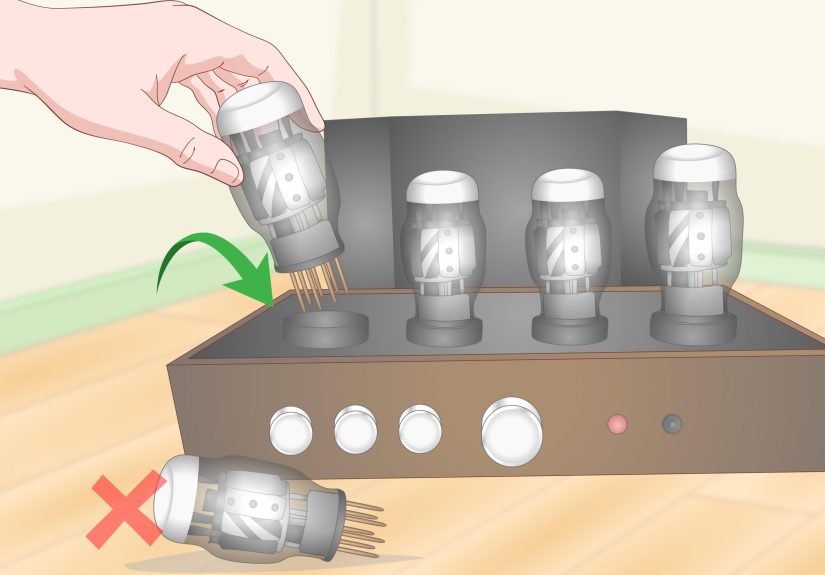
Tubes (tube amps): the usual suspects
- Weird noise, weak output, or no signal can be caused by a failing tubeSweetwater’s tube amp troubleshooting guidance highlights “bad tube” as a common cause.
- Some issues are solved by carefully reseating or replacing tubes (following the manufacturer’s instructions).
- If you’re not comfortable, don’t force ittube amps can store dangerous voltages even when unplugged.
Protect mode (powered speakers, pro amps, some modern combos)
If your amp or powered speaker shows a protect warning that persists, treat it seriously. QSC’s support guidance for
protect-mode conditions includes power cycling in some situations, but also states that if the error persists, it indicates
a hardware issue requiring authorized service, and recommends stopping use to avoid further damage.
Car amps (quick crossover lesson)
Even if you’re troubleshooting a guitar amp, car audio troubleshooting is a masterclass in “verify the basics with a meter.”
Crutchfield outlines measuring voltage at the amp terminals, checking an inline battery fuse for continuity, and confirming
remote turn-on voltage. The principle is universal: don’t guessmeasure.
5) Measure Smart (and Know When to Call a Tech)
You can do a lot without opening the chassis. In fact, for many players, “not opening the chassis” is an underrated life skill.
Here’s what you can safely measure and inspect from the outside.
Safe checks you can do without going inside
- Outlet check: verify the outlet works and the plug fits firmly (loose grip can cause intermittent hum).
- Cable continuity: if you have a cable tester, use it (Reverb recommends testing cablesincluding speaker cables).
- Speaker resistance (for a cab or combo speaker with accessible terminals): a multimeter can tell you if a speaker looks open (infinite/OL) or shorted (near 0).
- Thermal sanity: if the amp shuts down after a few minutes, check ventilation, dust, and whether it’s crammed against a wall like it’s hiding from responsibility.
When to stop and get professional help
Call a qualified tech (or an authorized service center) if you notice any of the following:
- Burning smell, smoke, visible arcing, or liquid leakage
- Repeatedly blown fuses (especially after correct replacement)
- Persistent protect mode warnings
- Shock/tingle sensations on strings or chassis (stop immediately)
- Tube amp internal work you’re not trained for (high-voltage risk is real)
Guitar Center’s practical advice is simple: for amplifiers and pro audio devices, use manufacturer-authorized repair options.
In other words: let the people with the right tools, parts, and insurance do the spicy jobs.
Quick Recap: The 5 Ways in One Breath
- Check power/standby/mute/volume and confirm the outlet is alive.
- Isolate the chain and swap in known-good cables, sources, and speakers.
- Use symptoms (no sound vs hum vs crackle vs distortion) to narrow the fault area.
- Respect protection systems: check fuses/tubes and take protect mode seriously.
- Measure what’s safe, document results, and call a tech when the clues say “stop.”
Experience Notes: 7 Real-World Amp Mysteries (and the Fix That Usually Wins)
Below are common “shop story” scenariospatterns that come up again and again across guitar amps, home audio amps,
powered speakers, and car systems. If any of these sound familiar, you’re in good company. Amp trouble loves an audience.
1) “It powers on, but there’s absolutely no sound.”
This one inspires immediate existential dread… until you discover a silent culprit: standby, mute, or a loop/jack issue.
The fastest confirmation is to run a minimal setup (instrument → amp) and then “jump” the FX loop send-to-return with a short
cable. If sound returns, dirty loop jack contacts were acting like a tiny bouncer blocking the whole band. Cycling a plug
in/out and using the proper contact cleaner can restore normal operation without replacing anything.
2) “My amp hums even with nothing plugged in.”
If the hum is present with no input connected, you’re usually looking at power/ground/environment factors rather than a noisy
pedal. First, try a different outlet and remove other gear from the chain. Then look for “physics problems”: an amp too close to
another device’s transformer can pick up induced noise. Spacing gear apart can help more than any mystical “tone crystal.”
And please don’t defeat the safety groundhum fixes that risk electrocution are a terrible bargain.
3) “The hum only happens when I connect one specific device.”
That’s classic “the system is fine until it isn’t.” The cure is methodical reconnection: build the system one device at a time
until the hum returns, then focus on that link. Sometimes it’s a cable, sometimes it’s a grounding difference between outlets,
and sometimes it’s a signal path that wants balanced connections or proper isolation. The real win is treating it like a detective
story, not a random gear swap marathon.
4) “It crackles when I touch the cable or turn the knobs.”
Crackle that changes when you wiggle a plug often points to dirty or worn jacks, a flaky cable, or a loose connection. It’s also
one of the most misdiagnosed problems because it feels “internal,” so people assume expensive repair. Start with the cheapest tests:
swap the instrument cable, then clean/inspect the input jack, then try a different input if available. Scratchy pots can often be
improved with the right cleaner, but if the noise is severe or returns quickly, the underlying part may be worn.
5) “My tube amp keeps blowing fuses.”
A fuse that blows repeatedly is not a suggestionit’s a warning. In many tube amps, that pattern often points to a failing power or
rectifier tube. Replacing the fuse with the correct rating is fine once; replacing it repeatedly while “hoping it’ll settle down”
is how you turn a small problem into a transformer problem (the expensive kind). If you’re not trained to troubleshoot tube circuits,
this is a perfect moment to stop and call a pro.
6) “It sounds weak and distorted, like it’s running out of breath.”
Weak, ugly distortion can come from gain staging issues (too much input level), an impedance mismatch, or overheating/limiting.
Check your source: boosted pedals, active pickups, and hot line-level devices can clip the preamp fast. Also verify the speaker load
makes sense for your amp’s output. And don’t ignore heatamps have protection behaviors for a reason. If it improves after cooling down,
ventilation and thermal management deserve your attention.
7) “It worked at home, but at rehearsal it’s a noisy mess.”
Congratulations, you’ve met the building. Different circuits, lighting dimmers, sketchy outlets, and crowded power strips can turn a
quiet rig into a buzz factory. The fix is often boring: one clean power source for the whole rig, tidy cable routing away from AC lines,
and a quick “minimal chain” test to see whether the environment is the trigger. If the noise vanishes when you change rooms or outlets,
your amp may be innocentjust surrounded by chaos.
Conclusion
Amp troubleshooting doesn’t have to feel like defusing a bomb in the dark. Start simple, isolate the chain, let the symptoms guide you,
respect protect modes, and measure what’s safe. Most importantly: the goal isn’t to “win” by doing everything yourselfthe goal is to get
reliable sound without turning a small issue into a larger repair (or a safety hazard). When in doubt, document what you tested and hand
that information to a qualified tech. You’ll save time, money, and at least one friendship in the band.