Table of Contents >> Show >> Hide
- First: What “GPU RAM” Really Means (and Why It’s So Picky)
- Why You (Usually) Can’t Upgrade VRAM Like Regular RAM
- The Plot Twist: VRAM “Upgrades” Already Exist (They’re Just Not Retail-Friendly)
- “But I Just Want More VRAM”What You Can Do Today (Without Soldering Your Soul)
- Why VRAM Matters More Than Ever in 2026
- The “Closer Than You Think” Part: Why VRAM Upgrades Are Moving from Fantasy to… Forecast
- Practical Buying Advice: Choosing VRAM Like a Person Who Likes Smooth Frame Times
- How to Tell If You’re Actually VRAM-Limited
- So… Will We Ever Get “VRAM Slots” on GPUs?
- Field Notes: of Real-World VRAM Life (a.k.a. “How It Feels in the Trenches”)
If you’ve ever hit a stutter mid-boss fight, watched textures turn into blurry oatmeal, or seen your “high-end” GPU suddenly act like it’s auditioning for a slideshow… congratulations. You’ve met the great equalizer: VRAM (a.k.a. “GPU RAM,” “graphics memory,” “video memory,” and “the thing I’m always short on when I’m having fun”).
Here’s the twist: while most graphics cards don’t let you upgrade VRAM the same way you upgrade system RAM, GPU RAM upgrades are closer than you thinknot because you’ll be snapping “VRAM sticks” into your RTX card next weekend, but because multiple trends are converging: real-world VRAM mods already exist, memory standards are evolving fast, and modern platforms are getting better at surviving (and even benefiting from) smarter memory designs.
Let’s break down what’s possible today, what’s practical tomorrow, and how to stop your GPU from wheezing like it just ran a marathon in a wool sweater.
First: What “GPU RAM” Really Means (and Why It’s So Picky)
“GPU RAM” usually means VRAM: ultra-fast memory sitting right next to the GPU, designed to feed it data at enormous bandwidth. Games stash textures, geometry, shadow maps, ray tracing data, frame buffersbasically everything your GPU needs right nowin VRAM so it doesn’t have to ask the CPU nicely and wait.
Consumer graphics cards typically use GDDR memory (like GDDR6/GDDR6X and the newer GDDR7 generation). Data-center and AI accelerators often use HBM (High Bandwidth Memory), which is stacked, extremely wide, and packed using advanced chip packaging.
The key point: VRAM isn’t just “some memory.” It’s part of a tightly engineered systemmemory chips, memory bus width, memory controllers, PCB routing, power delivery, cooling, and firmware all working together. When it works, it screams. When it doesn’t, it’s chaos with RGB.
Why You (Usually) Can’t Upgrade VRAM Like Regular RAM
1) Bandwidth and signal integrity are cruel masters
Desktop RAM modules (DIMMs) are already picky, but VRAM is pickier. Graphics memory runs at very high speeds, and it needs short, carefully tuned traces between the GPU and the memory chips. That’s why VRAM chips are typically soldered directly onto the graphics card PCB, very close to the GPU die.
2) The memory bus isn’t a suggestionit’s the whole deal
A GPU’s memory bus width (like 192-bit, 256-bit, etc.) and the number of memory chips it supports are baked into the design. You can’t just add more chips “somewhere else” without reengineering the board layout (and sometimes the firmware). Many boards don’t even have extra empty pads.
3) Firmware, stability, and thermals don’t care about your dreams
Even if you physically add or swap memory chips, the card still needs to recognize them, initialize them correctly, and remain stable under load. More VRAM also means different power and thermal behavior. In other words: your GPU doesn’t want your “fun weekend project.” It wants a warranty.
The Plot Twist: VRAM “Upgrades” Already Exist (They’re Just Not Retail-Friendly)
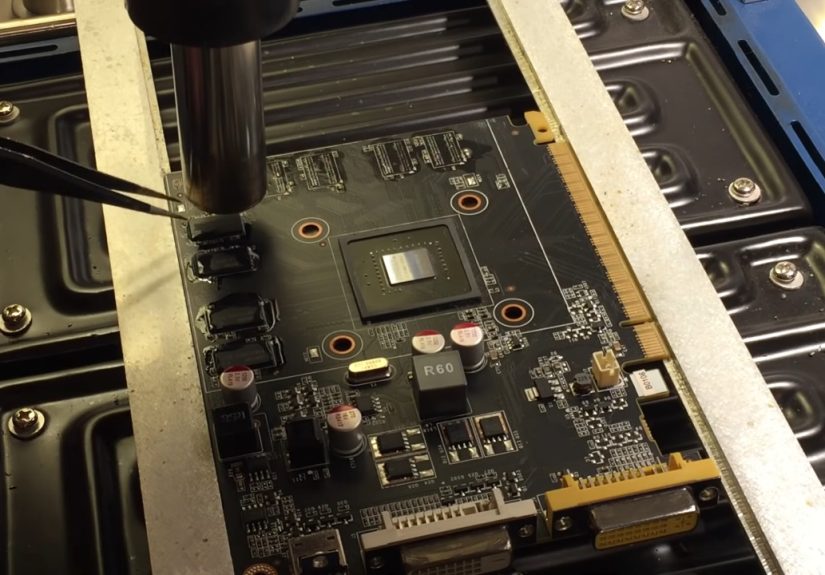
Let’s talk about the not-so-secret world of VRAM mods. Yes, people have taken certain GPUs and upgraded VRAM by replacing memory chips with higher-capacity ones. This is real, documented, anddepending on the cardcan produce very real performance improvements in VRAM-limited scenarios.
A well-known example is the RTX 3070 being modified from 8GB to higher capacities (like 16GB). In some modern games, the extra VRAM can improve not just average FPS, but the stuff that actually affects how the game feels: 1% lows, stutter reduction, and fewer “texture panic” moments.
But here’s the part you should read twice: these mods typically require specialized equipment and skill. We’re talking professional-grade rework tools, steady hands, careful validation, and the emotional resilience to accept that your GPU might turn into a decorative paperweight.
So nothis isn’t a “grab a screwdriver and vibe” upgrade. But it proves an important point: VRAM isn’t magically locked away by the laws of physics. It’s locked away by cost, manufacturing complexity, reliability requirements, and the fact that mass-market support is a support nightmare.
“But I Just Want More VRAM”What You Can Do Today (Without Soldering Your Soul)
If you’re VRAM-limited, your best “upgrade” might be a combination of smarter settings and smarter workflow. Think of it as VRAM budgeting with fewer spreadsheets.
In games: target the settings that actually hit VRAM
- Texture quality: Usually the biggest VRAM consumer. Dropping from Ultra to High can free up gigabytes with minimal visual pain.
- Texture packs / high-res assets: Optional downloads are often VRAM-hungry by design. Use them only if your GPU has the headroom.
- Ray tracing: Can increase memory pressure depending on the implementation and scene complexity.
- Resolution: Higher resolution raises buffer needs; it’s not always the top VRAM hog, but it adds pressure everywhere.
In creative apps: reduce VRAM pressure the pro way
- Use proxies for high-res video editing instead of forcing full-res playback all the time.
- Lower preview resolution when scrubbing and doing rough cuts.
- Optimize assets: oversized textures in 3D scenes are silent VRAM assassins.
Understand “shared GPU memory” (and why it’s not a free VRAM refill)
On Windows, GPUs can report both dedicated video memory (actual VRAM) and shared system memory (RAM the GPU can borrow). Borrowing is realbut it’s slower than dedicated VRAM, and heavy reliance can cause hitching or performance drops.
Integrated GPUs and “unified memory” systems are different. When the CPU and GPU share a single memory pool (common in many laptops and some modern desktop platforms), upgrading system memory can meaningfully improve how much memory the GPU can use. That’s not the same as upgrading VRAM on a discrete cardbut it’s absolutely a practical “GPU memory upgrade” in the real world.
Why VRAM Matters More Than Ever in 2026
VRAM used to be a checkbox you ignored while shopping for a “fast GPU.” Now it’s often the bottleneck that decides whether your experience is smooth or spicy (and not the good kind of spicy).
Games are getting bolder with textures, streaming, and open worlds
Modern engines and modern art pipelines love high-resolution assets. Even at 1080p, some titles can push well beyond “legacy” VRAM expectations once you crank textures and effects.
Creators increasingly rely on GPU memory for real-time workflows
Video editing, 3D rendering, and game development tools often specify minimum VRAM levelsand benefit from more headroom. Many mainstream creative workflows start at “a few GB” of VRAM, but complex timelines, heavy effects, large scenes, and high-res assets can quickly eat more.
Local AI and ML workloads are extremely VRAM-sensitive
If you’re running AI models locally, VRAM is often the hard limit. More VRAM can mean larger models, higher batch sizes, longer context windows, or simply fewer compromises. It’s common to see guidance that considers 8GB “minimum,” with 12–24GB being a comfortable range for many practical use cases, and higher capacities enabling larger workloads.
The “Closer Than You Think” Part: Why VRAM Upgrades Are Moving from Fantasy to… Forecast
1) Memory standards are advancing (and capacity density tends to follow)
GDDR7 is a major step forward in graphics memory standards. Higher per-pin speeds and evolving chip densities create a future where board designs can more easily offer higher VRAM configurations without radically changing the rest of the GPU.
Translation: even if your GPU doesn’t get a user-accessible VRAM slot, the market gets more room for sensible VRAM tiers, fewer “8GB forever” designs, and more cards that don’t run out of memory the moment you enable a texture pack.
2) The industry is getting better at memory “escape hatches”
On the compute side, technologies like unified memory and managed memory models can allow workloads to oversubscribe GPU memory, spilling to system memory when needed. That doesn’t make slow memory magically fast, but it does mean “not enough VRAM” doesn’t always equal “hard stop.”
For gamers, you mostly feel this as “it runs, but it stutters.” For compute workloads, smarter paging and memory management can be the difference between finishing a job and crashing at 98%.
3) Upgradable memory is coming backjust not where you expected
Laptop memory has been moving toward soldered designs, but new form factors (like CAMM-style modules) are pushing the industry back toward upgradeability. Meanwhile, some modern desktop designs lean into unified memory approaches where “system RAM” is also effectively “GPU memory.”
That matters because it shifts the question from “Can I upgrade VRAM on my GPU?” to “Can I upgrade the memory pool my graphics uses?” In many systemsespecially integrated graphics and unified memory designsthe answer is becoming “yes” more often.
Practical Buying Advice: Choosing VRAM Like a Person Who Likes Smooth Frame Times
If you’re shopping today and trying to avoid regret tomorrow, here’s a grounded way to think about VRAM without turning it into a religion:
Gaming targets (rule-of-thumb, not a sacred scroll)
- 1080p esports and lighter games: 8GB can be fine if you’re not living on Ultra textures.
- 1080p/1440p modern AAA with high textures: 12GB is a healthier floor; 16GB gives breathing room.
- 4K or heavy ray tracing / texture packs: 16GB+ is strongly preferred, and more helps with longevity.
Creator and workstation targets
- Video editing: 4–8GB can work for many projects, but higher-res and heavier effects benefit from more.
- Unreal Engine / real-time 3D: 8GB+ is a common baseline recommendation, with more helping for large projects.
- Local AI: 12–24GB is a comfortable range for many workflows; larger models often demand more.
The theme is simple: VRAM headroom is comfort. It doesn’t always increase average FPS, but it often improves consistency, reduces stutters, and expands what you can run.
How to Tell If You’re Actually VRAM-Limited
VRAM problems have a particular vibe. Look for these signals:
- Stutters and hitching that appear when entering new areas, turning quickly, or loading new assets.
- Texture pop-in or sudden drops in texture quality (even though you set it to Ultra).
- Big FPS drops in 1% lows while average FPS looks “fine.”
- Crashes or “out of video memory” errors in extreme cases.
A good test is to reduce texture quality by one step and see if the stutter improves significantly. If yes, you likely found the culprit.
So… Will We Ever Get “VRAM Slots” on GPUs?
For mainstream consumer cards, true plug-and-play VRAM modules are still unlikely in the near term. The performance and reliability penalties are hard to justify, and the support burden would be huge.
But here’s the optimistic reality: the ability to get more effective GPU memory is already expanding. Between real-world VRAM mods proving feasibility, rapid memory standard progress enabling better factory VRAM options, and unified memory systems making “GPU memory upgrades” feel more like “upgrade your RAM,” we’re moving toward a world where memory limits are less of a dead end.
In other words: the future of GPU RAM upgrades probably won’t look like a DIMM slot on your graphics card. It’ll look like smarter platforms, better memory tiers, and fewer GPUs that ship with “just enough VRAM to be annoying.”
Field Notes: of Real-World VRAM Life (a.k.a. “How It Feels in the Trenches”)
The first time people realize VRAM is the problem, it’s usually not during a calm benchmarking session with a spreadsheet and herbal tea. It’s during a moment of pure emotional investmentlike when you finally get your graphics settings dialed in, the game looks incredible, and then the camera pans… and your frame time graph turns into modern art.
One of the most common experiences goes like this: you upgrade your GPU for “more power,” because that’s what we’re trained to do. More cores, higher clocks, bigger number. You launch a new title, crank everything to Ultra, and for a few minutes you feel unstoppable. Then you enter a busy area with high-res textures, complex lighting, and a lot of assets streaming in. Suddenly, your GPU isn’t “slow.” It’s confused. You’re not watching the GPU fail to compute; you’re watching it juggle memory like a person trying to carry twelve grocery bags in one trip because pride is a powerful thing.
The giveaways are strangely consistent. There’s the micro-freeze when you open a door into a new section. There’s the half-second hitch when an explosion happens and the screen fills with effects. There’s the moment you alt-tab and come back to textures that look like they were painted with a wet spongeuntil the game “catches up.” And the most annoying part is that your average FPS might still be respectable, so it feels like you’re being gaslit by your own overlay.
Creators hit the same wall, just with different sound effects. A video editor scrubs a timeline and everything feels fineuntil they stack a few GPU-accelerated effects on 4K footage and the preview starts dropping frames like it’s trying to win a contest. A 3D artist opens a scene and it runs smoothly, until they load higher-resolution textures or add a dense environment and suddenly the GPU renderer taps out. That’s the VRAM ceiling: not always loud, but always final.
Then there’s the “I tried to outsmart VRAM” phase. People reduce resolution first, because that’s intuitive. Sometimes it helps, but not always enough, because textures are often the true culprit. The real “aha” moment is usually when they drop textures from Ultra to High andboomthe stutter melts away while the game still looks fantastic. That’s when you realize VRAM isn’t about bragging rights; it’s about consistency.
And yes, some enthusiasts go deeper. They read about VRAM mods and feel the temptation. Even if they never attempt one, just knowing it’s possible changes the conversation. It turns VRAM from “a locked box forever” into “a design choice with tradeoffs.” That perspective is oddly empowering. It’s also a reminder that the best “upgrade” is often planning: buying enough VRAM for your resolution and workload, leaving headroom for the next wave of games, tools, and models that will inevitably ask for more.
The most satisfying VRAM experience is boring in the best way: you play, create, or build, and nothing weird happens. No stutters, no crashes, no blurry textures. That’s the goal. And with better memory standards, better platform design, and smarter ways to stretch memory when you need to, that boring future is getting closer than you think.