Table of Contents >> Show >> Hide
- Before You Cite: Grab These Details (Your Future Self Will Thank You)
- Way #1: Cite a PowerPoint Presentation in APA (7th Edition)
- Way #2: Cite a PowerPoint Presentation in MLA (9th Edition)
- Way #3: Cite a PowerPoint Presentation in Chicago Style
- Bonus: Citing Sources Inside Your Own PowerPoint (Yes, Your Slides Need Citations Too)
- Quick “Which One Do I Use?” Decision Guide
- Common PowerPoint Citation Examples (Same Slide Deck, Three Styles)
- Real-World Experiences: 5 Lessons People Learn the Hard Way (and How You Can Skip the Pain)
- Conclusion
PowerPoint slides are everywhere: classrooms, conference keynotes, team standups, and that one meeting that
could’ve been an email (but, alas, became 47 slides). And when you use a slide deck as a sourcequoting it,
paraphrasing it, or borrowing a chartyou need to cite a PowerPoint presentation correctly.
The good news: citing slides isn’t hard once you know what your citation style wants. The trick is that the
“right” format depends on how you accessed the slides (online? through a course site? live lecture only?)
and which style guide you’re following (APA, MLA, or Chicago).
In this guide, you’ll learn three practical ways to create a clean PowerPoint citation, with examples you can
copy and adapt. We’ll also cover slide numbers, missing authors, and what to do when the deck lives behind a
login like Canvas or Blackboard (a.k.a. the velvet rope of course materials).
Before You Cite: Grab These Details (Your Future Self Will Thank You)
Regardless of style, most citations for presentation slides pull from the same basic building blocks. If you can,
collect:
- Author/presenter (person or organization)
- Date (year at minimum; month/day if available)
- Title of the presentation (slide deck title)
- Format description (e.g., “PowerPoint slides” or “PowerPoint presentation”)
- Where it lives (website/platform/LMS, conference, or class context)
- URL (if publicly available) or the name of the course site/platform
Also decide whether you’re citing the whole deck or a specific slide.
If you reference a particular image, quote, or statistic, slide numbers are your best friend.
Way #1: Cite a PowerPoint Presentation in APA (7th Edition)
APA style is common in social sciences, education, and many health-related fields. APA citations for slides tend
to look like a standard online document referencejust with a bracketed description like
[PowerPoint slides].
APA Reference List Format (Slides Available Online)
Use this model when the PowerPoint slides can be retrieved by your readers (public website, SlideShare, company
page, etc.).
APA example (online slide deck):
APA In-Text Citations (Whole Deck vs. Specific Slide)
- Paraphrase (whole deck): (Nguyen, 2024)
- Quote or specific idea from one slide: (Nguyen, 2024, slide 7)
Slide numbers are especially helpful when you’re pointing to a specific chart, definition, or diagram. Think of
them as page numbers for people who prefer transitions to chapters.
APA for Slides in a Course Site (Canvas/Blackboard) or Classroom Materials
If the slide deck is posted in a learning management system (LMS) and your audience can access it, cite it like
an online sourceinclude the platform name as the host, plus a URL if one exists for your readers.
APA example (LMS-hosted slides):
If the slides are not retrievable by your readers (for example, a live lecture deck that was never
shared), many APA-oriented guides treat that information similarly to other non-recoverable communications:
you cite it in the text, but typically do not include it in the reference list.
APA Troubleshooting: Missing Pieces Without Losing Your Mind
- No date: use
(n.d.)in the reference entry. - Organization as author: use the organization name in the author position.
- No individual author listed: treat the group/department as author if possible.
- Title slide is vague: use the most descriptive title available (sometimes a file name helps).
Way #2: Cite a PowerPoint Presentation in MLA (9th Edition)
MLA style is common in humanities and many general education courses. MLA citations focus on “containers”
(where the work is found), which is perfect for slide decks living on a website or inside an LMS.
MLA Works Cited Format (Slides Viewed Online)
If the deck is public (company site, SlideShare, conference page, etc.), cite it similarly to a web pagethen
label it as a PowerPoint.
MLA example (public slides):
MLA for Slides Uploaded to Canvas/Blackboard (LMS as the Container)
When slides are uploaded to a course platform, the LMS becomes the container. Include details that help someone
find the deck inside that system (and add “PowerPoint presentation” as a helpful format label).
MLA example (LMS-hosted slides):
MLA In-Text Citations and Slide Numbers
MLA in-text citations usually use the author’s last name (and sometimes a location like a page number). For
PowerPoint slides, many instructors and library guides recommend adding the slide number when you
reference a specific slide.
- Paraphrase: (Patel)
- Specific slide: (Patel, slide 12)
If your instructor prefers a different format (some classes use “Patel slide 12” without a comma), follow your
course guidelinesbut slide numbers are a solid default when you’re pointing to a specific visual.
MLA Troubleshooting: What If There’s No Author?
- No author: start the Works Cited entry with the title of the presentation.
- No date: omit the date (MLA is fine with that), and consider including an access date if your instructor requests it.
- Corporate deck: use the organization as the author (e.g., “Centers for Disease Control and Prevention”).
Way #3: Cite a PowerPoint Presentation in Chicago Style
Chicago style comes in two common flavors: Notes and Bibliography (often used in history and the
humanities) and Author-Date (often used in sciences and social sciences). The biggest difference:
do you cite with footnotes/endnotes (Notes-Bib) or parenthetical citations (Author-Date)?
Chicago Notes & Bibliography (Footnote) Format
Use this when your paper uses footnotes/endnotes. You’ll typically include the presenter, title, format,
context/location, and date. If you are citing a specific slide, add the slide number at the end.
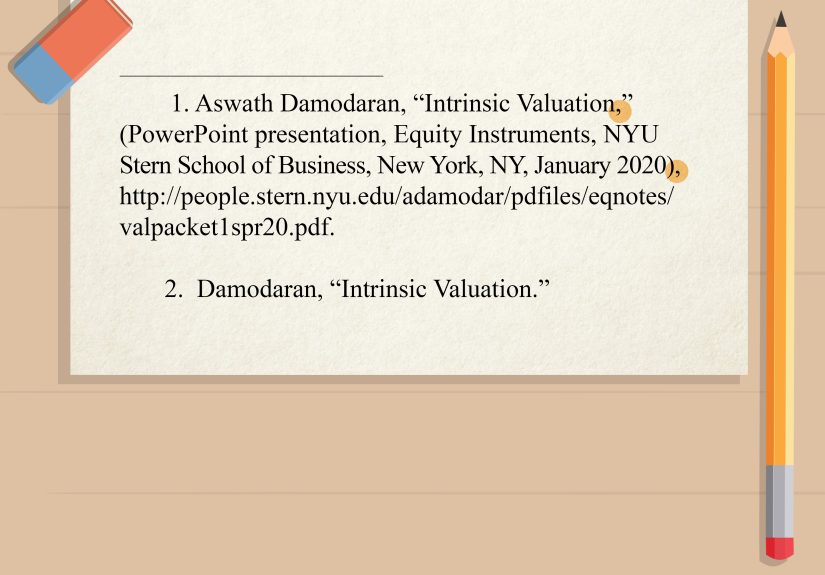
Chicago NB footnote example:
If you include a bibliography, the entry often mirrors the note but starts with last name first:
Chicago Author-Date Format (Reference List)
Author-date style typically uses parenthetical citations in the text and a reference list entry. A common pattern
is: author, year, title, and description of the presentation with context.
Chicago author-date example:
In-text (author-date): (Lee 2023)
Chicago Troubleshooting: Online Slides, Missing Dates, and Access Issues
- Slides online: you can include a URL at the end when it helps readers retrieve the deck.
- No date: use whatever date you can verify (upload date, event date) or omit if truly unknown.
- Behind a login: include the platform/course context so your reader understands where it came from, even if they can’t access it directly.
Bonus: Citing Sources Inside Your Own PowerPoint (Yes, Your Slides Need Citations Too)
Sometimes you’re not citing a PowerPoint in a paperyou’re citing sources in a PowerPoint you’re presenting.
The expectation varies by instructor and workplace, but these two habits are widely accepted:
-
Add brief citations on the slide where the information appears (author + year, or a short source label).
Keep it small and tidythink “polite whisper,” not “billboard.” -
Add a final References/Works Cited slide listing full citations for all sources used.
If you used multiple images, charts, or quotes, this slide is your credibility cape.
Pro tip: If a slide is visually busy, put a short citation on the slide and tuck the full details in speaker notes
or on the references slide. That way, your audience gets the point without squinting like they’re decoding a treasure map.
Quick “Which One Do I Use?” Decision Guide
- APA: psychology, education, health sciences; expects a reference list and author-date citations.
- MLA: humanities; uses containers and a Works Cited list; slide numbers are often added for clarity.
- Chicago: history and some humanities (Notes-Bib) or sciences (Author-Date); often uses footnotes.
Common PowerPoint Citation Examples (Same Slide Deck, Three Styles)
Imagine you used a public deck titled “Sleep and the Student Brain” by Dr. Alicia Brooks, posted March 10, 2024.
Here’s how it could look across styles (with a placeholder where a URL would go):
APA
MLA
Chicago (Notes-Bib footnote)
Real-World Experiences: 5 Lessons People Learn the Hard Way (and How You Can Skip the Pain)
Let’s talk about what actually happens outside the neat little world of perfectly labeled citations.
Slide decks in the real world can be messy: the author is “Marketing Team,” the date is “Final_FINAL2,” and the
title slide is a photo of a mountain with the words “Q3 Strategy” floating in the sky like an inspirational screensaver.
Here are five experience-based lessons that come up again and againplus how to handle them without losing your weekend.
1) The “Who Even Made This?” Corporate Deck Problem
You’re writing a report and want to cite slides from an internal presentation. The deck is usefulcharts, KPIs,
maybe even a rare moment of claritybut there’s no individual author. In situations like this, the best move is
to treat the organization or department as the author (for example, “Operations Analytics Team”).
If you can’t identify a team name, use the company name. Your citation won’t be poetic, but it will be traceable,
and traceable beats “trust me, bro” every time.
2) The LMS Link That Works for You… and Literally No One Else
Students often paste a course link into a citation and assume it’s universal. Then a classmate clicks it and gets
the digital equivalent of a bouncer saying, “Name’s not on the list.” When slides live behind Canvas/Blackboard,
your best bet is to cite the LMS as the container (MLA) or the course platform (APA),
and include the course context so a reader understands where the material came fromeven if they can’t access it.
If your audience is the general public (not your class), consider citing it as unpublished classroom material
and follow your instructor’s preference.
3) The Slide Number Saves the Day (Especially for Visuals)
Here’s a surprisingly common scenario: You reference “the chart from the presentation,” and your reader goes hunting.
The chart is on slide 14, but slide 13 has a different chart, slide 15 has a chart’s emotional support bullet points,
and now everyone is confused. Adding a slide number(Brooks, 2024, slide 14) or (Brooks, slide 14)turns a vague citation
into a precise pointer. If you’re using a single statistic or an image, slide numbers are the difference between
“I think it was in there somewhere” and “Here it is.”
4) The “No Date” Mystery File
Some decks have no date because the creator assumed their slides were timeless. (They are not. There is nothing timeless
about “2022 Market Outlook.”) If you don’t have a publication date, styles handle it differently: APA often uses (n.d.),
MLA may omit the date, and Chicago may use the event date or upload date if you can confirm it. In practice, people get the
most success by checking the platform upload timestamp, the conference schedule, or the course module date. The goal is not to
be psychicit’s to be reasonable and transparent.
5) Citing Inside Slides Without Turning Your Presentation into a Legal Document
The first time someone is told to “cite your sources on the slide,” they often panic and paste full citations into 12-point text
across the bottom. That’s how you get a slide that looks like a ransom note made of MLA entries. A smoother approach is to use a
short citation on the slide (author + year, or organization + year) and then place full citations on a final references slide.
This keeps your deck readable while still giving proper creditbecause nothing ruins a great presentation like your audience
spending the whole time reading tiny URLs instead of listening to you.
Conclusion
Citing a PowerPoint presentation isn’t about jumping through hoopsit’s about making your work verifiable, professional,
and fair to the original creator. Whether you’re using APA, MLA, or Chicago style, the winning strategy is the same:
capture the author, date, title, and where the slides live, then add slide numbers when you’re pointing to something specific.
If you remember one thing, make it this: cite like you want someone else to find the exact slide you used.
Your readers (and your future self) will appreciate the clarityand your credibility will stay intact, even if your slide deck
has a dramatic fade transition.