Table of Contents >> Show >> Hide
- What Does Roblox Error Code 267 Mean?
- Common Roblox Error Code 267 Messages
- Main Causes of Roblox Error Code 267
- 1. You Were Banned From a Specific Experience
- 2. A Game Script Kicked You
- 3. Anti-Cheat or Suspicious Client Behavior
- 4. Weak Internet Connection or Router Problems
- 5. Firewall, Antivirus, VPN, or Proxy Interference
- 6. Outdated Roblox App or Corrupted Cache
- 7. Browser Cookies, Extensions, or Site Data
- How to Fix Roblox Error Code 267
- 1. Read the Full Error Message First
- 2. Try Joining a Different Roblox Experience
- 3. Wait and Try Again Later
- 4. Check Roblox Status
- 5. Restart Roblox and Your Device
- 6. Restart Your Router and Use a Stable Connection
- 7. Turn Off VPNs and Proxies
- 8. Allow Roblox Through Your Firewall
- 9. Clear Browser Cache and Cookies
- 10. Clear Roblox Temporary Files
- 11. Update Roblox
- 12. Reinstall Roblox
- 13. Remove Exploits, Script Executors, and Suspicious Tools
- 14. Contact the Experience Creator Politely
- 15. Appeal Roblox Moderation Only When It Is a Roblox Account Action
- Fix Roblox Error Code 267 by Device
- How to Know Whether Error Code 267 Is a Ban or a Technical Problem
- What Not to Do When You See Error Code 267
- Frequently Asked Questions About Roblox Error Code 267
- Real Player Experience: What Roblox Error Code 267 Feels Like and What Usually Works
- Conclusion
- SEO Tags
Few things ruin a Roblox session faster than loading into an experience, getting excited, and then being slapped with Roblox Error Code 267. One second you are ready to grind levels, trade pets, survive disasters, or pretend your blocky avatar has a stable career. The next second, Roblox politelyor not so politelytells you that you have been kicked, banned, or disconnected.
The good news? Error Code 267 does not always mean your Roblox account is doomed. In many cases, it means one specific experience has removed you, blocked you, or failed to let you join properly. Sometimes it is a real experience ban. Sometimes it is a server-side script. Sometimes your internet connection, VPN, firewall, browser cache, or outdated Roblox app is acting like the final boss.
This guide explains what Roblox Error Code 267 means, why it happens, and how to fix it on PC, mobile, browser, and other devices. We will keep things clear, practical, and lightly seasoned with humorbecause troubleshooting is easier when your computer is not silently judging you.
What Does Roblox Error Code 267 Mean?
Roblox Error Code 267 usually means you were removed from a specific Roblox experience. Roblox’s official support guidance identifies Error Code 267 as “Banned from an Experience,” meaning the creator or moderation system of that particular experience has blocked your account from joining.
This is an important detail: an Error 267 ban is not always a Roblox-wide account ban. You may still be able to log in, chat, customize your avatar, use the Roblox website, and join other experiences. In many cases, the issue belongs to one experience, not your entire account.
However, Roblox players often see different versions of Error Code 267. The message may say you were kicked, banned, disconnected, or removed because of suspicious behavior. That means the exact wording matters. Before trying random fixes, read the full error message like it is a treasure map. A tiny phrase such as “banned from this experience” or “kicked by server” can tell you where to focus.
Common Roblox Error Code 267 Messages
Error Code 267 can appear with several messages, including:
- “You were kicked from this experience.”
- “You have been banned from this experience.”
- “Disconnected: You were kicked from this game.”
- “You were kicked due to suspicious client behavior.”
- “Please check your internet connection and try again.”
- “Your account is not allowed to join this experience.”
These messages do not all mean the same thing. A ban message points toward the experience creator’s rules or moderation system. A suspicious behavior message may involve anti-cheat detection, third-party software, scripts, or modified clients. A connection message points toward network problems, firewall restrictions, or temporary Roblox service issues.
Main Causes of Roblox Error Code 267
1. You Were Banned From a Specific Experience
The most direct cause is a ban from the experience itself. Roblox experiences are created and managed by individual developers or teams, and they may use their own moderation tools. If you broke the experience’s rules, used exploits, spammed, harassed players, bypassed systems, or triggered automated moderation, you may be blocked from joining.
In this case, Roblox Support generally cannot remove the ban because it was issued by the experience creator, not Roblox’s main moderation team. You can still try other Roblox experiences to confirm whether your account works elsewhere.
2. A Game Script Kicked You
Roblox experiences often use scripts to manage player behavior. A script can kick players for many reasons: using restricted commands, joining too quickly, failing verification, being too new, entering a private area, or triggering anti-cheat rules. Sometimes the script is correct. Sometimes it is about as graceful as a shopping cart with one broken wheel.
For example, an experience may require your account to be at least seven days old. If your account is brand new, the server may kick you automatically with Error 267. Another experience may require you to join a group before entering. If you skip that step, the game may remove you.
3. Anti-Cheat or Suspicious Client Behavior
Some Roblox experiences use anti-cheat systems to detect exploits, unauthorized scripts, abnormal movement, teleporting, speed changes, or modified game clients. If the system thinks your client is behaving suspiciously, it may remove you with Error Code 267.
This can happen if you actually used cheats, but it can also happen because of third-party overlays, injectors, macro tools, outdated files, or corrupted installations. The safest fix is simple: close suspicious programs, remove exploit tools, use the official Roblox app, and reinstall Roblox if needed.
4. Weak Internet Connection or Router Problems
Roblox needs a stable connection to join and stay inside experiences. If your Wi-Fi drops, your router is overloaded, or your connection has high latency, the experience may fail to load properly and remove you. This is especially common when Roblox works one minute and then suddenly refuses to cooperate the next.
Public Wi-Fi, school networks, office networks, and shared apartment internet can also block or limit game traffic. If Roblox cannot communicate with its servers correctly, Error Code 267 may appear alongside other connection errors.
5. Firewall, Antivirus, VPN, or Proxy Interference
Security software is useful, but sometimes it becomes a very enthusiastic bouncer. Firewalls, antivirus programs, VPNs, proxies, and network filters can block Roblox from connecting. If Roblox cannot pass through your firewall or your VPN makes your connection look suspicious, an experience may refuse entry.
This does not mean you should turn off all security forever. Instead, test carefully. Temporarily disable a VPN, allow Roblox through your firewall, or check whether your antivirus has quarantined Roblox files.
6. Outdated Roblox App or Corrupted Cache
An outdated Roblox client can cause joining problems. Corrupted cache files, old temporary files, or broken installation files can also trigger errors. If the app keeps crashing, looping on updates, or failing to join experiences, clearing temporary files or reinstalling Roblox can help.
7. Browser Cookies, Extensions, or Site Data
If you launch Roblox from a web browser, browser data can matter. Old cookies, broken cached files, strict privacy settings, or aggressive extensions may interfere with the Roblox website or launcher. Clearing cache and cookies, disabling extensions, or trying another browser can solve the problem.
How to Fix Roblox Error Code 267
1. Read the Full Error Message First
Before changing settings, read the exact message. If it says you are banned from the experience, the issue is likely experience-specific. If it says suspicious client behavior, focus on third-party software, exploit tools, and reinstalling Roblox. If it mentions connection problems, start with your internet, router, firewall, and VPN.
This step saves time. Troubleshooting without reading the message is like trying to assemble furniture without instructions: possible, but emotionally expensive.
2. Try Joining a Different Roblox Experience
Open Roblox and join a different popular experience. If other experiences work, your account and Roblox app are probably fine. The problem is likely limited to the original experience.
If every experience shows Error Code 267 or other connection errors, the issue may be your device, network, app installation, or Roblox service status.
3. Wait and Try Again Later
Some Error 267 kicks are temporary. A server may be overloaded, an anti-cheat check may fail, or the experience may be updating. Wait 10 to 30 minutes, then try again. If the message includes a ban duration, respect that timer. Attempting to bypass it can make things worse.
4. Check Roblox Status
If Roblox is having a service disruption, you may see joining errors across multiple experiences. Check the official Roblox Status page before blaming your computer, your router, or the poor family dog sitting near the Wi-Fi.
If there is an active outage, the best fix is patience. You can restart things all day, but if the platform is down, your keyboard does not deserve the violence.
5. Restart Roblox and Your Device
Close Roblox completely, including background processes. Then restart your computer, phone, tablet, or console. A clean restart can clear temporary glitches, stuck network sessions, and update problems.
On Windows, open Task Manager and make sure Roblox is fully closed. On mobile, swipe the app away from recent apps before reopening it.
6. Restart Your Router and Use a Stable Connection
Unplug your router for about 30 seconds, plug it back in, and wait until the connection returns. If possible, use a wired Ethernet connection on PC. If you are on Wi-Fi, move closer to the router or switch to a less crowded network.
A stable connection is especially important for fast-paced Roblox experiences where anti-cheat systems watch movement and server responses closely.
7. Turn Off VPNs and Proxies
Disable your VPN or proxy, then try Roblox again. Some Roblox experiences treat unusual IP addresses, location changes, or masked connections as suspicious. If Error Code 267 disappears after disabling the VPN, you found the culprit.
If you need a VPN for privacy, try a different server location later. For troubleshooting, though, test Roblox without it first.
8. Allow Roblox Through Your Firewall
On Windows, open Windows Security, go to Firewall & network protection, and choose the option to allow an app through the firewall. Make sure Roblox is allowed on private networks. If your antivirus has a separate firewall, check that too.
Do not allow random unknown programs just because a YouTube comment told you to. Only allow the official Roblox app or launcher.
9. Clear Browser Cache and Cookies
If you launch Roblox from Chrome, Edge, Firefox, or another browser, clear cached images, files, cookies, and site data. Then close the browser completely and reopen it.
You can also test Roblox in another browser. If Roblox works in one browser but not another, the problem may be cookies, extensions, privacy settings, or corrupted browser data.
10. Clear Roblox Temporary Files
On Windows, close Roblox first. Then press Windows + R, type %temp%, and look for Roblox-related temporary folders. Delete temporary Roblox files, restart your PC, and launch Roblox again.
Be careful not to delete unrelated personal files. Temporary files are usually safe to remove, but when in doubt, focus only on folders clearly related to Roblox.
11. Update Roblox
Make sure you are running the latest version of Roblox. On PC, launching an experience usually prompts Roblox to update. On iPhone or iPad, check the App Store for updates. On Android, open Google Play and update Roblox if an update is available.
An outdated app may fail to connect correctly or trigger compatibility problems with newer experience scripts.
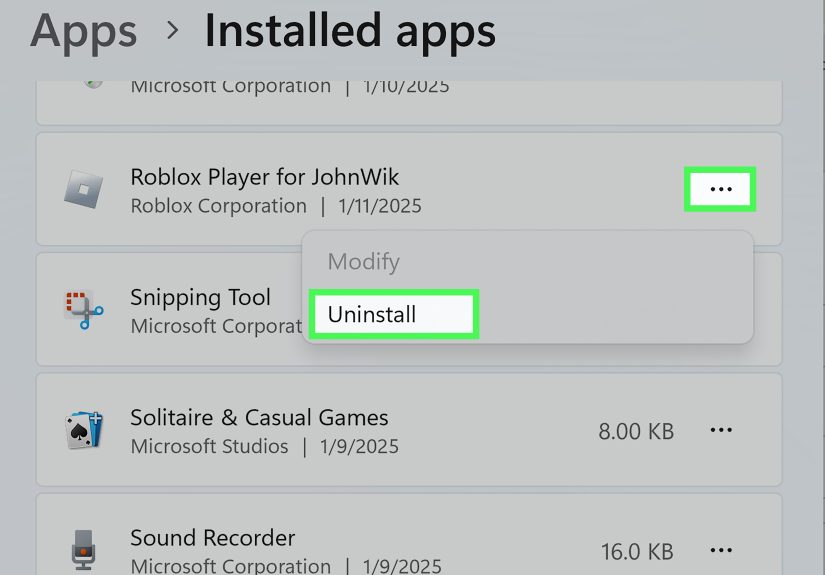
12. Reinstall Roblox
If updates, cache clearing, and restarts do not work, uninstall Roblox and reinstall it from the official Roblox website or your device’s official app store. Restart your device after uninstalling and before reinstalling.
Reinstalling helps when Roblox files are corrupted, missing, or stuck in an update loop. It is the digital equivalent of “turn it off and on again,” but with extra commitment.
13. Remove Exploits, Script Executors, and Suspicious Tools
If you use exploit tools, script executors, modified clients, or cheat software, remove them. Besides triggering Error Code 267, these programs can contain malware, steal accounts, or lead to moderation action.
Even if a tool claims it is “undetectable,” that usually means “detectable soon, probably while you are holding rare items.” Play fair, keep your account safe, and avoid anything that asks for your password or Roblox cookie.
14. Contact the Experience Creator Politely
If you believe you were wrongly banned from one experience, look for the experience’s official group, community server, support form, or social page. Send a short, polite appeal. Include your Roblox username, the error message, the date, and why you believe the ban was a mistake.
Do not spam, threaten, or create alternate accounts to bypass the ban. That can confirm the moderation team’s decision faster than you can say “oops.”
15. Appeal Roblox Moderation Only When It Is a Roblox Account Action
If your entire Roblox account is moderated, suspended, or banned by Roblox itself, use Roblox’s official appeal process. If only one experience blocks you with Error 267, Roblox Support usually cannot remove that experience-level ban.
Fix Roblox Error Code 267 by Device
On Windows PC
- Restart Roblox and your computer.
- Disable VPNs, proxies, and suspicious background tools.
- Allow Roblox through Windows Firewall.
- Clear browser cache if launching from a browser.
- Delete Roblox temporary files carefully.
- Reinstall Roblox from the official website if the issue continues.
On Mac
- Quit Roblox fully and restart your Mac.
- Update Roblox and your browser.
- Disable VPN or security tools temporarily for testing.
- Clear browser cache and cookies.
- Reinstall Roblox if joining errors continue.
On iPhone or iPad
- Close Roblox from the app switcher and reopen it.
- Update Roblox through the App Store.
- Restart your device.
- Switch between Wi-Fi and mobile data to test the connection.
- Delete and reinstall Roblox if the app keeps failing.
On Android
- Force close Roblox and reopen it.
- Update Roblox through Google Play.
- Clear app cache in Android settings if available.
- Restart your phone or tablet.
- Reinstall Roblox if the issue remains.
How to Know Whether Error Code 267 Is a Ban or a Technical Problem
Here is a simple way to diagnose the issue:
- Only one experience fails: You may be banned, kicked by a script, or blocked by that experience’s rules.
- Many experiences fail: Check Roblox Status, your connection, firewall, VPN, app version, and device.
- The message says “banned”: Treat it as an experience-level moderation issue.
- The message says “suspicious behavior”: Remove third-party tools and reinstall Roblox.
- The message mentions connection: Troubleshoot Wi-Fi, router, firewall, and VPN settings.
What Not to Do When You See Error Code 267
Do not download “Roblox unban tools.” They are usually scams, malware, or account-stealing traps wearing a fake mustache. Do not share your password, Roblox cookie, two-step verification code, or recovery email. Do not create multiple accounts to bypass bans, especially if the experience rules prohibit it.
Also, do not assume every Error 267 is unfair. Sometimes moderation systems remove players for real reasons. If you broke a rule, wait out the ban, learn from it, and move on. Your future Roblox self will appreciate the character development.
Frequently Asked Questions About Roblox Error Code 267
Is Roblox Error Code 267 permanent?
Not always. Some experience bans are temporary, while others may be permanent. Some Error 267 messages are not bans at all and may be caused by scripts, connection problems, or app issues.
Can Roblox Support remove Error Code 267?
If the ban came from an experience creator, Roblox Support usually cannot remove it. If your entire Roblox account was moderated by Roblox, you may be able to use the official appeal process.
Why can I join other Roblox experiences but not one specific game?
That usually means the issue is limited to that experience. You may be banned, blocked by account requirements, removed by an anti-cheat script, or affected by a server-side bug.
Can a VPN cause Roblox Error Code 267?
Yes. VPNs and proxies can sometimes trigger connection issues or suspicious behavior checks. Disable the VPN and try again to see whether the error disappears.
Does reinstalling Roblox fix Error Code 267?
Reinstalling Roblox can fix corrupted files, outdated installations, and client problems. It will not remove a real experience ban issued by the creator.
Real Player Experience: What Roblox Error Code 267 Feels Like and What Usually Works
Anyone who has played Roblox for long enough has probably met an error code at the worst possible time. Error Code 267 is especially annoying because it feels personal. You are not simply disconnected. You are “kicked.” That word has drama. It sounds like the server looked at your avatar, adjusted its tiny sunglasses, and said, “Not today.”
In real-world troubleshooting, the first clue is usually whether the error happens in one experience or everywhere. For example, imagine a player trying to join a popular anime battlegrounds experience. Every time they click Play, the loading screen appears for a few seconds, then Error Code 267 says they were kicked. They try a racing game, a tycoon, and an obby, and all three work perfectly. In that situation, reinstalling Roblox probably will not help. The player is likely blocked by that specific experience’s system. Maybe their account is too new. Maybe the game requires group membership. Maybe they were banned after a report. The practical move is to read the message, check the experience description, and contact the creator’s support channel if one exists.
Now imagine another case. A player gets Error Code 267 in every experience after installing a free “FPS booster” from a random website. That is a giant red flag waving in blocky slow motion. Many so-called boosters, script tools, and exploit programs interfere with Roblox or trigger anti-cheat systems. The best fix is to uninstall the tool, scan the device for malware, restart the computer, and reinstall Roblox from the official source. If Roblox works afterward, the “booster” was not boosting anything except stress levels.
Another common experience involves school, hotel, or public Wi-Fi. Roblox may load the website, but joining an experience fails. The player thinks their account is banned, but the real problem is the network. Some networks block gaming traffic, restrict ports, or filter connections. Testing Roblox on mobile data or a home network can quickly reveal whether the network is the villain.
Browser users often run into a quieter version of the problem. They click Play, Roblox tries to launch, and then things break. Clearing browser cache, disabling extensions, or trying another browser can fix it. It is not glamorous, but it works often enough to deserve a place in the troubleshooting hall of fame.
The most important lesson is this: do not panic. Error Code 267 is not automatically the end of your Roblox account. Start small. Test another experience. Restart the app. Check Roblox Status. Turn off your VPN. Update Roblox. Clear cache. Reinstall only after easier steps fail. And if the message clearly says you were banned from one experience, treat it as an experience-level issue rather than a device problem.
Roblox errors can feel mysterious, but Error 267 usually follows a pattern. Once you separate bans from technical issues, the fix becomes much easier. Your avatar may have been kicked once, but with the right troubleshooting, it can usually walk back into Roblox with dignitysquare shoulders, square head, and all.
Conclusion
Roblox Error Code 267 means you were removed from or blocked by an experience, but the reason can vary. It may be an experience ban, an admin script, an anti-cheat action, a connection problem, a firewall issue, a VPN conflict, an outdated app, or corrupted cache files.
The fastest fix is to identify the pattern. If only one experience fails, check the experience rules or contact the creator politely. If every experience fails, troubleshoot your device, network, Roblox installation, firewall, VPN, and browser data. Avoid shady “unban” tools, keep Roblox updated, and use only official downloads.
Most importantly, do not assume the worst. Error Code 267 can look scary, but it is often fixable once you know where to look. Roblox may have kicked you out, but with a little troubleshooting, you can usually kick the error right back.
Note: This article is for general troubleshooting and player education. It does not guarantee removal of any Roblox or experience-level ban. If an experience creator issued a ban, follow that experience’s official appeal process if available.