Table of Contents >> Show >> Hide
- What Makes a Raspberry Pi Clone “Real”?
- The ODROID-W: Small Board, Big Identity Crisis
- Why Other “Raspberry Pi Clones” Were Usually Not Clones
- The BCM2835 Was the Secret Ingredient
- Software Compatibility: The Boring Feature That Matters Most
- Why the Form Factor Made Sense
- The Catch: A Brilliant Idea With a Short Shelf Life
- Raspberry Pi Clone vs Raspberry Pi Alternative
- What Makers Can Learn From the ODROID-W
- Where the Idea Lives On Today
- Conclusion: The Clone That Proved Compatibility Is a Feature
- Experience Notes: What Building Around a Real Raspberry Pi Clone Feels Like
In the world of single-board computers, the phrase “Raspberry Pi clone” gets thrown around with the confidence of a cat walking across a keyboard. A board has a 40-pin header? Clone. It runs Linux? Clone. It is rectangular and costs less than dinner for two? Definitely clone. But most so-called Raspberry Pi clones are not truly clones at all. They are alternatives, competitors, cousins, rivals, or enthusiastic impersonators wearing a small green cape.
The ODROID-W was different. It was not merely Raspberry Pi-inspired. It was not just another board that copied the general shape, borrowed the educational spirit, and hoped nobody looked too closely at the processor. It used the same Broadcom BCM2835 system-on-chip that powered the original Raspberry Pi, paired it with 512MB of memory, kept important Raspberry Pi-style expansion connections, and aimed for genuine software compatibility. That made it one of the rare boards that could honestly walk into the room and say, “Yes, I am actually related.”
That distinction matters. In hardware, compatibility is not a vibe. It is not a sticker on a product page. It is a stack of electrical decisions, processor architecture, boot firmware, pinouts, drivers, graphics support, camera interfaces, storage behavior, and community expectations. The ODROID-W showed what a real Raspberry Pi clone could look like when the goal was not simply to beat the Pi on specs, but to carry the same software DNA in a smaller, wearable-friendly body.
What Makes a Raspberry Pi Clone “Real”?
A true Raspberry Pi clone must do more than run Linux and blink an LED. Many single-board computers can do that, including boards with faster CPUs, more RAM, SATA ports, Gigabit Ethernet, and enough marketing adjectives to power a small drone. But a real clone should answer a much harder question: can it behave like a Raspberry Pi where it counts?
The original Raspberry Pi ecosystem was built around the Broadcom BCM2835, an ARM11 processor core, the VideoCore IV GPU, a specific boot process, GPIO conventions, camera support, and the huge body of Raspbian-era software that grew around it. A board based on a completely different Allwinner, Rockchip, Amlogic, or Freescale chip may be excellent. It may even be faster. But it is not truly the same machine.
That is why the ODROID-W was so interesting. It did not merely imitate the Raspberry Pi’s personality. It used the same key silicon. That meant the software compatibility story was much stronger than it was for boards that simply placed a Raspberry Pi-like header on the PCB and hoped the ecosystem would follow politely.
The ODROID-W: Small Board, Big Identity Crisis
Hardkernel’s ODROID family was already known for powerful maker boards, often using processors from Samsung and later other chipmakers. The ODROID-W, however, took a different path. Instead of chasing raw benchmark glory, it focused on compact size, low-power projects, and Raspberry Pi software compatibility.
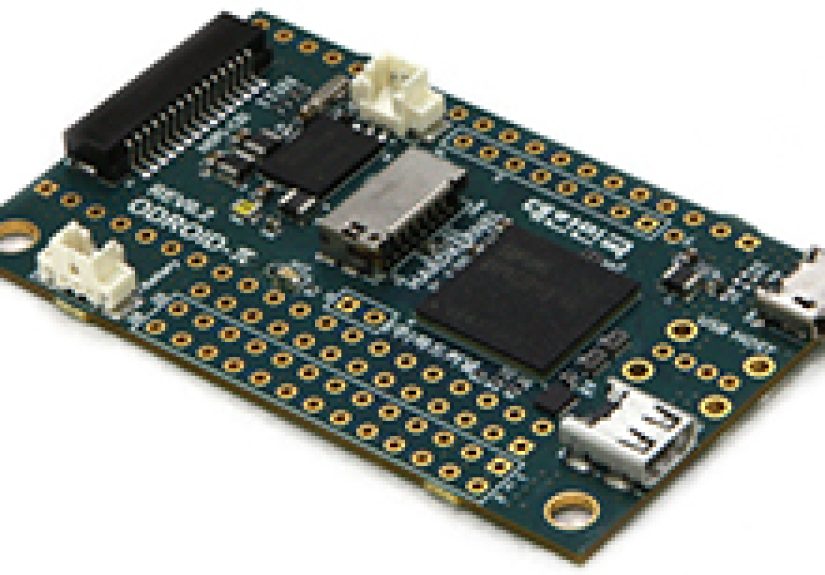
The board measured about 60mm by 36mm, making it much smaller than the classic credit-card-sized Raspberry Pi Model B. It used the Broadcom BCM2835 ARM1176JZ-F processor running at 700MHz with VideoCore IV graphics, along with 512MB of LPDDR2 memory. It supported microSD storage and even offered an eMMC socket, a nice touch for builders who wanted something more robust than a removable card wobbling around like a tiny plastic bookmark.
For expansion, the ODROID-W included a Raspberry Pi-compatible 26-pin GPIO header and a 15-pin CSI camera connector. It also exposed additional pins for GPIO, ADC, power, and USB. That made it more than a shrunken Pi. It was a Pi-like core redesigned for embedded, portable, and wearable projects.
Key ODROID-W Features
The ODROID-W was not just a Raspberry Pi squeezed in a copier set to 70 percent. It had its own design priorities. Its features included micro HDMI video output, micro USB power, optional USB host support, a real-time clock, Li-Po battery support, battery charging, fuel-gauge-style power management, ADC inputs, and compact expansion options.
It also left some things behind. There was no onboard Ethernet. No full-size USB port came soldered as a standard convenience. No analog audio jack sat waiting for your tiny speakers. These omissions were not accidental; they reflected the board’s intended role. The ODROID-W was not built to sit on a desk beside a monitor and a tangle of cables. It was built for small, battery-powered, embedded projects where every millimeter mattered.
Why Other “Raspberry Pi Clones” Were Usually Not Clones
To understand why the ODROID-W stood out, compare it with boards such as the Banana Pi and HummingBoard. Both were part of the early wave of Raspberry Pi alternatives. Both borrowed enough of the Pi concept to appeal to existing Pi users. Both offered appealing upgrades in certain areas.
The Banana Pi used an Allwinner A20 dual-core processor and offered 1GB of RAM, SATA, and faster networking features that the original Raspberry Pi lacked. The HummingBoard used Freescale i.MX6 options and leaned into modularity and stronger performance. These were not bad boards. In fact, for certain projects, they were better choices than the original Raspberry Pi. But their processors, boot requirements, GPU behavior, and software support differed from the Pi’s BCM2835-based world.
That is the difference between “compatible enough for some projects” and “binary-compatible in the areas that made the Pi the Pi.” A GPIO header can be copied. A board outline can be copied. Even a product page can say “Raspberry Pi compatible” with a straight face. But the deeper compatibility story depends on the processor, firmware, graphics stack, camera interface, and operating system images.
The BCM2835 Was the Secret Ingredient
The Broadcom BCM2835 was the heart of the first-generation Raspberry Pi. It combined an ARM11 CPU with VideoCore IV graphics and multimedia acceleration. For a $35 educational computer, that was a surprisingly capable combination. It enabled 1080p video playback, practical Linux use, and a GPU pipeline that gave the Pi much of its media personality.
Using the same chip gave the ODROID-W a major advantage: it could work with the same broad software base that had already made the Raspberry Pi popular. That included Raspbian-era images and software expecting the BCM2835 environment. For hobbyists, that meant fewer mysterious driver problems and less time wandering through forum threads at 2:13 a.m. muttering, “But it worked on the Pi.”
This is also why the ODROID-W was so unusual. Broadcom chips used in the Raspberry Pi were not commonly available to every small board maker in the same way many other ARM chips were. The Pi’s combination of affordable hardware, stable software images, educational branding, and massive community support was not easy to duplicate. The ODROID-W briefly showed what could happen if another manufacturer got close to the source.
Software Compatibility: The Boring Feature That Matters Most
Specs sell boards. Compatibility keeps them alive. A faster processor is exciting until the camera does not work, the GPIO library needs patching, the kernel image is ancient, and the forum answer is from 2015 and ends with “try recompiling everything.”
The ODROID-W’s strongest pitch was that it could run Raspberry Pi software because it used Raspberry Pi-like core hardware. This was especially valuable during the early Pi era, when the ecosystem was growing rapidly and many educational projects assumed a Raspberry Pi environment. If a teacher, hobbyist, or product designer already had software built for the Pi, the ODROID-W looked like a practical way to shrink the hardware without rewriting the project from scratch.
That made it attractive for projects such as compact cameras, wearables, sensor nodes, battery-powered displays, robotics controllers, and portable data loggers. It was not designed to be a desktop replacement. It was designed to be the Pi you could tuck into places where the full Model B felt like bringing a lunch tray to a tea party.
Why the Form Factor Made Sense
The original Raspberry Pi Model B was already small, but embedded builders are greedy in the best possible way. Give them a credit-card computer and they will immediately ask whether it can be smaller, thinner, lighter, and powered by a battery while hiding inside a badge, camera rig, wearable display, or sensor housing.
The ODROID-W answered that demand. Its small footprint made it easier to integrate into compact enclosures. The Li-Po battery connector and real-time clock made it especially interesting for projects that needed to wake, record, timestamp, and sleep. The ADC inputs helped with sensor work, and the eMMC option hinted at more durable storage for embedded deployments.
Of course, shrinking the board came with trade-offs. The lack of Ethernet and full-size ports meant users had to add adapters, docking boards, or soldered connectors. For beginners, that could be annoying. For advanced makers, it was simply Tuesday.
The Catch: A Brilliant Idea With a Short Shelf Life
The ODROID-W did not become a long-running Raspberry Pi clone dynasty. Its story was short because the supply of the BCM2835 to Hardkernel became a problem. Hardkernel later indicated that Broadcom would not continue supplying the SoC, which effectively ended the board after its initial batch.
That short life is part of what makes the ODROID-W fascinating. It was not just a product; it was a glimpse into an alternate timeline. In that timeline, multiple manufacturers might have built truly Raspberry Pi-compatible boards using the same silicon, producing a broader marketplace of Pi-like modules for wearables, industrial devices, robotics, and education.
Instead, the Raspberry Pi ecosystem largely remained centered around official Raspberry Pi boards and, later, official Compute Modules. Other manufacturers continued making excellent alternatives, but most were alternatives rather than true clones.
Raspberry Pi Clone vs Raspberry Pi Alternative
The difference is not academic. A Raspberry Pi alternative competes with the Pi. A Raspberry Pi clone attempts to behave like it. That distinction affects everything from project portability to documentation quality.
A Raspberry Pi alternative may offer stronger CPU performance, more memory, faster Ethernet, built-in storage, M.2 slots, AI acceleration, or industrial I/O. These features are useful, especially for home servers, media boxes, edge computing, and commercial prototypes. But alternatives often require board-specific images, custom kernels, different pin mappings, or special camera/display support.
A real clone prioritizes continuity. It says: your existing Pi software, your existing learning material, your existing scripts, and many of your existing assumptions should still work. That is a less glamorous promise than “quad-core turbo dragon processor,” but for real projects, it can be far more valuable.
What Makers Can Learn From the ODROID-W
The ODROID-W teaches a simple lesson: ecosystem beats raw specifications more often than hardware fans want to admit. The original Raspberry Pi was not the most powerful board even in its early years, but it had a magical combination of price, documentation, community, availability, and software consistency.
Hardkernel’s tiny board understood that. Instead of trying to defeat the Pi by being faster, it tried to become more Pi-like while solving a specific problem: size and battery-friendly embedded use. That was a smart strategy. It gave users a reason to care beyond benchmarks.
Modern single-board computer shoppers should remember this. The best board is not always the one with the highest clock speed. It is the one that lets you finish the project before your motivation evaporates. Drivers, documentation, community support, stable images, and compatible accessories matter. A board that saves three hours of troubleshooting is faster in the only benchmark your weekend cares about.
Where the Idea Lives On Today
Today, the Raspberry Pi family has moved far beyond the original Model B. Newer boards use more powerful Broadcom processors, more memory, faster I/O, wireless connectivity, and modern camera/display interfaces. Official Compute Modules now serve many embedded and industrial use cases that the ODROID-W seemed eager to chase back in 2014.
At the same time, the market for Raspberry Pi alternatives has exploded. ODROID, Orange Pi, Banana Pi, ROCK boards, Jetson modules, BeagleBone boards, and many others serve different niches. Some are faster. Some are better for AI. Some are better for storage. Some are better for industrial control. But very few can be described as true Raspberry Pi clones in the ODROID-W sense.
That is why the ODROID-W remains memorable. It was not merely a board with a familiar header. It was a sincere attempt to carry the Pi’s hardware identity into a smaller design. It was a clone in a way most “Pi clones” are not.
Conclusion: The Clone That Proved Compatibility Is a Feature
The ODROID-W was small, strange, clever, and short-lived. It lacked the convenience of a full-size Raspberry Pi, but it offered something rare: a miniature board built around the same BCM2835 foundation as the original Pi. That gave it a stronger claim to the word “clone” than most boards that borrowed the Pi’s layout while changing the entire computing engine underneath.
For makers, the lesson is still useful. When choosing a single-board computer, do not stop at the spec sheet. Ask whether the software is maintained, whether the drivers work, whether the GPIO behaves as expected, whether the camera interface is supported, and whether the community has already solved the problems you are about to meet. A real clone is not defined by resemblance. It is defined by behavior.
The ODROID-W may not have become the long-term Raspberry Pi clone people imagined, but it remains one of the best examples of what the phrase should mean. Not “inspired by.” Not “kind of compatible.” Not “close enough after three patches and a prayer.” A real Raspberry Pi clone.
Experience Notes: What Building Around a Real Raspberry Pi Clone Feels Like
Working with a board like the ODROID-W is a very different experience from buying a modern Raspberry Pi alternative and starting from scratch. With a true Raspberry Pi clone, the first emotional response is relief. You download familiar software, use familiar commands, recognize the GPIO logic, and feel like the board is speaking the same dialect as the projects you already know. That familiarity saves mental energy. Instead of spending the first evening decoding a board-specific bootloader ritual, you can get to the fun part: making the thing do the thing.
The second experience is physical adjustment. A miniature Pi-like board changes how you think about enclosures, cables, and power. A normal Raspberry Pi is small, but it still expects a desk-like environment: HDMI cable, USB devices, Ethernet, maybe a case, maybe a hat. A tiny clone designed for wearables or embedded systems feels more like a component than a computer. You start thinking in layers: battery placement, airflow, connector height, where the camera ribbon bends, whether the USB connector should face up or down, and whether your enclosure has enough room for fingers during debugging. Suddenly, the project is not just software and electronics. It is spatial negotiation with plastic, screws, and your own optimism.
The third experience is compromise. A compact Raspberry Pi clone gives you freedom, but it also asks for skill. No built-in Ethernet? Add a USB adapter or docking board. No convenient full-size USB port? Solder carefully, and maybe do not drink coffee first. Battery support? Excellent, but now you must care about charging behavior, voltage drop, sleep modes, and whether your project can survive being left in a backpack for a week. The board rewards people who enjoy building systems rather than merely plugging in accessories.
The fourth experience is appreciation for software ecosystems. When a board runs familiar Raspberry Pi software, every tutorial becomes more useful. Camera projects, sensor scripts, GPIO examples, and Python libraries suddenly feel reachable. Even when a tweak is required, the starting point is close. That matters because the hidden cost of many single-board computers is not the board price; it is the time spent solving obscure compatibility issues. A $30 board can become expensive if it eats three weekends.
The final experience is perspective. A real Raspberry Pi clone reminds you why the Raspberry Pi became so influential in the first place. The magic was never only the hardware. It was the dependable combination of affordable computing, approachable documentation, reusable projects, and a community large enough that your problem was probably someone else’s problem last Tuesday. The ODROID-W captured a piece of that magic by staying close to the Pi’s core identity while shrinking it into a more embedded-friendly shape. That is why it still feels important: it showed that cloning the Raspberry Pi was not about copying the outline of the board. It was about preserving the experience of building with one.