Table of Contents >> Show >> Hide
- What You’re Actually Buying
- Build Experience: A Kit That Respects Your Time
- Display Quality: Why 64 Pixels Look Weirdly Luxurious
- Pixelblaze: The Tiny Wi-Fi Brain That Makes This Worth Reviewing
- Sound Reactive (and Beyond): The Sensor Expansion Board
- Power, Practicalities, and “Please Don’t Fry Your Joy”
- Value: Who This Kit Is Perfect For
- Alternatives and Upgrades (If This Kit Starts a New Hobby)
- Hands-On Addendum: of Real-Life Use
- Conclusion
Some gadgets try to be “the future.” This one is happy being a tiny square of joy that lives on your desk and quietly
improves your moodlike a plant, but with fewer emotional consequences if you forget to water it.
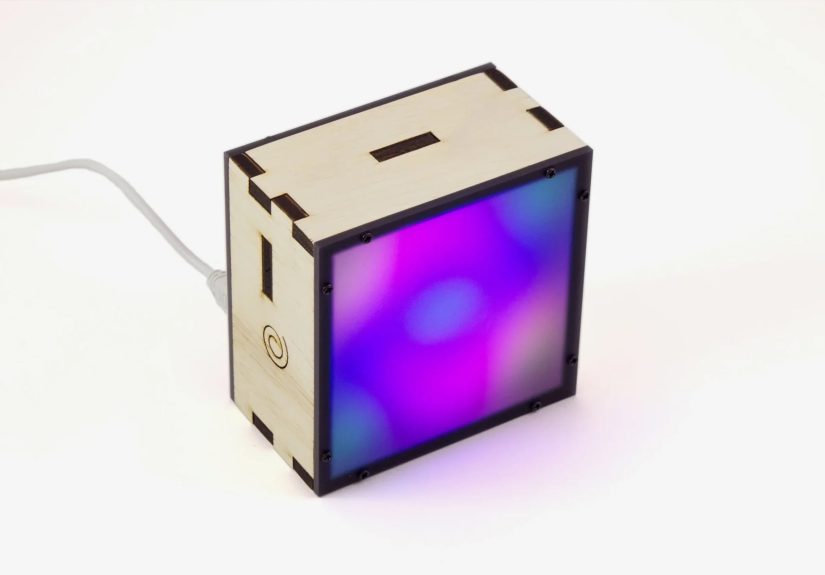
The Beautiful Pixelblaze Display Box Kit is a compact 8×8 LED matrix art piece built around Pixelblaze, a Wi-Fi LED
controller famous for making animation feel less like firmware wrestling and more like doodling with light. If you’ve
ever wanted a “screen” that’s more vibe than Netflixand a kit that doesn’t punish you for being humanthis one deserves
your attention.
What You’re Actually Buying
Think of this kit as three things bundled into one: a finished decor object (a clean wood-and-acrylic display), a
learning-friendly LED controller (Pixelblaze), and a gentle gateway drug into generative light art. The box is small
enough to live on a shelf or desk without taking over your life, but it’s visually “present” in a way that makes people
ask questions. (This is good if you like talking. Dangerous if you don’t.)
Kit contents, explained like you’re opening it on a Tuesday night
- A Pixelblaze V3 Standard XL (the Wi-Fi brain that runs patterns and hosts the editor)
- A Sensor Expansion Board (for sound reactivity and more)
- An 8×8 HDR LED panel (64 pixels that punch above their weight)
- A custom wood box and dark diffusing acrylic face (the “why this looks expensive” part)
- Hardware (screws and the bits that make assembly feel official)
You’ll also need a USB power source and a micro USB cable. The kit is designed to be plug-and-enjoy, not
plug-and-pray.
Build Experience: A Kit That Respects Your Time
The best compliment I can give the build is that it feels like assembling a well-designed object, not surviving a rite
of passage. Everything has a place, the parts make sense, and you’re not forced into a scavenger hunt for mystery
fasteners.
Assembly vibes
Expect a straightforward build with basic tools. No soldering marathon required. If you’ve built a simple DIY kit
beforeanything from a wooden model to a beginner electronics projectyou’ll recognize the rhythm: align, fasten,
route wires neatly, and resist the urge to “improve” things mid-build.
Customization: stain it, paint it, make it yours
The wood enclosure is a gift to anyone who likes a project that looks finished but still allows personal flair. Leave it
natural for a minimal, modern look, stain it darker for a more “grown-up office,” or paint it a color that matches your
room. You can also treat it like a tiny gallery framebecause that’s basically what it is, except the art moves.
Display Quality: Why 64 Pixels Look Weirdly Luxurious
An 8×8 matrix sounds humble, and on paper it is. But the kit cheatsin a good wayby using depth and diffusion to make
low-resolution animation feel silky. The dark, light-diffusing acrylic face is doing serious work here: it softens harsh
points of light, reduces glare, and turns pixel edges into something closer to “glow.”
Diffusion and depth: the secret sauce
When you put a diffuser at the right distance from the LEDs, you don’t just blur the pixelsyou create a visual blend
that reads as gradients and motion, not “64 individual Christmas lights trying their best.” That’s exactly what this box
nails. Animations look smoother than you’d expect, and even simple patterns feel intentional.
HDR support: smooth transitions, fewer “banding” moments
The kit pairs Pixelblaze’s HDR-capable output with an HDR-oriented panel. In practice, that means softer dim levels,
nicer fades, and a more refined look at both low brightness (nightstand-friendly) and higher brightness (desk statement
piece). It’s the difference between “bright LED thing” and “ambient light art.”
Pixelblaze: The Tiny Wi-Fi Brain That Makes This Worth Reviewing
If you’ve ever programmed LEDs the “classic” waycompile, upload, stare, edit, repeatyou’ll immediately understand
Pixelblaze’s appeal. It’s a Wi-Fi controller with a web-based live editor: you connect, choose patterns, tweak settings,
and even write your own animation code while seeing changes instantly.
Setup and control: you don’t need a shrine to drivers
Pixelblaze runs its interface in a browser, so you’re not locked into a specific OS or app. It feels closer to tuning a
synthesizer than debugging a microcontroller. For beginners, that means less friction. For experienced makers, that means
faster iteration and fewer “why won’t it flash?” moments.
Patterns: from “pretty” to “I accidentally learned math”
Out of the box, you get a library of patterns designed to show off motion and color on a small matrix: flowing gradients,
spark-like bursts, hypnotic loops, and sound-reactive animations that make the display feel alive. The fun part is how
quickly you can personalize them. Add a speed control, adjust a palette, or change how motion wraps across the gridand
suddenly it feels like your piece, not a demo unit.
Pixelblaze’s coding style is friendly to tinkering: you can treat patterns like recipes. Start with one you like, swap
ingredients, taste as you go. The result is a platform that encourages curiosity instead of punishing it.
Mapping: make patterns think in “space,” not wiring
One of Pixelblaze’s superpowers is mappingdefining your LEDs in 2D (or 3D) so patterns can be written in terms of
coordinates instead of pixel numbers. For an 8×8 display, that means patterns can naturally flow left-to-right,
top-to-bottom, rotate, mirror, or do more complex spatial tricks without you rewriting everything when the physical layout
changes. It’s an “advanced” feature that makes the whole system feel oddly future-proof.
Sound Reactive (and Beyond): The Sensor Expansion Board
The kit includes a sensor add-on that turns this from “pretty light art” into “responsive little creature that reacts to
your environment.” Sound reactivity is the headline feature, but it’s not the only trick.
Microphone vs. line-in: choose your chaos level
Built-in mic reactivity is perfect for casual fun: clap, talk, play music, watch the box dance. If you want cleaner
results (less room noise, more intentional input), line-in is the grown-up optionfeed it audio directly and you get
tighter, more predictable patterns. Either way, sound-reactive visuals make the display feel like it’s participating in
the room instead of just decorating it.
Motion and light: tiny sensors, big personality
The sensor board also opens up motion- and ambient-reactive designs. Tilt-based effects can make patterns “spill” or
rotate. Ambient light sensing can automatically dim the display at night. These are small quality-of-life touches that
make the box feel like a product, not just a project.
Power, Practicalities, and “Please Don’t Fry Your Joy”
An 8×8 matrix is not a power-hungry monster compared to giant LED installs, but it still benefits from basic LED best
practices. The kit’s recommended USB power (around the 2A neighborhood) is sensible: it gives headroom for bright
patterns and prevents weirdness when animations spike current.
Brightness management: the underrated feature
Here’s the thing about LED art: the best-looking setting is rarely “full blast.” This box shinesliterallywhen you treat
brightness like a mood dial. Lower brightness levels make gradients richer and the diffuser more magical. Higher levels
make it a conversation piece, but can also overpower a small room. The sweet spot is easy to find, and once you do, it
becomes the kind of object you leave on because it improves the space.
Reliability and safety: small habits, big payoff
If you ever expand beyond this kitbigger matrices, longer stripskeep the classic addressable-LED habits in mind:
solid grounding, sane wiring, and protection against spikes. The nice part is that this kit is a controlled environment:
it’s a safe place to learn what “good LED behavior” looks like before you build something that resembles a glowing
ladder of regret.
Value: Who This Kit Is Perfect For
The Beautiful Pixelblaze Display Box Kit sits at an interesting intersection: it’s polished enough to gift, approachable
enough for a first LED art project, and nerdy enough to keep experienced makers entertained. Value depends on what you
want.
Buy it if you want…
- A finished-looking object that doesn’t scream “prototype.”
- A friendly introduction to generative LED patterns and real-time tweaking.
- Sound-reactive ambient light art that can live on a desk, shelf, or nightstand.
- A giftable maker kit that won’t ruin anyone’s weekend.
Skip it if you want…
- Maximum pixels per dollar. You can DIY a bigger matrix cheaper if you optimize for raw size.
- A traditional “screen.” This is ambient animation, not a tiny monitor.
- Zero tinkering. It’s easy, but it’s still a kitand that’s part of the charm.
Alternatives and Upgrades (If This Kit Starts a New Hobby)
This box is a great “starter planet” for an LED solar system you might accidentally build. If you catch the bug, here’s
where people typically go next:
Go bigger
A larger matrix (16×16 or 32×32) turns patterns into something closer to pixel art and low-res video. The tradeoff is
power planning, wiring complexity, and the reality that “just one more upgrade” becomes a lifestyle.
Go weirder
Use mapping to define non-grid shapesrings, spirals, cubes, sculpturesand let the same pattern concepts evolve into
completely different visuals. This is where Pixelblaze’s coordinate-first approach becomes addictive.
Go calmer
The most underrated upgrade is not more hardwareit’s better “lighting behavior.” Build a set of patterns for specific
moments: focus time, break reminders, evening wind-down, soft wake-up, or “I need my brain to stop buffering.” Once you
treat it like functional ambient light, it earns its space.
Hands-On Addendum: of Real-Life Use
After the novelty phase (roughly 36 minutes, depending on your personality and caffeine levels), the Pixelblaze Display
Box settles into a surprising role: it becomes a tiny environmental soundtrack for your dayexcept it’s visual, and it
doesn’t demand headphones.
On workdays, I found myself using it as a “soft boundary” tool. Not an alarm clock, not a bossy timermore like a gentle
suggestion in color. A slow, warm gradient became my default “deep work” mode because it’s present without being
distracting. When I needed a break, I’d switch to a pattern with more motionsomething that visibly says, “Hey, your eyes
have been locked onto spreadsheets for too long.” The funniest part is how quickly your brain starts associating certain
looks with certain behaviors. You’re basically training yourself with light, like a very polite science experiment.
In the evening, the box did its best work at low brightness. That dark diffuser turns bright pixels into a soft glow,
which makes it feel less like an electronics project and more like a design object. I tested it in the classic places:
a desk corner, a bookshelf, and the “nightstand zone where everything becomes a permanent resident.” On a shelf, it reads
like kinetic art. On a desk, it’s a fidget toy for your peripheral vision. By the bed, it becomes the least aggressive
nightlight imaginableespecially if you pick patterns with slow motion and fewer sharp flashes.
Sound reactivity is where the box becomes social. It’s not the same as a full-on party light, but it’s enough to make
music feel “visible” in the room. With the microphone, it reacts to claps, voice, and whatever chaos is happening nearby,
which is fun in a casual setting. With direct audio input, it feels more intentionallike the box is actually listening
to the track instead of reacting to a chair squeak and calling it a beat drop. The difference is subtle but real: one is
playful, the other is clean.
The most unexpectedly satisfying use was “micro-mood control.” If I felt mentally fried, I’d flip to a calming palette
and slow everything down. If I needed energy, I’d bump saturation and speed. This sounds silly until you realize we do
the same thing with playlists, candles, and ambient lightingthis just happens to be programmable. And because Pixelblaze
encourages tinkering, I ended up making tiny tweaks: a slightly warmer palette for winter nights, a gentler motion curve
for late work, a brighter setting for afternoons when the room light washes everything out.
In short: the kit starts as a build, becomes a toy, and then quietly upgrades into a daily object. The best kind of maker
projects do exactly thatthey earn a permanent spot by being genuinely useful, not just impressive for a weekend.
Conclusion
The Beautiful Pixelblaze Display Box Kit is what happens when a maker kit is designed like a product: satisfying to
assemble, easy to live with, and delightful even when you’re not “actively using it.” The diffuser-and-depth design
makes a small 8×8 matrix look upscale, and Pixelblaze’s live, Wi-Fi-based pattern workflow makes customization feel fun
instead of tedious. If you want ambient LED art that’s equal parts decoration and creative playground, this kit earns a
confident recommendation.