Table of Contents >> Show >> Hide
- How Scanners Work (Without the Tech Headache)
- Flatbed Scanners: The All-Purpose Workhorse
- Sheet-Fed & Document Scanners: Built for Speed
- Photo, Film, and Slide Scanners: For the Image-Obsessed
- Portable and Handheld Scanners: Scanning on the Go
- 3D Scanners: From Real-World Objects to Digital Models
- Other Specialized Scanner Types
- Key Specs That Actually Matter
- Which Scanner Type Is Right for You?
- Real-World Experiences with Different Types of Scanners
Once upon a time, “scanning” meant feeding a single piece of paper into a noisy machine at the office and hoping it didn’t jam.
Today, the world of scanners is way more interesting (and a lot less squeaky). From flatbed scanners that baby your old photos to
industrial 3D scanners that capture every curve of a car engine, there’s a scanner for almost everything you want to digitize.
The tricky part? Knowing the differences between types of scanners so you don’t end up buying a high-speed office workhorse when you really
needed something gentle enough for grandma’s photo albumsor a simple document scanner when your job actually screams for 3D capture.
In this guide, we’ll break down the most common scanner types, what they’re good at, what they’re terrible at, and how to decide which one
fits your home, office, or creative workflow.
How Scanners Work (Without the Tech Headache)
No matter what type you buy, most 2D scanners share a basic mission: they shine light on something, capture how that light bounces back,
and convert it into digital information. Flatbed and document scanners typically use a light source and a sensor (like CCD or CIS) that
move under or across the item to record tiny dots (pixels) of information line by line. Resolution is measured in dpi (dots per inch), and
color depth in bits (like 24-bit or 48-bit) tells you how many colors or tonal variations the scanner can capture.
3D scanners do something similar but in three dimensions, using lasers, structured light, or multiple photos to build a full 3D model of an object.
Flatbed Scanners: The All-Purpose Workhorse
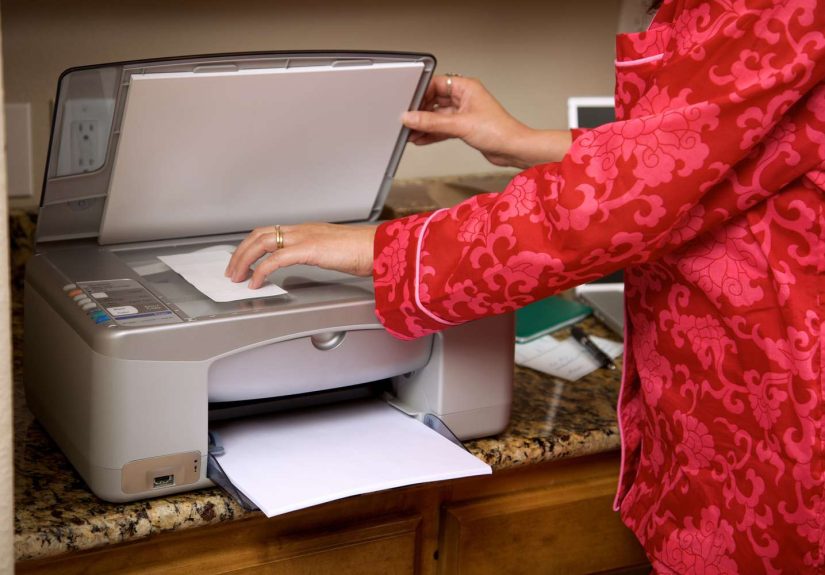
If scanners had a “default” option, it would be the flatbed. A flatbed scanner looks like a small photocopier: you lift the lid, place
your document or photo on a glass surface, close the lid, and hit scan. The scanning head moves beneath the glass to capture the image.
Best Use Cases
- Photos, artwork, and documents that must stay perfectly flat
- Books, magazines, and passports that don’t fit through a feeder
- Fragile or wrinkled documents you’re afraid to run through a roller
Pros
- Typically higher optical resolution and better image quality than many sheet-fed scanners, especially for photos
- Excellent for delicate, odd-shaped, or bound materials
- No paper jams, because nothing is pulled through rollers
Cons
- Slower for large batches of pages
- Takes up more desk space
- Requires manual placement for each scan
Flatbeds are ideal if image quality and versatility matter more than speed: think home offices, photographers archiving prints,
artists scanning artwork, or anyone digitizing family photos.
Sheet-Fed & Document Scanners: Built for Speed
Sheet-fed scanners take a very different approach. Instead of your document sitting still on glass, the scanner pulls each page through
using rollerslike a printer in reverse. Many include an Automatic Document Feeder (ADF) so you can stack a bunch of pages, press scan,
and walk away while it churns through them.
Best Use Cases
- Offices that need to scan large volumes of paper quickly
- Invoices, contracts, forms, and multi-page documents
- Workflows that rely on OCR (optical character recognition) to make documents searchable
Pros
- Fast batch scanning of multi-page documents
- Double-sided (duplex) scanning on many models
- Designed to integrate with document-management systems
Cons
- Not friendly to fragile, wrinkled, or very thick items
- Higher paper-jam risk than flatbed scanners
- Less ideal for high-end photo or artwork scanning
If your main goal is to go paperlessdigitizing bills, HR documents, or client recordsa sheet-fed document scanner is your new best friend.
But for priceless family photos, you’ll probably want a flatbed instead.
Photo, Film, and Slide Scanners: For the Image-Obsessed
When you care about every pixel, a dedicated photo or film scanner is the star of the show. These scanners are specifically designed to
handle photographic prints, negatives, or slideswith much higher resolution and color depth than basic office scanners.
What Sets Them Apart
-
High resolution: Optical resolutions in the thousands of dpi make it possible to enlarge film scans without everything
turning into a pixelated mess. - Deeper color and tonal range: 48-bit color and higher dynamic range (e.g., 4.0 Dmax) help preserve detail in shadows and highlights.
- Film holders and adapters: Special trays keep film flat and aligned for consistent scanning.
Dedicated film scanners are popular with photographers digitizing older negatives or slides, archivists, and serious hobbyists. The trade-off?
They’re slower and often pricier than basic flatbeds, and they’re overkill if you just want to scan a few receipts.
Portable and Handheld Scanners: Scanning on the Go
Need to scan a contract in a coffee shop or capture pages from a library book that you’re not allowed to pull apart? Portable scanners and
handheld “wand” scanners are designed for you. These battery-powered devices often store scans on an SD card or send them wirelessly to your phone or laptop.
Types of Portable Scanners
- Portable sheet-fed scanners: Mini document scanners that pull pages through, great for business travelers.
-
Wand scanners: You physically glide the scanner across the page, which lets you scan books and oddly shaped documents that would
never survive a roller.
Pros
- Lightweight and easy to carry
- Perfect for travel, client visits, and field work
- Can scan books or fragile items without bending them
Cons
- Lower image quality than a full-size flatbed, especially for photos
- Wand scanning takes a bit of practice to avoid skewed or blurry scans
- Not ideal for high-volume office work
Think of portable scanners as the “emergency kit” of the scanning world: not the absolute best at anything, but incredibly useful when you’re away from your desk.
3D Scanners: From Real-World Objects to Digital Models
3D scanners step into a different universe. Instead of capturing a flat image, they build a full three-dimensional model that you can rotate,
measure, or send to a 3D printer. These scanners are used in manufacturing, engineering, medical fields, game design, and even cultural heritage projects.
Common 3D Scanner Technologies
-
Laser scanners: Project a laser onto an object and measure how the light bounces back to calculate distance and shape.
Great for precise industrial work. -
Structured light scanners: Project a pattern of light (like stripes) onto the surface and analyze how the pattern deforms to
reconstruct the 3D geometryoften very accurate and fast. - Photogrammetry: Uses multiple photos of an object from different angles and software to build a 3D model.
Pros
- Capture complex shapes and surfaces that are impossible to measure manually
- Extremely useful for reverse engineering and quality inspection
- Crucial in modern workflows like digital twins and 3D printing
Cons
- Much more expensive than office scanners
- Require training and specialized software
- Some systems are sensitive to lighting, reflections, or movement
Most everyday users will never need a 3D scanner, but in industries like automotive, aerospace, medical devices, and product design, they’re game-changing tools.
Other Specialized Scanner Types
Beyond the “big four” (flatbed, sheet-fed, photo, portable), there are several niche scanners designed for specific jobs.
Barcode and QR Code Scanners
These scanners use lasers or imaging sensors to read barcodes and QR codes on packaging, labels, or tickets. They’re optimized not for pretty images,
but for speed, durability, and accuracy in retail, logistics, and warehouses.
Large-Format & CAD Scanners
Large-format scanners handle big materials like blueprints, posters, maps, and architectural drawings. They’re often used by engineering firms,
print shops, and design studios that work with oversize documents.
Book & Overhead Scanners
Book scanners or overhead scanners capture pages from above, so you don’t have to flatten a book and break its spine. They’re popular in libraries,
archives, and schools digitizing rare or bound materials.
Key Specs That Actually Matter
Once you’ve narrowed down the type of scanner, you still have to pick a model. Instead of drowning in spec sheets, focus on a few core factors:
1. Resolution (DPI)
For documents, 300 dpi is usually enough. For photos, 600–1200 dpi is a good target. Higher resolutions help when you need to enlarge images
or capture very fine detailbut they also produce larger file sizes.
2. Color Depth and Dynamic Range
Look for 24-bit color as a baseline; 48-bit and higher dynamic range matter if you’re serious about image quality, especially for film or artwork.
3. Speed
In offices, pages per minute (ppm) and duplex speed can make or break your workflow. For home use, a slightly slower scanner is often fine if the quality is better.
4. Connectivity
USB-only might be fine for a single computer. But if you want to share scanners across a team, models with Wi-Fi or Ethernet will save a lot of hassle.
5. Software & OCR
Good OCR software lets you search and copy text from scanned documents. Some scanners bundle capable software; others rely on third-party tools.
If you need searchable PDFs or want to automate filing, pay attention to this.
Which Scanner Type Is Right for You?
Still stuck? Here’s a quick way to match scanner types with real-world needs:
-
“I just want to digitize bills, contracts, and paperwork.”
Go for a sheet-fed document scanner with a good ADF and duplex scanning. -
“I’m archiving family photos and a few important documents.”
Choose a flatbed scanner, ideally one marketed for photos. -
“I travel a lot and need to scan on the road.”
Get a portable sheet-fed or wand scanner that fits in your bag. -
“I’m a photographer or artist and want top-tier detail.”
Look at photo or film scanners with high resolution and 48-bit color. -
“I work in engineering, product design, or manufacturing.”
You may need a 3D scannerlaser or structured-lightplus compatible CAD software.
The right scanner isn’t always the most expensive or the one with the highest dpi. It’s the one that actually matches what you do every day.
Real-World Experiences with Different Types of Scanners
Spec sheets are nice, but nothing beats real-life experience. Here are some typical situations that show how different scanner types behave once you
get them out of the box and into the wild.
From Shoe Box Photos to Digital Archive
Imagine you inherit a box of old family photosdifferent sizes, curled corners, some slightly faded, and absolutely priceless. A sheet-fed scanner
would chew these up like a shredder auditioning for a horror movie. A flatbed, on the other hand, lets you gently place each photo on the glass,
close the lid, and scan at a high resolution. You can even preview the image, adjust cropping, and straighten slightly crooked shots before saving.
After a few sessions, you end up with a clean, organized digital archive you can share with relatives instead of passing around fragile originals.
This is where the “slower but safer” nature of flatbeds really shines.
Office Going Paperless (For Real This Time)
In a busy office, nobody has time to babysit a flatbed all day. When a company decides to go paperless, IT teams usually bring in dedicated document
scanners with big ADFs and duplex scanning. Instead of scanning one page at a time, staff can drop a stack of invoices or signed contracts into the
feeder and let the scanner rip through them at dozens of pages per minute.
With OCR turned on, those scanned pages become searchable PDFs. Suddenly, “Where’s that contract from last March?” turns into a quick text search
instead of a dusty filing cabinet expedition. The experience isn’t glamorous, but it’s incredibly satisfying to see a wall of paper shrink into a
neat digital archive.
Traveling Consultant with a Portable Scanner
Now picture a consultant flying between cities with a laptop bag and not much else. Printing and scanning at client sites may not always be convenient
or even possible. A portable sheet-fed scanner or wand scanner fits easily into a bag and turns hotel desks into mini offices.
On the road, the consultant can scan signed agreements, receipts, or handwritten notes, then upload them to the cloud before they’re lost or crumpled.
The image quality may not rival a studio flatbed, but for documents and receipts, “good and fast” beats “perfect but impossible to carry.”
A Designer’s First 3D Scanner
Then there’s the industrial designer who wants to tweak an existing product but doesn’t have the original CAD files. A 3D scanner changes everything:
by scanning the physical object, they get a detailed 3D model that can be modified, reverse-engineered, or used to design accessories.
The first day with a 3D scanner often comes with a learning curvecalibrating, adjusting lighting, and mastering the softwarebut once that’s done,
the ability to capture complex shapes in minutes feels almost magical. Parts that would have taken hours to measure by hand are suddenly available
as accurate digital meshes.
Why Experience Matters More Than Specs
Across all these scenarios, one theme pops up again and again: the best scanner is the one that fits seamlessly into your life and workflow.
A 3D scanner with stunning accuracy is useless if you never work with 3D models. A document scanner that can blast through 60 pages per minute
doesn’t help much if you only scan a birthday card once a year.
When you’re choosing between types of scanners, imagine a typical month of your real life. How often are you scanning? What exactly are you scanning?
Who needs access to those files? Answer those questions honestly, and you’ll find it much easier to pick a scanner that feels like a helpful teammate
rather than another piece of office equipment gathering dust.
In short: don’t chase the fanciest spec sheet. Chase the experience that will actually make your work and home life smoother, faster, and just a
little bit more organized.