Table of Contents >> Show >> Hide
- 1) Start With the Work You Actually Do (Not the Work You Wish You Did)
- 2) Space-Smart Layouts for Tiny Homes, Shared Rooms, and Weird Corners
- The “Cloffice” (Closet Office) for Maximum Focus in Minimum Space
- The Corner Command Center (Best for Dual Use)
- The Floating Desk Setup (Lightweight Look, Heavyweight Function)
- The Under-Stairs or Hallway Nook (Yes, Really)
- The Living Room Office That Doesn’t Take Over the Living Room
- The Bedroom Office Without the “I Sleep Next to My Inbox” Vibe
- The Portable Office Kit (For Kitchen Tables and Shared Spaces)
- 3) Storage That Doesn’t Eat Your Legroom
- 4) Ergonomics in a Small Space (So Your Neck Doesn’t File a Complaint)
- 5) Lighting, Sound, and Video Calls: Look Awake, Feel Awake
- 6) Design Tricks That Make Small Home Offices Feel Bigger
- 7) Budget-Friendly Upgrades That Punch Above Their Price Tag
- 8) Small Office Ideas by Work-From-Home “Personality”
- Real-World Work-From-Home Lessons (About of “Been There” Energy)
- Conclusion: Your Small Office Can Be Small and Still Be Mighty
- References (No Links)
Working from home sounds dreamy until you realize your “office” is also your kitchen, your living room, your craft table, your cat’s favorite nap zone, and (somehow) the place where mail goes to retire. The good news: a small home office doesn’t have to feel like you’re answering emails from inside a shoebox. With the right layout, storage, and ergonomics, even a tiny nook can work like a serious workstationwithout looking like a corporate supply closet moved in and refused to leave.
Below are small office ideas that fit real-life spaces (studios, shared homes, rentals, awkward corners, and “this is technically a hallway” situations). You’ll get practical setups for different work stylesvideo calls, creative work, dual monitors, admin-heavy tasksplus ways to make your workspace more comfortable and less chaotic. Because your desk should not double as a stress multiplier.
1) Start With the Work You Actually Do (Not the Work You Wish You Did)
Before you buy anything or start rearranging furniture like you’re filming a home makeover show, define what your work-from-home setup must handle. “Small office” is not one problemit’s 12 different problems wearing a trench coat.
A quick 3-minute setup checklist
- Device load: laptop only, or laptop + monitor(s) + printer?
- Call frequency: daily video meetings or mostly solo focus time?
- Paper needs: minimal paperwork, or you regularly deal with documents?
- Noise sensitivity: do you need a quieter zone or sound buffering?
- Space reality: dedicated room, shared room, or “I’m borrowing 2 feet of wall”?
Once you know your must-haves, you can design a small office that supports your workflow instead of forcing your workflow to do parkour around your space.
2) Space-Smart Layouts for Tiny Homes, Shared Rooms, and Weird Corners
The “Cloffice” (Closet Office) for Maximum Focus in Minimum Space
A closet officeoften lovingly called a clofficeturns an underused closet into a compact workstation. It’s a favorite small office idea because it creates a visual boundary: when you close the doors, work is done (at least in theory). Add a slim desk surface, a task light, and vertical storage so supplies don’t migrate into your lap. If you want it to feel less “broom closet chic,” paint, wallpaper, or a peel-and-stick backdrop can add personality without taking up space.[8]
The Corner Command Center (Best for Dual Use)
Corners are underrated. A compact corner desk or a wall-mounted corner surface can turn “dead space” into a functional micro-office. The key is to keep the footprint tight and build up with shelves, pegboards, or wall organizers. You’re not just saving floor spaceyou’re reclaiming it from the void where dust bunnies form unions.
The Floating Desk Setup (Lightweight Look, Heavyweight Function)
Wall-mounted or “floating” desks are perfect when your room can’t spare depth. Pair a floating surface with a small drawer unit, a wall shelf above, and cable clips so cords don’t hang like tech spaghetti. This style is especially useful in bedrooms or living rooms because it reads as “built-in design feature,” not “temporary panic desk.”
The Under-Stairs or Hallway Nook (Yes, Really)
If your home has an under-stairs area, an entry nook, or a hallway wide enough for a slim surface, you can create a functional workstation with a shallow desk and wall storage. Prioritize a comfortable chair and good lighting, because small spaces can feel cramped fast. Even design pros emphasize the basicslight, comfort, air quality, and minimizing distractionsbecause the environment affects how well you work.[14]
The Living Room Office That Doesn’t Take Over the Living Room
Living room offices work best when they’re intentional. A modular wall desk (low-profile, configurable, and paired with shelves) can blend into your decor and keep your workspace tidy without dominating the room.[12] Another strong strategy: use a console table as a desk and store work supplies in attractive bins so you can “reset” the space after hours.
The Bedroom Office Without the “I Sleep Next to My Inbox” Vibe
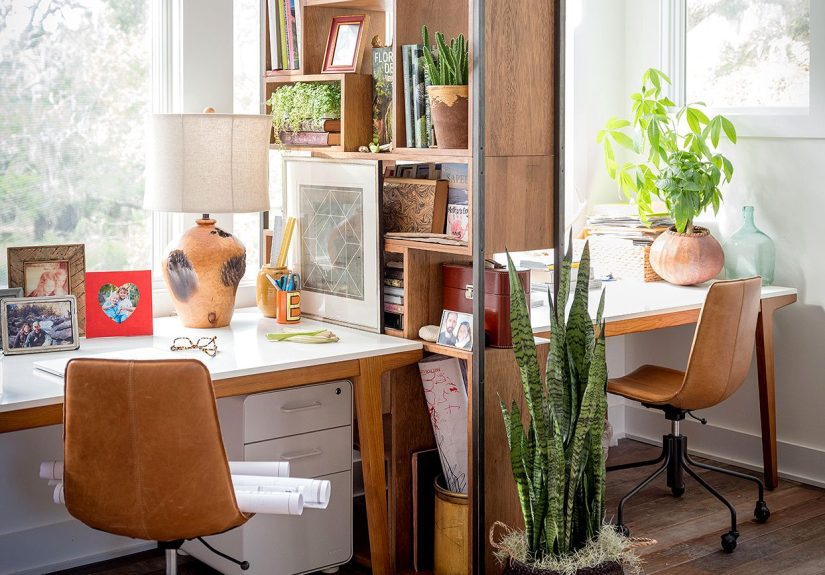
If your small office has to live in your bedroom, create separation. Try a folding screen, a curtain on a ceiling track, or a bookcase that doubles as a room divider. Use a desk lamp that feels warm and homey (not interrogation-bright), and keep work items in drawers or baskets at night. Your brain loves cueshelp it understand when it’s time to work and when it’s time to power down.
The Portable Office Kit (For Kitchen Tables and Shared Spaces)
If you work at the dining table, don’t accept chaos as your permanent coworker. Build a portable kit: laptop stand, compact keyboard/mouse, notepad, pens, charger, and headphonesall in a basket or tote you can stash away. Add a slim rolling cart nearby if you need extra storage but can’t claim a permanent desk. This is one of the most realistic work-from-home setup options for small homes and roommates.
3) Storage That Doesn’t Eat Your Legroom
In small home offices, storage isn’t “nice to have.” It’s how you prevent your desk from becoming a museum exhibit titled Artifacts of Unfinished Tasks. The secret is vertical storage and hidden storageorganized in a way that matches what you actually reach for daily.
Go vertical: shelves, pegboards, and wall organizers
Floating shelves and pegboards over a small desk keep supplies accessible while freeing up desktop space. This approach shows up repeatedly in small office design ideas because it’s functional and easy to customize (hooks, cups, baskets, and clips can all adapt as your needs change).[9][10]
Use the backs of doors (the most ignored storage real estate)
The back of a door can hold hooks, slim racks, or hanging organizersgreat for headphones, chargers, scissors, or even a small filing pouch. It’s a simple way to expand storage without adding furniture, which matters a lot in tight work-from-home spaces.[13]
Make paper behave
If you handle paperwork, create a “paper path”: one inbox tray (incoming), one action tray (to do), and one archive spot (file box or folder drawer). Limiting paper to a defined system prevents it from multiplying like it’s trying to win a science fair.
4) Ergonomics in a Small Space (So Your Neck Doesn’t File a Complaint)
Ergonomics isn’t about fancy gearit’s about neutral posture and reducing strain. The core idea across trusted ergonomics guidance is to align your body so you’re not constantly reaching, twisting, hunching, or craning.[2][4]
Monitor height: eye level is your friend
For a desktop monitor, guidance commonly recommends positioning the top of the screen at or slightly below eye level. This helps reduce neck strain and supports a more neutral head position.[1] If you’re on a laptop, raise it with a stand or sturdy books and use an external keyboard/mouse so your hands aren’t forced into “tiny dinosaur arms” posture.[3]
Chair and feet: support beats suffering
Aim for feet flat on the floor (or a footrest), and a chair that supports your lower back. Adjustable chairs help, but even a small lumbar pillow can improve comfort if you’re working with a basic chair.[2][5]
Keyboard and mouse: close, level, and relaxed
Keep your keyboard and mouse on the same surface and within easy reach, with wrists as straight as possible and shoulders relaxed. Small tweakslike pulling devices closercan reduce shoulder and wrist strain over long work sessions.[2]
Eye comfort: try the 20-20-20 rule
For screen-heavy days, many eye care organizations recommend the 20-20-20 approach: every 20 minutes, look at something about 20 feet away for 20 seconds. It’s a simple way to encourage breaks and reduce digital eye strain symptoms for many people.[6][7]
5) Lighting, Sound, and Video Calls: Look Awake, Feel Awake
Natural light is greatglare is not
If possible, set your desk perpendicular to a window to reduce glare on the screen while still getting daylight. If glare is unavoidable, add a simple shade or curtain and adjust your screen brightness to match the room.
Easy video call lighting (no studio required)
For a flattering video setup, avoid strong backlighting (like a bright window behind you). Aim for soft, diffused light in front of you or slightly to the side. Even a basic lamp with a shade can help, and multiple light sources can create more balanced lighting than one harsh overhead light.[16]
Sound-softening tricks for echo-y rooms
If your small office is in a hard-surfaced room, add a rug, curtains, or a fabric wall hanging to reduce echo. This matters more than people expectyour audio quality affects how “professional” you seem on calls, even if you’re wearing sweatpants.
6) Design Tricks That Make Small Home Offices Feel Bigger
Use “zones” to make a workspace feel intentional
A small home office benefits from visual zoning: a rug under the desk, a different wall color behind it, or a gallery wall that frames the space. This is a common thread in home office decor ideas because it creates a sense of “place” even when the office is part of another room.[11]
Choose calm storage (so your brain can calm down too)
Matching bins, simple drawer organizers, and cable management reduce visual clutter. Desk organization ideas often focus on hiding cables, creating “homes” for small items, and keeping the desktop clear enough that you can start work without a 10-minute excavation.[15]
Add one living thing (plant, flowers, even a tiny herb pot)
A small plant can make a compact office feel less sterile and more inviting. Keep it low-maintenance if you’re busyyour office should not become a guilt garden.
7) Budget-Friendly Upgrades That Punch Above Their Price Tag
- Monitor riser: books, a sturdy box, or a real standanything to improve screen height.[1]
- Lumbar support: a small pillow or rolled towel if your chair lacks support.[2]
- Footrest: a small step stool, box, or even a thick book (stable!) if your feet dangle.[5]
- Cable clips: keeps cords from falling behind the desk and turning into a daily scavenger hunt.
- Sit-stand converter: helpful if you can’t fit a standing desk but want occasional posture changes.
8) Small Office Ideas by Work-From-Home “Personality”
The Video-Call Hero (Meetings All Day)
Priorities: clean background, good lighting, reliable audio. Choose a simple backdrop (blank wall, bookcase, or curtain), use diffused front lighting, and keep your desk visually tidy so you’re not broadcasting yesterday’s snack wrappers to your entire department.[16]
The Deep-Work Creature (Focus Time Is Sacred)
Priorities: fewer distractions, more comfort. Try a cloffice or a corner setup with a divider. Use headphones, keep frequently used items within reach, and reduce clutter. If you can close a door (or even a curtain), your brain will thank you.
The Creative Maker (Crafts, Design, Content Creation)
Priorities: flexible surface space and vertical organization. Use pegboards, labeled bins, and a rolling cart. A floating shelf above your desk can hold supplies while keeping the work surface clear for active projects.[9][10]
The Spreadsheet Sprinter (Screens, Data, and Multiple Windows)
Priorities: monitor height, keyboard comfort, and enough surface depth. If possible, add an external monitor positioned at comfortable height and distance, and keep your keyboard/mouse aligned and close so your shoulders aren’t working overtime.[1][2]
The Renter / No-Drill Setup (Temporary but Polished)
Priorities: portable pieces and minimal wall damage. Choose a slim desk, a shelving unit that stands on its own, removable hooks for cable control, and a portable office kit. Use peel-and-stick wallpaper or art to define the zone without permanent changes.
Real-World Work-From-Home Lessons (About of “Been There” Energy)
Here’s the part nobody puts in the glossy photos: most work-from-home setups don’t start out cute. They start out as “laptop on the couch,” then evolve into “why does my neck hurt,” and eventually reach the final form: “I own three chargers and none of them are where I need them.” If that feels familiar, you’re in excellent company.
One common experience remote workers report is the slow creep of work into everything else. When your desk is also your dining table, work can lingerphysically (papers, cables, notebooks) and mentally (the feeling that you should “just answer one more email”). The easiest fix isn’t willpower; it’s creating a reset routine. Even a tiny basket that holds your keyboard, mouse, and notepad can act like a visual “closing time” sign. Put work tools away, wipe the surface, and your space stops shouting “unfinished business” at you during dinner.
Another real-life challenge is sharing space with other humans (or pets who believe they are humans). If you’re in a household where someone is always on a call, the layout matters more than the square footage. People often find that rotating the desk so the screen faces a wall reduces distractions and makes video calls easierno one needs to watch your roommate doing a snack inventory behind you. Soft furnishings can also be surprisingly helpful; adding a rug or curtain isn’t just decorit can cut down echo and make calls sound less like you’re presenting from inside a cereal box.
The third lesson: comfort is productivity’s quiet best friend. Many people try to “tough it out” on a dining chair because it feels like the responsible, frugal thing to do. Then they discover that discomfort doesn’t build characterit builds tension in your shoulders. Small ergonomic changes tend to have outsized impact: raising a laptop so you’re not looking down all day, using an external keyboard and mouse, and adjusting screen height so your head stays neutral. When your body isn’t spending the day in protest mode, it’s easier to focus.
Finally, there’s the emotional side of a small office: you need a space that feels like a place you want to be. A personal photo, a small plant, a favorite pen, or a lamp that makes the corner feel warmthose details aren’t frivolous. They’re signals that your work matters and your environment matters. The most successful small office setups often aren’t the biggest or the fanciest. They’re the ones that are intentionally designed around real habits, real constraints, and the very real desire to log off without stepping over a tangle of cords on the way to the couch.
Conclusion: Your Small Office Can Be Small and Still Be Mighty
The best small office ideas aren’t about squeezing a corporate cubicle into your home. They’re about building a workspace that fits your life: a cloffice for focus, a floating desk for tight rooms, a modular living room office that disappears after hours, or a portable kit for shared spaces. Prioritize comfort, use vertical storage, keep lighting workable, and give your setup a “reset” system so work doesn’t take over your entire home. Small space, big difference.
References (No Links)
- OSHA eTool: Computer Workstations Monitor positioning and neutral posture guidance.[1]
- Mayo Clinic: Office ergonomics guidance for chair, desk, keyboard, and mouse positioning.[2]
- Harvard Health: Practical posture tips for neck comfort and screen height.[3]
- CDC/NIOSH: Computer Workstation Checklist for posture and setup considerations.[4]
- NIH (Occupational Safety): Computer workstation self-assessment checklist (chair/feet/lumbar support).[5]
- American Optometric Association: 20-20-20 rule and digital eye strain basics.[6]
- American Academy of Ophthalmology: Tips for computer use and eye strain prevention.[7]
- The Spruce: Closet office (“cloffice”) concepts and small-space inspiration.[8]
- HGTV: Small home office ideas emphasizing vertical space and floating shelves.[9]
- Better Homes & Gardens: Small-space desk ideas, including storage-forward solutions.[10]
- Real Simple: Home office decor ideas that balance function and style.[11]
- Apartment Therapy: Living room office solutions like modular wall desks.[12]
- Martha Stewart: Small-space storage ideas, including back-of-door storage strategies.[13]
- Architectural Digest: Work-from-home space basics (light, comfort, air quality, distractions).[14]
- Architectural Digest: Desk organization strategies for a more functional workspace.[15]
- Video call lighting guidance (industry expert advice on flattering, diffused lighting setups).[16]