Table of Contents >> Show >> Hide
- What “Email in Userpilot” Really Means (And Why It’s Different)
- When Email Beats In-App (And When It Absolutely Doesn’t)
- The Building Blocks of Great Lifecycle Email in Userpilot
- 8 High-Impact Email Plays You Can Run with Userpilot
- 1) The “Welcome, Here’s Your First Win” email
- 2) The “You’re stuckwant a hand?” unblock email
- 3) Feature discovery that doesn’t feel like a sales pitch
- 4) The “nudge to habit” retention email
- 5) The win-back email that doesn’t beg
- 6) Usage-based upgrade prompts that feel fair
- 7) Product updates that don’t read like release notes
- 8) Feedback and NPS at the right time
- Design & Copy: How to Write Emails Users Don’t Mentally Auto-Delete
- Deliverability & Compliance: The Unsexy Stuff That Keeps You in the Inbox
- How to Build a Userpilot Email Program (Without Making It Weird)
- Common Mistakes (So You Can Avoid Them and Sleep at Night)
- From the Trenches: What Using Userpilot Email Actually Feels Like
- Final Thoughts
Email is the cockroach of growth channels: it survives every trend cycle, outlives every “new hotness,” and somehow still shows up to work on time. The catch? Most product teams still treat email like a loudspeaker instead of a conversation. That’s where Userpilot Email comes in: it’s built to send emails based on what users actually do (or don’t do) in your productso your messages arrive like helpful guidance, not like a stranger tapping your shoulder at the gym to sell you protein powder.
This guide breaks down how to use email inside Userpilot to drive activation, adoption, and retentionwithout spamming your users, tanking deliverability, or writing copy that sounds like it was generated by a toaster with Wi-Fi.
What “Email in Userpilot” Really Means (And Why It’s Different)
Traditional email marketing tools are great at lists, campaigns, and templates. But when you’re building a product-led motion, your best email timing isn’t “Tuesday at 10 a.m.” It’s “five minutes after the user gets stuck,” or “the moment they hit a plan limit,” or “the day they stop logging in.”
Userpilot’s Email feature is designed for behavior-driven lifecycle emailemails triggered by real-time user signals. That matters because product usage is the most honest data you have. A user can open every newsletter and still never reach value in your app. Meanwhile, a user who never opens email might still be wildly successfulso you need to measure outcomes in-product, not just opens and clicks.
One platform, one conversation
The real power move is that Userpilot is built for multi-channel engagement. Email works best when it complements in-app guidance: email pulls users back into the product, and in-app experiences (checklists, tooltips, modals, banners, resource centers) help them succeed once they arrive. Think of email as the invitation and in-app as the host who actually shows people where the snacks are.
When Email Beats In-App (And When It Absolutely Doesn’t)
Email is strongest when users are not currently inside your product:
- Welcome + setup nudges when a user signs up but hasn’t taken the first meaningful step.
- Win-back when a previously active user goes quiet.
- Upgrade prompts tied to usage thresholds (not vibes).
- Education and announcements that users can read on their schedule.
In-app messaging wins when the user is already engaged and needs context:
- Guiding a user through a workflow step-by-step.
- Pointing to a specific UI element (“Click that button. Yes, that one.”).
- Helping users discover features in the moment they’re relevant.
The sweet spot is pairing both: email gets them back, then Userpilot in-app experiences get them to value.
The Building Blocks of Great Lifecycle Email in Userpilot
1) Start with a “moment,” not a message
Most bad emails start with “We need an email.” Good emails start with: “A user is trying to do something, and we can help them finish.” Your triggers should come from user behaviorlike starting onboarding but not completing it, visiting a key page but not acting, or reaching a milestone worth celebrating.
2) Target with segmentation that feels human
If your segmentation is “All users,” you’re not doing lifecycle emailyou’re doing digital yelling. Great segments are specific and empathetic, like:
- New signups who haven’t completed the first checklist item within 24 hours.
- Trial users who invited no teammates (and your product is collaborative).
- Power users who hit 80% of a usage limit.
- At-risk users whose weekly active days dropped from 4 to 1.
3) Define a goal that’s measurable inside the product
Opens and clicks are fine, but they’re not the point. The point is product outcomes: activation events, feature adoption, retention, upgrades, and reduced support load. A great lifecycle email has one clear “next best action,” and it leads to an in-product success path.
4) Control frequency like you’re not trying to get blocked
Users don’t churn because you sent one email. They churn because you sent six emails that all said, “Just circling back…” like a haunted boomerang. Use frequency caps and make sure each email earns its place by being timely, specific, and useful.
8 High-Impact Email Plays You Can Run with Userpilot
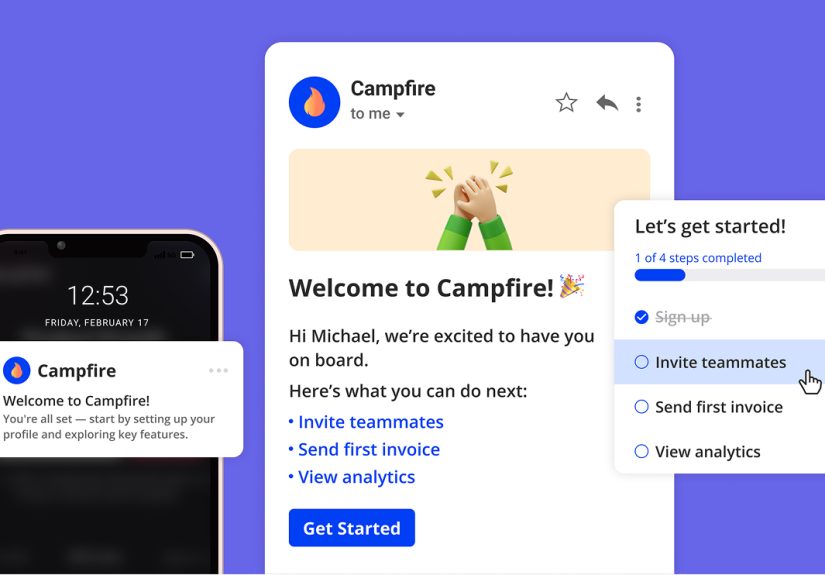
1) The “Welcome, Here’s Your First Win” email
Trigger: Immediately after signup.
Goal: Drive the first meaningful action (your activation event).
Example subject lines:
- “Welcome! Let’s get your first win in 3 minutes.”
- “You’re in. Here’s the fastest path to value.”
Copy approach: One sentence of context, one clear step, one button. No autobiography. If your product is a project management tool, your “first win” might be “Create your first project and assign a task.” Link directly to the exact screen where that happens.
2) The “You’re stuckwant a hand?” unblock email
Trigger: User starts a key workflow but doesn’t complete it (e.g., setup wizard, integration install, checkout, invite teammates).
Goal: Remove friction and get them back into the flow.
Example subject lines:
- “Quick questiondid something break?”
- “Want a 60-second fix for that setup step?”
Make it useful: Include the most common reason users get stuck (missing permission, unclear settings, wrong data format), a short fix, and a deep link back to the next step. If you have a resource center in-app, link to it so help is one click away.
3) Feature discovery that doesn’t feel like a sales pitch
Trigger: User reaches a relevant moment (e.g., they created a report but haven’t scheduled it; they invited teammates but haven’t set roles).
Goal: Drive adoption of a feature that increases stickiness.
Pro tip: Teach the feature using the user’s own context. “Since you created two dashboards, here’s how to automate sharing.” That feels like a personal assistant. “Check out our dashboard feature!” feels like a billboard.
4) The “nudge to habit” retention email
Trigger: User is active but hasn’t formed a usage pattern (e.g., logged in once this week).
Goal: Encourage a repeatable routine.
Good retention emails are like good coaches: specific, encouraging, and not yelling. Give one small habit suggestion: “Try saving a template for your weekly workflow,” or “Set a reminder for your Friday review.”
5) The win-back email that doesn’t beg
Trigger: No login for 7/14/30 days (depending on your product cycle).
Goal: Bring users back with a clear reason and a short path.
Example subject lines:
- “Still want to finish what you started?”
- “Your workspace is ready when you are.”
Keep it simple: remind them of the value they were aiming for, show one new improvement (if relevant), and give a single button to return. If you ask, “Can you tell us why you left?” before you’ve helped them succeed, you’re basically asking for a break-up speech.
6) Usage-based upgrade prompts that feel fair
Trigger: User approaches plan limits (seats, projects, events, exports).
Goal: Expansion without annoyance.
The best upgrade emails are math, not drama: “You’re using 92% of your monthly exports. Upgrade to avoid interruptions.” Add a short comparison and a link to upgrade. Don’t add seven testimonials and a GIF of fireworks.
7) Product updates that don’t read like release notes
Trigger: New feature release + relevant segment (people who will benefit).
Goal: Awareness and adoption.
Structure it like this: Problem → New capability → How to use it → One CTA. Bonus points if the CTA drops them into an in-app walkthrough built with Userpilot so they learn by doing.
8) Feedback and NPS at the right time
Trigger: After a success milestone (first report created, first teammate invited, first integration installed).
Goal: Capture sentiment while it’s freshand learn what’s working.
Asking for feedback immediately after signup is like proposing on the first date. Wait until the user has done something meaningful, then keep the request short and respectful.
Design & Copy: How to Write Emails Users Don’t Mentally Auto-Delete
Write like a helpful human, not a corporate fortune cookie
- Be specific: “Finish connecting your Slack workspace” beats “Complete your onboarding.”
- One email, one job: If you want three actions, choose one and save the rest for later.
- Use micro-commitments: “Add one teammate” is less intimidating than “Set up your whole org.”
- Keep scannable structure: Short paragraphs, bullets, clear CTA.
Personalization that actually matters
Using someone’s first name is fine. Using their behavior is better. Mentioning what they already did (“You created your first project”) and what’s next (“Now assign your first task”) feels like momentum. It also keeps your emails from sounding like they were sent to “Dear Valued Human.”
Deliverability & Compliance: The Unsexy Stuff That Keeps You in the Inbox
Deliverability is like plumbing: you only notice it when it’s broken. A few essentials:
- Authenticate your sending domain (SPF, DKIM, and DMARC) so mailbox providers trust your mail.
- Make unsubscribing easy. If users can’t leave politely, they’ll leave angrily (by marking you as spam).
- Honor opt-outs quickly and keep your list permission-based.
- Include required information in commercial emails (like a valid physical address and clear opt-out instructions).
Why open rates can lie to you
Privacy changes (like Apple Mail Privacy Protection) can inflate opens and blur location/device data. If your reporting still worships open rate, it’s time for a healthier relationship with metrics. Track clicks, conversions, andmost importantlyproduct outcomes. Userpilot’s angle here is compelling: measure what email drove users to do inside the product, not just what they did in the inbox.
How to Build a Userpilot Email Program (Without Making It Weird)
Step 1: Define your activation moment
Pick the one action that predicts long-term success for your product (e.g., “Invite a teammate,” “Publish a dashboard,” “Connect a data source”). If you don’t know your activation event, your emails will feel like motivational posters: uplifting, vague, and not actually helpful.
Step 2: Map the lifecycle, then pick 3 “money moments”
Don’t build 20 automations on day one. Choose three:
- Welcome → first win
- Unblock a common stuck point
- Win-back inactive users
Once those work, expand into adoption nudges, usage-based upgrades, and education series.
Step 3: Keep your triggers behavior-based and your segments tight
A practical example for a B2B SaaS:
- Segment: Trial users in accounts with 3+ seats available
- Trigger: No teammate invited within 48 hours
- Email: “Invite one teammatesee collaboration instantly”
- In-app follow-up: A checklist + tooltip pointing to the “Invite” button
- Goal: “Teammate invited” event
Step 4: Sync your stack where it helps
Userpilot plays nicely with common tools in a modern SaaS stackso you can connect product engagement data with marketing and support workflows. For example, syncing events and attributes into HubSpot can enable richer lifecycle campaigns, and sending Userpilot events into Intercom can trigger support or messaging actions when users struggle. If you use Segment, piping event data through it can keep your tracking consistent across tools.
Step 5: Measure success like a product team
A strong measurement setup answers:
- Did the email lead to the activation event?
- Did it increase feature adoption among the targeted segment?
- Did it reduce time-to-value?
- Did it improve retention cohorts?
If your email program can’t answer those, you’re optimizing the wrong scoreboard.
Common Mistakes (So You Can Avoid Them and Sleep at Night)
Mistake 1: Sending “product updates” to everyone
Not everyone needs every update. Target the segment that will benefit right now, and let the rest discover it later in-app.
Mistake 2: Treating email like a replacement for onboarding
Email can’t click the buttons for users. It can only guide them back to the product. Use Userpilot in-app flows to do the heavy lifting once they return.
Mistake 3: Over-automating before you understand the journey
Automation scales clarityor it scales chaos. Start small, prove impact, then expand.
From the Trenches: What Using Userpilot Email Actually Feels Like
Here’s the part nobody puts on the landing page: the first time you turn on behavior-based email, you’ll discover how messy “real users” are. They don’t move in straight lines. They sign up on mobile, then try again on desktop. They invite a teammate before finishing setup. They click around, disappear, return at 2 a.m., then message support with “is this broken?” even though the feature is working perfectly. And honestly? That’s exactly why lifecycle email inside Userpilot is so usefulbecause it’s built for reality, not theory.
The biggest shift is psychological: you stop writing emails to “users” and start writing emails to moments. Instead of “Welcome to our platform,” you write “You’re one step away from your first report.” Instead of “We noticed you haven’t logged in,” you write “Want to pick up where you left off? Your dashboard is saved.” That tiny change makes your copy shorter, your CTA clearer, and your users less likely to treat your message like background noise.
Another lesson: the best-performing emails are rarely the clever ones. They’re the emails that reduce effort. A simple “Finish setup” email with a deep link and one bullet list of what happens next often beats the beautifully written, brand-voice masterpiece that tries to explain your entire product philosophy. (Save the philosophy for your About page. Or don’t. Nobody reads it anyway.)
You’ll also learn to respect frequency caps like they’re speed limits in front of a police station. When you have multiple triggers stuck onboarding, inactive, feature adoption, upgrade thresholdit’s dangerously easy to stack emails on top of each other. Users don’t experience those as “separate flows.” They experience them as “this company is chasing me with a megaphone.” A good rule: if two emails would land within 24 hours, combine the intent or choose the most helpful one.
Replies are the secret weapon. When you set sensible reply-to addresses and write like a human, people respond. They’ll tell you what’s confusing. They’ll ask for a quick call. They’ll say, “I tried this and got stuck on step 2.” Those replies are pure product goldbecause they expose friction you can fix with better in-app guidance, better UI, or a smarter trigger. Over time, your email program becomes less about “sending more” and more about “removing obstacles.”
Finally, the most satisfying part is measuring outcomes beyond vanity metrics. Opens can be noisy. Clicks can be misleading. But when you can see that a win-back email led to actual logins, or that an onboarding nudge increased completion of a checklist step, it changes the conversation internally. Email stops being a marketing activity and becomes a product growth leverone that’s easier to iterate, test, and improve than most teams expect.
Final Thoughts
Email still worksbut only when it’s timely, relevant, and tied to real user behavior. Userpilot’s approach to email is powerful because it’s built for product-led growth: trigger messages from what users do in-app, guide them back to value, and measure success in product outcomes. Start with a few high-impact lifecycle plays, keep your segmentation tight, respect deliverability, and let your in-app experiences do the teaching. Your users will feel helpednot huntedand your metrics will finally tell a story you can be proud of.