Table of Contents >> Show >> Hide
- What the ScanSnap S1300i Actually Is (and Who It’s For)
- Core Specs That Matter in Real Life
- The ScanSnap “Secret Sauce”: One-Button Workflows
- Software in 2026: The Part You Should Not Ignore
- How It Performs: A Realistic View
- Standout Features People Actually Use
- Tips to Get Cleaner Scans (and Fewer Paper Jams)
- Maintenance: Keep It Snappy, Not Slappy
- Buying the S1300i Today: What to Watch For
- Pros and Cons (The Honest Version)
- Real-World Experiences (About )
- Conclusion
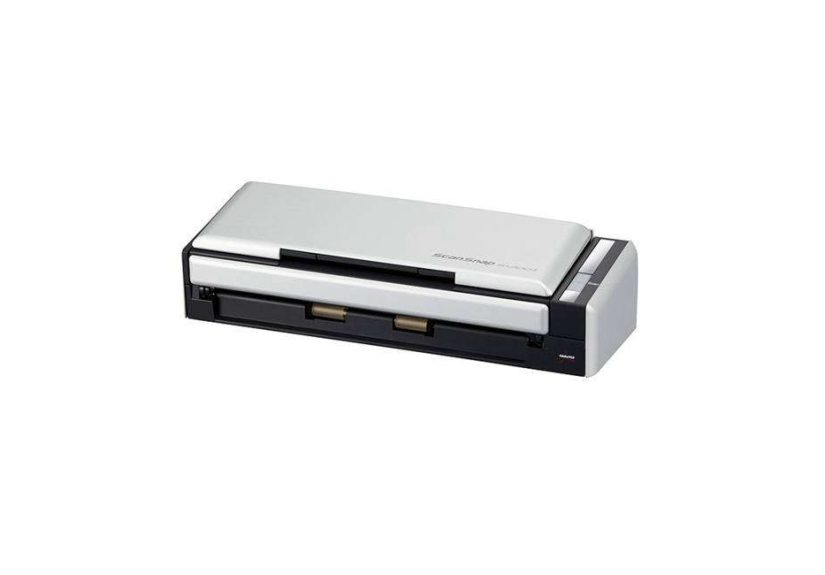
Paper has a special talent: it multiplies when you’re not looking. One minute you have a neat little “to file” pile, and the next it’s a full-blown documentary titled “The Receipts Strike Back.” That’s where the Fujitsu ScanSnap S1300i steps inan A4/Letter-size, sheetfed, duplex document scanner built for people who want to turn paper stacks into searchable files without turning scanning into a weekend hobby.
This guide breaks down what the ScanSnap S1300i is good at, where it shows its age, and how to get the best resultsespecially if you’re buying one used in 2026 and want to avoid the classic “Why is my scanner making that noise?” moment.
What the ScanSnap S1300i Actually Is (and Who It’s For)
The ScanSnap S1300i is a compact, USB-connected, sheetfed scanner with a small automatic document feeder (ADF) and automatic duplex scanning. In plain English: you load up a mini stack of pages, press one button, and it scans both sides while the software turns that pile into PDFs, images, or editable documents.
It’s best for:
- Home offices that need to digitize bills, statements, school paperwork, and “important stuff” that currently lives in a shoebox.
- Small businesses scanning receipts, invoices, signed forms, and client documents into a consistent filing system.
- Travel or hybrid work where you want a portable-ish scanner that can work with only a laptop when outlets are scarce.
- Light batch scanningthink “several small batches a day,” not “let’s digitize the entire accounting department by lunch.”
Core Specs That Matter in Real Life
Specs can feel like alphabet soup, so here are the ones that actually affect your day:
Speed and Duplex Scanning
The S1300i is rated up to 12 pages per minute at typical settings, and because it scans duplex, that’s up to 24 images per minute (front + back counts as two images). The catch is that speed varies by resolution and power modehigher quality settings slow things down, as you’d expect.
ADF Capacity: Small but Practical
The automatic document feeder holds up to 10 sheets. That sounds tiny until you remember the goal: quick, repeatable batches. It’s ideal for “scan today’s mail,” “scan this client packet,” or “scan tax receipts by month,” rather than giant archives without supervision.
Optical Resolution and Image Quality
Optical resolution is 600 dpi. In everyday use, you’ll rarely need 600 dpi for documents300 dpi is often the sweet spot for legible text and strong OCR (searchable text) without ballooning file sizes. Save higher resolutions for tiny print, detailed graphics, or anything you may need to zoom into later.
Paper Handling Limits (So You Don’t Fight Physics)
It supports common sizes (Letter, Legal, A4, etc.), plus smaller items like business cards. It can also handle longer pages up to about 34 inches in length, which is handy for certain forms and long receiptswithin reason.
Paper weight support is roughly standard office paper territory. Extremely fragile originals, crumpled thermal receipts, and sticky-note archaeology will still require a little prep (flattening, smoothing, or using a carrier method if you’re careful).
USB Connectivity and Power Options
The scanner connects via USB and can run off an AC adapter or USB bus power. The portable angle is real: if you’re away from an outlet, it can be powered by your computerbut the USB-bus-power setup may require two USB ports (one for data, one for power) depending on how you cable it. If you want the most consistent performance, especially for duplex scanning sessions, AC power is the “set it and forget it” choice.
The ScanSnap “Secret Sauce”: One-Button Workflows
ScanSnap scanners became popular because they treat scanning like an appliance, not a science project. The S1300i is built around “profiles” (often called shortcuts) that bundle settings such as:
- color vs. black and white
- resolution
- PDF vs. JPEG
- OCR on/off (searchable PDFs)
- destination (folder, email, cloud-connected workflow, etc.)
Create a few profiles and you’re basically done. A practical starter set might look like:
- Receipts (OCR): 300 dpi, auto color, searchable PDF, save to “Receipts/2026”
- Contracts: 300 dpi, grayscale, searchable PDF, save to “Client Files”
- Photos (quick): 600 dpi, color, JPEG, save to “Photos to Sort”
- Share/Send: 200 dpi, PDF, smaller file size for emailing
Software in 2026: The Part You Should Not Ignore
If you’re buying an S1300i today, software compatibility is just as important as roller condition. ScanSnap’s ecosystem has evolved over time, and support policies changedespecially around older companion apps.
ScanSnap Home vs. ScanSnap Manager
Historically, many ScanSnap models relied on “ScanSnap Manager.” In more recent support documentation, ScanSnap Manager is flagged as no longer supported, and some older companion apps (like certain organizer/receipt/business card tools) may also be considered end-of-support. The good news: the S1300i is still listed among models that can work within supported ScanSnap software paths on modern systemsjust be sure you’re following the current compatibility guidance for your OS.
What This Means for Buyers
- Check your operating system first. A scanner can be “perfect” and still be useless if your Mac/Windows version won’t run the supported software.
- Plan your workflow. If your goal is “scan to searchable PDF and save to folders,” you’re in great shape. If your goal is “use TWAIN in a niche legacy app,” this model isn’t designed for that.
- Expect updates and transitions. Older utilities may be retired, but core scanning workflows can still be solid when you follow current guidance.
How It Performs: A Realistic View
The S1300i lives in a specific sweet spot: faster and more capable than ultra-cheap portable scanners, but not meant to outgun bigger desktop workhorses. You’ll feel that most in two areas: batch size and speed under heavier settings.
Small Batches Feel Effortless
For day-to-day scanningmail, receipts, signed formsthe rhythm is great. Load 5–10 sheets, press the button, move on. The duplex scanning means you don’t babysit page flipping, and the output is usually ready to file immediately.
Big Archives Require Patience (and Snacks)
If you’re digitizing years of paperwork, you’ll be reloading the ADF constantly. That doesn’t make the scanner bad; it just means your project needs a plan: sort first, scan in categories, and take breaks. Your future self will thank you, and your scanner rollers will also appreciate the emotional support.
Standout Features People Actually Use
Duplex Scanning That Doesn’t Slow to a Crawl
A common frustration with some budget scanners is that duplex feels like hitting the brakes. The S1300i is designed for duplex from the start, so two-sided scanning feels like the defaultnot an “extra.”
Portable Power Options
Being able to run via USB bus power is genuinely helpful when you’re scanning away from a desk. Think: a real estate closing, a job site packet, a conference check-in, or the world’s most thrilling hotel desk paperwork marathon.
Merge/Combine Use Cases
One neat trick supported in the ScanSnap feature set is the ability to merge two single pages into a single spread-like output. That’s useful when you scan facing pages that belong together (like a two-page layout) and want them treated as one visual document.
Tips to Get Cleaner Scans (and Fewer Paper Jams)
1) Prep the Paper for a Better Feed
- Remove staples and paper clips (your scanner is not a metal detector).
- Flatten folds and smooth crinkles.
- Fan the stack lightly to reduce pages sticking together.
2) Pick the Right Resolution for the Job
- 200 dpi: fast sharing, basic reference copies, smaller files
- 300 dpi: best all-around choice for OCR and readable archives
- 600 dpi: small text, detailed graphics, or “I might zoom in later” documents
3) Use OCR Strategically
Searchable PDFs are the whole point of “going paperless.” Use OCR for anything you may need to search later: taxes, warranties, medical records, contracts, manuals, and invoices. For throwaway reference (like a one-time form), OCR might be unnecessary overhead.
4) Create a Filing System Before You Scan Everything
Scanning without a folder structure is like cleaning your kitchen by moving everything into the bathtub. It looks amazing for five minutes, and then reality returns. Start with a simple hierarchy:
- Home: Taxes, Medical, School, Warranties
- Work: Clients, Projects, HR, Invoices
- Receipts: by year, then by month
Maintenance: Keep It Snappy, Not Slappy
Sheetfed scanners rely on consumable partsmostly rollers and padsbecause friction is how paper moves. Over time, those parts wear out or get glazed with paper dust and toner residue.
Clean Regularly
If you scan often, a quick cleaning routine prevents skewed feeds and multi-feeds. Wipe rollers gently (using appropriate cleaning supplies) and keep the feed path free of debris. You’ll spend five minutes now or fifty minutes lateryour choice.
Know When Parts Are Due
Consumables have recommended replacement intervals (pads and rollers), and heavy scanning may push you there faster. If you’re buying used, assume you may need a refresh unless the seller can confirm recent maintenance.
Buying the S1300i Today: What to Watch For
The ScanSnap S1300i is discontinued and has been positioned as replaced by newer models in the ScanSnap lineup. That means most purchases today happen via used, refurbished, or leftover inventory channels.
Used/Refurb Checklist
- Confirm included cables: USB cable plus AC adapter (and any special USB power cable if included).
- Inspect feed behavior: repeated multi-feeds or slipping can indicate worn rollers/pads.
- Verify software path: confirm you can download and install the supported ScanSnap software for your OS.
- Test duplex: scan a 5–10 page double-sided stack to make sure both sides capture cleanly.
- Listen for “angry squirrel” noises: squeaks and grinding can signal maintenance needs.
When to Consider a Newer Alternative
If you need Wi-Fi scanning, larger batches, or newer workflow automation, a newer ScanSnap model (often cited as the successor class) may fit better. But if your goal is dependable USB scanning with duplex and a compact footprint, the S1300i can still make a lot of senseespecially at a good used price.
Pros and Cons (The Honest Version)
Pros
- True duplex scanning in a compact sheetfed design
- One-button workflow that’s easy for non-technical users
- Strong everyday document scanning speed at practical settings
- Flexible power (AC or USB bus power) for portable use
- Great for receipts, statements, forms, and small business paperwork
Cons
- 10-sheet ADF means frequent reloading for large projects
- Software/support considerations matter more now that it’s discontinued
- Not designed for TWAIN/ISIS-driven enterprise scanning workflows
- Worn consumables on used units can cause feed issues until replaced
Real-World Experiences (About )
The most common “ScanSnap S1300i experience” isn’t dramaticit’s quietly life-improving, like replacing a wobbly chair with one that doesn’t try to end you. People typically don’t buy a scanner for fun. They buy it because paper is becoming a threat.
The “I Can Finally Find Things” Moment
A classic scenario: tax season hits, and suddenly you need a specific receipt from last summer. Not “a receipt,” not “the receipt for something,” but the receipt. With the S1300i, the win is creating searchable PDFs so you can type a keyword and actually locate the document instead of reenacting an archaeological dig in your filing cabinet. That first successful searchwhere the file pops up instantlyfeels like cheating (the legal kind).
Small Businesses and the Daily Paper Drip
In small offices, paperwork doesn’t arrive in one epic mountain. It arrives in a steady drizzle: invoices, delivery slips, signed approvals, insurance forms, and a mysteriously important document that someone printed twice “just in case.” The S1300i’s 10-sheet feeder fits that reality. Staff can scan a small batch, name it, file it, and move onwithout needing a dedicated “scanning station” that becomes a second job.
Travel Scanning: Surprisingly Useful
If you travel for work, scanning can become urgent at inconvenient times: you sign paperwork on-site, you need to send it back immediately, and the only “office equipment” nearby is a hotel pen that barely works. The S1300i’s USB power option is made for those moments. Plug in, scan, send. It’s not glamorous, but it saves the day in a way that makes you look absurdly prepared. (You can’t buy that kind of reputationyou can only scan it.)
The “It Turns On When I Open It” Delight
Some owners love the small design touches: the scanner feels more like a tool than a gadget. Open the lid, it’s ready. Close it, it’s out of the way. That kind of frictionless behavior matters because scanning fails when it’s annoying. If it’s easy, you keep up with it. If it’s annoying, the paper pile returns like a sequel nobody asked for.
Where People Get Frustrated (and How They Fix It)
The biggest frustrations usually come from two places: feeding messy paper and software expectations. Crumpled receipts, thin originals, or sticky pages can cause multi-feeds, especially on older rollers. Most users solve it with a quick routine: flatten paper, scan smaller batches, clean rollers, and replace consumables when needed. On the software side, the smartest owners treat compatibility like part of the purchase: they confirm their OS support path first, then commit.
Bottom line: the ScanSnap S1300i tends to become one of those quietly beloved desk devices. Not because it’s flashy, but because it consistently turns “paper chaos” into “organized files” with minimal dramaand honestly, that’s the dream.
Conclusion
The Fujitsu ScanSnap S1300i is a practical, compact sheetfed scanner that still earns its keep: duplex scanning, one-button workflows, and reliable everyday performance. The biggest “modern” consideration is software support and OS compatibilityespecially for used buyers. If your workflow fits the S1300i’s strengths (small batches, fast filing, searchable PDFs, and a USB-connected setup), it can still be a smart tool for building a paperless system without turning your desk into a document circus.