Table of Contents >> Show >> Hide
- What Are WhatsApp Blue Ticks?
- How to Disable Blue Ticks in WhatsApp on Android
- How to Disable Blue Ticks in WhatsApp on iPhone
- Can You Disable Blue Ticks on WhatsApp Web or Desktop?
- What Happens After You Turn Off Read Receipts?
- Important Limit: Blue Ticks Still Work in Group Chats
- Do Read Receipts Affect Voice Messages?
- How to Hide “Last Seen” and “Online” for Better Privacy
- Can You Turn Off Blue Ticks for One Person Only?
- Can Someone Tell If You Turned Off Blue Ticks?
- Pros and Cons of Disabling WhatsApp Blue Ticks
- Common Mistakes When Turning Off Blue Ticks
- Practical Examples: When Disabling Blue Ticks Helps
- Experience-Based Tips for Using WhatsApp Without Blue Tick Stress
- Final Thoughts
Few tiny symbols have caused as much modern social drama as WhatsApp’s blue ticks. You open a message for “just one second,” your brain says you will reply later, and suddenly the sender knows you have seen it. Now the invisible clock begins. Are you ignoring them? Are you busy? Are you crafting a Pulitzer-worthy reply? Or did you simply read the message while holding a sandwich and forget?
The good news is that WhatsApp gives you a simple way to disable the “message seen” blue ticks, also known as read receipts. The setting works on both Android and iPhone, and once it is turned off, people in individual chats generally will not see blue check marks when you read their messages. The not-so-mysterious catch? You also lose the ability to see when they read yours. WhatsApp privacy is a two-way street, not a one-way invisibility cloak.
In this guide, you will learn exactly how to turn off blue ticks in WhatsApp, what changes after you disable read receipts, what still remains visible, and how to combine this setting with other privacy tools for a calmer messaging life.
What Are WhatsApp Blue Ticks?
WhatsApp uses check marks to show the status of a message. A single gray tick means your message was sent. Two gray ticks mean it was delivered to the recipient’s device. Two blue ticks mean the recipient has read the message. Simple? Yes. Emotionally peaceful? Not always.
The blue tick feature is officially called read receipts. It was created to make communication clearer, but it can also create pressure. When someone sees that you read their message, they may expect a quick response. That is fine when the message is urgent, but not so fine when someone sends “hey” at 11:47 p.m. and your only plan is to become one with your pillow.
How to Disable Blue Ticks in WhatsApp on Android
If you use WhatsApp on an Android phone, disabling read receipts takes less than a minute. You do not need a third-party app, secret menu, or questionable “privacy hack” from a comment section that looks like it was written by a toaster.
Step-by-Step Instructions for Android
- Open WhatsApp on your Android phone.
- Tap the three-dot menu in the top-right corner.
- Select Settings.
- Tap Privacy.
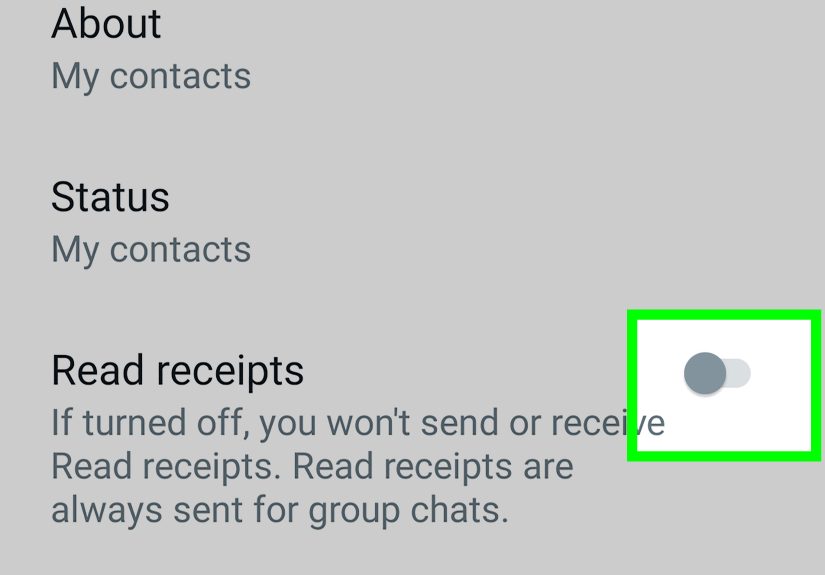
- Find Read receipts.
- Turn the toggle off.
That is it. Once read receipts are turned off, people in one-on-one chats should no longer see blue ticks when you read their messages. Their messages may still show as delivered with two gray ticks, but the “seen” confirmation disappears.
How to Disable Blue Ticks in WhatsApp on iPhone
The iPhone process is just as simple, though the menu placement looks a little different because iOS prefers to dress everything in a cleaner outfit.
Step-by-Step Instructions for iPhone
- Open WhatsApp on your iPhone.
- Tap Settings in the bottom-right corner.
- Select Privacy.
- Scroll to Read Receipts.
- Switch Read Receipts off.
After this, WhatsApp will stop sending read receipts for most individual chats. You can read messages with less social pressure and reply when you actually have the time, energy, and emotional bandwidth to type something better than “lol.”
Can You Disable Blue Ticks on WhatsApp Web or Desktop?
WhatsApp Web and WhatsApp Desktop follow the privacy settings from your main WhatsApp account. In most cases, you cannot separately disable read receipts only for WhatsApp Web while keeping them active on your phone. If you want blue ticks turned off across your WhatsApp account, change the setting in the mobile app.
Once read receipts are disabled on your phone, the same privacy behavior generally applies when you use WhatsApp on linked devices. This is helpful if you often reply from a laptop and do not want your desktop reading habits to reveal more than your face does during a Monday morning meeting.
What Happens After You Turn Off Read Receipts?
Turning off WhatsApp read receipts changes a few things immediately. First, people in individual chats will not see blue ticks when you read their messages. Second, you will not see blue ticks when they read yours. WhatsApp makes this feature mutual, which keeps the privacy system fair.
This means disabling read receipts is not a magic surveillance tool. You cannot quietly read everyone’s messages while still tracking exactly when they read yours. WhatsApp basically says, “Privacy for you, privacy for them.” Annoying? Maybe. Fair? Absolutely.
What Still Remains Visible?
Even with blue ticks turned off, some activity indicators may still appear depending on your other privacy settings. For example, your Last seen, Online status, profile photo, About information, and Status updates may still be visible to certain people unless you adjust those settings separately.
That is why disabling blue ticks is only one part of WhatsApp privacy. If your goal is to reduce visibility, you should also review the rest of the Privacy menu.
Important Limit: Blue Ticks Still Work in Group Chats
Here is the detail many people miss: turning off read receipts does not fully hide read activity in group chats. WhatsApp read receipts are still sent in group conversations. If someone checks message information in a group, they may be able to see who has read a message.
In other words, disabling blue ticks works best for private one-on-one chats. In group chats, the feature has limitations. So if your family group sends 63 messages about dinner plans and you open the chat, do not assume you are completely invisible. The group chat always knows more than it should. Like an auntie with Wi-Fi.
Do Read Receipts Affect Voice Messages?
Voice messages can behave differently from regular text messages depending on WhatsApp’s current design and updates. In general, read receipt settings are meant to control whether people can see when you have read their messages. However, playback indicators and voice-message behavior may not always match what users expect from text-message blue ticks.
The safest rule is this: if you want maximum privacy, avoid opening or playing a message until you are comfortable with the sender knowing you interacted with it. WhatsApp features can change over time, so it is wise to check your app’s current Privacy settings after major updates.
How to Hide “Last Seen” and “Online” for Better Privacy
If you disable blue ticks but leave your Online status visible, people may still know you are active. That can lead to the classic follow-up message: “I see you’re online.” This sentence has ended more peaceful evenings than burnt popcorn.
To manage this, go to Settings > Privacy > Last seen and online. From there, you can choose who sees when you were last active and who can see when you are online.
Recommended Privacy Setup
- Read receipts: Off, if you do not want blue ticks in individual chats.
- Last seen: My Contacts, My Contacts Except, or Nobody.
- Online: Match your Last Seen setting for stronger privacy.
- Profile photo: Limit to contacts if you do not want strangers viewing it.
- Status updates: Share only with selected contacts when needed.
This combination helps you avoid sending mixed privacy signals. Otherwise, you might hide blue ticks while still broadcasting that you are online, which is like closing the curtains but leaving the front door open with a neon sign.
Can You Turn Off Blue Ticks for One Person Only?
WhatsApp does not usually offer a simple setting that disables read receipts for only one specific contact while keeping them active for everyone else. The read receipt toggle applies broadly to individual chats.
If one person is the reason you want more privacy, you can consider other options. You may mute the chat, archive it, restrict your Last Seen and Online visibility, or use the “My Contacts Except” option for certain privacy categories. If the person is bothering you, blocking or reporting may be more appropriate than simply hiding blue ticks.
Can Someone Tell If You Turned Off Blue Ticks?
WhatsApp does not send a notification saying, “This person has turned off read receipts.” However, people may notice that their messages no longer turn blue after you read them. They may guess that you disabled read receipts, but they cannot always know for sure.
There are many reasons blue ticks may not appear. The recipient may have turned off read receipts, not opened the chat, lost internet connection, or changed privacy settings. So no, turning off blue ticks does not create a giant privacy announcement. It simply removes the read confirmation.
Pros and Cons of Disabling WhatsApp Blue Ticks
Pros
- You can read messages without feeling rushed to respond.
- You reduce social pressure and unnecessary misunderstandings.
- You gain more control over your communication habits.
- You can set healthier digital boundaries.
Cons
- You cannot see blue ticks from others in individual chats.
- Group chats may still show read activity.
- Some people may assume you are intentionally avoiding them.
- It does not hide your Online status unless you change that separately.
For many users, the benefits outweigh the drawbacks. If WhatsApp feels like a tiny courtroom where every opened message becomes evidence, disabling read receipts can make the app feel more relaxed.
Common Mistakes When Turning Off Blue Ticks
Only Turning Off Blue Ticks and Ignoring Other Settings
Read receipts are just one privacy feature. If you still show your Online status, Last Seen, and public profile photo, people may still track your activity. Review the full Privacy menu for better control.
Expecting Group Chats to Become Invisible
Group chats are different. Read receipts can still appear there, so do not rely on this setting for complete privacy in groups.
Using Untrusted Third-Party Apps
Avoid apps that promise “secret WhatsApp viewing” or “perfect blue tick hiding.” Many are unsafe, unnecessary, or may violate platform rules. The official WhatsApp settings are safer and easier.
Forgetting the Setting Works Both Ways
Once you disable read receipts, you also stop seeing read receipts from others. If you rely on blue ticks for work or urgent communication, think carefully before turning them off.
Practical Examples: When Disabling Blue Ticks Helps
Example one: You receive work messages after hours. Turning off blue ticks lets you read them without accidentally creating the impression that you are available for a full conversation.
Example two: A friend sends long messages, and you need time to reply thoughtfully. Without blue ticks, you can read, think, and answer later without making the pause feel personal.
Example three: You are trying to reduce screen anxiety. Disabling read receipts removes one layer of digital pressure and helps you respond on your own schedule.
Example four: You use WhatsApp for family, school, work, and social life. Turning off read receipts creates a small but useful boundary between “I saw it” and “I am ready to respond.”
Experience-Based Tips for Using WhatsApp Without Blue Tick Stress
After using WhatsApp with read receipts turned off, many people notice one thing first: the app becomes quieter, even if the number of messages stays exactly the same. The messages are still there, the chats are still active, and your cousin may still send blurry photos of lunch, but the pressure changes. You are no longer performing your availability in real time.
One helpful habit is to create reply windows. Instead of answering every message the moment it arrives, check WhatsApp at certain times of the day. For example, you might reply once in the morning, once after school or work, and once in the evening. This keeps conversations moving without letting WhatsApp control your entire schedule.
Another useful experience is learning which messages actually need fast replies. Not every message is urgent. “Can you send the file before 3 p.m.?” deserves attention. “Look at this meme” can wait. “Hi” with no context can probably sit there until the sender discovers the lost art of finishing a sentence.
It also helps to be honest with close contacts. You do not need to announce, “I have disabled read receipts for my mental peace and personal sovereignty.” That sounds like a dramatic press conference. A simple “I’m slower with replies now, but I’ll get back to you” is enough. Most reasonable people understand boundaries when they are explained kindly.
If you manage work or school chats, combine disabled read receipts with starred messages. When something needs follow-up, star it so you can find it later. This prevents the classic problem of reading a message privately, forgetting it completely, and discovering three days later that it contained an important deadline. Privacy is good. Accidental chaos is less good.
Muted chats can also make a huge difference. Turning off blue ticks reduces read pressure, but muting noisy chats reduces interruption pressure. For large groups, mute notifications and check them manually. This is especially useful for community groups, class chats, neighborhood chats, and any group where one person treats WhatsApp like a live radio station.
One personal rule that works well is not opening a message unless you are ready to do one of three things: reply, save it for later, or intentionally ignore it because it does not need action. This prevents WhatsApp from becoming a messy pile of half-read conversations. Turning off blue ticks gives you privacy, but you still need a small system to stay organized.
Finally, remember that disabling blue ticks is not rude by itself. It is a communication preference. Some people keep read receipts on because they like transparency. Others turn them off because they prefer breathing room. Neither choice is morally superior. The best setting is the one that helps you communicate clearly without feeling trapped by tiny blue symbols.
Final Thoughts
Disabling the “Message Seen” blue ticks in WhatsApp is one of the easiest ways to make messaging feel less stressful. On Android, go to Settings > Privacy > Read receipts and turn it off. On iPhone, open Settings > Privacy and switch off Read Receipts. The change helps you read individual chats more privately, but it also means you will not see other people’s read receipts.
For the best results, combine this setting with Last Seen, Online, Status, and profile photo privacy controls. Blue ticks are only one part of the privacy puzzle. Once you understand how the setting works, you can use WhatsApp with fewer awkward expectations and more control over your time.
Note: WhatsApp features and menu labels may change slightly depending on app version, device type, and region. Always check the latest Privacy menu in your WhatsApp app for the most accurate options.