Table of Contents >> Show >> Hide
- What Is a Phone-Charging Table?
- Before You Start: Safety Comes First
- Tools and Materials You’ll Need
- Step 1: Choose the Right Table Design
- Step 2: Pick the Best Wireless Charger
- Step 3: Plan the Charging Spot
- Step 4: Build or Prepare the Tabletop
- Step 5: Test the Charger Before Installing It
- Step 6: Mount the Charger
- Step 7: Build the Base
- Step 8: Manage the Cable Like a Pro
- Step 9: Sand, Finish, and Protect the Table
- Step 10: Mark the Charging Zone
- Step 11: Final Testing
- Design Ideas for a Better Charging Table
- Common Mistakes to Avoid
- How Much Does It Cost?
- Maintenance Tips
- Real-Life Experience: What It’s Like to Use a DIY Charging Table
- Conclusion
There are two kinds of people in this world: people who always know where their phone charger is, and people who have purchased seven charging cables and somehow own zero charging cables. If you belong to the second group, welcome. Today, we are solving your problem with a DIY table that charges your phone.
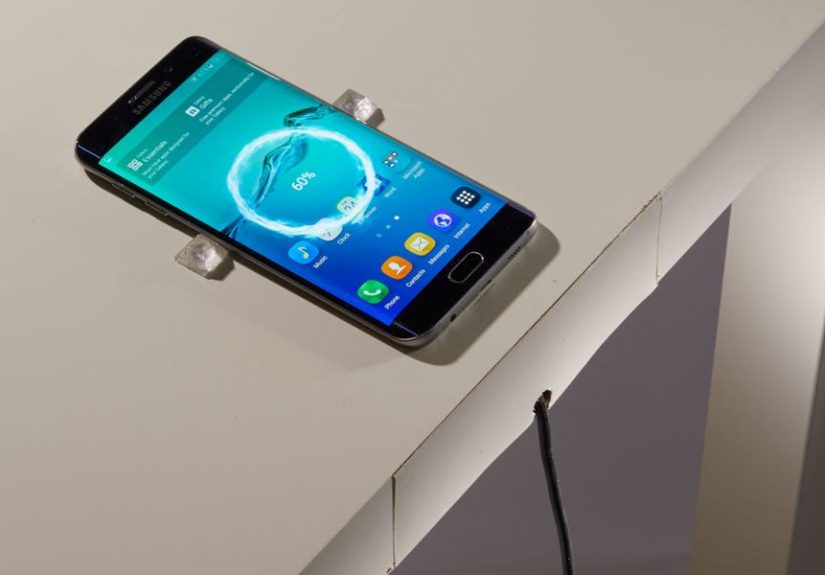
A phone-charging table is exactly what it sounds like: a side table, nightstand, coffee table, or desk with a wireless charger built into the surface or hidden underneath it. You place your phone on the marked charging spot, and the battery begins filling up without a cable doing its usual impression of a spaghetti noodle.
This project combines basic woodworking, smart cable management, and wireless charging technology. You do not need to be a master carpenter, but you do need patience, accurate measuring, and a healthy respect for electricity. The goal is simple: build a sturdy, attractive table that looks like furniture first and a gadget second.
What Is a Phone-Charging Table?
A phone-charging table uses a built-in wireless charging pad or under-table wireless charger to send power to a compatible smartphone. Most modern wireless charging systems use Qi or Qi2 technology, the common wireless charging standard supported by many iPhone, Samsung Galaxy, Google Pixel, and other smartphone models.
Wireless charging works through electromagnetic induction. In plain English, the charger has a coil inside it, your phone has a coil inside it, and when they line up correctly, energy moves from the charger to the phone. No tiny robot plugs in the cable for you, although that would be adorable.
The best DIY version hides the charging hardware under the tabletop or recesses it neatly into the top. The result is a clean surface where you can drop your phone at bedtime, beside the sofa, or on your desk while you work.
Before You Start: Safety Comes First
This is a beginner-friendly woodworking project, but it is not a “throw random electronics into wood and hope” project. Use a quality wireless charger from a reputable brand, preferably one that is Qi-certified or Qi2-certified. Certification matters because it helps confirm that the charger has been tested for safety, interoperability, and efficiency.
Do not modify the internal wiring of a charger unless you are qualified to do electrical work. The safest approach is to use a complete, certified wireless charging unit and mount it according to the manufacturer’s instructions. You are building furniture around the charger, not reinventing the charger itself.
Also, avoid using extension cords as a permanent wiring solution. If your table will live far from a wall outlet, consider rearranging the furniture or asking a licensed electrician about adding an outlet. Running cords under rugs, trapping power bricks in sealed compartments, or daisy-chaining power strips may look tidy, but it can create heat and fire risks.
Tools and Materials You’ll Need
Materials
- One tabletop board or plywood panel
- Four table legs or material to build a base
- Wood screws or pocket-hole screws
- Wood glue
- Qi or Qi2 wireless charging pad or under-desk charger
- USB-C power adapter recommended by the charger manufacturer
- Cable clips, adhesive cable mounts, or cord channels
- Sandpaper in 120-, 180-, and 220-grit
- Wood stain, paint, or clear polyurethane finish
- Painter’s tape
- Optional: rubber feet, felt pads, decorative trim, or a charging symbol sticker
Tools
- Tape measure
- Pencil
- Drill and driver bits
- Jigsaw, circular saw, or table saw
- Router or Forstner bit, if recessing the charger
- Clamps
- Pocket-hole jig, optional but helpful
- Sander or sanding block
- Safety glasses
- Dust mask
Step 1: Choose the Right Table Design
Start by deciding what kind of table you want. A nightstand is perfect if your phone spends the night beside your bed. A sofa-side table is great if your living room has become a cable jungle. A desk works well if you want your phone nearby while you work but do not want yet another cord creeping across your keyboard.
For beginners, a small side table is the easiest option. A simple design might include a 16-by-20-inch wooden top, four legs, and a small lower shelf. You can also upgrade an existing table, which is often faster and cheaper than building from scratch. Thrift-store furniture is perfect for this project because it already has character, and if you make a mistake, you can call it “rustic.”
Step 2: Pick the Best Wireless Charger
Not all wireless chargers are ideal for furniture projects. A regular charging puck can work if you cut a shallow recess into the tabletop and place it near the surface. An under-desk wireless charger is even cleaner because it mounts below the tabletop and sends power through the wood.
Check the charger’s recommended charging distance before you buy. Some under-table chargers can transmit through a specific range of wood thickness, while ordinary charging pads usually need the phone to sit directly on the pad. If your tabletop is too thick, the phone may charge slowly, charge inconsistently, or refuse to charge at all. Phones can be dramatic like that.
Look for these features:
- Qi or Qi2 certification
- USB-C power input
- Foreign object detection
- Over-temperature protection
- A power adapter that matches the charger’s wattage requirements
- Clear installation instructions
If you use an iPhone with MagSafe or Qi2 magnetic charging, magnetic alignment can make the table easier to use. If you use an Android phone, check whether your model supports wireless charging and what wattage it accepts. Many budget phones do not support wireless charging, so confirm compatibility before building a shrine to a feature your phone does not have.
Step 3: Plan the Charging Spot
The charging spot should be easy to reach but not in the way. On a nightstand, place it near the front corner closest to the bed. On a sofa table, place it near the edge where your hand naturally lands. On a desk, keep it away from metal frames, monitor arms, or other hardware that might interfere with the charger.
Use your phone as a template. Set it on the tabletop and test a few positions. Ask yourself: Can I place the phone here without looking? Will a lamp, coffee mug, book, or snack plate block it? Will the charging cable underneath have a clean path to the outlet?
Once you choose the spot, mark the center with painter’s tape. This mark will guide the charger placement from above or below.
Step 4: Build or Prepare the Tabletop
If you are building from scratch, cut your tabletop to size and sand the edges smooth. A 3/4-inch hardwood board or plywood panel is a good choice for a small charging table. It is thick enough to feel sturdy but not so thick that installing a charger becomes a woodworking soap opera.
If you are upgrading an existing table, remove drawers or shelves as needed so you can access the underside of the top. Clean off dust, wax, or old adhesive. The charger needs a stable mounting surface, especially if it uses adhesive strips.
If you plan to recess a standard charging pad into the tabletop, measure the charger carefully. Use a router, hole saw, or Forstner bit to create a shallow pocket. The charger should sit close to the top surface without wobbling. Do not cut all the way through unless your design intentionally exposes the charging pad.
Step 5: Test the Charger Before Installing It
Before glue, screws, finish, or dramatic victory music, test the wireless charger. Plug it into the recommended adapter and place your phone on it. Make sure charging starts reliably. Try it with your phone case on and off.
This test matters because thick phone cases, metal rings, magnetic accessories, credit cards, and pop-out grips can interfere with wireless charging. If the charger works only when your phone is naked and perfectly centered under a full moon, choose a better charger or adjust your plan.
Step 6: Mount the Charger
Option A: Recess a Charging Pad Into the Top
This method is straightforward and works with many standard wireless charging pads. Cut a pocket that lets the pad sit flush or slightly below the tabletop surface. Feed the cable through a small hole toward the back or underside of the table. Secure the charger with removable adhesive, thin double-sided tape, or a custom wooden retaining ring.
The advantage is reliability because the phone sits directly above the charger. The downside is that the charger may be visible. You can make it look intentional by choosing a charger with a clean design or creating a neat circular insert.
Option B: Hide an Under-Desk Charger Beneath the Top
This method creates the cleanest look. Mount the charger under the tabletop using the manufacturer’s adhesive or screws. Align it carefully with the charging mark on top. Many hidden wireless chargers include templates, stickers, or sensors to help with alignment.
The key is tabletop thickness. Follow the charger’s instructions exactly. If the wood is too thick, you may need to thin the underside slightly with a router while leaving the top surface intact. Work slowly. Removing too much material can weaken the table or create an accidental skylight for your charger.
Step 7: Build the Base
A simple base can be made with four legs and apron boards. Use wood glue and screws for strength. Pocket-hole joinery is a popular option because it hides screws and creates strong angled joints. If you use a pocket-hole jig, set it according to your board thickness and use the correct screws for your wood type.
Make sure the table does not wobble. A charging table that rocks every time you touch it is not “interactive furniture.” It is annoying. Clamp pieces square while assembling, check the diagonals, and test the table on a flat surface before final finishing.
If you are adding a lower shelf, leave enough room for cable routing. You can mount the power adapter under the tabletop or along the back apron, but keep it ventilated and accessible.
Step 8: Manage the Cable Like a Pro
Cable management separates a polished DIY charging table from a table that looks like it is being attacked by a black plastic snake. Use adhesive cable clips or screw-in cord channels to guide the charging cable along the underside of the table and down the back leg.
Do not pinch the cable between wood parts. Do not staple through it. Do not trap the power adapter inside a sealed wooden box. Chargers and adapters can produce heat, and heat needs somewhere to go.
For a clean look, run the cable down the rear leg and secure it with clips. Add a small loop of slack near the charger so movement does not pull directly on the connector. If the table will move often, use a removable cord wrap or Velcro strap near the plug.
Step 9: Sand, Finish, and Protect the Table
Sand the table with 120-grit paper, then 180-grit, then 220-grit for a smooth finish. Wipe away dust with a tack cloth or slightly damp microfiber cloth. If you want a warm wood look, apply stain before the protective topcoat. If you prefer a modern style, paint the base and leave the top natural.
For a tabletop, durability matters. A clear polyurethane finish helps protect the wood from scratches, spills, and the mysterious sticky circles left by drinks that nobody admits they set down. Follow the product directions for drying and recoating. Many fast-drying polyurethane products allow recoating in a few hours, but full durability takes longer, so be gentle with the table at first.
Important: avoid burying the wireless charger under heavy layers of finish if the charger is exposed or flush-mounted. Finish the wood, not the electronics.
Step 10: Mark the Charging Zone
A hidden charger is beautiful until nobody knows where to put the phone. Mark the charging zone in a subtle way. You can use a small engraved lightning bolt, a brass dot, a tiny inlay, a painted circle, or a minimalist sticker. Keep it tasteful. Your table should not look like a spaceship control panel unless that is exactly your design goal.
Place your phone on the spot and confirm that charging starts within a second or two. Test it from different angles. If alignment is fussy, make the marker slightly larger or add a small tray-like border to guide placement.
Step 11: Final Testing
Once the table is assembled and finished, test it for at least several charging sessions. Plug the charger into a wall outlet, place your phone on the charging zone, and check that charging begins reliably. After 20 to 30 minutes, touch the tabletop near the charger and the power adapter. Warm is common with wireless charging; uncomfortably hot is not okay.
If the phone stops charging, gets too hot, or repeatedly disconnects, check these common issues:
- The tabletop may be too thick.
- The phone may not be centered over the coil.
- The phone case may be too thick or contain metal.
- The power adapter may not provide enough wattage.
- The charger may be mounted near metal hardware.
- The cable may be loose or damaged.
Design Ideas for a Better Charging Table
The Minimalist Nightstand
Use light wood, tapered legs, and a hidden charger under the top. Add one small drawer for glasses, lip balm, or the five receipts you are apparently emotionally attached to.
The Sofa Snack-and-Charge Table
Build a narrow C-table that slides partly under the sofa. Put the charging zone near the outer corner and leave space for a mug. This is perfect for small apartments and binge-watching headquarters.
The Home Office Charging Desk
Install a hidden charger near the front-right or front-left edge of your desk. Add a cable tray underneath for your laptop charger, monitor cords, and USB hub. Suddenly, your desk looks intentional instead of “recently survived a robot thunderstorm.”
The Family Drop Zone
Build a console table near the entryway with two charging zones, a bowl for keys, and hooks below for bags. It keeps phones, wallets, and keys in one place, which may reduce the daily “Has anyone seen my phone?” concert.
Common Mistakes to Avoid
Using the Wrong Charger
A cheap, uncertified charger may work for a while, but it is not worth the risk. Choose a reputable charger with safety protections and clear installation instructions.
Making the Top Too Thick
Wireless charging has limits. If the charger is too far from the phone, charging becomes weak or unreliable. Always check the manufacturer’s recommended distance.
Forgetting Ventilation
Power adapters and wireless chargers can generate heat. Do not seal them inside a tight compartment with no airflow.
Hiding the Charging Spot Too Well
A completely invisible charger looks cool until guests spend three minutes sliding their phone around like they are solving a treasure map. Add a subtle marker.
Skipping the Test Phase
Always test before permanent mounting. It is much easier to move a charger before the adhesive is pressed down, the screws are installed, and your confidence has made promises your measurements cannot keep.
How Much Does It Cost?
A DIY phone-charging table can cost anywhere from about $50 to several hundred dollars, depending on the wood, charger, finish, and whether you already own tools. An upcycled thrift-store table with a basic charging pad may be very affordable. A hardwood table with a premium hidden charger, custom joinery, and a high-end finish will cost more but look like something from a design catalog.
Here is a realistic budget range:
- Used table: $10 to $60
- Wood for a new table: $30 to $150
- Wireless charger: $15 to $120
- Finish and supplies: $15 to $50
- Cable clips and accessories: $5 to $20
The sweet spot for most DIYers is upgrading a solid existing table with a good charger. It saves time, reduces waste, and lets you spend more of the budget on reliable electronics.
Maintenance Tips
Keep the charging zone clean and dry. Dust, crumbs, and mystery debris can interfere with a flat phone placement. Do not place coins, keys, metal cards, or magnetic accessories between the phone and charger. Wireless chargers with foreign object detection are helpful, but common sense is still the best accessory.
Check the cable every few months. If it is frayed, crushed, loose, or unusually warm, stop using it and replace the damaged part. If your table uses an adhesive-mounted charger, confirm that it has not sagged or shifted over time.
Finally, remember that wireless charging is convenient, not magical. It may be slower than wired fast charging, especially through a tabletop. The goal is effortless top-ups throughout the day, not necessarily winning the Phone Charging Olympics.
Real-Life Experience: What It’s Like to Use a DIY Charging Table
The first thing you notice after making a table that charges your phone is how quickly it becomes part of your routine. At first, you proudly show everyone. “Look,” you say, placing your phone on the table with the confidence of a stage magician. The battery icon lights up, and for a brief moment, you feel like you personally invented electricity. Then, after a few days, the novelty fades in the best possible way. The table simply becomes useful.
A charging table works especially well beside a bed. Instead of fumbling for a cable in the dark, you place the phone on the marked spot and go to sleep. No more sweeping your hand behind the nightstand like you are searching for treasure in a cave. No more cable falling exactly one inch out of reach. The table reduces one tiny daily irritation, and tiny daily irritations are the mosquitoes of modern life.
In a living room, the biggest benefit is clutter control. A side table with hidden wireless charging keeps the surface clean. Guests can set down a phone without asking, “Do you have an iPhone charger?” or “Do you have USB-C?” or “Do you have the ancient cable used by my Bluetooth speaker from 2013?” If the charger supports common Qi devices, most compatible phones can use the same spot.
The experience is not perfect, though, and honest DIY advice should include the little annoyances. Alignment matters. If the charging coil is not centered well, the phone may start and stop charging. This is why a visible marker is worth adding, even if you love the completely invisible look. A tiny engraved dot or simple ring can save everyone from playing “find the charging zone” with a 12 percent battery.
Phone cases also matter. Slim plastic, silicone, and leather cases usually work well, but thick rugged cases can reduce charging performance. Cases with metal plates, wallet pockets, magnetic grips, or pop-out stands may cause problems. If your table charges perfectly with the case off but not with the case on, the table is not being rude; physics is just refusing to negotiate.
Heat is another real-world detail. Wireless charging often feels warmer than wired charging because energy is being transferred through coils. A little warmth is normal, but excessive heat is a warning sign. During the first week, it is smart to check the tabletop and adapter after each charging session. If anything feels too hot to touch comfortably, unplug the system and troubleshoot before using it again.
The best surprise is how polished the project can look. Even a simple thrift-store table can feel expensive once the cable is hidden and the finish is refreshed. Sanding the top, adding a smooth protective coat, and routing the cable neatly down the back leg makes the whole project feel intentional. People notice the convenience before they notice the hardware, which is exactly the point.
The second-best surprise is how many places suddenly seem like they need built-in charging. After one successful table, you may look at your desk, entryway console, kitchen counter, and workshop bench with dangerous ambition. This is normal. DIY success is highly contagious. Please use it responsibly.
Overall, a DIY phone-charging table is one of those projects that balances fun and function beautifully. It teaches measuring, planning, finishing, cable management, and basic tech integration without requiring a full home renovation. It also solves a real problem in a way that feels delightfully modern. You are not just building a table. You are building a small daily convenience, wrapped in wood, powered by common sense, and protected from the chaos of loose charging cables.
Conclusion
Learning how to make a table that charges your phone is a practical DIY project with a surprisingly stylish payoff. The core idea is simple: choose a sturdy table design, use a safe Qi or Qi2 wireless charger, align it carefully, manage the cable neatly, and finish the wood so it looks like furniture rather than a science fair prototype.
The most important rules are safety and planning. Use certified charging equipment, follow the manufacturer’s instructions, avoid permanent extension-cord setups, and test everything before final assembly. Once the table is working, you get a cleaner room, fewer cables, and the quiet joy of placing your phone down and watching it charge like the future politely arrived.