Table of Contents >> Show >> Hide
- What Was Firefox Hello?
- Quick Answer: How Did You Start a Conversation With Firefox Hello?
- Step-by-Step: How To Start A Conversation With Firefox Hello
- Why Firefox Hello Felt Different
- Common Problems Users Ran Into
- Features Firefox Hello Added Over Time
- Can You Still Start A Conversation With Firefox Hello Today?
- What Using Firefox Hello Felt Like Back Then
- Conclusion
- SEO Tags
Note: Firefox Hello is a discontinued Mozilla feature, so this article explains how it worked when it was available and why people found it so refreshingly simple.
If you ever searched for How To Start A Conversation With Firefox Hello, you were probably looking for one thing: a quick way to talk to someone without downloading another app, making another account, or convincing your cousin to install something “super easy” that somehow required six steps and a small sacrifice to the Wi-Fi gods. That was the charm of Firefox Hello. It lived inside the Firefox browser, used a simple link-based setup, and tried to make voice and video chat feel as casual as sending someone a webpage.
In its best moments, Firefox Hello felt like Mozilla looked at online calling and said, “What if this involved less fuss and fewer logins?” Instead of building a giant social platform, it built a browser-based communication tool around WebRTC, simple room links, and a lightweight interface. You clicked a button, started a conversation, copied the link, and invited someone in. That was the pitch. Elegant, fast, and just a little ahead of its time.
This guide explains exactly how to start a conversation with Firefox Hello, what the process looked like, what features came later, and why the product is now part of internet history rather than your current toolbar.
What Was Firefox Hello?
Firefox Hello was Mozilla’s built-in voice and video calling feature for the Firefox browser. It was designed to let people connect directly from the browser without installing separate calling software. In other words, it wanted to be the “let’s just talk already” button of the web.
The feature was introduced around the Firefox 34 era and refined soon after. One of its biggest selling points was that you did not need to create an account just to place a call. Instead, Firefox Hello generated a unique conversation link. You shared that link with another person, and they joined from a compatible browser. Later versions added rooms, easier invitations, instant messaging, and tab-sharing tools that made the whole thing more collaborative.
That meant Firefox Hello sat somewhere between a video call app and a lightweight collaboration tool. It was useful for chatting with friends, helping family troubleshoot something online, showing someone a page you were viewing, or discussing travel plans without sending twelve separate tabs and a dramatic “just look at this one first” message.
Quick Answer: How Did You Start a Conversation With Firefox Hello?
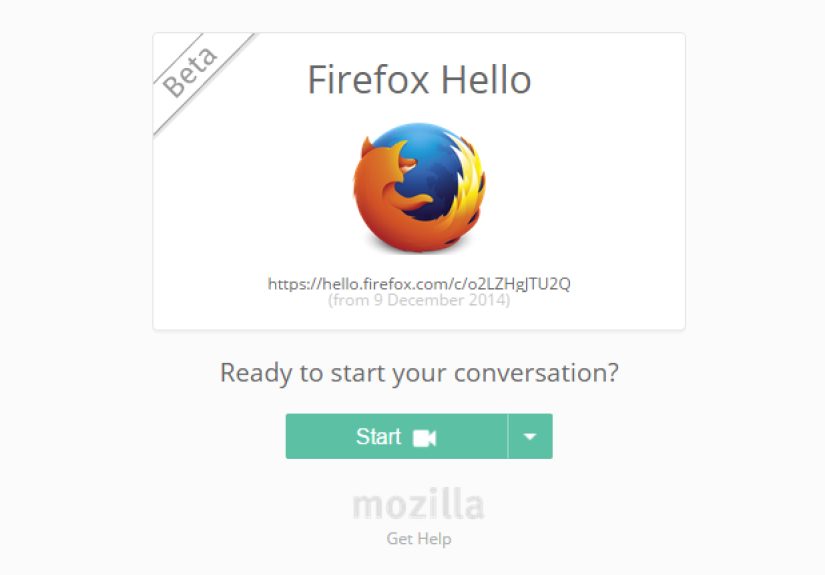
To start a conversation with Firefox Hello, you opened Firefox, found the Hello button in the toolbar or customization area, clicked Start a conversation, copied the unique room link, and sent that link to the person you wanted to talk to. Once they clicked the link and joined, you could talk by voice, use video if you wanted, and in later versions even share tabs or exchange messages.
That is the short version. Now let’s do the full version, minus the mystery and plus the details.
Step-by-Step: How To Start A Conversation With Firefox Hello
1. Open Firefox and locate the Hello button
The first step was simply opening Mozilla Firefox on your computer. Firefox Hello was a desktop browser feature, and depending on the version you were using, the Hello icon might already be visible in the toolbar. In some setups, it appeared in the customization panel instead, so you might have needed to add it to the toolbar before using it.
The Hello button was the doorway to everything. No hunting through a separate app drawer. No installing a standalone messenger. No “download this desktop client, then update it, then restart your laptop.” Just Firefox.
2. Click “Start a conversation”
Once you clicked the Hello icon, you could select Start a conversation. In updated versions of Firefox Hello, this action opened a conversation window right away. You would typically see your own self-view while waiting for the other person to join. That may sound ordinary now, but at the time it felt surprisingly smooth for a browser-based tool.
This was part of Mozilla’s effort to simplify the experience. Earlier video calling tools often felt like mini projects. Firefox Hello tried to make the beginning of a call feel more like opening a tab than launching a whole communications platform.
3. Copy the conversation link and share it
After the conversation started, Firefox Hello generated a unique URL for that chat or room. You copied the link and sent it to the other person. Depending on the version, you could share it manually or use built-in options tied to email and social sharing tools.
This was the heart of the Firefox Hello experience. You did not need to ask for a username, a handle, a profile name, or a contact code that looked like it was generated by a moody robot. You just sent a link. If the other person could open it in a supported browser, they could join.
That simplicity made Firefox Hello especially attractive for one-off conversations. Need to talk to a relative? Send the link. Need to discuss a page with a coworker? Send the link. Need to avoid signing up for yet another communication service? Firefox Hello basically nodded in approval.
4. Choose your audio and video setup
Before or during the conversation, Firefox Hello allowed you to enable your microphone and webcam. A microphone was the essential piece if you wanted voice communication. A webcam was optional, which was perfect for anyone who believed their current hairstyle should remain a private matter.
Because the feature relied on browser permissions, you sometimes had to allow Firefox access to your microphone or camera. If you denied those permissions, the conversation might still connect, but not in the way you intended. A silent video call has a certain avant-garde charm, but it is not usually productive.
5. Wait for the other person to join
Once the recipient clicked the link, they entered the room. Firefox Hello would notify you when they joined. Mozilla refined this flow over time by adding alerts and making the waiting experience easier to understand. Instead of wondering whether the other person had received the invitation, you got a clearer signal when the room became active.
That sounds small, but it mattered. Waiting in a digital room can feel awkward enough without wondering if you are early, wrong, or somehow video-calling yourself by accident.
6. Start talking, chatting, or sharing
At that point, the conversation had officially started. In its early form, Firefox Hello focused on voice and video. Later updates made the service more versatile by adding instant messaging and tab-sharing. That meant a conversation could evolve from “Can you hear me?” into “Look at this page,” “Click that tab,” or “Let me show you the thing I’ve been trying to explain for ten minutes.”
Why Firefox Hello Felt Different
Plenty of communication tools have promised simplicity. Firefox Hello actually came pretty close. Its biggest strengths were baked into the design:
- No required account for basic use: You could start quickly without building a profile first.
- Browser-based communication: The tool lived inside Firefox, which reduced friction.
- Link-based invitations: Sharing a room URL was much easier than trading usernames.
- Cross-browser ambition: The person joining did not necessarily need Firefox if they had a compatible WebRTC browser.
- Light collaboration features: Later additions like messaging and tab sharing made the tool more practical.
This was a very Mozilla-style idea. Firefox Hello was not trying to become a giant social empire. It was trying to remove the nonsense between “we should talk” and “we are talking.” That mission still feels modern, honestly.
Common Problems Users Ran Into
As clean as the concept was, Firefox Hello was not magic. A few practical issues could trip people up.
The Hello button was hidden
Some users expected to see the feature immediately and then had a small existential crisis when it was nowhere in sight. In some Firefox versions, the icon appeared in the customization menu and needed to be added to the toolbar before it felt obvious.
Permissions got in the way
If Firefox did not have permission to use your microphone or webcam, the conversation could fail in a very confusing way. Many browser-based communication tools still deal with this problem today. The technology changes. The phrase “Can you hear me now?” remains undefeated.
Browser compatibility was not always perfect
Firefox Hello was built around WebRTC and worked with compatible browsers, but “compatible” in the real world sometimes meant “mostly, probably, with a few conditions and some optimism.” Firefox and Chrome were generally the strongest fits.
People misunderstood the room concept
As Firefox Hello evolved into rooms-based conversations, some users expected a more traditional call button or contacts list. Others loved the room-link idea because it made repeat conversations easier. In short, the feature made sense, but it still required users to understand that a room link was the center of the experience.
Features Firefox Hello Added Over Time
If you only remember Firefox Hello as “that browser video thing,” you may have missed how much Mozilla tried to improve it over time.
Rooms-based conversations
Mozilla moved toward room-based chats so users could create named conversations and return to them more easily. This made the product feel less like a throwaway call generator and more like a lightweight meeting space.
Social and email link sharing
Mozilla also integrated sharing options that made it easier to send a conversation link through email or social channels. That removed another layer of friction. Because apparently the future of communication often comes down to reducing copy-and-paste fatigue.
Instant messaging
Later versions of Firefox Hello added instant messaging during video calls. This was useful for dropping a quick note, sending a detail without interrupting someone, or communicating when one person’s microphone setup was behaving like it had personal grievances.
Tab sharing
One of the most interesting upgrades was tab sharing. Instead of merely talking about a webpage, you could actually share the tab you were viewing. For collaboration, online shopping, trip planning, and casual “wait, are you looking at the same thing I am?” moments, this made Firefox Hello much more useful.
Can You Still Start A Conversation With Firefox Hello Today?
No. This is the part where history gently taps us on the shoulder.
Mozilla removed Firefox Hello from Firefox 49 in 2016. So if you are trying to use the feature in a current version of Firefox, you are not missing a hidden setting, a secret keyboard shortcut, or a buried menu item. The service is gone.
That is why the most accurate way to answer How To Start A Conversation With Firefox Hello today is this: you cannot use the original feature anymore, but you can understand how it worked, why it mattered, and why it still gets remembered as a clever experiment in browser-based communication.
And honestly, it deserves that little historical footnote. Firefox Hello tried to solve a real problem with uncommon elegance.
What Using Firefox Hello Felt Like Back Then
For many people, the most memorable thing about Firefox Hello was not raw technical power. It was the feeling of low friction. You opened a browser, clicked a button, created a room, and shared a link. That sequence sounds simple now, but at the time it felt oddly liberating. So many communication tools wanted your account, your profile photo, your phone number, your contact list, and perhaps a small donation of your patience before you even reached the actual conversation. Firefox Hello skipped much of that ceremony.
The experience often felt casual in the best possible way. Imagine helping a parent figure out an online purchase, or walking a friend through a travel booking, or showing someone a page while discussing whether the hotel looked “charming” or “concerning.” Firefox Hello fit those moments well because it did not demand that both people fully move into a new platform. It asked for a click, not a lifestyle change.
There was also a certain novelty to it. A browser was supposed to browse. Firefox Hello made it talk. That felt futuristic without being flashy. You did not launch a giant communications app with a hundred buttons and half a dozen status indicators. You stayed inside the web and made the web more social. For Mozilla fans, that carried a kind of ideological charm too. It suggested that open web standards could do more than display pages. They could handle real conversation.
Of course, the experience was not flawless. Sometimes the other person did not understand the room link. Sometimes permissions blocked the microphone. Sometimes the browser compatibility story was technically true but practically uneven. Sometimes you clicked into a conversation and stared at your own camera preview long enough to begin evaluating every life choice that brought you to that exact angle. Technology remained technology.
Still, Firefox Hello had a distinct personality. It felt lighter than enterprise meeting software and less socially loaded than mainstream messaging platforms. It was useful without being needy. That may be why people still search for it. Not because it dominated the market, but because it represented a cleaner idea of communication on the web.
In hindsight, Firefox Hello also hinted at features that later became normal elsewhere: link-based rooms, in-browser calling, lightweight collaboration, quick sharing, and hybrid text-plus-video communication. It did not win the long game, but it spotted where the game was going. That counts for something.
So if your interest in Firefox Hello comes from nostalgia, curiosity, or a forgotten toolbar memory, the experience is worth remembering like this: it was the browser saying, “You know what? We can just start talking.” No parade, no maze, no twelve-field form. Just a conversation, launched with a link and a little optimism.
Conclusion
Firefox Hello may be gone, but the question of how to start a conversation with Firefox Hello still reveals why the feature stood out. It made calling feel lighter. You found the Hello button, clicked Start a conversation, copied the room link, and invited someone in. Later, Mozilla made the process even better with chat, social sharing, and tab sharing.
That mix of simplicity and browser-native design is what made Firefox Hello memorable. It was not just a calling tool. It was an attempt to prove that the browser itself could be the meeting place. Even though Mozilla retired the feature in 2016, the product remains a smart example of how reducing friction can make technology feel more human.
If you were searching for a live feature you could still use, the practical answer is no. If you were searching for how it worked, why it mattered, and why people still remember it, now you have the full picture.