Table of Contents >> Show >> Hide
- What the Rabbit H1 Actually Is
- The Design Philosophy: A HOTAS-Inspired Mouse Alternative
- How the Rabbit H1 Was Built (And Why Makers Love It)
- Is It Better Than a Mouse? Depends on the Job.
- Rabbit H1 vs. Trackball vs. Vertical Mouse
- Why This 2014 Build Still Feels Relevant
- If You Want to Build a Rabbit H1-Style Controller Today
- Experience Notes: What Using a Stationary Mouse Replacement Feels Like (Extended)
- Final Take
If you’ve ever looked at your mouse and thought, “This little plastic hockey puck has been bossing my wrist around for far too long,” the Rabbit H1 will make you smile. It’s a quirky, clever, DIY-built pointing device that rethinks a basic assumption: what if moving the cursor didn’t require moving the mouse itself?
The Rabbit H1 is best described as a stationary mouse replacementa custom handheld desktop controller designed to stay planted while your fingers and thumb do the work. It borrows inspiration from aviation-style control logic (think “everything under one hand”), then combines it with maker-friendly hardware and firmware to create a surprisingly modern idea from a very maker-era build.
And yes, it sounds niche. But niche is where many great ideas start. Before trackballs came back into ergonomic discussions, before “desk space optimization” became a productivity flex, and before every gadget promised to reduce strain while increasing focus, people were already experimenting with alternative input devices. The Rabbit H1 is one of those experimentsand it still feels relevant.
What the Rabbit H1 Actually Is
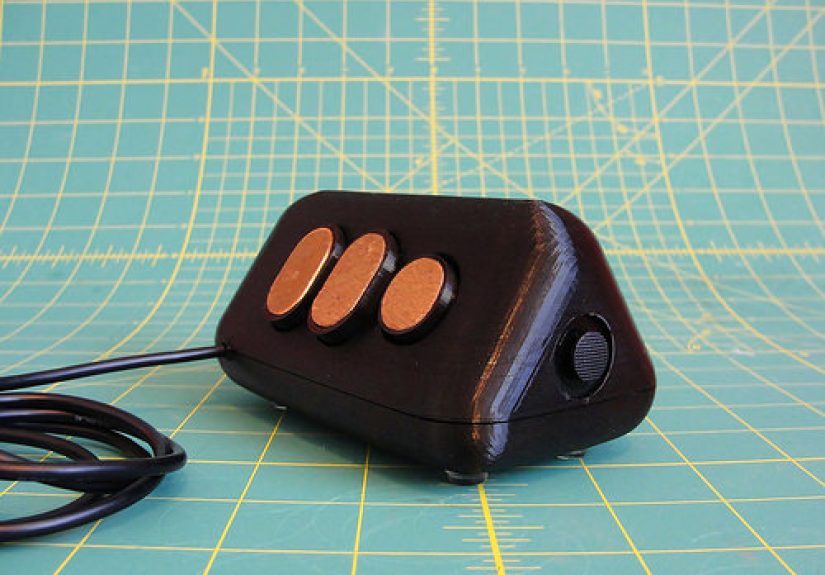
At its core, the Rabbit H1 is a custom controller built to replace the everyday mouse without sliding around the desk. Instead of moving a sensor across a surface, the user controls the cursor with a thumb-operated joystick and handles clicks/scrolling with finger-accessible controls. That means the device stays in one place while your hand remains anchored.
In plain English: it’s part mouse, part mini cockpit, part ergonomic experiment.
Why “stationary” matters
Traditional mice require arm, wrist, and shoulder movementsometimes a little, sometimes a lot, depending on sensitivity, display size, and how many monitors you’ve somehow convinced yourself are “necessary.” A stationary input device changes that equation by shifting more of the work to smaller movements in the fingers and thumb.
That idea overlaps with why trackballs remain popular: they can reduce desk travel, work in tight spaces, and help some users minimize repetitive wrist or shoulder movement. The Rabbit H1 takes a different path than a trackball, but it aims at a similar destination.
The Design Philosophy: A HOTAS-Inspired Mouse Alternative
One of the coolest things about the Rabbit H1 is its inspiration. The design concept borrows from the HOTAS (Hands On Throttle-And-Stick) philosophy used in aviation controls: keep essential actions available without forcing the user to constantly reposition their hand.
That sounds fancy, but the practical idea is beautifully simple: less reaching, less repositioning, more direct control. Instead of moving your hand between cursor movement, clicks, and scrolling, the Rabbit H1 puts those functions under different fingers.
This is what makes the Rabbit H1 interesting from an ergonomic design perspective. It isn’t just “a weird mouse.” It’s a deliberate custom input device that treats hand placement as a primary design constraint.
How the controls are mapped
- Thumb: Analog joystick for cursor movement
- Index finger: 5-way joystick for left click and scrolling actions
- Middle finger: Middle-click button
- Ring finger: Right-click button
In other words, the Rabbit H1 doesn’t just replace a mouseit redistributes mouse behavior across your hand. It’s the difference between driving a car with one giant lever and having a dashboard where the important stuff is exactly where you expect it.
How the Rabbit H1 Was Built (And Why Makers Love It)
The Rabbit H1 isn’t just an input-device concept; it’s a fantastic example of iterative hardware design. The builder shaped and reshaped the controller to fit the hand, then refined it in software and fabrication workflows. This is the kind of project that makes makers nod approvingly and immediately say, “Okay, but what would I change?”
1) Ergonomics came first, not last
The shell was modeled in OpenSCAD and physically tested in hand, then adjusted after comfort issues were discovered. That detail matters. Too many DIY input devices start with electronics and end with ergonomics as an afterthought. The Rabbit H1 flipped that order.
The design was narrowed and refined to better fit finger placement, and the final button/joystick locations were measured and transferred back into the model. That’s textbook iterative prototypingexcept more fun, because it ends with a strange little mouse-throttle.
2) Mixed fabrication workflow: 3D printing + CNC-friendly design
Another standout feature is the build strategy: the project used OpenSCAD to generate geometry for parts that could be produced across different tools. The shell and control structures were designed in a way that supported 3D printing, while other pieces (like inlays) were also integrated into the same design thinking.
That kind of workflow is still smart today. If you’re prototyping a custom controller, designing for multiple fabrication methods can speed up iteration and improve the final lookespecially when you want structural parts, decorative pieces, and functional controls to line up cleanly.
3) Maker-friendly electronics, smart HID choice
The Rabbit H1 used a Teensy board as the USB HID interface, which is a practical choice for a custom mouse-like controller. Teensy boards are well known in DIY hardware circles for flexible USB device emulation, and they can present themselves as keyboard/mouse devices while running a custom program.
The project also used joystick components commonly available from hobby electronics suppliers, including an analog thumb joystick. That makes the concept reproducible even if the exact original parts change over time.
4) It was designed to stay put
This is the “stationary mouse replacement” part that people miss if they only glance at the photos. The build included added weight and non-slip feet so users wouldn’t instinctively drag it around like a normal mouse. That’s a tiny design decision with big usability impact.
In product design terms, it’s behavioral design: the device physically nudges you toward the intended interaction model.
Is It Better Than a Mouse? Depends on the Job.
Let’s be honest: “replacement” is a big word. For some tasks, a standard mouse is still the king of immediate familiarity. For other tasks, a stationary controller can feel better, especially when desk space is limited or repetitive movement becomes annoying.
Where the Rabbit H1 concept shines
- Tight workspaces: No need for mouse travel area
- Long browsing sessions: Reduced arm repositioning can feel less fatiguing for some users
- Custom workflows: Finger-mapped controls can be tailored to specific habits
- DIY experimentation: Easy to tweak firmware, dead zones, button behavior, and sensitivity curves
Where it may struggle
- Learning curve: Joystick cursor control feels different from a mouse sensor immediately
- Precision tasks: Pixel-perfect selection may require tuning and practice
- Thumb fatigue: Some users may prefer finger-operated trackballs over thumb-driven control
- Shared computers: The next person will look at it like you built a submarine interface for Excel
That last point is a joke. Mostly.
Rabbit H1 vs. Trackball vs. Vertical Mouse
If you’re researching ergonomic pointing devices, the Rabbit H1 concept sits in a fascinating middle ground between a trackball mouse and a fully custom controller.
Rabbit H1 vs. trackball mouse
Both are stationary on the desk. Both reduce or eliminate the need to move the device around. Both can be useful in small spaces. The main difference is input style:
- Trackball: Spin a ball; usually thumb- or finger-operated; familiar commercial options available
- Rabbit H1: Joystick-based cursor control plus separate directional/click controls; more customizable, more experimental
Modern trackballs from mainstream brands prove there’s still demand for stationary pointer devices. They’re often marketed for comfort, reduced movement, and productivity in limited desk space. That makes the Rabbit H1 feel less like an oddity and more like an early DIY cousin of a category people now recognize.
Rabbit H1 vs. vertical mouse
Vertical mice change hand posture but still require desk movement. The Rabbit H1 changes the interaction model itself. If your main issue is wrist angle, a vertical mouse may be enough. If your issue is repeated arm travel and reaching, a stationary solution may be more interesting.
Rabbit H1 vs. a standard mouse
Standard mice still win for universality, low friction onboarding, and broad software compatibility expectations. But they assume a flat surface, movement space, and a familiar arm/wrist motion pattern. The Rabbit H1 asks a different question: what if your hand stayed in one supported position and the controls came to you?
Why This 2014 Build Still Feels Relevant
The Rabbit H1 was featured years ago, but the idea has aged surprisingly well. In fact, it feels more relevant now for three reasons:
1) Ergonomic awareness is mainstream
Users are more aware of neutral positioning, strain, and repetitive-use discomfort than they were a decade ago. Workplace ergonomics guidance emphasizes comfort, neutral posture, and avoiding prolonged awkward wrist positions or excessive force. The Rabbit H1 isn’t a medical device, but it clearly lives in that design conversation.
2) Stationary pointer devices are having a moment (again)
Trackballs keep evolving, and manufacturers continue releasing new models with more buttons, updated connectivity, and productivity-focused features. That ongoing market activity suggests there is still a real appetite for alternatives to conventional miceespecially for work-heavy setups.
3) DIY input devices are easier to prototype now
Between better firmware ecosystems, accessible CAD tools, improved 3D printing reliability, and a bigger enthusiast community, it’s easier than ever to build a custom controller. What looked like a bold one-off project in the early 2010s now looks like a very reasonable weekend obsession.
If You Want to Build a Rabbit H1-Style Controller Today
You don’t need to copy the Rabbit H1 exactly to benefit from its design lessons. If you want to create a modern DIY stationary mouse replacement, focus on these practical principles:
Start with hand posture, not electronics
Prototype a rough shell first. Cardboard, foam, clay, cheap printsanything is fine. The goal is to find relaxed finger positions before you commit to button spacing.
Tune cursor behavior aggressively
A joystick-controlled cursor lives and dies on firmware tuning. Dead zones, acceleration, smoothing, and max speed all matter. A bad curve makes the device feel “imprecise”; a tuned curve makes it feel intentional.
Separate “precision” and “travel” modes
Consider a firmware toggle for slow precision movement vs. fast screen traversal. This can dramatically improve usability on large displays and multi-monitor setups.
Design for maintenance
Make the shell easy to open. Joysticks, switches, wires, and feet all wear over time. A beautiful sealed shell is great until a switch fails and you need a chisel and a pep talk.
Accept that iteration is the product
Version 1 teaches you where your thumb gets tired. Version 2 fixes it. Version 3 gets a nicer scroll action. Version 4 is the one you swear is final. (It isn’t.)
Experience Notes: What Using a Stationary Mouse Replacement Feels Like (Extended)
One of the most interesting parts of a Rabbit H1-style controller isn’t the parts listit’s the experience curve. Users coming from a standard mouse usually go through a similar sequence of reactions, and it’s almost universal: curiosity, confusion, adjustment, then either “I get it now” or “this is not for me.” That doesn’t mean the idea fails; it means the input model is genuinely different.
The first day typically feels slower than normal. Cursor movement on a thumb joystick can seem over-eager or under-responsive until sensitivity is dialed in. People often overshoot icons, miss tiny UI targets, and wonder whether the device is less accurate than a mouse. In many cases, the issue is not the conceptit’s tuning and muscle memory. Traditional mice have decades of user conditioning behind them. A custom stationary controller starts with zero.
By the second or third day, a different effect can show up: less desk fidgeting. Because the device stays put, the hand settles into a single position instead of sliding, lifting, and recentering. Some users really like this, especially in tight setups where a keyboard, notebook, coffee mug, and one questionable pile of cables are already fighting for territory. The desk feels calmer because the pointer device is no longer competing for real estate.
There’s also a productivity personality match. People who do a lot of clicking through menus, browsing, coding, reading, or timeline scrubbing may appreciate finger-mapped controls once they adapt. Tasks that depend on sweeping arm motionespecially fast gaming or rapid freehand graphic workmay feel less natural unless the firmware is heavily optimized. That doesn’t make the device “bad”; it just means input tools have job descriptions.
Comfort feedback is mixed in a healthy, realistic way. Some people prefer thumb-operated controls and feel relief from reduced wrist travel. Others notice thumb fatigue and realize they’d rather use a finger-operated trackball or a vertical mouse. That is exactly why the Rabbit H1 remains a valuable design reference: it encourages experimentation instead of pretending one shape solves every human hand.
The biggest “aha” moment often comes when users stop comparing it to a mouse and start treating it like a controller. Once that mental shift happens, the layout makes more sense. You’re not dragging a pointer tool across a desk anymore; you’re operating a compact command interface. At that point, the Rabbit H1 concept becomes less of a novelty and more of a legitimate approach to desktop interactionespecially for people who enjoy custom hardware, ergonomic tinkering, and squeezing more function into one hand position.
Final Take
The Rabbit H1 is a smart, weird, and still-useful reminder that the mouse is not the final word in computer input. It combines ergonomic curiosity, maker craftsmanship, and practical HID engineering into a controller that challenges the “move the mouse to move the cursor” assumption.
Is it a universal replacement for everyone? No. Is it a compelling example of what happens when you design around hand behavior instead of hardware convention? Absolutely.
If you’re into ergonomic mouse alternatives, DIY input devices, or simply want your desk to look like you’re about to launch a tiny spaceship while opening a spreadsheet, the Rabbit H1 is a concept worth studyingand maybe rebuilding.