Table of Contents >> Show >> Hide
- Why Remote Work Accessories Suddenly Feel Smarter
- 1. Portable Monitors Are the New Productivity MVP
- 2. Docks and Hubs Are Finally Earning Their Desk Space
- 3. Webcams Are No Longer an Afterthought
- 4. Ergonomic Accessories Are Getting More Flexible and Less Ugly
- 5. Audio Gear Does More Than Block Noise
- 6. Lighting Accessories Are Having a Quiet Moment
- 7. Power and Connectivity Accessories Matter More Than Ever
- 8. The Best Remote Work Setup Is the One That Matches Your Real Life
- What Using These Accessories Actually Feels Like Over a Full Remote-Work Week
- Conclusion
Remote work used to mean opening a laptop at the kitchen table, balancing a coffee mug next to a charger that looked like it had survived three breakups, and hoping your built-in webcam didn’t make you resemble a haunted potato. Now the accessory market has grown up. Today’s best computer accessories for remote work are not just prettier desk ornaments or gadgets with suspiciously dramatic product photos. They solve real problems: cramped screens, neck strain, bad lighting, weak audio, cable chaos, and the weirdly specific frustration of trying to look professional while sitting three feet from a laundry basket.
That is why the newest wave of remote work accessories is so interesting. Instead of asking you to build a full command center worthy of a space launch, many of these products are designed to make flexible work feel normal. Some help you turn a dining table into a real workstation in under a minute. Others give laptops the ports, lighting, and ergonomic support they have always deserved but rarely receive. And a few are so useful that they quietly become part of your daily routine, which is the highest compliment any accessory can earn.
If you are building or upgrading a remote work setup, the big idea is simple: buy tools that remove friction. Not tools that look cool for five minutes and then live forever in a drawer next to mystery cables. The accessories below stand out because they make it easier to focus, communicate, move, and work from more than one location without sacrificing comfort.
Why Remote Work Accessories Suddenly Feel Smarter
The category has changed because remote work itself has changed. Fewer people are locked into one permanent home office. Plenty of professionals now move between a home desk, a shared office, a coffee shop, a hotel, or a relative’s house with suspicious Wi-Fi and heroic levels of background noise. That shift has pushed brands to design accessories that are more portable, more adaptable, and more useful in small spaces.
At the same time, laptops have become powerful enough to serve as full-time work machines, which means accessories now do more of the supporting labor. A strong dock can turn a thin laptop into a multi-monitor desktop setup. A portable display can expand a cramped screen into a serious workspace. A webcam with better framing and low-light performance can make meetings look less chaotic. An ergonomic keyboard and mouse can reduce the kind of low-grade physical discomfort that quietly drains your concentration all day long.
In other words, modern home office accessories are not trying to replace your computer. They are trying to fix the parts of laptop life that still feel compromised.
1. Portable Monitors Are the New Productivity MVP
If one accessory has become the unofficial symbol of grown-up remote work, it is the portable monitor. The reason is not complicated: laptop screens are fine until you need to compare documents, manage a spreadsheet while answering messages, edit media, or keep a meeting visible without sacrificing the rest of your workflow. At that moment, one screen suddenly feels like a tiny apartment with no closets.
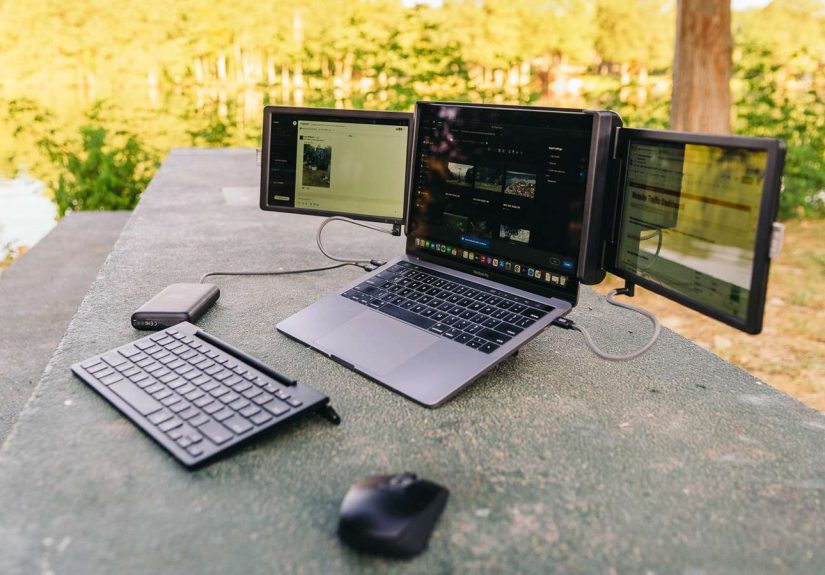
Newer portable monitors are far more compelling than the bulky second screens of a few years ago. Many connect with a single USB-C cable, slide easily into a bag, and deliver sharp, bright panels that make real work possible away from a permanent desk. Premium models are now pushing into better color, better brightness, and more polished stands, which makes them attractive for creative professionals, analysts, and anyone who likes seeing more than three cells of a spreadsheet at a time.
Portable display accessories are especially useful for hybrid workers because they travel well. You can set one up beside your laptop at home, then pack it for a work trip or a temporary remote day elsewhere. That flexibility matters. A remote work setup should not collapse the moment you leave your primary desk.
What to look for in a portable monitor
Prioritize USB-C connectivity, decent brightness, a sturdy stand, and a size that matches your real habits. If you commute often, a lighter 14- or 15-inch model may be perfect. If you mostly work around the house, a larger panel or even a foldable dual-screen extender might make more sense. The best portable monitor for remote work is not necessarily the fanciest one. It is the one you will actually carry and use.
2. Docks and Hubs Are Finally Earning Their Desk Space
Docks used to be boring little bricks that existed mainly to remind you how many ports laptop makers had removed. Today, docking stations are becoming central remote work accessories because they can simplify almost everything on your desk. One cable connects your laptop to monitors, storage, Ethernet, audio, card readers, chargers, and other peripherals. That means less plugging, less unplugging, and less muttering under your breath before your first meeting.
Newer docks are also faster and more ambitious. Thunderbolt 5 and updated USB4 standards are expanding bandwidth, power delivery, and display support. Translation: one good dock can help support more demanding remote work setups without turning your desk into a spaghetti festival of adapters and half-trusted cables. Some new models even add built-in storage or higher charging output, which turns the dock into more of a workstation brain than a passive connector box.
For remote workers, a dock matters because it reduces setup time. If you move between locations, you do not want to rebuild your desk from scratch every day. You want one clean connection that says, “Welcome back, your monitors are ready, your keyboard is awake, and your life is slightly less ridiculous now.”
Who benefits most from a dock
If you use multiple displays, transfer large files, plug into wired internet, or swap between desk mode and travel mode, a docking station is one of the smartest upgrades you can make. It is especially helpful for people using thin laptops with limited ports and big workloads.
3. Webcams Are No Longer an Afterthought
Built-in laptop cameras have improved, but external webcams still hold a huge advantage for remote work. Better sensors, sharper image quality, stronger low-light performance, and smarter framing can make you look more present, more professional, and less like a witness in a true-crime reenactment.
The newest webcam accessories also address different styles of work. Some are simple and affordable, ideal for everyday meetings. Others focus on 4K quality, auto framing, or presentation-friendly movement. A few newer models even track motion or make it easier to demonstrate physical objects on camera, which can be useful for teachers, creators, sales professionals, and anyone who regularly presents something more exciting than a shared slide deck.
A good webcam does not need to make you look cinematic. It needs to make you look clear, well-lit, and easy to engage with. That is a much more useful goal. Combined with decent lighting and a reasonable camera angle, an external webcam can make remote meetings smoother for everyone involved.
What makes a webcam worth buying
Look for reliable autofocus, strong low-light handling, a field of view that matches your setup, and software controls that are not obnoxious. If you spend a lot of time in calls, that small upgrade can pay off every single weekday.
4. Ergonomic Accessories Are Getting More Flexible and Less Ugly
For years, ergonomic gear had a branding problem. It often worked well, but it looked like office equipment from a future where every object was designed by a tax consultant. That is changing. New ergonomic computer accessories are more portable, more attractive, and more realistic about how remote people actually work.
Laptop-raising kits are a great example. Instead of asking users to buy a stand, a separate keyboard, a separate mouse, and a bag to carry everything, some newer systems bundle the essentials into a compact format. That is useful because laptop ergonomics are not optional in a real remote schedule. If you spend six to eight hours hunched over a low screen, your neck, shoulders, and wrists will absolutely send feedback. They are very committed to the feedback process.
Ergonomic keyboards and mice are improving too. Split or curved keyboards can help reduce strain, while newer ergonomic mice aim for a more natural hand position without feeling awkward or oversized. The key is matching the tool to your body and your workflow. The “best” ergonomic accessory on paper can still be the wrong one if it feels unnatural after two hours.
Best ergonomic strategy for remote workers
Raise the laptop screen, separate the keyboard from the display, and choose an input device that feels comfortable for long sessions. You do not need a dramatic makeover. Small ergonomic upgrades often deliver the biggest improvement in comfort and concentration.
5. Audio Gear Does More Than Block Noise
Noise-canceling headphones and earbuds remain some of the most useful home office accessories, but their role has expanded. Yes, they still help with barking dogs, leaf blowers, hallway chaos, and that one neighbor who appears to be assembling furniture with a medieval hammer. But modern audio gear also improves call clarity, reduces listening fatigue, and gives remote workers more control over their environment.
This matters because remote work is rarely silent. Even in a quiet home, there is mental clutter. Good headphones create a cleaner space for focus. Some people prefer over-ear noise-canceling headphones for long work blocks, while others like open-ear or lighter earbuds for staying aware of what is happening around them. There is no universal winner. The right choice depends on whether you need isolation, comfort, portability, or a blend of all three.
Microphone quality matters too. If you spend half your day speaking in meetings, colleagues should not have to decode your voice through laptop fan noise and kitchen acoustics. Better call audio is not just a luxury. It is a professional courtesy.
6. Lighting Accessories Are Having a Quiet Moment
One of the sneakiest remote work problems is bad lighting. Not dramatic darkness. Just the normal kind: dim corners, overhead glare, monitor brightness fighting the room, and eyes getting tired by late afternoon. That is why screen bars and laptop lighting accessories are gaining attention.
They solve a very specific issue elegantly. Instead of taking up desk space like a conventional lamp, a screen bar sits above your display and throws light onto your workspace. Newer laptop-focused versions bring the same idea to smaller setups. This can improve visibility, reduce eye strain, and make the desk feel more intentional without requiring a total lighting overhaul.
Lighting will not magically make work fun, but it can make long days more tolerable. And that counts. A workspace that is easy on the eyes is usually easier on the brain too.
7. Power and Connectivity Accessories Matter More Than Ever
Remote work is easier when your setup can survive movement. That means newer chargers, cables, travel routers, and compact power accessories deserve more attention than they get. Small connectivity tools are often the difference between “I can work from anywhere” and “I can technically work anywhere, but only if that place has the exact cable ecosystem of my apartment.”
GaN chargers are especially helpful because they can power multiple devices from a smaller brick. Travel-friendly routers and Ethernet-capable accessories can rescue unstable connections. High-speed cables matter more as docks, monitors, and storage devices become more demanding. And as newer standards like USB4 and Thunderbolt 5 spread, the upside of buying a better accessory is not only speed. It is simplicity. Fewer bottlenecks. Fewer compatibility surprises. Fewer mysterious moments where nothing works until you unplug everything and begin negotiating with the desk.
8. The Best Remote Work Setup Is the One That Matches Your Real Life
It is tempting to chase the perfect setup photo: giant monitor, cinematic lighting, sculpted keyboard, spotless wood desk, suspiciously healthy plant, and not a single ugly cable in sight. But real remote work is messier. You may need to work from a small apartment, a shared room, a couch, a temporary rental, or a desk that also serves as a homework station, craft table, and occasional storage zone for things that definitely do not belong there.
That is why the smartest computer accessories for remote work are the ones that fit your actual routine. If you move often, portability matters more than extreme power. If you live in meetings, prioritize webcam and audio quality. If your body feels wrecked by lunchtime, ergonomics should come first. If you manage lots of windows and documents, a second screen will probably beat almost any other upgrade.
The goal is not to buy more gear. The goal is to remove the friction that steals time and attention from your work.
What Using These Accessories Actually Feels Like Over a Full Remote-Work Week
Here is the part that matters most: the experience. On paper, remote work accessories sound like features. In real life, they feel like fewer tiny annoyances stacking up all day.
Imagine a Monday morning with a laptop alone on the table. You start the day squinting at tabs, tilting the screen to dodge glare, reaching for one port after another, and jumping into a meeting where your camera makes you look like you are broadcasting from inside a shoe box. Nothing is catastrophic. It is just mildly irritating in twelve separate ways. That is how bad setups wear people down. Not with one giant failure, but with constant background friction.
Now picture the same day with a few smart upgrades. You open a compact workstation kit or put your laptop on a stand so the screen is closer to eye level. A portable monitor snaps into place beside it, and suddenly your inbox can live on one screen while your real work stays visible on the other. A dock handles power, storage, and accessories through one cable. Your webcam sits at a flattering height instead of staring up at your chin like a documentary crew studying cave formations. Your keyboard and mouse feel natural. Your headphones cut the noise without making your head feel trapped in a padded vault. A screen bar turns the desk into a place where reading and typing feel easy instead of dim and cramped.
By Tuesday, you notice something surprising: you are not thinking about the accessories anymore. You are just working. That is the magic. The best remote work gear fades into the background and lets your attention stay on tasks, conversations, and ideas.
By Wednesday, the portability starts to matter. Maybe you shift to another room for a change of pace. Maybe you work from a shared office or a cafe. A good remote work setup no longer feels fixed to one sacred desk. It becomes modular. You take the pieces that matter most and rebuild your comfort quickly in a new place. That flexibility feels freeing, especially if your schedule changes often.
By Thursday, the ergonomic benefits become obvious. Your shoulders are not creeping upward. Your wrists are less cranky. You are not leaning toward the screen like it owes you answers. Comfort sounds boring until you realize discomfort has been stealing your patience all week. Better posture and better input devices do not make you a different person, but they can make you a less distracted one.
By Friday, the cumulative effect shows up in your energy. Meetings feel less draining when you can hear clearly and be seen clearly. Focus work feels more possible when your screen space matches your workload. Even the small rituals improve. Plug in one cable. Open the stand. Turn on the light. Start working. The day begins with less resistance.
That is the real promise of new computer accessories for remote work. They do not transform work into a beach vacation with spreadsheets. They do something better: they make remote work feel stable, intentional, and easier to sustain. And in a world where so many jobs now rely on digital tools, that kind of improvement is not flashy. It is valuable.
Conclusion
The latest remote work accessories are not just chasing novelty. The best ones answer practical questions: How do I get more screen space without carrying a full desktop monitor? How do I connect everything without drowning in dongles? How do I look and sound better on calls? How do I stay comfortable when my job lives on a laptop? From portable monitors and high-speed docks to ergonomic keyboards, noise-canceling headphones, better webcams, and compact lighting tools, these upgrades are making remote work more flexible and more human.
If you are deciding where to start, begin with your biggest pain point. Buy the accessory that fixes the most annoying part of your workday. That one change is usually worth more than a dozen trendy extras. Remote work may never be perfect, but with the right accessories, it can feel a lot less like improvisation and a lot more like a system that actually supports you.