Table of Contents >> Show >> Hide
- So, What Is This “Creepy” Photo-Sharpening Tool, Anyway?
- How AI Brings Sharpness Back to Low-Res Photos
- Why Some AI-Enhanced Faces Look So Unsettling
- When “Enhancing” Becomes Misleading
- Fun and Legit Ways to Use AI Photo Sharpening Tools
- How to Use AI Photo Sharpeners Without Creating Nightmare Fuel
- Real-World Experiences With AI Photo Sharpening
- Conclusion: Powerful, Impressive… and Not Actual Magic
The internet has a special talent for taking cool new technology and immediately using it on the weirdest possible things.
That’s exactly what happened when people discovered a neural network “face depixelizer” that could turn super blocky, low-res
faces into sharp portraits. At first glance, it looked like tech magic. Then folks tried it on video game characters, emojis,
and famous people. That’s when the results went from “wow” to “uh… please close that tab.”
The Bored Panda feature that popularized this phenomenon showed what happens when you feed a handful of pixels into a smart
AI tool and ask it to imagine the “most likely” real human behind them. Sometimes it nailed it. Other times the results
looked like someone who lives in the uncanny valley and only comes out at 3 a.m. for snacks.
But behind the memes and creepy faces is a genuinely fascinating technology: AI-powered image super-resolution. These
tools can restore detail, remove blur, and make old or tiny images look like they were shot on a modern DSLR… at least
when everything goes right. Let’s unpack what these tools do, why they sometimes go off the rails, and how to use them
without turning your family photo album into a horror anthology.
So, What Is This “Creepy” Photo-Sharpening Tool, Anyway?
The Bored Panda article spotlighted an online demo often referred to as a “face depixelizer.” Under the hood, it was
built on research called PULSE (short for “Photo Upsampling via Latent Space Exploration”), a method that uses a
powerful generative model to reconstruct high-resolution faces from very low-resolution inputs.
Here’s the key twist: the tool doesn’t magically reveal the “true” face hidden in the pixels. It generates a
completely new face that could plausibly match the blurry original. Think of it less like cleaning a window,
and more like asking a very confident artist to redraw a tiny, fuzzy photo from memory.
The model works by:
- Taking a tiny, pixelated face as input.
- Searching a “latent space” of possible faces that a generative model (like StyleGAN) knows how to create.
- Downscaling each candidate face and comparing it to the original pixels.
- Picking the one whose downscaled version best matches the low-res image.
It’s clever, but it comes with some big caveats. The model was trained on a large celebrity face dataset, which means
it’s really good at generating people who look like they belong on red carpets or magazine covers. It’s not great at
generating, say, Minecraft creepers, cartoon plumbers, or presidents whose features aren’t well represented in the
training data. That’s why some depixelized faces looked nothing like the original characters and sometimes even
changed race or age compared with the source image.
How AI Brings Sharpness Back to Low-Res Photos
The face depixelizer is just one example of a bigger field called image super-resolution. The core idea
is simple: take a low-resolution image and generate a higher-resolution version that looks detailed instead of blurry.
Traditional methods did this with math and guesswork: bicubic interpolation, sharpening filters, or simple denoising.
These tricks can make an image look a bit crisper, but they can’t invent real detail. In fact, aggressive sharpening
can actually make things worse by adding halos, noise, or strange edge artifacts.
Modern AI tools take a different approach. Deep learning models like ESRGAN, Real-ESRGAN, and GFPGAN are trained on
huge datasets of high- and low-resolution image pairs. During training, they learn how fine textures, edges, and
details should look when you upscale a small image. Once trained, they can take a low-res input and generate
a higher-res output that looks remarkably realistic.
These systems don’t just “stretch” the image they hallucinate detail based on patterns they’ve seen before.
That’s why:
- Old portraits can suddenly show sharper eyes, hair, and skin texture.
- Vintage family photos look like they were scanned in HD instead of with a potato.
- Product photos for e-commerce can be upscaled for big banners without looking muddy.
In 2025, AI enhancers have gone mainstream. There are:
- Online tools that let you drag-and-drop images for instant enhancement.
- Desktop apps aimed at photographers and designers that tie into full editing workflows.
- Open-source models like Real-ESRGAN and GFPGAN that hobbyists run locally or integrate into scripts.
The pros love them because they can rescue borderline images. Regular users love them because they’re one-click magic.
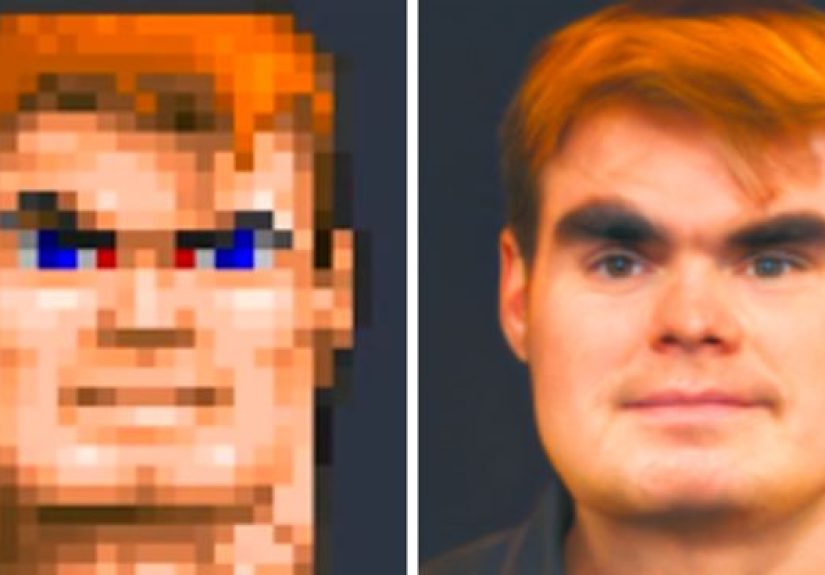
And meme-makers love them because, frankly, nothing beats turning a 16-pixel game character into an oddly intense middle-aged guy.
Why Some AI-Enhanced Faces Look So Unsettling
Let’s talk about the elephant in the room or rather, the stranger with too-perfect skin and slightly haunted eyes.
When AI “restores” a face from a handful of pixels, it’s not restoring the person, it’s guessing. That guess is influenced by:
-
Training data bias. If most of the faces in the training set are of a certain race, age, or style,
the model tends to drift toward that look, even if the original person doesn’t match it. -
Over-smooth perfection. AI often cleans up noise and texture so aggressively that faces look plastic
or doll-like, which our brains interpret as “off.” -
Symmetry obsession. Human faces are naturally a bit asymmetrical. AI models sometimes over-correct,
creating faces that are technically pretty but eerily unnatural. -
Micro-expression mismatch. Tiny details around the eyes and mouth communicate emotion. AI doesn’t
always get those nuances right, so the expression doesn’t quite match what you expect from the original.
That’s why people found some PULSE depixelizations and similar tools “creepy.” You’d start with a pixelated Barack Obama
and end up with a vaguely similar-looking white guy. Or you’d feed it an 8-bit game character and get a human who looked
like they’d taken a wrong turn out of a haunted oil painting. The face fits the pixels, but not the context.
When “Enhancing” Becomes Misleading
The creepiness isn’t just aesthetic it can also be ethical. Recently, AI upscalers have been used on blurry security
or surveillance photos, with people sharing “enhanced” faces online as if they reveal hidden truth. That’s a serious problem.
Because these tools are generative, they can easily change crucial details: skin tone, facial hair, clothing, even
facial structure. In other words, the “enhanced” face might look sharp and convincing… and still be completely wrong.
Treating that as hard evidence in a real investigation is like trusting a police sketch made by a chatbot.
For personal use restoring old memories, making prints, or cleaning up vacation photos AI enhancement is amazing.
For law enforcement, journalism, or identifying real people in sensitive situations, it should be used with extreme caution
or not at all. “Looks realistic” is not the same thing as “is accurate.”
Fun and Legit Ways to Use AI Photo Sharpening Tools
Thankfully, there are lots of totally non-problematic ways to use these tools that don’t involve misidentifying strangers
on the internet. Here are some of the most useful and fun use cases.
1. Restoring Old Family Photos
This is where AI upscaling really shines. Many modern enhancers can:
- Remove grain and blur from scanned prints.
- Reconstruct facial details that were lost in low-resolution scans.
- Even colorize black-and-white photos in a reasonably natural way.
You still want to keep a copy of the original, but an enhanced version can make a great print, photo book page, or
framed gift. Just remember: you’re creating a modern interpretation of the photo, not an exact historical document.
2. Upgrading Product and Social Media Photos
If you sell online or post content regularly, sharp images are non-negotiable. AI enhancers can:
- Upscale small product photos for banners without turning them into mush.
- Reduce noise from phone photos shot in bad lighting.
- Polish portraits for profile pictures, headshots, or content branding.
Many tools now have “portrait,” “product,” or “general” modes that adjust how aggressively they sharpen or smooth
details. That helps you avoid the dreaded plastic-skin effect.
3. Leaning Into the Weirdness for Art and Memes
Let’s be honest: the creepy results are also part of the fun. People love:
- Feeding pixelated game characters into face enhancers just to see what comes out.
- Turning emoji faces into “real people” portraits.
- Combining AI upscaling with scary filters for horror-style edits.
Used responsibly, this is pure entertainment. As long as you’re not pretending these are real people, AI-generated
weirdness can be a creative playground.
How to Use AI Photo Sharpeners Without Creating Nightmare Fuel
Want the benefits without the accidental horror poster vibes? Here are some practical, user-tested tips:
1. Start With the Best Version You Have
AI can do a lot, but it’s not a resurrection spell. The fewer pixels it has to guess, the more it has to invent. If
you have any way to scan or export a slightly higher-res version of a photo, do that first. Even going from “tiny
thumbnail” to “small but not microscopic” can dramatically improve the result.
2. Avoid Extreme Jumps in Resolution
Going from, say, 64×64 to 4K resolution is asking for hallucinations and weirdness. If a tool lets you choose 2×, 4×,
or 8× upscaling, start with 2× or 4×. You can always upscale again or combine multiple passes instead of forcing one
massive leap.
3. Use Face Enhancement Settings Carefully
Many apps include a “face enhancement” toggle or slider. That’s the part that tries to reconstruct eyes, lips, and
skin texture. If your results look creepy:
- Reduce or disable face enhancement.
- Try a more “general” or “natural” model instead of a heavy beauty filter.
- Compare with the original to make sure the expression and identity still feel right.
4. Always Keep the Original
It’s tempting to overwrite lower-quality images once you see a sharp version, but don’t. The original is your only
true record of what was actually captured. The AI-enhanced version is more like a restoration plus an artistic guess.
5. Be Honest About What’s Been Edited
For personal sharing, a simple “AI-enhanced” mention is usually enough. For anything related to news, documentation,
or sensitive topics, transparency is crucial. People deserve to know when a photo has been algorithmically altered.
Real-World Experiences With AI Photo Sharpening
If you hang out online long enough, a familiar pattern emerges in people’s stories about using these tools. It usually
goes something like this:
First, there’s the nostalgia test. Someone digs up a small, blurry photo maybe a shot from an early digital camera,
or a cropped thumbnail from a long-defunct social network. They drop it into an AI enhancer “just to see what happens.”
The result pops up in a few seconds: suddenly, the faces are clearer, the background is less muddy, and the whole scene
looks like it was captured with much better gear. For many users, this is a genuinely emotional moment, especially with
photos of family members or old friends.
Next comes the curiosity phase. Once that first success hits, people start experimenting. What if they run the same tool
on an old school yearbook scan? On a favorite band photo from a grainy concert? On a pixelated screenshot from a childhood
video game? This is where things often get funny. A vaguely human-shaped blob from a retro game suddenly becomes a sharply
rendered stranger with oddly intense eyes. Emojis morph into strangely specific humans. Cartoon monsters turn into
individuals who look like they’re one coffee away from starting a podcast.
The reactions tend to fall into two camps. One group is delighted by the weirdness they lean into it, share the results
as memes, and try to one-up each other with the strangest before-and-after pairs. The other group hits a point where the
uncanny valley kicks in. They’re fine with restored family photos and upgraded travel shots, but there’s a line between
“cool enhancement” and “I don’t want this face looking at me from my screen anymore.”
People who restore old family albums often describe a mixed feeling of warmth and unease. On the one hand, details like
eyes, hair, and fabric texture feel more “alive” than in the original scans. On the other, some notice that the enhanced
faces feel just a bit too smooth like their grandparents have been lightly filtered by an influencer app. For many,
the solution is to treat these as two separate artifacts: the original as the historical record, and the enhanced version
as a modern tribute that makes the photo easier to appreciate today.
Over time, experienced users get more selective. They figure out which tools work best for portraits, which are better for
landscapes or products, and which ones are most likely to generate odd-looking faces. They learn to dial down aggressive
settings, avoid wild upscaling jumps, and stop expecting AI to reconstruct truth from almost no data. The goal shifts from
“let’s see what happens” to “let’s make this look great while still feeling like the same moment.”
And that’s really the sweet spot. AI photo sharpeners are at their best when they act like respectful restorers rather
than overconfident makeover artists. Used thoughtfully, they can bring old memories into sharper focus, rescue borderline
images from the trash folder, and power an infinite stream of internet jokes without accidentally turning your pixelated
childhood into a gallery of haunted strangers.
Conclusion: Powerful, Impressive… and Not Actual Magic
The tool that “brings back sharpness of low-res photos” and all its modern cousins reveals something important about
AI. These systems are incredibly good at making things look plausible. They are not always good at making things
accurate. When you feed a few pixels into a generative model and ask it to imagine a face, it will do exactly that: imagine.
For Bored Panda readers, that mix of brilliance and weirdness is part of the charm. You get stunning restorations,
hilarious misfires, creepy almost-humans, and the occasional “wow, that actually looks just right.” As long as we remember
that AI-enhanced photos are interpretations rather than x-ray reveals of hidden detail, we can enjoy the tech, laugh at
the fails, and use these tools to make our visual lives sharper without losing sight of reality.