Table of Contents >> Show >> Hide
- Why an Xbox 360 Wireless Controller Keeps Shutting Off
- Way 1: Replace or Recharge the Power Source Properly
- Way 2: Clean the Battery Contacts and Tighten the Connection
- Way 3: Re-Sync the Controller and Reset the Console
- When an Xbox 360 Controller Is Probably Beyond an Easy Fix
- Final Thoughts
- Experience-Based Notes: What This Problem Usually Looks Like in Real Life
- SEO Tags
If your Xbox 360 wireless controller keeps shutting off in the middle of a race, firefight, or wildly important couch co-op argument, you are not alone. This is one of those old-school gaming problems that can feel dramatic, but the fix is usually less “replace the whole controller” and more “your power connection is being weird again.” In plain English: most random shutoffs come down to power, contact, or connection.
The good news is that you usually do not need a soldering iron, a repair degree, or the patience of a saint. In most cases, you can solve the problem with a better battery test, a quick cleaning session, and a proper re-sync. This guide walks you through the three most effective ways to fix an Xbox 360 wireless controller that keeps shutting off, plus the signs that tell you when the controller is simply too far gone and deserves retirement.
Why an Xbox 360 Wireless Controller Keeps Shutting Off
Before jumping into the fixes, it helps to know what is probably going wrong. An Xbox 360 wireless controller that shuts off unexpectedly usually falls into one of these buckets:
- The batteries are weak, inconsistent, or installed in a pack that is starting to fail.
- The battery contacts are dirty, corroded, bent, or not making solid contact.
- The controller loses its sync with the console, or wireless interference interrupts the connection.
- The rechargeable battery pack is old enough to qualify for a nostalgia exhibit.
- The controller has internal wear from drops, heavy use, or years of being tossed onto the couch “gently.”
That is why the smartest approach is not to guess. It is to test the controller in a simple order: power first, contact second, connection third. Start with the easy stuff. Your future self will appreciate the efficiency.
Way 1: Replace or Recharge the Power Source Properly
Start Here Because Power Problems Are the Usual Culprit
If your Xbox 360 wireless controller keeps shutting off, the first fix is to stop trusting the current batteries just because they “worked yesterday.” Old AA batteries can look fine and still drop power under load. Rechargeable battery packs can also seem okay, then suddenly behave like they are on their final emotional support bar of energy.
This is especially common with older Xbox 360 rechargeable packs. They wear out over time, and once that happens, the controller may turn on, blink, work for a few minutes, then shut off again. It can look like a console issue when the real problem is simply unstable power delivery.
What to Do
- Remove the current batteries or battery pack.
- Install a fresh, known-good set of disposable AA batteries.
- Turn the controller on and test it for at least 15 to 20 minutes of actual gameplay.
That last part matters. Do not test it by pressing the Xbox button once and declaring victory. Play something. Make the controller work. If it stays on during real use, your old batteries or rechargeable pack were almost certainly the problem.
If You Use a Rechargeable Pack
If you normally use an Xbox 360 rechargeable battery pack, swap to AA batteries just for troubleshooting. This is the fastest way to isolate the fault. If the controller works flawlessly with fresh AAs but keeps shutting off with the rechargeable pack, congratulations: you found the troublemaker.
At that point, your best move is usually to replace the rechargeable pack rather than keep wrestling with it. Aging packs do not get better with pep talks.
Signs the Battery or Battery Pack Is the Problem
- The controller turns on, then shuts off after a few seconds or minutes.
- The ring lights flash, but the controller will not stay connected.
- The controller works better with fresh AA batteries than with the rechargeable pack.
- The problem gets worse during vibration-heavy games, which demand more power.
Extra Tip
If you keep multiple controllers around, test the suspect battery pack in another compatible controller if possible. If the issue follows the battery pack, the case is basically closed. If the issue stays with the original controller, move on to the next fix.
Way 2: Clean the Battery Contacts and Tighten the Connection
Why This Fix Works
An Xbox 360 wireless controller depends on a steady connection between the power source and the contact points inside the controller. If those metal contacts are dirty, slightly corroded, flattened, or loose, the power can cut in and out whenever you shift your grip, hit a button hard, or let the controller vibrate. In other words, your controller is not always “dying.” Sometimes it is just losing electrical contact for a split second and shutting itself down.
This is especially common on older controllers that have seen years of battery swaps, minor drops, or leaky batteries. Even a tiny amount of grime or oxidation can cause a surprisingly annoying problem.
What You Need
- A dry microfiber cloth
- A cotton swab
- A small amount of isopropyl alcohol
- Fresh batteries or a known-good battery pack
How to Clean the Contacts
- Turn the controller off completely.
- Remove the batteries or battery pack.
- Inspect the battery contacts inside the controller and on the battery pack.
- Use a dry cloth to wipe away loose dust or debris.
- Lightly dampen a cotton swab with isopropyl alcohol and gently clean the metal contacts.
- Let everything dry fully before reinstalling the batteries.
The key word here is lightly. You are cleaning electronics, not marinating them. The swab should be damp, not dripping.
Check for Loose or Bent Contacts
After cleaning, look closely at the metal battery contacts. If one looks noticeably flattened or pushed too far back, it may not be pressing firmly against the battery or battery pack. That weak connection can cause random shutoffs, especially when the controller vibrates or gets moved around.
If you are comfortable doing so, you can very gently nudge a slightly flattened metal contact outward so it makes better pressure against the battery. Be careful. You want a tiny adjustment, not a heroic bend that snaps the metal. If the contact is badly damaged, corroded, or loose inside the shell, replacement is smarter than improvisation.
Pay Attention to the Battery Pack Fit
Sometimes the issue is not the inside contacts at all. It is the battery pack fit on the back of the controller. If that pack wiggles, sits loosely, or loses power when touched, the controller may shut off even if the batteries inside it are fine.
Try this simple test: install the pack, power on the controller, and gently move the battery pack with your hand. If the controller shuts off or flickers, the connection is unstable. That usually means the pack is worn, the contact point is not lining up correctly, or the spring contacts inside the controller need attention.
When Cleaning Is Not Enough
If you see visible corrosion, rust-like residue, or serious battery leakage damage, cleaning may not fully solve the problem. At that point, the controller may need deeper repair or replacement parts. Still, it is worth trying the cleaning step first because it costs almost nothing and often fixes intermittent shutdown issues surprisingly fast.
Way 3: Re-Sync the Controller and Reset the Console
Sometimes the Problem Is Not Power at All
If your batteries are good and the contacts are clean, the next fix is to re-sync the controller and reset the console. Wireless controllers can lose their connection, especially if the controller has not been used in a while, the console has been moved, or there is interference from nearby electronics.
With the Xbox 360, interference can come from other wireless devices in the room. Routers, cordless phones, and even microwaves can be surprisingly rude neighbors. No, your controller is not being haunted. It is just sharing airspace with too many gadgets.
How to Re-Sync an Xbox 360 Wireless Controller
- Turn on the Xbox 360 console.
- Turn on the controller by pressing the Xbox button.
- Press the connect button on the console.
- Then press the connect button on the controller.
- Wait for the ring lights to stop spinning and settle into a connected position.
If the controller connects and stays on, great. If it still shuts off, do a full reset next.
How to Reset the Controller and Console
- Turn the controller off completely.
- Remove the batteries or battery pack for several seconds.
- Turn off the Xbox 360 console.
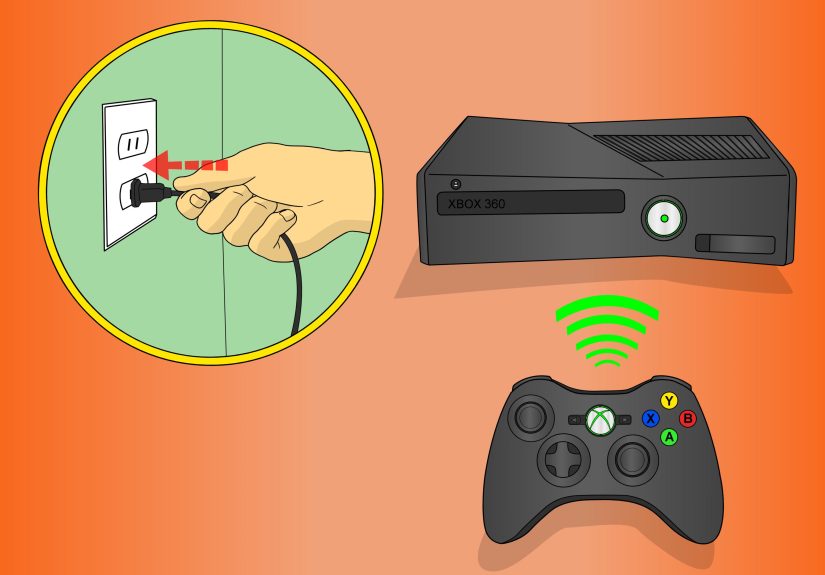
- Unplug the console from power for about 30 seconds.
- Plug it back in and turn it on.
- Reinstall the controller batteries and sync the controller again.
This reset clears a lot of random connection weirdness. It is not glamorous, but it often works because it removes temporary communication hiccups between the controller and the console.
Reduce Wireless Interference
If the controller disconnects only in a specific room setup, interference may be part of the problem. Try these quick adjustments:
- Move closer to the console.
- Move wireless routers or cordless phones farther away.
- Avoid using the controller right next to large metal shelving or enclosed cabinets.
- Turn off nearby devices temporarily and see whether the problem improves.
If one change suddenly makes the controller stable, you have found your answer. It is not always elegant, but at least it is better than rage-quitting because the controller rage-quit first.
When an Xbox 360 Controller Is Probably Beyond an Easy Fix
Sometimes none of the three main fixes solve the issue. If that happens, the controller may have internal hardware damage. This is more likely if:
- The controller has been dropped repeatedly.
- The battery compartment has visible corrosion or broken plastic.
- The controller only powers on when pressure is applied to the battery pack.
- The controller shuts off even with fresh batteries, clean contacts, and a fresh sync.
At that point, you are looking at a choice between repair and replacement. If you enjoy tinkering, opening the controller to inspect battery springs, internal contact points, or disconnected components may be worth it. If not, replacing the controller may be the more practical move.
For many people, the deciding factor is simple: if the controller is sentimental, repair it. If it smells vaguely like old battery acid and disappointment, let it go.
Final Thoughts
The best way to fix an Xbox 360 wireless controller that keeps shutting off is to work in order, not in panic. Start with the power source. Then clean and inspect the battery contacts. Finally, re-sync the controller and reset the console. Those three steps solve the vast majority of shutoff problems without requiring major repair.
In most cases, the fix ends up being less dramatic than the symptom. A tired battery pack, a slightly loose contact, or a controller that needs a fresh sync can all make the problem feel bigger than it really is. Once you know the pattern, troubleshooting gets a lot easier.
So before you blame the console, the game, the TV, or the universe, give the controller a proper power-and-contact check. There is a very good chance your next gaming session will be uninterrupted, and your controller will finally stop acting like it has stage fright.
Experience-Based Notes: What This Problem Usually Looks Like in Real Life
One of the most common real-world versions of this issue goes like this: the controller powers on just fine, signs into a profile, and then shuts off right when the game starts to get busy. That is a huge clue. If the controller dies during vibration, fast movement, or heavy gameplay but seems fine on the dashboard, the problem is often unstable power rather than a total controller failure. A half-dead rechargeable pack can fake “normal” until the controller asks for a little more juice. Then it folds like a lawn chair.
Another very common experience is the “works if I hold it a certain way” mystery. A player notices the controller only shuts off when they set it down, squeeze the grips, or shift on the couch. That usually points to battery contact issues or a loose battery pack connection. In other words, the controller is not magically responding to your body language. It is responding to pressure. A tiny change in angle can reconnect the battery terminals for a moment, which is why the problem feels random even though it is mechanical.
There is also the classic false alarm where the controller is not actually broken at all. Some people run into shutoff issues only in one room setup or only at one distance from the console. Move closer, remove a source of interference, and suddenly the controller behaves again. That can be especially confusing because it makes the controller seem unreliable when the actual issue is the environment. Wireless devices, entertainment centers, nearby adapters, and crowded living room setups can all create connection headaches that look like hardware failure.
Then there is the aging battery-pack story, which shows up a lot with older Xbox 360 gear. A rechargeable pack that worked for years can gradually become inconsistent. At first, it just seems like shorter battery life. Then the controller starts shutting off mid-game. Then it only works with the charge cable attached. Eventually, it does not hold enough charge to stay alive for a normal session. Many people waste time cleaning everything else first because the pack still lights up and seems to charge. The simplest test is still the best one: swap in fresh AA batteries and see what happens.
Finally, there is the hard truth longtime players know well: old controllers collect history. They get dropped, packed into drawers, loaned to friends, forgotten with leaky batteries, and brought back for one more round of split-screen nostalgia. That history matters. An Xbox 360 controller that keeps shutting off is often telling a story about wear, not just bad luck. The upside is that these stories usually follow a pattern, and patterns are fixable. If you test power, clean the contacts, and re-sync the controller in a sensible order, you can usually tell the difference between a controller that needs a quick rescue and one that has already played its final match.