Table of Contents >> Show >> Hide
- Before You Cancel: Find Out Who Bills Your BetterMe Subscription
- 1. Unsubscribe on the BetterMe Website
- 2. Use the BetterMe App’s “Manage Subscription” Path
- 3. Cancel BetterMe on iPhone, iPad, or Mac Through Apple
- 4. Cancel BetterMe on Android Through Google Play
- 5. Cancel BetterMe Through PayPal Automatic Payments
- 6. Contact BetterMe Support or Use a Payment Dispute as a Backup
- What Happens After You Unsubscribe from BetterMe?
- Mistakes to Avoid When Canceling BetterMe
- Real-World Experiences: What People Usually Learn the Hard Way
- Final Thoughts
Note: This guide reflects current cancellation paths and billing rules as of April 2026. App menus and account pages can shift a little after updates, but the billing-source rule usually stays the same: cancel where you originally subscribed.
You downloaded BetterMe with great intentions. Maybe you were ready to stretch, sweat, fast, meditate, hydrate, or become the kind of person who says things like, “I’m really in my wellness era.” Then real life happened. Suddenly your workout mat became a decorative floor stripe, and that subscription charge looked a lot less inspiring.
If that sounds familiar, don’t panic. Unsubscribing from BetterMe is usually pretty simple once you figure out who is actually billing you. That part matters more than people think. A lot of users get stuck because they try to cancel in the app when the charge is actually coming from Apple, Google Play, PayPal, or BetterMe’s website.
This guide breaks down 6 easy ways to unsubscribe from the BetterMe app, plus what happens after you cancel, how refunds usually work, and the mistakes that can turn a quick cancellation into a small personal feud with your bank statement.
Before You Cancel: Find Out Who Bills Your BetterMe Subscription
Here is the golden rule: cancel BetterMe through the same place where you signed up. Not the place where you happen to be holding your phone. Not the app you opened first. Not the place your tired brain guessed at 11:47 p.m.
In most cases, your BetterMe subscription came from one of these places:
- BetterMe website if you signed up through a web page or quiz funnel
- Apple if you subscribed through an iPhone or iPad payment screen
- Google Play if you subscribed on Android through Google billing
- PayPal if you approved a recurring payment there
A quick clue is the receipt. If the receipt comes from Apple, cancel through Apple. If it comes from Google Play, cancel through Google. If it comes from BetterMe directly, use BetterMe’s profile or support tools. If the charge is routed through PayPal, check PayPal automatic payments too.
1. Unsubscribe on the BetterMe Website
This is one of the easiest methods if you purchased your BetterMe subscription directly from BetterMe’s website. It is also the route many people need when they signed up through one of those quiz-style landing pages that promise a customized plan in about the time it takes to reheat leftovers.
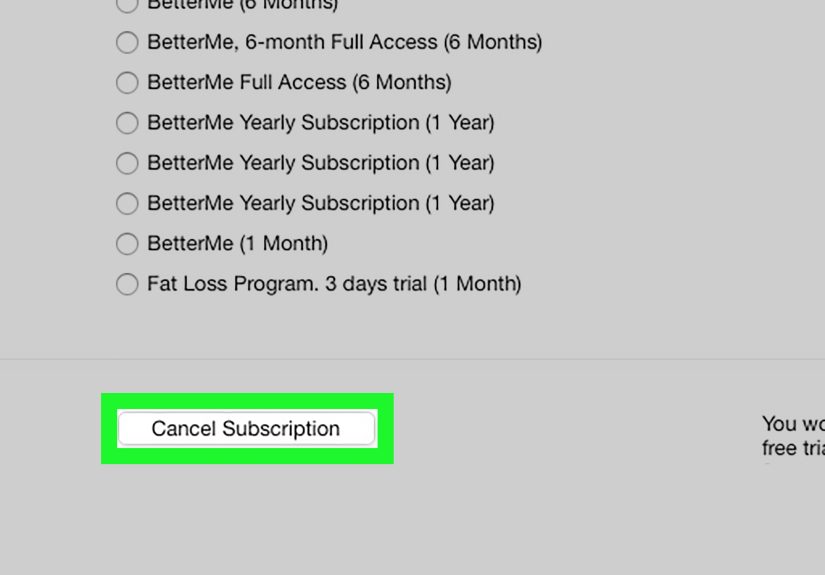
How to cancel BetterMe on the website
- Log in to your BetterMe account on the website.
- Open your profile or account area.
- Go to your subscription settings.
- Choose the option to manage or cancel the subscription.
- Confirm the cancellation and save any confirmation email or screenshot.
If your plan was billed on the web, this is often the cleanest way to stop auto-renewal. BetterMe says website subscribers can manage cancellation in their profile settings, and you should do it before the current billing period ends to avoid the next charge.
Best for: People who signed up through a BetterMe web page, mobile browser, or promotional plan outside the App Store or Google Play.
2. Use the BetterMe App’s “Manage Subscription” Path
This option sounds a little sneaky, but it is actually useful. If your subscription was purchased on the BetterMe website, the app may redirect you to the right place instead of handling the cancellation directly inside the app.
In BetterMe’s current subscription terms, website subscribers may be sent from the app to their web subscription settings. In other words, the app is less of a cancellation headquarters and more of a polite hallway pointing you toward the correct door.
Try this inside the app
- Open the BetterMe app.
- Tap More or go to your profile section.
- Select View My Profile or My Profile.
- Tap Manage Subscription.
- Follow the redirect to the website and switch off renewal there.
This method is especially helpful if you are not sure whether you bought the plan on the web. If the app sends you to a browser-based subscription page, that is your clue that BetterMe, not Apple or Google, is handling the billing.
Best for: Website subscribers who want to start from the app and be directed to the right cancellation screen.
3. Cancel BetterMe on iPhone, iPad, or Mac Through Apple
If you subscribed through Apple, BetterMe is not the company processing the cancellation. Apple is. That means the fix lives in your Apple subscriptions list, not in the BetterMe app itself.
How to unsubscribe from BetterMe on iPhone or iPad
- Open Settings.
- Tap your name at the top.
- Tap Subscriptions.
- Select BetterMe.
- Tap Cancel Subscription.
How to cancel on Mac
- Open the App Store.
- Click your name.
- Open Account Settings.
- Find Subscriptions and click Manage.
- Select BetterMe and cancel it.
Apple also notes something very helpful: if you do not see a cancel button, the subscription may already be canceled. That little missing button has saved many people from doing a dramatic “Why won’t this app let me leave?” monologue in the kitchen.
Best for: Anyone billed through Apple, including free trials started through the App Store.
4. Cancel BetterMe on Android Through Google Play
If your BetterMe subscription runs through Google Play, you need to cancel it from your Google account’s subscription settings. Simply deleting the app will not end the billing. That is an important detail and one of the most common reasons people think they canceled when they really just deleted the evidence.
How to cancel BetterMe on Android
- Open the Google Play Store.
- Tap your profile icon.
- Tap Payments & subscriptions.
- Tap Subscriptions.
- Select BetterMe.
- Tap Cancel subscription and follow the prompts.
Google also makes it clear that uninstalling an app does not cancel the subscription. So if you removed BetterMe three weeks ago and still got charged, that is annoying, but it is also a very fixable situation.
Best for: Android users whose receipt or billing history shows Google Play as the merchant.
5. Cancel BetterMe Through PayPal Automatic Payments
If you approved BetterMe billing through PayPal, you may need to turn off the automatic payment there too. This is one of the most overlooked routes, and it can matter a lot when users remember the app but forget the payment authorization sitting quietly in PayPal settings like a tiny financial raccoon.
How to cancel BetterMe in PayPal
- Log in to your PayPal account.
- Open Settings.
- Go to Payments.
- Select Manage Automatic Payments.
- Find BetterMe.
- Cancel the automatic payment or recurring authorization.
This step can be especially useful if you signed up on the web and used PayPal as the payment method. Turning off the recurring payment gives you one more layer of protection against future charges.
Best for: Anyone who paid BetterMe through PayPal instead of a card stored directly with Apple, Google, or BetterMe.
6. Contact BetterMe Support or Use a Payment Dispute as a Backup
Sometimes the billing source is unclear. Sometimes the cancel button is missing. Sometimes you already canceled and the charge still appeared anyway. That is when you move to the grown-up part of the process: customer support, records, and if needed, a dispute.
When to contact BetterMe support
- You cannot identify where the subscription was purchased
- Your account page will not load or show subscription settings
- You believe you were charged after canceling
- You want to request a refund for a BetterMe website purchase
When contacting support, include the purchase date, email address on the account, the payment method used, and screenshots of any cancellation confirmation you already received. That turns your request from “please help” into “here is the exact paper trail,” which is much more persuasive.
If the charge will not stop
If you have already tried to cancel and recurring charges continue, you may need to contact your payment provider. Consumer guidance in the United States also supports disputing unauthorized recurring charges and stopping certain automatic debits through your bank or card issuer. This is not the first step, but it is a legitimate backup plan when normal cancellation fails.
Best for: Messy billing situations, unclear purchase paths, refund issues, or charges that continue after cancellation.
What Happens After You Unsubscribe from BetterMe?
In most cases, canceling BetterMe stops the next renewal. It does not usually erase your access instantly. If you already paid for the current billing cycle, you will generally keep access until that period ends.
That means canceling is more like saying, “No thanks, do not renew this,” rather than slamming a digital trapdoor shut. You can still use the app for the time you already paid for, then the premium features typically expire at the end of the billing cycle.
BetterMe refund basics
- If you bought through Apple, refund requests usually go through Apple.
- If you bought through Google Play, refund requests usually go through Google.
- If you bought through the BetterMe website, BetterMe handles the refund request directly.
- BetterMe generally does not promise refunds for partially used subscription periods.
There is also an important exception many people miss: certain U.S. state residents may have additional cancellation rights for a short period after purchase. So if you are requesting a refund very soon after signing up, it is worth acting fast instead of assuming the answer is automatically no.
Mistakes to Avoid When Canceling BetterMe
Deleting the app and calling it a day
This is the classic mistake. Deleting BetterMe removes the icon, not the billing agreement.
Canceling in the wrong place
If Apple bills you, BetterMe support may not be able to cancel the Apple-managed subscription for you. Same idea with Google Play. Always follow the money.
Waiting until the last minute
Many subscriptions renew automatically, and some systems recommend canceling at least 24 hours before renewal. Waiting until the final hour is a bold choice, but not a peaceful one.
Not saving proof
Take screenshots. Save emails. Keep timestamps. Future You will be grateful, and Future You deserves nice things.
Ignoring the receipt email
Your receipt usually tells you exactly who is billing you. That one email can save ten minutes of confused tapping.
Real-World Experiences: What People Usually Learn the Hard Way
One of the most common BetterMe experiences goes like this: someone signs up quickly because the offer looks customized, the onboarding is smooth, and the plan sounds motivating. At first, it feels useful. Then the person realizes they are not using it much, assumes deleting the app is enough, and moves on. A little later, the next charge arrives. That is usually the moment when they discover the annoying but important truth that uninstalling an app and canceling a subscription are not the same thing.
Another common experience involves the billing source confusion trap. A user downloads BetterMe on an iPhone and naturally assumes Apple handles everything. But the actual subscription may have started on the BetterMe website, perhaps through a mobile browser or a quiz page. So the user opens Apple subscriptions, finds nothing, and thinks the charge is mysterious. In reality, the subscription is sitting quietly inside a web profile page, waiting to be canceled there. This is why the best first move is always checking the receipt and identifying who billed you.
Free trials create another familiar story. Many people tell themselves they will remember to cancel later. That sentence has ended badly for humanity for years. A few days pass, work gets busy, life becomes chaotic, and suddenly the trial has rolled into a paid plan. The lesson here is painfully simple: if you are unsure, cancel early. In most cases, you still keep access until the trial or billing period ends anyway, so there is very little downside to being proactive.
There are also users who do everything correctly but still feel anxious until they receive confirmation. That is understandable. Subscription cancellations feel much better when there is proof. People who take screenshots, save support emails, and check their account page after canceling usually have a much smoother experience. The cancellation itself may take only a minute, but the peace of mind comes from documentation.
PayPal users often learn a different lesson. They may cancel inside BetterMe or send a support request, but forget to review PayPal’s automatic payment settings. When that recurring authorization is still active, it can create confusion about whether the subscription truly ended. Checking PayPal is not always necessary, but when it applies, it is a smart extra step.
Then there is the “I canceled, so why was I still charged?” experience. Sometimes the charge happened because the cancellation was too close to the renewal date. Sometimes it happened because the request was made in the wrong place. And sometimes the user canceled correctly but did not realize they were seeing the last valid charge for the already-active period. This is why reading the billing date, cancellation date, and access end date together matters so much. Those three details tell the whole story.
The best experience, honestly, is the boring one: identify the billing source, cancel in the correct place, keep proof, and check that auto-renewal is off. Not glamorous, not dramatic, not exactly worthy of a documentary series. But effective. And when it comes to subscriptions, effective beats exciting every single time.
Final Thoughts
If you want to unsubscribe from the BetterMe app, the process is usually straightforward once you know where the charge comes from. Website purchase? Cancel in BetterMe profile settings. Apple purchase? Use Apple subscriptions. Android purchase? Use Google Play. PayPal billing? Shut off the automatic payment there too. If things get weird, contact support and keep your records.
The biggest mistake is assuming the app itself controls every subscription. It often does not. The smartest move is to trace the billing source first, cancel through that platform, and keep your confirmation. That way, your fitness journey can end gracefully instead of continuing as a recurring line item that shows up every month like an uninvited motivational speaker.