Table of Contents >> Show >> Hide
- Why Your iPhone Needs a “Brainy” Stabilizer
- Meet the Insta360 Flow Pro (and Friends)
- What Sets This AI Tracking Stabilizer Apart?
- Insta360 Flow Pro vs. Other iPhone Gimbals
- Who This Stabilizer Is Perfect For
- Tips for Getting the Most Out of Insta360’s AI Tracking Stabilizer
- Real-World Experiences With Insta360’s AI Tracking Stabilizer
- Final Thoughts: Is Insta360’s New AI Tracking Stabilizer Worth It?
Your iPhone camera is probably better than your first “real” camera ever was. The only problem? Your hands still shake like a leaf when you’re running after your dog, your kids, or that perfect sunset shot. That’s where Insta360’s new AI tracking stabilizer for iPhone the Flow Pro and its upgraded siblings comes in. It doesn’t just smooth out your footage; it actively follows your subject, thinks ahead, and plays nice with Apple’s own camera tech.
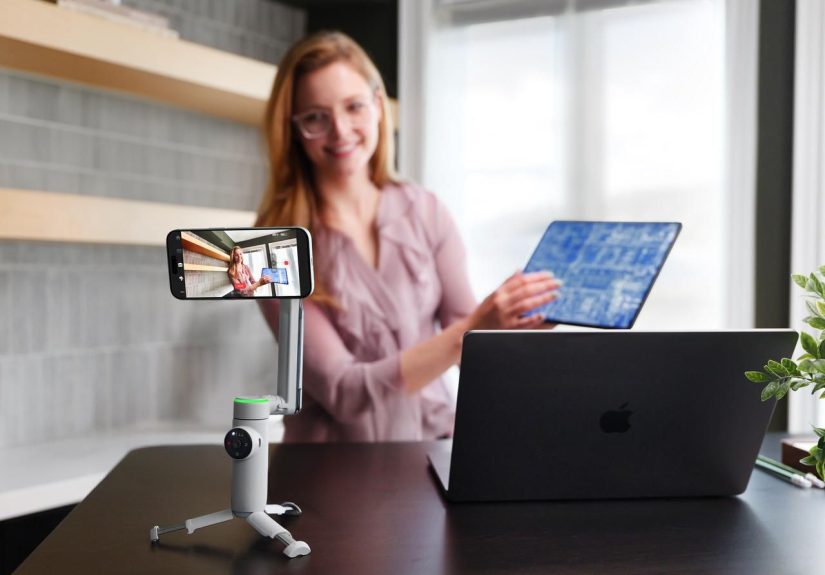
If you’ve ever tried to vlog, livestream, or shoot TikToks solo, you know the pain of framing, focusing, and filming all at once. This stabilizer is designed to fix that. With Apple DockKit support, Deep Track AI, 3-axis stabilization, and a built-in tripod and selfie stick, Insta360 basically wrapped a camera operator, gimbal, and production assistant into one foldable gadget you can toss in a bag.
Why Your iPhone Needs a “Brainy” Stabilizer
You can absolutely film handheld. But as soon as you start walking, spinning, or filming anything that moves faster than a houseplant, your iPhone footage starts looking like found footage from a disaster movie. Traditional smartphone gimbals fix part of that by mechanically smoothing your motion. Insta360’s new stabilizer goes further by adding AI tracking and native iPhone integration.
Instead of just stabilizing your hand, it actively keeps your subject centered in the frame. You can move, your subject can move, and the gimbal quietly rotates, tilts, and pans to follow along. For creators who film themselves think vloggers, fitness trainers, educators, or small-business owners this is a huge deal. You no longer need a friend behind the camera or a clunky manual pan every time you step to the side.
Meet the Insta360 Flow Pro (and Friends)
Insta360’s newest AI tracking stabilizers for iPhone build on the original Flow gimbal and crank everything up a notch. The star of the show is the Flow Pro, a compact smartphone stabilizer that folds up small but opens into a full rig with a handle, built-in tripod, extending selfie stick, and magnet-based phone clamp.
Here are the headline features that matter in real life, not just on spec sheets.
Apple DockKit + Native iPhone Camera Support
The Flow Pro is the first gimbal to fully integrate Apple’s DockKit subject-tracking technology. That’s a fancy way of saying: your iPhone and the gimbal speak fluent “Apple” together.
Instead of forcing you into a third-party camera app every time you want tracking, DockKit lets the gimbal work directly with the native iPhone Camera app and other compatible apps. You can open your standard camera, tap to enable tracking, and the stabilizer will follow your subject without extra setup. This is a big benefit for people who prefer Apple’s default camera, want to use built-in features like Cinematic mode, or are filming in apps like FaceTime, Zoom, or social platforms that leverage the native camera pipeline.
There are some technical requirements you’ll need a recent iPhone and iOS 17.4 or later for full DockKit support but once you’re set up, it feels almost invisible. The tracking just happens in the background while you focus on your script, your workout, or your dance routine.
Deep Track AI That Actually Keeps Up
Insta360 has been iterating on its Deep Track AI for years in its 360 cameras and first-gen Flow gimbal. In this new stabilizer, that AI is smarter about recognizing and sticking to a subject, even if they briefly step out of frame or get blocked for a second.
In practice, that means the system doesn’t give up the moment someone walks in front of you. If you’re filming a soccer game, a kid’s recital, or a busy street scene, the stabilizer tries to predict where your subject is going and reacquires them when they reappear. For multi-person scenes, it can lock onto a specific person you’ve selected, reducing random re-framing and weird jumps.
Rock-Solid 3-Axis Stabilization
Underneath all the AI buzzwords, this is still a serious 3-axis gimbal. It compensates for shake on the pan, tilt, and roll axes, smoothing out your footsteps, arm movement, and subtle jitters. That stability is what takes your footage from “phone clip” to “usable b-roll” for YouTube, Reels, or short-form edits.
Combined with the iPhone’s built-in optical and digital stabilization, the result is remarkably steady footage even when you’re climbing stairs, jogging, or panning quickly. Creators who review gear have compared the Flow Pro favorably against long-time competitors, calling out its ability to stay locked and smooth in real-world shooting, not just staged demos.
All-in-One Design: Gimbal, Tripod, and Selfie Stick
One of the biggest strengths of Insta360’s stabilizers is that they’re designed as all-in-one tools. The handle hides a telescoping selfie stick and fold-out tripod legs. That means you can:
- Hold it like a traditional gimbal for walk-and-talk vlogs.
- Extend the selfie stick to frame wider group shots or dramatic low/high angles.
- Set the tripod on a table or the ground, walk into frame, and let the AI keep tracking you.
You don’t have to carry a separate mini tripod or a selfie stick in another pocket. Everything folds together, and the magnetic clamp pops off quickly so you can go back to regular handheld use in seconds.
Battery Life and Everyday Portability
Insta360’s stabilizers are known for long run times, and the new AI tracking model continues that trend. Expect hours of shooting on a single charge, even with tracking enabled more than enough for a day of travel vlogging or a full afternoon of client content creation.
Because the unit folds compactly and ships with a simple protective pouch, it’s realistic to toss it into a tote, messenger bag, or even a large jacket pocket. For creators who want pro-level stabilization but hate carrying big rigs, that “throw it in your bag and forget it” factor matters just as much as any spec.
What Sets This AI Tracking Stabilizer Apart?
There are lots of smartphone gimbals on the market. So what actually makes Insta360’s new AI tracking stabilizer worth paying attention to?
No-App-First Shooting
Most gimbals require you to open their companion app before you can track a subject or control advanced features. With DockKit support, Flow Pro can start tracking directly in the iPhone’s native Camera app. That saves time and reduces friction when you’re trying to grab a quick shot before the moment disappears.
360° Infinite Pan and Smart Framing
The stabilizer supports 360-degree infinite pan rotation, so it can spin all the way around without hitting a hard limit. That’s useful for dynamic subject tracking, creative circular shots, and transitions where you whip the camera around and let the gimbal keep things smooth instead of jarring.
Paired with AI tracking, the system can swing smoothly as your subject circles you or moves unpredictably, maintaining composition instead of “giving up” when it runs out of mechanical range.
Visual Tracking Ring Light
A tracking ring light on the stabilizer gives you instant feedback: when it’s lit, tracking is active. That simple cue helps creators avoid that awkward moment when you thought the gimbal was following you, but it actually stopped five minutes ago.
Flexible App Ecosystem
Insta360’s own app adds creative modes like panoramas, time-lapses, slow-motion tricks, and AI-assisted editing. Combine that with DockKit’s compatibility with Apple’s camera and third-party iOS apps, and you have a stabilizer that doesn’t lock you into one narrow workflow.
If you want to go full creator mode with B-roll, hyperlapses, and automated edits, use Insta360’s app. If you prefer a simple, clean interface for quick clips, stick with the iPhone’s Camera app. The hardware works with both approaches.
Insta360 Flow Pro vs. Other iPhone Gimbals
To understand where this stabilizer lands, it helps to look at a few key alternatives on the market.
Versus Insta360’s Own Budget Options
Insta360 also offers more affordable gimbals that share some DNA with the Flow Pro but cut back features to keep the price lower. Budget models can still deliver solid stabilization and AI tracking, but they may lack luxuries like infinite pan, DockKit support, or the same level of native app compatibility. In some cases, you need an add-on accessory to unlock full tracking with third-party apps.
If you mostly shoot inside the Insta360 app and want to save money, those options can be attractive. But if you care about using Apple’s native camera, jumping between apps, or future-proofing your setup, the new AI tracking stabilizer is the more flexible, “buy once, cry once” pick.
Versus DJI’s Smartphone Gimbals
DJI has long dominated the smartphone gimbal market with its Osmo Mobile line. Those gimbals offer excellent stabilization, solid build quality, and a polished app. However, they lean heavily on their own software and don’t (yet) integrate as deeply with Apple’s DockKit framework as Insta360’s new stabilizer does.
So while DJI is still a strong competitor especially if you already live inside its ecosystem for drones or cameras Insta360’s DockKit support and all-in-one tripod/selfie-stick design give it a real edge for iPhone-first creators who value convenience and native app workflows.
Versus New AI Gimbals From Other Brands
Other companies have started rolling out AI-powered stabilizers with gesture control, multi-subject tracking, and more advanced shooting modes. Some of these are excellent, but they’re often pricier or less tightly integrated with iOS than Insta360’s option.
The result: Insta360’s AI tracking stabilizer hits a sweet spot. It’s more capable and iPhone-friendly than many budget gimbals, but more affordable than some “pro” AI rigs while still offering high-end tracking features and DockKit integration.
Who This Stabilizer Is Perfect For
Not everyone needs an AI tracking gimbal. But if you see yourself in one of these groups, it might quickly become your favorite piece of gear:
- Solo content creators and vloggers who film themselves and want professional-looking footage without a camera operator.
- Fitness coaches, dancers, and performers who move around a lot on camera and need smooth, centered framing during routines.
- Small-business owners filming behind-the-scenes clips, product demos, or Instagram Reels without hiring a video team.
- Parents who want to capture sports games, performances, and chaotic kid moments without shaky zooms and missed action.
- Travelers who want compact, all-day stabilization for city walks, hikes, and scenic shots.
If you mostly shoot static photos, occasional short clips, or don’t mind a little wobble, you may not need a gimbal at all. But if video is a central part of how you share, sell, teach, or create, this kind of stabilizer quickly feels less like a gadget and more like a core tool.
Tips for Getting the Most Out of Insta360’s AI Tracking Stabilizer
To make sure the stabilizer actually delivers on the promise of smoother, smarter video, keep these practical tips in mind:
- Update your iPhone and the Insta360 app first. DockKit and advanced tracking features rely on current firmware and iOS versions. Do the boring updates before your big shoot day.
- Balance the phone properly in the clamp. Even though the motors are strong, a balanced phone reduces strain and improves stability and battery life.
- Give the AI something clear to track. High-contrast clothing, a well-lit face, or a consistent subject makes it easier for the system to lock on and stay locked.
- Use the tripod plus tracking for “set and forget” shots. For workouts, cooking, or tutorial content, set the gimbal on a stable surface, enable tracking, and focus on your performance instead of the camera.
- Experiment with creative modes. Try subject-tracked time-lapses, moving selfies with the extended stick, or walk-through tours where the gimbal follows you through a space.
- Pack a small power bank for long days. The stabilizer battery lasts a long time, but if you’re also hammering your iPhone battery with 4K video and bright screen time, extra juice never hurts.
Real-World Experiences With Insta360’s AI Tracking Stabilizer
Specs and feature lists are one thing. What really sells a tool like this is how it feels to use in everyday scenarios. Here are some realistic examples of how people are putting Insta360’s AI tracking stabilizer to work.
The Solo Travel Vlogger
Imagine you’re wandering through a busy city square trying to record a “day in my life” vlog. With a basic handheld setup, you’d be juggling your phone, trying to keep your face framed, and periodically glancing at the screen to see if you’re even in shot.
With the Insta360 stabilizer, you unfold the gimbal, snap your iPhone onto the magnetic clamp, and activate tracking. As you walk and talk, the gimbal quietly compensates for your steps, rotates when you glance back at a landmark, and keeps your face or torso centered without you thinking about it.
Instead of obsessing over framing, you can react to your surroundings, crack jokes, or interact with locals. Your energy on camera improves because you’re less stressed about whether your viewers are staring at your chin or the edge of your backpack.
The Fitness Coach Livestreaming Classes
A home-based fitness instructor might run live classes on Instagram, YouTube, or Zoom. They need to move around, demonstrate full-body exercises, and occasionally step toward the camera for form cues. With a static tripod, they’d risk stepping out of frame or forcing students to squint at tiny movements in the distance.
Using the AI tracking stabilizer, the coach drops the tripod on the floor, angles the phone slightly downward, and enables tracking before class begins. As they move side to side for lunges, step backward for squats, or step forward to talk, the gimbal follows smoothly, keeping them centered and visible.
Students get a clearer view, the instructor feels more free to move naturally, and the entire stream looks more like a polished studio setup than a living-room hack.
The TikTok Home Chef
For creators sharing recipe videos and kitchen content, shooting alone can be a puzzle. One moment you’re at the counter chopping; the next you’re at the stove; then you’re plating food near a window for that perfect natural light.
With this stabilizer, the chef can mount the phone, tilt it slightly downward, and let AI tracking handle the rest. As they move between cooking zones, the camera pans and tilts to follow. Paired with the built-in selfie stick and creative angles, they can easily grab dynamic overhead shots of sizzling pans, close-ups of texture, and wide shots showing the full workspace.
Because the footage stays stable and centered, editing becomes easier too. They can cut between different moments without fighting shaky or off-center angles, which speeds up production for frequent posting.
The Parent Filming the Big Game
Parents know the heartbreak of missing the key moment the winning goal, the first basket, the big recital solo because they were zoomed in wrong or accidentally pointed at the wrong kid. A stabilizer with AI tracking can’t fix every chaotic situation, but it dramatically increases your odds.
Before the game, a parent can set the stabilizer on the sideline or in the stands, zoom in just enough to frame their child, and tap to lock tracking. As the child moves up and down the field, the gimbal pans left and right, keeping them the focus. The footage ends up smoother, more centered, and far more watchable later.
Even if the parent occasionally looks away to cheer or talk, the stabilizer keeps doing its thing. Later, when they share the clip with friends or relatives, it looks like someone was dedicated behind the camera the entire time.
Takeaways From These Use Cases
Across all of these scenarios, a pattern shows up: the AI tracking stabilizer doesn’t just make video smoother; it makes the process less stressful. When you’re not constantly babysitting your framing, you can focus on performance, storytelling, and connection.
That’s ultimately what makes Insta360’s new iPhone stabilizer compelling. It’s not just an accessory it’s a quiet teammate that handles the technical stuff while you get to be the on-screen talent.
Final Thoughts: Is Insta360’s New AI Tracking Stabilizer Worth It?
If you only shoot quick clips here and there, your iPhone alone is probably fine. But if video is a big part of your brand, business, or creative life, this stabilizer is easy to justify.
You get rock-solid 3-axis stabilization, smart AI tracking that actually keeps up, deep integration with the iPhone’s native camera via Apple’s DockKit, and a cleverly designed all-in-one body with a built-in tripod and selfie stick. Add long battery life and app-based creative tools, and you’re looking at a powerful portable video rig that still feels simple and approachable.
No, it won’t turn bad lighting into a Hollywood set or write your scripts for you. But it will make your footage cleaner, more professional, and far easier to capture especially when you’re working solo. If you’ve been waiting for a stabilizer that truly treats your iPhone like a serious camera, Insta360’s new AI tracking model is absolutely worth a spot in your kit.