Table of Contents >> Show >> Hide
- Why iPad Screens Are Easier to Damage Than They Look
- Quick Checklist: What You Need (and What You Absolutely Don’t)
- The Safest Step-by-Step Method (Works 90% of the Time)
- Disinfecting an iPad Screen: When Alcohol Wipes Are Okay
- Stubborn Messes: Oil, Lotion, Makeup, and Mystery Spots
- What About Screen Cleaners? Sprays, Foams, and “Miracle” Bottles
- Common Mistakes That Cause Damage (Even If Your Screen “Looks Fine”)
- Tips & Tricks for Keeping Your iPad Cleaner Longer
- If You Accidentally Used the Wrong Cleaner
- Mini FAQ
- Conclusion
- Real-World Experiences & Lessons Learned (So You Don’t Have To Learn the Hard Way)
Your iPad screen is basically a high-definition museum exhibit for fingerprints, snack dust, and that mysterious streak you swear appeared while you were asleep. The good news: you can get it sparkling clean without wrecking the display, the oleophobic (oil-repelling) coating, or your sanity. The bad news: “just grab a paper towel and whatever cleaner is under the sink” is how screens end up sad, cloudy, and quietly judging you.
This guide pulls together best practices from manufacturer guidance, consumer testing orgs, and tech-care pros to give you a safe, repeatable routineplus a few “please don’t do this” warnings that could save your screen (and your wallet).
Why iPad Screens Are Easier to Damage Than They Look
Modern iPad glass is tough, but it’s not invincible. The real drama happens on the surface: coatings that reduce glare, resist oil, and improve the feel of touch. Harsh chemicals (or rough materials) can wear those coatings down over time. Even if the glass doesn’t scratch immediately, repeated bad cleaning habits can leave the screen looking hazy, streaky, or “permanently smudged.”
Think of your iPad screen like a nonstick pan: you can clean it easily, but you shouldn’t attack it with abrasive pads and industrial-strength chemicals just because you’re feeling motivated.
Quick Checklist: What You Need (and What You Absolutely Don’t)
Safe tools (your screen’s best friends)
- Microfiber cloth (lint-free; ideally a clean one used only for screens)
- Distilled water (optional, for stubborn smudges; reduces mineral spotting)
- Pre-moistened screen wipes made for electronics (optional)
- 70% isopropyl alcohol wipes or 75% ethyl alcohol wipes (optional, for disinfectingused sparingly)
- A soft brush (optional, for dust around edges/casenot for digging into ports)
Not safe (the “please don’t” list)
- Paper towels, tissues, napkins (they can be surprisingly scratchy and leave lint)
- Window/glass cleaners (often contain ammonia or other harsh ingredients)
- Household cleaners, bleach, or abrasive powders
- Hydrogen peroxide-based cleaners (can be too aggressive for coatings)
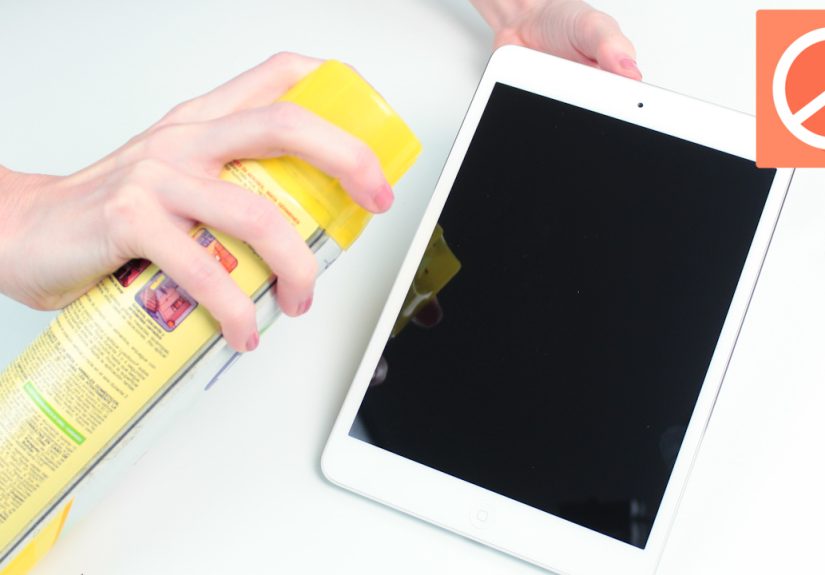
- Aerosol sprays aimed at the screen (moisture + openings = regret)
- Compressed air blasting at the display or seams (not a screen-cleaning method)
- Soaking wet cloths (liquid should never be in charge here)
The Safest Step-by-Step Method (Works 90% of the Time)
This is the “do it like a responsible adult” routine: gentle, effective, and very hard to mess up.
Step 1: Power down and de-clutter
- Turn off the iPad. (It’s easier to see smudges on a dark screen, and safer around moisture.)
- Unplug cables and remove accessories (case, keyboard, Apple Pencil if it’s attached).
- Place the iPad on a soft, flat surface (like a clean towel) to prevent accidental scratching.
Step 2: Dry wipe first (don’t skip this)
Use a clean microfiber cloth to gently wipe the screen. Start with light pressure and broad strokes. You’re removing dust and grit first so you don’t rub tiny particles across the glass like sandpaper.
Step 3: Spot-treat stubborn smudges
If fingerprints laugh at your dry wipe, lightly dampen a corner of the microfiber cloth with distilled water. The cloth should be barely dampno dripping, no “it’s basically a washcloth now.”
- Do: wipe gently, then flip to a dry section of the cloth and buff.
- Don’t: spray water directly on the screen.
Step 4: Buff to streak-free
Use a dry part of the microfiber cloth to polish the screen in smooth strokes. If you’re seeing streaks, it usually means “too much moisture” or “cloth isn’t clean anymore.”
Disinfecting an iPad Screen: When Alcohol Wipes Are Okay
Cleaning and disinfecting aren’t the same thing. Cleaning removes oils and grime; disinfecting reduces germs. You don’t need to disinfect your iPad every time you watch one episode of something and eat a sandwich. But if you’ve been traveling, sharing a device, or you just want a periodic sanitation pass, there’s a safe approach.
Safe disinfecting approach
- Power off and unplug.
- Use a 70% isopropyl alcohol wipe (or 75% ethyl alcohol wipe) and gently wipe the screen and exterior.
- Avoid openings (speaker grilles, ports, buttons). Don’t let liquid pool at edges.
- Let it air-dry briefly, then buff with a clean microfiber cloth if needed.
Key idea: disinfecting is an occasional tool, not a daily hobby. Overdoing strong wipes can accelerate wear on coatings over the long termso use them when there’s a reason, not because you like the smell of “medical-grade cleanliness.”
Stubborn Messes: Oil, Lotion, Makeup, and Mystery Spots
Some smudges are not created equal. Fingerprints usually surrender to microfiber. Sunscreen and lotion? Those are the final bosses of screen grime.
For oily residue
- Start dry with microfiber.
- Then use a barely damp microfiber corner with distilled water.
- If the residue persists and you truly need extra help, use a screen-safe electronics wipe or a single, gentle pass with a 70% isopropyl wipethen buff dry.
For sticky gunk (kids, candy, or “how did this happen?”)
- Don’t scrape with nails or sharp objects.
- Use a damp microfiber corner to soften the spot, then wipe it away with light pressure.
- Repeat instead of pressing harder. Pressure is how people create micro-scratches and stress the display.
What About Screen Cleaners? Sprays, Foams, and “Miracle” Bottles
Some screen-cleaning solutions are perfectly fineif they’re designed for electronics and don’t contain harsh ingredients (like ammonia or abrasives). The biggest rule isn’t the brand; it’s the technique:
- Never spray directly onto the screen. Spray the cloth, then wipe.
- Use minimal moisture. A little goes a long way.
- Test first. If you’re unsure, try a tiny spot near an edge with very light use.
If you want the lowest-risk approach, you can skip specialty sprays entirely and stick with microfiber + distilled water, with occasional alcohol wipes for disinfecting when appropriate.
Common Mistakes That Cause Damage (Even If Your Screen “Looks Fine”)
1) Using paper towels or tissues
They feel soft to your hands, but many paper products contain fibers that can create fine scratches or leave lint behind.
2) Spraying cleaner directly on the iPad
Liquid can seep toward edges and openings. Even tiny amounts of moisture in the wrong place can cause long-term issues.
3) Pressing too hard
Touchscreens aren’t lottery tickets. Hard rubbing doesn’t “activate” cleaning powerit just increases risk.
4) Mixing DIY concoctions like a chemistry experiment
Some guides recommend vinegar mixtures for certain screens. For iPads, it’s safer to avoid DIY acids and stick to water and approved wipes. Your goal is clean, not “science fair champion.”
5) Reusing a dirty microfiber cloth
A microfiber cloth loaded with grit becomes a polite sanding block. Wash cloths regularly and store them clean.
Tips & Tricks for Keeping Your iPad Cleaner Longer
Use a screen protector (especially if you’re a frequent snacker)
A good screen protector takes the abuse so your actual screen doesn’t have to. Bonus: it’s easier to replace a protector than to mourn a permanently scratched display.
Wash your hands (boring, effective, undefeated)
Oils and lotions transfer instantly. Cleaner hands = fewer smudges = less cleaning = happier coating.
Keep a “screen-only” microfiber cloth
Don’t use the same cloth to clean your keyboard, then your iPad, then your sunglasses. That’s not a clothit’s a travel agency for grime.
Clean cases and keyboards separately
Dirt trapped in a case edge can rub against the screen. If you use a keyboard case, wipe both the case interior and the screen routinely (and keep moisture away from hinges/ports).
If You Accidentally Used the Wrong Cleaner
First: don’t panic-clean. That usually makes it worse.
- Power off and unplug the iPad.
- Wipe the screen with a clean microfiber cloth slightly dampened with distilled water to remove residue.
- Buff dry with a fresh microfiber section.
- Let the device sit for a bit before turning it back on, especially if moisture got near edges.
If you notice persistent haziness after repeated harsh cleaning, it may be coating wear. At that point, a screen protector can help mask minor cosmetic issues, but prevention is your best friend.
Mini FAQ
Can I use glasses lens wipes?
Some lens wipes are safe, but others contain ingredients that aren’t ideal for screen coatings. If you use them, choose wipes intended for electronics screens or follow manufacturer-approved options. When in doubt: microfiber + distilled water.
Can I use hand sanitizer on the screen?
Please don’t. Hand sanitizer often includes gels, fragrances, and additives that can leave residue or be harsher than necessary. If you need to disinfect, use an appropriate alcohol wipe and keep it away from openings.
How often should I clean my iPad screen?
Light wipe: as needed. Deeper clean: weekly or whenever smudges build up. Disinfecting: occasionally, when there’s a real reason (travel, shared devices, sickness season, etc.).
What about ports and speakers?
For the screen-cleaning mission, focus on the display and exterior surfaces. Avoid pushing anything into ports or blasting openings with liquids. If you suspect debris in ports or speakers, consider professional guidance rather than DIY poking.
Conclusion
Cleaning an iPad screen without damage comes down to three simple rules: be gentle, use the right materials, and keep liquids under control. A clean microfiber cloth handles most jobs, a tiny bit of distilled water handles the rest, and disinfecting wipes are for occasional, intentional usenot a daily ritual.
Treat your screen like it’s wearing a fancy invisible jacket (because it kind of is). Clean it the right way and it’ll stay glossy, responsive, and smudge-resistant for the long haul.
Real-World Experiences & Lessons Learned (So You Don’t Have To Learn the Hard Way)
Let’s talk about what happens in actual homes, offices, classrooms, and airport gateswhere iPads live their messy little lives. In theory, everyone cleans with a pristine microfiber cloth and angelic patience. In reality, most cleaning attempts start with, “Where is that cloth?” and end with, “Is this napkin… soft enough?” (Spoiler: it’s usually not.)
The “I only used a little Windex” era
A super common story: someone sees fingerprints, reaches for glass cleaner, and gives the iPad a quick spritz. The screen looks fine at first… until it starts feeling oddly grabby, streaky, or harder to wipe clean over time. That’s often because cleaners meant for windows can be rough on screen coatings. The lesson: your iPad is not a kitchen window. It’s more like a sports car windshieldyes, it’s glass, but it has “special stuff” on it.
The “paper towel polish” trap
Another classic: a paper towel seems harmless, so it gets used in a pinch. The iPad looks clean, but under bright light, you start noticing faint micro-swirls that weren’t there before. They might not show during normal use, but they can become more visible as screens age. The lesson: microfiber isn’t a luxury; it’s damage prevention you can fold into your pocket.
When sunscreen becomes screen glue
If you’ve ever used an iPad near a pool, beach, or sunny window seat, you may have encountered the stubborn combo of sunscreen + skin oil. People often respond by rubbing harder. That’s the moment coatings quietly whisper, “Please stop.” The better move is to repeat gentle passes with a barely damp microfiber cloth, buff dry, and only escalate to screen-safe wipes when needed. The lesson: persistence beats pressure. Cleaning is cardio, not weightlifting.
The shared iPad problem (schools, families, teams)
Shared devices tend to collect more grime because no single person feels personally responsible. The screen gets “washed” with whatever is nearby: a sleeve, a hoodie, a worksheet (yes, really), and oncetragicallya slice of soft bread (desperate times, apparently). The lesson: keep a small “screen kit” nearby: a microfiber cloth and a travel-size pack of appropriate wipes. It’s cheap insurance for shared tech.
The streak mystery: why it still looks weird after cleaning
Many people clean an iPad and then wonder why streaks remain. In practice, streaking usually comes from one of three things: (1) the cloth isn’t clean, (2) too much liquid was used, or (3) oils were smeared rather than lifted. The fix is surprisingly simple: switch to a fresh microfiber cloth, do a dry wipe first, then use only a tiny bit of moisture, then buff. The lesson: cleaning is less about “stronger products” and more about “cleaner tools.”
The long-game habit that actually works
The most successful “my screen always looks good” routine is boring in the best way: a quick microfiber wipe every few days, an occasional distilled-water spot clean, and disinfecting only when it makes sense. People who do this rarely need aggressive cleaning, and their screens tend to stay clearer and easier to maintain. The lesson: a little maintenance beats a monthly panic scrub that turns into an accidental science experiment.
If you take nothing else from these real-world scenarios, take this: your iPad screen doesn’t need heroic cleaning. It needs consistent, gentle care. And maybe a snack-free zone. (Okay, fine. At least a “wipe your hands first” zone.)