Table of Contents >> Show >> Hide
- iPad Mini vs iPad Air at a Glance
- Design and Size: This Is the Biggest Difference
- Display Quality: Similar Tech, Very Different Feel
- Performance: The iPad Air Is the Muscle Tablet
- Accessories: The Air Is Better If You Want a Productivity Setup
- Cameras, Audio, and Connectivity
- Battery Life: Mostly a Draw
- Which iPad Is Better for Different Types of Users?
- Price and Value: Cheaper Is Not Always Better, but Sometimes It Is
- The Real Difference in One Sentence
- Final Verdict: Should You Buy the iPad Mini or iPad Air?
- Real-World Experience: What It Actually Feels Like to Live With Both
- SEO Tags
If Apple’s iPad lineup feels a little like a family reunion where everyone shares the same face but wildly different personalities, you are not imagining things. The iPad mini and iPad Air are both excellent tablets, both support Apple Pencil Pro, both run iPadOS beautifully, and both can handle everything from note-taking to Netflix marathons. But they are not interchangeable. Not even close.
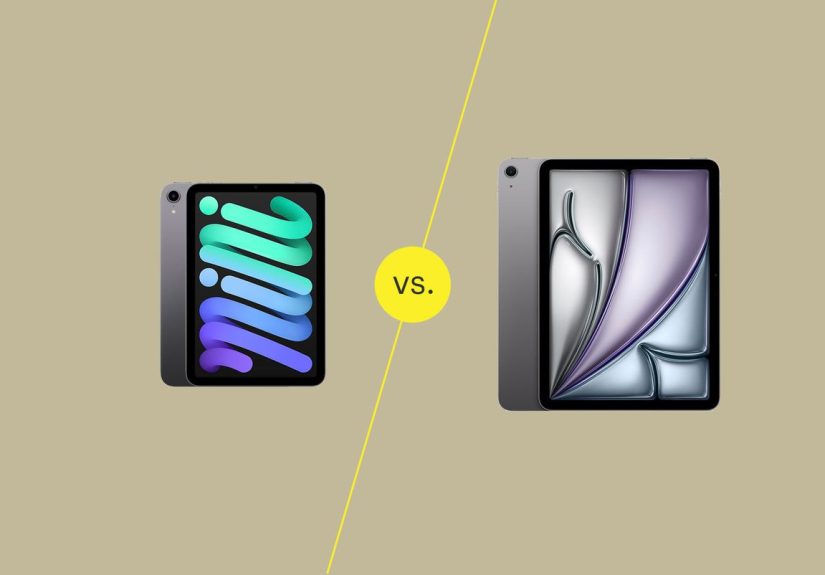
The short version is this: the iPad mini is the ultra-portable, toss-it-in-any-bag, hold-it-in-one-hand machine. The iPad Air is the bigger, faster, more work-friendly option that edges closer to laptop territory without crossing into iPad Pro pricing. One is the travel buddy. The other is the do-more desk companion. Think espresso shot versus full-size coffee.
In this iPad Mini vs iPad Air guide, we will break down the real differences in size, performance, display, accessories, battery life, portability, and day-to-day experience so you can buy the one that actually fits your life instead of the one that just looks good in a product photo.
iPad Mini vs iPad Air at a Glance
| Category | iPad mini | iPad Air |
|---|---|---|
| Current model | iPad mini with A17 Pro | iPad Air with M4 |
| Display sizes | 8.3-inch | 11-inch or 13-inch |
| Starting price | $499 | $599 for 11-inch, $799 for 13-inch |
| Best for | Travel, reading, notes, gaming on the go | Work, multitasking, art, editing, keyboard use |
| Keyboard support | Bluetooth keyboards only | Magic Keyboard for iPad Air |
| Apple Pencil support | Apple Pencil Pro, Apple Pencil USB-C | Apple Pencil Pro, Apple Pencil USB-C |
| Weight | About 0.65 lb | About 1.02 lb for 11-inch, 1.36 lb for 13-inch |
| External display | Up to 4K at 60Hz | Up to 6K at 60Hz |
Design and Size: This Is the Biggest Difference
If you remember only one thing from this comparison, make it this: size is the story.
The iPad mini has an 8.3-inch display and weighs only about 293 grams for the Wi-Fi model. It is the iPad you grab when you want something that feels almost notebook-sized. It slips into smaller bags, works well in crowded airplanes, and is comfortable to hold while reading in bed without making your wrists file a complaint.
The iPad Air, meanwhile, comes in 11-inch and 13-inch versions. The 11-inch model is still light and portable, but it feels like a serious tablet. The 13-inch Air is where things change dramatically. It is much better for side-by-side apps, drawing on a larger canvas, spreadsheet work, and long writing sessions, but it is no longer the kind of device you casually hold one-handed while walking around the kitchen looking for snacks.
Who wins on portability?
The iPad mini wins by a mile. The Air is portable. The mini is portable portable. There is a difference.
Who wins on usable screen space?
The iPad Air wins easily, especially the 13-inch model. More screen means less zooming, less squinting, and fewer moments where your spreadsheet starts looking like abstract art.
Display Quality: Similar Tech, Very Different Feel
Both tablets use Liquid Retina displays with laminated panels, True Tone, P3 wide color, and anti-reflective coating. In other words, neither screen is bad. Apple knows how to make LCDs look sharp, clean, and pleasing even before you start pretending you are definitely going to edit photos “professionally.”
That said, the experience is different because of size and brightness. The iPad mini packs a 2266-by-1488 display at 326 ppi, so text looks very crisp. It is wonderful for reading ebooks, comics, PDFs, and handwritten notes. The 11-inch iPad Air has a 2360-by-1640 display at 264 ppi and 500 nits brightness, while the 13-inch Air jumps to 2732-by-2048 and 600 nits brightness. The larger Air panels simply feel roomier and more comfortable for extended work.
Neither model offers ProMotion. So if you were hoping for a 120Hz buttery-scroll party, Apple is saving that invitation for the iPad Pro lineup.
Performance: The iPad Air Is the Muscle Tablet
This is where the gap widens.
The iPad mini uses the A17 Pro chip, which is fast enough for everyday productivity, gaming, streaming, note-taking, sketching, and even fairly demanding apps. It is not a weak device by any stretch. For many people, it will feel quick for years.
But the iPad Air now runs on Apple’s M4 chip, which puts it in a different class. The Air is better suited for heavier multitasking, creative apps, larger files, more serious video work, and workflows that benefit from more horsepower. It also has more breathing room for iPadOS features that continue pushing the iPad toward desktop-style multitasking.
So does the iPad mini feel slow?
No. Not at all. It feels fast. The issue is not that the mini is underpowered. The issue is that the Air is simply more powerful and more future-facing if your workload includes editing, design, advanced schoolwork, or using your tablet as a near-laptop replacement.
Who needs the extra power?
- Students juggling research, notes, split-screen apps, and accessories
- Artists using large canvases and more layered projects
- People editing photos, videos, or audio
- Anyone who wants their iPad to behave more like a work machine
Accessories: The Air Is Better If You Want a Productivity Setup
Both the iPad mini and iPad Air support Apple Pencil Pro and Apple Pencil (USB-C), which is great news for note-takers, illustrators, and people who like circling things in PDFs as if they are an angry movie detective.
But the iPad Air has one giant advantage: it supports the Magic Keyboard for iPad Air. That matters a lot.
If you want a true keyboard-and-trackpad setup with pass-through charging and a more laptop-like feel, the Air is the obvious choice. The mini can pair with Bluetooth keyboards, but it is not designed to be a full-on typing workstation. You can make it work. You can also technically eat soup with a fork. That does not make it the right tool.
Cameras, Audio, and Connectivity
Both tablets are well-equipped for modern tablet life. Each has a 12MP rear camera, a 12MP Center Stage front camera, stereo speakers in landscape orientation, Touch ID in the top button, USB-C, and Apple Intelligence support.
Still, the Air has a few practical advantages. The M4 iPad Air supports Wi-Fi 7, Bluetooth 6, Thread, and up to one 6K external display at 60Hz. The iPad mini supports Wi-Fi 6E, Bluetooth 5.3, and one external display up to 4K at 60Hz. The difference will not matter to everyone, but if you are building a desk setup or buying for long-term flexibility, the Air is more capable.
Battery Life: Mostly a Draw
On paper, battery life is very similar. Both tablets are rated for up to 10 hours of web browsing on Wi-Fi or watching video, and up to 9 hours on cellular. In the real world, your mileage depends on brightness, accessories, app load, and whether your “quick check of email” somehow turns into 90 minutes of YouTube and online shopping.
The bigger takeaway is that battery life should not be the deciding factor in iPad Mini vs iPad Air. Size, performance, and accessory support matter more.
Which iPad Is Better for Different Types of Users?
Best for students
The iPad Air is the better all-around student tablet, especially if you plan to type papers, multitask heavily, or use a keyboard case. The iPad mini is a fantastic secondary study device for notes, reading, flashcards, and portability.
Best for travel
The iPad mini wins. It is easier to hold on planes, easier to pack, and easier to use in places where a larger tablet feels awkward.
Best for reading and note-taking
The iPad mini is surprisingly hard to beat here. Its size makes it feel intimate and natural, almost like a digital journal. If your note-taking style is handwritten and lightweight, the mini has a real charm.
Best for drawing and creative work
The iPad Air wins because canvas size matters. The larger display, stronger chip, and better productivity accessory ecosystem make it the more serious creative tool.
Best for work and multitasking
The iPad Air, no contest. Especially the 11-inch or 13-inch model with a Magic Keyboard.
Best for people who already own a laptop
This gets interesting. If your laptop already handles the heavy lifting, the iPad mini may actually be the smarter buy. It fills a different role instead of overlapping with what your laptop already does.
Price and Value: Cheaper Is Not Always Better, but Sometimes It Is
The iPad mini starts at $499, while the iPad Air starts at $599 for the 11-inch model. That $100 difference is not massive, but it is enough to make people pause and stare at comparison charts like they are studying for a final exam.
Here is the practical view:
- If you want the smallest, easiest-to-carry iPad with strong performance, the mini offers excellent value.
- If you want a more complete primary tablet with better long-term productivity potential, the Air justifies the extra money.
- If you are considering the 13-inch Air, make sure you actually want that larger format. It is impressive, but it also adds cost and reduces the grab-and-go magic that makes iPads fun in the first place.
The Real Difference in One Sentence
The iPad mini is the best small iPad, while the iPad Air is the better all-around iPad for people who want more screen, more power, and more productivity options.
Final Verdict: Should You Buy the iPad Mini or iPad Air?
Choose the iPad mini if you care most about portability, reading comfort, travel friendliness, handheld gaming, quick note-taking, and having a tablet that never feels like too much device. It is a compact powerhouse and one of the few gadgets that truly earns the phrase “take it everywhere.”
Choose the iPad Air if you want the better long-term main tablet. It gives you a larger display, much stronger performance, better keyboard support, better external display support, and a more versatile setup for school, work, and creative tasks. For most people choosing only one iPad, the Air is the safer, more flexible investment.
So, what’s the difference between the iPad mini and iPad Air? The mini fits your hand better. The Air fits your workflow better. And that, in typical Apple fashion, is how two devices that look like cousins end up living very different lives.
Real-World Experience: What It Actually Feels Like to Live With Both
Specs are helpful, but experience is where the iPad Mini vs iPad Air decision becomes obvious. The iPad mini feels personal in a way most tablets do not. You pick it up casually. You carry it from room to room. You read on it the way you would read a paperback. You jot down grocery lists, mark up a PDF, watch a few videos, answer messages, and suddenly realize it has become the device you reach for first when you do not feel like opening a laptop. It is less formal. Less demanding. More spontaneous.
The mini is especially good for little in-between moments. Waiting at the doctor’s office? Great. Sitting on the couch while half-watching a show? Perfect. Reading recipes in the kitchen? Absolutely. It is also excellent for students and professionals who want a digital notebook they can actually keep with them all day. With Apple Pencil Pro, it feels like a smart legal pad that also happens to run apps, games, and video calls. That is a pretty good trick.
The iPad Air creates a different kind of relationship. It feels more intentional. When you pick it up, you usually have a plan. Maybe you are writing, editing, researching, sketching, or using multiple apps at once. The 11-inch Air is a sweet spot because it still feels portable, but it has enough room to stop everything from feeling cramped. The 13-inch Air pushes even farther into laptop-adjacent territory. It is the one you set on a desk, attach to a keyboard, and use for real sessions of work instead of quick bursts.
That also means the Air can feel like a better value if it is your main device. It handles “serious tablet” duties with less compromise. Split-screen work feels more natural. Creative apps breathe easier. Typing is more comfortable. And if you connect it to an external display or build out a desk setup, it feels far more at home than the mini ever does.
But here is the funny part: some people buy the Air because it seems like the smarter choice, then end up wishing they had the mini because the Air is just a little too big for casual use. Others buy the mini because it is adorable and portable, then slowly realize they are asking it to do Air-level jobs. That is why this comparison matters. Neither device is better in a vacuum. The better one depends on the life you want it to fit into.
If your tablet should disappear into your routine and go everywhere with you, the mini feels delightful. If your tablet needs to step up and replace some laptop time, the Air is the grown-up answer. The mini is the one you love because it is always there. The Air is the one you respect because it can handle more. The best choice is the one that matches your habits, not the one with the flashier comparison-chart win.