Table of Contents >> Show >> Hide
- What One UI 8 Is (and Why This Launch Matters)
- Smarter AI: From “Look What I Can Do” to “Let Me Help”
- Big-Screen Friendliness: Foldables, Tablets, and Multitasking That Doesn’t Fight You
- Stronger Security: The “AI is Personal” Era Needs Better Locks
- What’s New for Regular Humans: Practical Examples
- Rollout, Eligibility, and How to Update Without Regret
- Should You Upgrade? A Quick Reality Check
- Real-World Experiences: What Living on One UI 8 Feels Like (The Extra Stuff You Actually Care About)
- SEO Tags
Samsung’s One UI 8 is the kind of update that feels like your phone went away for the weekend, read a stack of self-help books, hired a security team, and came back saying, “I’m a better version of me now.” Built on Android 16, One UI 8 leans hard into two things people actually care about: AI that’s useful (not just loud) and security that’s serious (not just a checkbox). And yesSamsung still found time to make your lock screen prettier, because priorities.
What One UI 8 Is (and Why This Launch Matters)
One UI is Samsung’s custom interface layered on top of Androidwhere Samsung turns “stock Android” into “Galaxy-flavored Android.” With One UI 8, Samsung frames the update as a new phase of software evolution: more proactive, more personalized, and more protective of private data. The stable rollout began with the Galaxy S25 series and expanded across more phones and tablets over time, while some newer Galaxy devices also shipped with One UI 8 out of the box.
The big shift isn’t just “new features.” It’s the way those features are designed to work together: AI learns your patterns, but the system is also built to keep those insights locked down. In other words, One UI 8 is trying to prove you can have a smarter phone without handing over your digital soul.
Smarter AI: From “Look What I Can Do” to “Let Me Help”
Multimodal AI that fits how you actually use your phone
Samsung positions One UI 8 as an “intelligent multimodality” upgradeAI that can interpret what you’re seeing, hearing, and doing, then respond in a way that feels less like a chatbot and more like a capable assistant. Instead of forcing you to hop between apps, One UI 8 pushes toward in-the-moment help, like translating text while you scroll or helping you act on what’s on your screen.
Now Bar + Now Brief: your day, summarized (and hopefully not judged)
Two features do a lot of the “daily life” heavy lifting:
- Now Bar surfaces real-time activity on the lock screen (and on the Z Flip’s FlexWindow cover screen), including progress and updates from appsmore like “live activities” than a pile of notifications.
- Now Brief packages personalized updates such as traffic, reminders, and daily recaps (“Samsung Moments”), plus recommendations based on subscriptions and interests. If you use Galaxy Watch, health insights can also be pulled into the mix.
The idea is simple: fewer “open five apps to figure out your life” moments. Your phone becomes a dashboard, not a scavenger hunt.
Gemini Live + Circle to Search: AI that meets you where you are
One UI 8 integrates Google’s AI tools more deeply in ways that feel practical:
- Gemini Live enables more natural interactions that can respond to what you’re viewing in real timewithout forcing you to switch apps mid-task. On certain Flip models, it can even run right on the FlexWindow for hands-free help.
- Circle to Search expands beyond “identify this thing” into situational supportlike giving game tips when you circle something on-screen, and improving translation so you can see translated text while scrolling.
The theme here is speed and flow. The best AI feature is the one that saves you time without asking for a ceremony to launch it.
Creative and communication tools that don’t require a film degree
One UI 8 sprinkles AI across creativity and accessibility in ways that are easy to appreciate:
- Writing Assist and Drawing Assist support quick content creation and idea generation.
- Audio Eraser can detect and remove unwanted background noise (wind, traffic, crowds) with a tap in supported apps.
- Call Captions can convert speech to text during callsuseful in loud environments or when you need clarity.
- Interpreter supports typed input for translation, which is helpful when speaking out loud isn’t ideal (or when your accent + a busy café is not the vibe).
- Portrait Studio can generate studio-style pet portraitsbecause your dog deserves a professional headshot too.
Big-Screen Friendliness: Foldables, Tablets, and Multitasking That Doesn’t Fight You
Samsung emphasizes that One UI 8 is optimized for different device form factorsespecially foldables and tablets. That matters because “bigger screen” should mean “more capable,” not “same phone UI, just stretched.”
Multi Window that treats AI outputs like real work
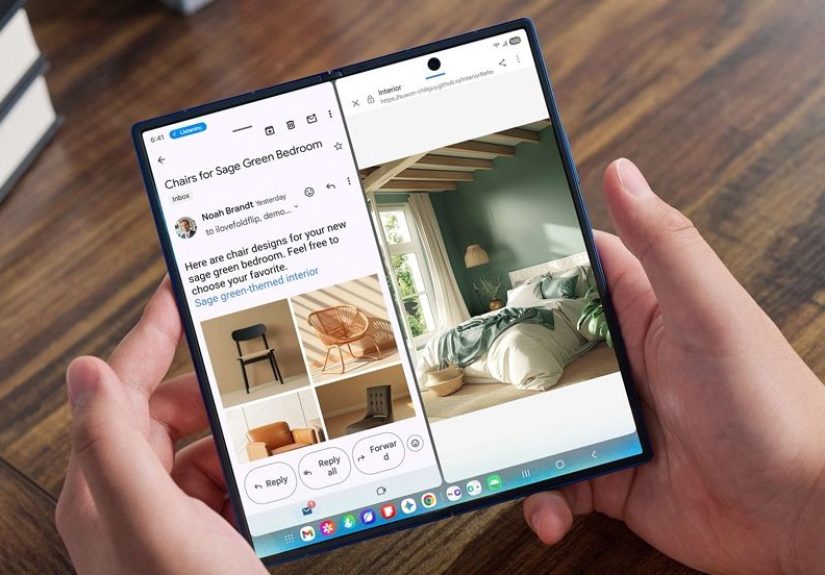
A standout productivity angle is how One UI 8 handles AI-generated content on larger screens. Features like AI Results View can keep AI outputs visible in split or floating views so you don’t lose your original content. And with “Galaxy AI optimized for large screens,” you can drag-and-drop AI-generated images or text directly into your workflowless copying and pasting, more actual finishing.
Split-screen improvements + quality-of-life polish
Early beta coverage highlighted usability upgrades like improved split-screen behavior (including a mode that can tuck one app partially off-screen while you focus on another), plus refreshed experiences in apps like Quick Share and Reminder. These aren’t flashy keynote moments, but they’re the kind of changes you feel every daylike better handles on a door you open 200 times.
Auracast via QR code: accessibility that’s also just… convenient
One UI 8 also leans into Auracast (Bluetooth LE Audio broadcast) with simpler ways to connect multiple deviceslike earbuds and hearing aidsto a shared audio stream using QR code scanning and sharing. That’s huge for accessibility, but it’s also great for regular humans who don’t want to run IT support just to share audio.
Stronger Security: The “AI is Personal” Era Needs Better Locks
Here’s the uncomfortable truth: AI personalization gets more valuable as it becomes more personalroutines, preferences, habits, and “why are you awake at 2 a.m.?” patterns. One UI 8’s security story is basically Samsung saying: “Yes, we want the phone to know you. No, we don’t want everybody else to know you.”
KEEP: app-specific encrypted storage for AI-era personalization
One UI 8 introduces Knox Enhanced Encrypted Protection (KEEP), a security architecture designed to protect the next generation of AI experiences. The key idea is encrypted, app-specific storage: each app gets its own protected environment, and apps can only access their own sensitive information.
That matters because One UI 8 also uses a Personal Data Engine to power personalized experiences. If your device is going to learn your routines, it needs a safe place to store those insights. KEEP aims to make that storage more isolated and harder to abuseeven if an app gets curious in the wrong way.
Knox Matrix: cross-device protection with a “contain the threat” mindset
Samsung also expands Knox Matrixits ecosystem-level approach to security across connected Galaxy devices. In One UI 8, if a device is flagged for serious risk, it can be signed out of the Samsung Account to cut off cloud-connected services and reduce the chance of threats spreading. You also get notifications and guidance across your connected devices so you can respond faster.
Secure Wi-Fi with post-quantum cryptography: planning for the next kind of bad day
One UI 8 upgrades Secure Wi-Fi with post-quantum cryptography (PQC) to strengthen protection on public networks. The practical benefit is defense against emerging “harvest now, decrypt later” attacks, where someone records encrypted traffic today hoping future computing can crack it. Samsung describes Secure Wi-Fi’s upgrade as reinforcing the encrypted tunnel between Galaxy devices and Samsung servers, with features like automatic protection in public places, privacy relays, and activity visibility.
For normal people, the translation is: if you’re using airport Wi-Fi, your phone is doing more behind the scenes so you can doomscroll safely.
More user control over AI processing
One UI 8’s security story also includes a control angle: Samsung references “Advanced Intelligence” settings that can let users turn off online data processing for AI features, keeping more information on-device. This is the direction privacy-conscious users have been asking formore “you choose” and less “trust us, bro.”
What’s New for Regular Humans: Practical Examples
Example 1: Morning commute without app-juggling
You wake up, glance at the lock screen, and Now Brief has traffic plus your first reminder. You tap once, and the next step is obvious. That’s not magicit’s just smart presentation. But it saves time in the most valuable way: small friction removed every day.
Example 2: Public Wi-Fi without the “am I being watched?” spiral
At a coffee shop, Secure Wi-Fi’s upgraded protections can kick in automatically, encrypting traffic and reducing tracking risk. The goal is that you don’t have to be a cybersecurity expert just to send an email and pretend you’re writing a novel.
Example 3: Content cleanup in one tap
You record a short video and the wind sounds like it’s trying to join your friend group. Audio Eraser helps remove that noise fast, without exporting to a separate editor. That’s the kind of AI win that feels like a superpower, not a science project.
Rollout, Eligibility, and How to Update Without Regret
One UI 8’s stable rollout started with the Galaxy S25 series and expanded across more Galaxy phones and tablets, including select S-series devices, foldables, and tablets. Samsung’s own update guidance generally follows the familiar path:
- Back up anything you’d cry about losing (photos, messages, important files).
- Go to Settings → Software update → Download and install.
- Plug in if you’re low on battery and let the update do its thing.
If you’re coming from a beta build, expect the usual beta-life realities: it might be smooth, it might be weird, and it might be both in the same afternoon. For most people, the stable release is the sweet spotespecially because One UI 8’s security upgrades are a strong reason to stay current.
Should You Upgrade? A Quick Reality Check
If you want the short version: yes, if your device supports itespecially for the security improvements alone. KEEP and the upgraded Secure Wi-Fi protections are meaningful in a world where AI personalization is growing and threats are getting smarter. Meanwhile, the AI features (Now Brief, Gemini Live access, Audio Eraser, writing tools) are most valuable when they reduce daily friction, not when they exist as party tricks.
The best upgrades are the ones you stop thinking about because life gets easier. One UI 8 is aiming for exactly that: a Galaxy experience that feels more helpful, more personal, and a lot harder for the wrong people to mess with.
Real-World Experiences: What Living on One UI 8 Feels Like (The Extra Stuff You Actually Care About)
Let’s talk about the “experience” partbecause spec sheets don’t capture the moment your phone saves you from your own chaos. One UI 8’s biggest vibe is that it’s trying to reduce the number of tiny decisions you make all day. Not in a creepy, “I know your soul” way. More like a competent assistant who quietly hands you the right clipboard at the right time.
Imagine a normal weekday: you’re half-awake, you’re already late (or at least emotionally late), and you’re doing the classic phone shuffleCalendar, Maps, Messages, Weather, repeat. With One UI 8, that routine can feel more streamlined. Now Brief becomes the “one glance” layer: traffic, reminders, maybe a nudge about something you always forget. It’s not that your phone suddenly became a life coach. It’s that the important stuff shows up earlierbefore you’ve opened five apps and burned ten minutes.
On foldables or larger screens, the experience gets even more “this is why I bought the big screen.” The ability to keep original content visible while AI results sit in a split view is the kind of change you don’t appreciate until you’re juggling tasks. Drafting a message while referencing an email, pulling text from notes into a document, or moving an AI-generated image idea into a chat that drag-and-drop workflow makes the device feel less like a phone and more like a pocket workstation that doesn’t hate you.
The creative tools land in a similar way. Audio Eraser is the poster child for “quietly helpful.” You don’t need it every day, but when you do, it’s a lifesaver. A windy video at the park, a birthday clip with background noise, a voice memo recorded near trafficcleaning that up with a tap feels like cheating (the legal kind). Meanwhile, writing and drawing assists are at their best when you use them as accelerators: a quick draft, a polished paragraph, a concept sketchthen you take over and make it yours.
Security is where One UI 8’s experience is less visible but arguably more important. If you’ve ever used public Wi-Fi and felt that tiny “am I being watched?” paranoia, the upgraded Secure Wi-Fi approach is comforting. You don’t see post-quantum cryptography doing its jobjust like you don’t see airbags until you really, really need them. But the point is you can work in airports, hotels, and cafés with fewer risks and less mental overhead.
And that’s the big takeaway: One UI 8 doesn’t just add featuresit changes the texture of daily phone use. More “things happen for me,” less “I have to manage everything manually.” If your idea of a good tech upgrade is one that disappears into your routine (while keeping your data safer), One UI 8 delivers that kind of grown-up glow-up.