Table of Contents >> Show >> Hide
- Why a Dial Makes Perfect Sense for Linux
- The Rotary Phone Dial: Ridiculous, Useful, and Very Linux
- The Linux Input Stack Is Built for Weird Ideas
- Modern Dials: From Surface Dial to Open-Source Knobs
- Best Uses for a Linux Dial
- The Tools That Make a Dial Practical on Linux
- What Linux Still Needs for Dials to Shine
- Experiences With a Linux Dial: What It Feels Like in Real Life
- Conclusion: The Dial Is a Small Idea With a Big Point
Note: This article is written for web publishing and synthesizes real public information about Linux input devices, rotary dials, kernel drivers, desktop shortcuts, HID hardware, and modern control knobs without adding source-link clutter.
Linux has a reputation for supporting almost anything you can plug into a computer: keyboards older than your favorite hoodie, mice with enough buttons to qualify as a small piano, drawing tablets, game controllers, macro pads, foot pedals, and the occasional homemade gadget held together by optimism and heat-shrink tubing. So when someone asks, “What does Linux need?” the expected answers are usually predictable: better app packaging, fewer audio surprises, smoother GPU drivers, or maybe a universal setting that simply says, “Make my printer behave.”
But here is a more delightful answer: Linux needs a dial.
Not just any dial, either. A real, physical, turn-it-with-your-fingers dial. A rotary phone dial. A media knob. A programmable encoder. A small circular control that lets you scroll, scrub, adjust, select, zoom, launch, or type numbers with a tiny flourish of mechanical drama. It sounds silly for about three seconds. Then you realize it sits right at the intersection of Linux’s greatest strengths: hardware freedom, input customization, open-source experimentation, and the joy of making a computer do something wonderfully specific.
Why a Dial Makes Perfect Sense for Linux
The Linux desktop has always been a playground for people who like control. You can remap keys, create custom shortcuts, script workflows, bind buttons to commands, automate window management, and teach your keyboard to do things your keyboard manufacturer never imagined. A dial fits naturally into that world because it turns physical motion into simple input events.
At its most basic, a rotary dial can behave like a keyboard. Turn left, send one key. Turn right, send another. Press down, send Enter, mute, play, paste, or open a launcher. A classic rotary phone dial can count pulses and turn them into number-pad input. A modern rotary encoder can become a volume knob, scroll wheel, timeline scrubber, brush-size controller, workspace switcher, or terminal command trigger. Linux does not need a dial because typing is broken. Linux needs a dial because some tasks feel better when they are twisted instead of typed.
That distinction matters. A mouse is great for pointing. A keyboard is great for language and commands. A dial is great for continuous adjustment. Volume, zoom, brush size, scrolling speed, video timeline movement, track seeking, brightness, and virtual desktop navigation all have one thing in common: they are not always best handled by stabbing at keys like a woodpecker with a deadline.
The Rotary Phone Dial: Ridiculous, Useful, and Very Linux
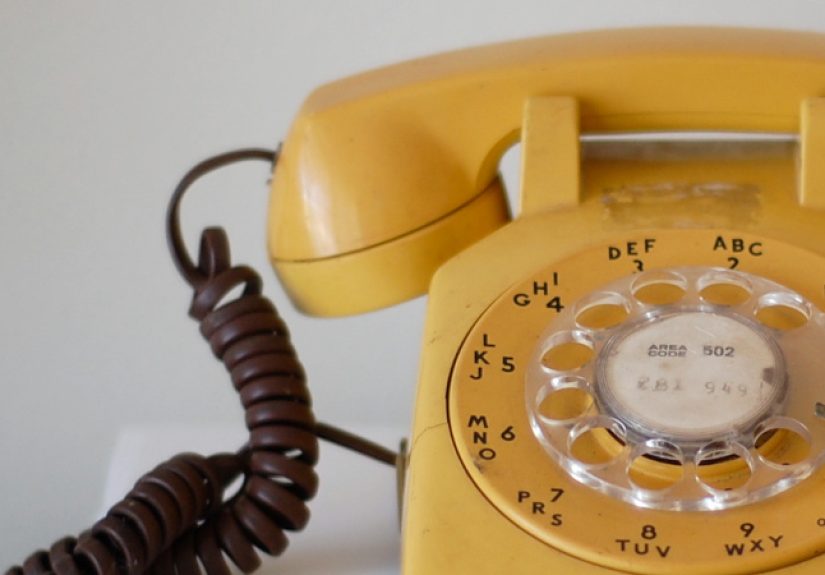
The funniest version of this idea is also the most Linux-flavored: turning an old rotary telephone dial into an input device. A rotary phone dial is not exactly fast. Nobody is replacing a mechanical keyboard with one unless they enjoy entering passwords at the speed of 1958. But as a hardware project, it is brilliant.
A traditional rotary phone dial works by using mechanical switches. When you wind the dial, one switch indicates that dialing has begun. As the dial returns, another switch opens and closes in pulses. Those pulses represent digits. In many systems, one pulse means “1,” two pulses mean “2,” and ten pulses mean “0,” though historical telephone standards varied by country. The mechanism is slow, noisy, bouncy, and charming. In other words, it is exactly the kind of old hardware Linux users love rescuing from a parts drawer.
A Linux kernel driver can read those pulse and busy signals through GPIO pins on an embedded Linux board or system-on-chip. Once the driver interprets the pulses, it can present the dial as an evdev input device. From the desktop’s point of view, the rotary dial can behave like a number pad. Turn the dial to 5, and Linux receives a key event for 5. Suddenly your retired telephone hardware has joined the modern input stack. Somewhere, a beige office phone just got promoted.
Why Use a Kernel Driver Instead of a Microcontroller?
Many hobbyists would solve the rotary dial problem with a microcontroller. Connect the dial to an Arduino, Raspberry Pi Pico, or similar board, have the firmware count pulses, then send USB HID keyboard events to the computer. That approach is simple, portable, and practical. It works across operating systems because the computer simply sees a keyboard-like device.
The kernel-driver approach is different. It is less about convenience and more about learning, integration, and experimentation. A driver shows how Linux handles real input devices below the desktop layer. It connects GPIO, timing, debouncing, keycode mapping, device-tree configuration, and evdev event reporting. For educators, embedded developers, and curious hackers, that makes the dial more than a novelty. It becomes a friendly doorway into Linux device-driver development.
Is a rotary phone dial likely to be merged into the mainline Linux kernel as the next essential desktop revolution? Probably not. Linus Torvalds is many things, but he is unlikely to wake up tomorrow declaring that the future of computing depends on pulse dialing. Still, the project captures something important: Linux remains one of the few mainstream computing environments where turning antique phone hardware into a recognized input device feels not only possible, but normal.
The Linux Input Stack Is Built for Weird Ideas
Part of the reason a dial works on Linux is that the input stack is flexible. The Linux input subsystem is designed to support many classes of input hardware through common event interfaces. Devices can report key presses, relative movement, absolute positions, switches, LEDs, force feedback, and other event types. Userspace applications and desktop environments do not need to understand every circuit or sensor. They receive standardized events.
The evdev interface is especially important. It exposes input devices through files under /dev/input/, allowing tools to inspect, record, remap, or transform input events. Utilities such as evtest and evemu help users see what a device is actually sending. For tinkerers, this is the moment the magic becomes visible. Turn a knob, watch events appear. Press a button, see the keycode. Dial a number, observe the pulse count become input. It is not mystical. It is just Linux being gloriously transparent.
There is also uinput, which allows userspace programs to create virtual input devices. That is a big deal for dial projects. A program can read one physical device, transform its behavior, and output a new virtual keyboard, mouse, joystick, or controller. This is how remapping tools can turn a quirky dial into something applications already understand.
Modern Dials: From Surface Dial to Open-Source Knobs
The idea of a dial is not limited to old telephones. Microsoft’s Surface Dial helped popularize the modern “wheel device” concept for creative workflows. It can be rotated, clicked, and used with radial menus in supported applications. On Windows, it was designed as a secondary input tool for tasks like zooming, undoing, changing brush size, and navigating creative controls without interrupting the main pointer or pen workflow.
Linux support for dial-like devices has grown over time. The kernel gained support for hardware such as the Surface Dial through HID-related work, and user-space projects have explored ways to map dial events into practical shortcuts. The experience may not be as polished as a first-party Windows integration, but Linux users are rarely helpless when a device emits recognizable input. If the events are visible, they can often be remapped, scripted, or routed into something useful.
Meanwhile, open-source hardware has pushed the concept forward. Devices such as programmable macro pads and rotary encoder keyboards show that a knob can be part of a serious daily setup. QMK firmware, widely used in custom keyboards, supports advanced input customization, layers, macros, and encoder behavior. A QMK-powered knob can handle actions on the device itself, reducing the need for extra desktop software. That is ideal for Linux because it keeps the operating system side clean: plug it in, map it, twist away.
Recent open-source control dials, including high-resolution scrolling knobs, show where this category is heading. A good dial is not merely a volume knob with ambition. It can provide fine-grained scrolling, precise timeline movement, and smooth interaction for editing, coding, browsing, and media work. On Linux, where high-resolution wheel events and input remapping continue to improve, the dial is no longer just a novelty. It is becoming a small but serious productivity accessory.
Best Uses for a Linux Dial
1. Volume and Media Control
The obvious use is still one of the best. A physical volume dial is faster than opening a sound menu, easier than hunting for function keys, and satisfying in the way only a knob can be. Press to mute, rotate to adjust volume, double-press to play or pause, and suddenly your desktop feels like a studio console instead of a spreadsheet bunker.
2. Scrolling Long Documents
Writers, developers, researchers, and spreadsheet survivors spend a lot of time scrolling. A dial can become a dedicated scroll control, letting your mouse remain where it is while your other hand navigates. High-resolution scrolling makes this even better, especially for dense PDFs, code files, documentation, and long web pages.
3. Creative Software Control
Artists and designers can map a dial to brush size, opacity, zoom, canvas rotation, undo history, or layer navigation. Video editors can use it for timeline scrubbing. Audio editors can adjust gain, jog through clips, or control transport functions. Linux creative apps may not all support dedicated dial APIs, but keyboard shortcuts and remapping tools can bridge much of the gap.
4. Window and Workspace Navigation
Linux desktop environments such as GNOME and KDE Plasma already support extensive keyboard shortcuts. A dial can trigger those shortcuts. Rotate left and right to move between workspaces. Press to show the overview. Hold a modifier and rotate to move windows. It is the kind of setup that feels unnecessary until you use it for a week and then resent every computer that lacks it.
5. Terminal and Developer Workflows
Developers can map dial movement to command history, tab switching, pane navigation, log scrolling, or build/test commands. A press could run a script, open a terminal, toggle a service dashboard, or send a frequently used key sequence. The dial becomes a tiny command wheel for people who already treat the keyboard like a cockpit.
The Tools That Make a Dial Practical on Linux
Linux has several ways to make unusual input hardware useful. Desktop settings are the simplest. GNOME and KDE Plasma both provide keyboard shortcut configuration, and many applications allow custom shortcuts internally. If a dial sends ordinary key events, that may be enough.
For deeper control, tools such as Input Remapper can change the behavior of keyboards, mice, controllers, wheels, and other input devices across X11 and Wayland. It can map one input to another and supports more advanced behavior such as macros. For users who prefer command-line power, evsieve can read events from physical devices, transform them, and write them to virtual devices. Key remapping daemons such as keyd work at a low level using Linux input primitives, which can help mappings survive across different environments.
The best path depends on the hardware. If the dial is a USB HID device that already sends volume or scroll events, configuration may be easy. If it sends unusual events, you may need remapping. If it is a raw rotary encoder attached to GPIO pins, you may need a driver, microcontroller firmware, or a userspace program. The good news is that Linux gives you options at nearly every layer. The bad news is that Linux gives you options at nearly every layer. Welcome to the buffet; please bring a plate and emotional resilience.
What Linux Still Needs for Dials to Shine
Linux does not lack raw capability. What it needs is smoother, friendlier integration. A perfect Linux dial experience would include reliable device detection, a simple graphical mapping interface, per-application profiles, high-resolution scroll support, easy export and import of settings, and consistent behavior across Wayland sessions, desktop environments, and toolkits.
Per-application behavior is especially important. A dial should control volume in a browser, zoom in an image editor, brush size in a painting app, and timeline position in a video editor without the user manually switching profiles every five minutes. That requires better cooperation between input tools, portals, desktop environments, and applications.
Accessibility is another major reason dials matter. A physical rotary control can be easier for some users than complex key combinations or precise pointer movements. For people with limited dexterity, repetitive strain, or specialized workstation needs, a programmable dial can reduce effort and make common actions more comfortable. Linux should embrace this not as a gimmick, but as part of a broader commitment to flexible human-computer interaction.
Experiences With a Linux Dial: What It Feels Like in Real Life
The first experience of using a dial on Linux is usually half delight, half detective work. You plug in the device, open an input-event viewer, turn the knob, and wait for proof of life. When events appear, there is a tiny spark of victory. The computer has heard the twist. That small moment is addictive because it changes the relationship between user and machine. The desktop stops feeling like a fixed appliance and starts feeling like a workshop.
For daily productivity, the most surprising benefit is not speed. It is rhythm. A dial gives repeated actions a smoother physical pattern. Scrolling through documentation with a knob feels less twitchy than flicking a mouse wheel. Adjusting volume during a call feels cleaner than alt-tabbing into settings. Moving through video frames with a dial feels more natural than tapping arrow keys. The advantage is subtle, but it adds up. Your non-dominant hand finally has something useful to do besides hover near the coffee mug like a tiny office gargoyle.
Creative work is where the dial becomes genuinely persuasive. Imagine editing a photo and using the dial to change brush size while your stylus remains on the tablet. Or scrubbing through an audio track without moving the mouse away from a cut point. Or zooming in and out of a design while your other hand keeps selecting tools. These actions are possible with keyboard shortcuts, but the dial makes them feel continuous rather than binary. Instead of “bigger, bigger, bigger, too big, smaller,” you get a smooth adjustment curve.
Developers get a different kind of joy from the dial. A knob mapped to terminal history, browser tabs, or workspace switching can reduce friction in small but frequent tasks. Pair it with a press action and it becomes a compact control surface: rotate to select, press to confirm. A rotary phone dial is not practical for most developer workflows, but it is fantastic for demos, teaching, and themed projects. Dial “9” to run tests. Dial “0” to deploy to a staging box. Dial “1” to open documentation. Is it necessary? Absolutely not. Is it memorable? Completely.
The setup process can still be bumpy. Wayland security improvements have changed how input injection and remapping work, so older X11 habits do not always transfer neatly. Some devices identify themselves oddly. Some send relative wheel events when you expected keys. Some need permissions adjusted. Some work in one application and behave differently in another. This is where Linux can feel less like a polished showroom and more like a garage where every drawer contains three cables, one mystery adapter, and a note reading “probably works.”
Still, once configured, a dial often becomes part of the muscle-memory landscape. It is like a good keyboard shortcut, but with better ergonomics and more personality. You stop thinking, “I am using an input device,” and start simply reaching for it. That is the highest compliment any peripheral can earn. The best technology disappears into habit, even when it looks like a knob that escaped from a 1970s stereo.
The broader lesson is that Linux does not need one specific dial. It needs a culture and software stack that welcomes dials, knobs, pedals, sliders, macro pads, sensors, and strange handmade controls. The future of desktop computing should not be limited to keyboard, mouse, and touchscreen. People work differently. Hands differ. Tasks differ. Preferences differ. Linux, at its best, is the operating system that says, “Fine, plug it in and let’s see what it can do.”
Conclusion: The Dial Is a Small Idea With a Big Point
“What Does Linux Need? A Dial!” is a funny title, but the answer is more serious than it first appears. A dial represents tactile computing, user freedom, hardware reuse, accessibility, customization, and playful engineering. It reminds us that input devices do not have to be boring rectangles. They can be knobs, wheels, encoders, salvaged phone parts, or open-source gadgets built for one perfect task.
Linux is already capable of supporting these ideas through its input subsystem, evdev, uinput, HID support, desktop shortcuts, remapping tools, and open-source firmware communities. The next step is making the experience easier, more consistent, and more discoverable. When that happens, the dial will not just be a hacker joke. It will be a practical tool for creators, developers, accessibility users, and anyone who believes computers should respond to the human hand in more interesting ways.
So yes, Linux needs a dial. Maybe not because the world depends on rotary phone input. Maybe not because every laptop should ship with a giant silver knob next to the touchpad, although let’s not dismiss greatness too quickly. Linux needs a dial because it proves the desktop can still be playful, personal, and deeply hackable. Sometimes progress is not a thinner screen or a louder AI assistant. Sometimes progress is a satisfying click, a smooth turn, and a penguin that finally learned how to take a call.