Table of Contents >> Show >> Hide
- What Does “Drone Takes Off With A Flick Of The Wrist” Really Mean?
- Why Gesture-Controlled Drones Feel So Exciting
- How Wrist Gesture Drone Control Works
- Real Examples of Flick-of-the-Wrist Drone Ideas
- Benefits of a Drone That Launches With a Wrist Flick
- Challenges: Why This Technology Is Harder Than It Looks
- Safety Tips Before You Try Gesture Drone Flying
- Where Flick-of-the-Wrist Drones Could Be Useful
- The Future of Gesture-Controlled Drones
- Experience Notes: What It Feels Like to Use Wrist and Gesture Drone Controls
- Conclusion
- SEO Tags
Imagine standing at the edge of a trail, raising your hand, giving one small gesture, and watching a drone lift into the air like a well-trained mechanical falcon. No clunky controller. No frantic button-mashing. No awkward “Wait, which stick makes it go up?” moment. Just a flick of the wrist, a soft buzz of propellers, and suddenly the sky has become your camera crew.
The idea behind a drone that takes off with a flick of the wrist sounds like science fiction, but it is rooted in real drone technology: gesture control, wearable sensors, computer vision, motion tracking, and increasingly intelligent flight software. Over the past decade, inventors, hobbyists, and major drone companies have explored ways to make drones easier to launch, guide, land, and command using natural human movements.
This matters because drones are no longer just toys for tech enthusiasts or expensive tools for film crews. They are used by travelers, real estate agents, search-and-rescue teams, farmers, inspectors, first responders, athletes, and everyday creators who want cinematic shots without needing a pilot’s cockpit in their backpack. A wrist-controlled or gesture-controlled drone promises something very powerful: flying technology that feels natural.
What Does “Drone Takes Off With A Flick Of The Wrist” Really Mean?
The phrase can refer to a few related ideas. In one version, a drone responds to hand gestures detected by sensors or cameras. In another, a wearable drone sits on the wrist like a chunky bracelet, then unfolds and launches when the user makes a specific motion. In a third version, a pilot uses a wearable controller, glove, wrist device, or motion sensor to send flight commands without touching a standard remote.
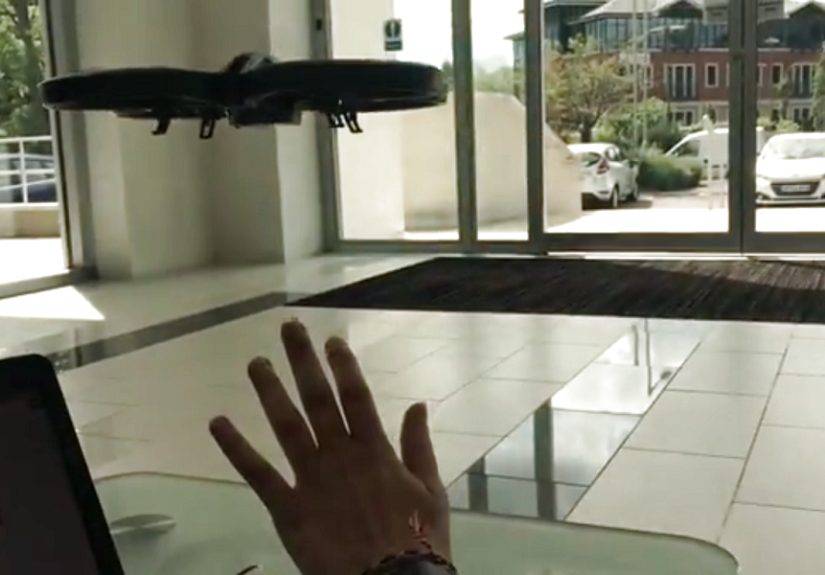
One well-known example from the maker community involved a Leap Motion sensor, LabVIEW software, and a Parrot AR Drone. The system detected hand movements, converted them into control data, and sent flight commands to the drone. It was not magic, though it probably felt like magic the first time the drone obeyed a hand gesture instead of a joystick. Behind the scenes, software translated human motion into machine-readable instructions.
Commercial drone companies have also experimented with gesture control. DJI’s Spark, launched in 2017, became famous for features like PalmLaunch and PalmControl. The drone could take off from the hand and respond to gestures for movement, selfies, and return commands. It helped introduce casual users to a future where flying a drone might feel less like operating equipment and more like interacting with a smart companion.
Why Gesture-Controlled Drones Feel So Exciting
Traditional drone controllers are precise, but they can also be intimidating. Two sticks, multiple buttons, a smartphone app, camera settings, battery warnings, signal strength, GPS statusit can feel like trying to play a video game while balancing a coffee cup on a windy day. Gesture control cuts through that complexity.
A flick-of-the-wrist drone is appealing because it lowers the barrier to flight. Instead of learning a full control layout, users can rely on movements that feel natural: raise a hand, wave, point, tilt, beckon, or hold a palm in place. When designed well, gesture control makes a drone feel more approachable for beginners and more efficient for experienced users who need quick hands-free operation.
It Makes Drones More Human-Friendly
The best technology disappears into the task. A camera should help you capture a moment, not force you to wrestle with settings while the moment escapes. Gesture-controlled drones aim to do exactly that. If you are hiking, biking, climbing, filming a family picnic, or inspecting a hard-to-reach area, you may not want to pull out a remote every time you need a quick aerial view.
It Helps With Fast, Spontaneous Shots
Drone photography often rewards timing. A sunset does not wait while you update firmware. A dog sprinting across a field will not pause because you forgot which button starts tracking mode. Gesture launch and quick control allow users to capture short, spontaneous aerial clips with less setup time.
It Opens Doors for Accessibility
Gesture control can also be useful for people who find standard controllers difficult. A simplified movement-based interface may help users with certain mobility needs, limited grip strength, or workflows where hands-free control is helpful. This is one reason gesture interfaces matter beyond novelty. The fun part is the “look, no controller” effect. The important part is making advanced tools easier for more people to use.
How Wrist Gesture Drone Control Works
A drone that responds to wrist movement needs three major ingredients: motion detection, command interpretation, and stable flight response. The drone or connected device must first detect what the user did. Then software decides what that gesture means. Finally, the drone must perform the action safely.
1. Motion Sensors Detect the Gesture
Wearable controllers can use accelerometers, gyroscopes, magnetometers, or optical tracking systems to detect hand and wrist movement. These sensors measure tilt, rotation, speed, direction, and orientation. If you flick your wrist upward, the system can detect a quick change in angle and acceleration.
2. Software Translates Movement Into Commands
Raw motion data is messy. People move differently. One person’s gentle flick is another person’s dramatic movie-trailer flourish. The software must separate intentional commands from accidental movement. This usually requires thresholds, calibration, gesture recognition, and sometimes machine learning.
For example, a wrist tilt might mean “move forward,” while a flat palm might mean “hover.” A raised hand could trigger takeoff, and a beckoning motion could call the drone back. The goal is to create gestures that are easy to remember but hard to trigger accidentally.
3. The Drone Executes the Flight Safely
Once the gesture becomes a command, the drone’s flight controller handles motors, stabilization, GPS, obstacle sensing, altitude, and orientation. Modern drones are remarkably good at staying steady, but gesture control adds another challenge: the drone must obey quickly without becoming unpredictable.
That is why the best gesture systems usually limit what gestures can do. They may allow takeoff, landing, framing, selfie capture, tracking, or short movements, while leaving complex flight paths to a standard controller or app. In drone design, convenience is wonderful, but safety is the adult in the room holding the clipboard.
Real Examples of Flick-of-the-Wrist Drone Ideas
The concept has appeared in several forms, from maker projects to consumer drones and prototype wearables.
Leap Motion and Parrot AR Drone Projects
Maker projects have shown how hand tracking can control a drone through external sensors. A Leap Motion sensor can track hand position and gestures, while software such as LabVIEW can process those gestures and send flight instructions through an API. These projects are important because they show that gesture drone control does not require fantasy hardware. With the right sensor, software, and drone platform, the concept is achievable.
DJI Spark and Palm-Based Control
DJI Spark brought gesture control into mainstream consumer drone conversation. Its PalmLaunch feature allowed the drone to take off from the user’s hand, while Gesture Mode made it possible to move, frame, and capture shots using hand signals. Spark was not perfectgesture recognition could be sensitive to lighting, distance, and positioningbut it proved that casual pilots wanted drones that felt less technical and more immediate.
Nixie, the Wearable Camera Drone Concept
Nixie became one of the most memorable wearable drone concepts. The idea was simple and wonderfully bold: wear a lightweight drone on your wrist, flick your hand, let it unfold, fly away, capture a photo or video, then return. It was pitched as a next-generation point-and-shoot camera for adventurers, climbers, runners, and travelers. Although it never became a common retail product, Nixie helped inspire public imagination around wearable flying cameras.
Skydio Beacon and One-Handed Control
Skydio’s approach focused less on wrist launch and more on intelligent tracking and easy one-handed control. Its Beacon accessory allowed users to guide and reposition compatible Skydio drones while the drone handled obstacle avoidance and subject tracking. This reflects a broader industry trend: instead of forcing people to micromanage every flight input, drones are becoming smarter partners that can follow, frame, avoid obstacles, and film with less effort from the pilot.
Benefits of a Drone That Launches With a Wrist Flick
The biggest benefit is speed. A gesture-controlled launch can reduce the time between seeing a shot and capturing it. That is valuable for action sports, travel, journalism, inspections, outdoor adventures, and creative content.
Another benefit is portability. A wrist-based or gesture-based system supports the dream of a drone you can carry anywhere. If the drone is compact enough, it could become an everyday camera rather than a special piece of gear you only bring when you feel ambitious.
There is also a storytelling advantage. Drone footage can make ordinary scenes feel cinematic. A simple walk through a forest becomes an opening shot. A beach picnic becomes a travel montage. A backyard barbecue becomes, depending on the uncle operating the grill, either a lifestyle commercial or a smoke-emergency documentary.
Challenges: Why This Technology Is Harder Than It Looks
Gesture-controlled drones sound simple until reality walks in wearing steel-toed boots. The first challenge is gesture accuracy. A drone must know whether you intentionally gave a command or simply scratched your ear. Misreading a gesture can be annoying at best and dangerous at worst.
The second challenge is environmental reliability. Bright sunlight, shadows, reflective surfaces, wind, moving crowds, and low light can confuse vision-based systems. Wearable sensors avoid some visual problems, but they introduce others, such as calibration drift, battery life, signal reliability, and comfort.
The third challenge is safety. A wrist-launched drone has propellers near skin, clothing, hair, pets, and curious children who believe every flying object is their new best friend. Propeller guards, automatic shutdown, launch confirmation, and safe-distance rules are essential.
The fourth challenge is regulation. In the United States, recreational drone pilots must follow FAA rules, including taking The Recreational UAS Safety Test, maintaining visual line of sight, avoiding interference with crewed aircraft, and complying with registration and Remote ID requirements when applicable. A drone may feel casual, but once it is airborne, it is part of the national airspace system. The sky has rules, even when your drone looks like a flying sandwich with ambition.
Safety Tips Before You Try Gesture Drone Flying
Before launching any drone by hand or gesture, read the manufacturer’s manual and practice in an open area. Do not begin near people, roads, power lines, airports, emergency response areas, stadiums, or wildlife. Keep your first flights boring. Boring first flights are excellent because they usually end with the drone intact.
Check battery level, GPS lock, propeller condition, firmware status, return-to-home settings, and local flight restrictions. If your drone uses visual gesture recognition, make sure the lighting is good and your hands are visible. Avoid dark clothing or busy backgrounds if the system needs to recognize your palm or body.
When palm launching or landing, use propeller guards if recommended, keep your fingers below the propeller plane, and do not grab the aircraft while the motors are spinning. Let the drone land or power down properly. The goal is to look smooth, not to earn a nickname like “Bandage Hands.”
Where Flick-of-the-Wrist Drones Could Be Useful
Travel and Adventure Filming
For hikers, cyclists, skiers, and climbers, a fast-launch drone could capture dramatic shots without requiring a full production setup. A small drone that follows a user, films a short orbit, and returns safely would be especially useful in remote places where every ounce of gear matters.
Search and Rescue
Gesture-controlled drones could help rescuers send a small aerial camera ahead while keeping their hands available for radios, ropes, medical gear, or navigation. In stressful environments, simple controls can reduce cognitive load.
Inspections and Field Work
Roof inspectors, utility workers, bridge teams, and construction managers could benefit from quick aerial views. A wrist gesture might launch a drone for a short inspection path, while obstacle avoidance and automated return reduce risk.
Content Creation
Creators want tools that help them move quickly. A drone that launches with a gesture could become a compact filming assistant for social videos, real estate clips, tutorials, events, and behind-the-scenes footage.
The Future of Gesture-Controlled Drones
The future is likely not one single “flick your wrist and everything happens” product. Instead, gesture control will probably become one layer in a larger intelligent flight system. Users may combine voice commands, phone apps, wearable controllers, AI subject tracking, obstacle avoidance, automated shot modes, and standard remotes.
In other words, the drone of the future may not need you to fly it every second. You will tell it what shot you want, where to stay, who to follow, and when to come home. The drone will handle the boring math: stabilization, framing, collision avoidance, wind correction, and smooth camera movement.
That is the real promise behind a drone taking off with a flick of the wrist. It is not just a flashy launch trick. It represents a shift from drones as remote-controlled machines to drones as intelligent visual assistants. The easier they are to command, the more useful they become.
Experience Notes: What It Feels Like to Use Wrist and Gesture Drone Controls
The first time you use gesture control with a drone, the experience is usually a mixture of wonder, nervous laughter, and the quiet hope that nobody nearby is recording your learning curve. There is something undeniably strange about holding up your hand and expecting a flying robot to understand you. When it works, it feels futuristic. When it does not, you may find yourself waving at a drone like you are trying to flag down a very small, very stubborn taxi.
In practical use, the best experience begins before takeoff. You need a calm location, enough space, and a patient mindset. Gesture flying is not where you show off on day one. It is where you learn how the drone “sees” you. For camera-based systems, body position matters. Standing too close can confuse the drone. Standing too far away may prevent recognition. Backlighting can turn your hand into a mysterious shadow puppet. Busy backgrounds can make the drone hesitate like it is trying to solve a visual crossword puzzle.
A smooth palm launch feels impressive because the drone rises gently and holds position without needing a controller. The sound of the propellers is close enough to make you respect the machine immediately. Even small drones create a strong reminder that convenience does not cancel physics. Keeping your palm steady, fingers flat, and face away from the propeller path helps make the launch feel controlled rather than dramatic.
Once airborne, simple gestures are usually the most satisfying. A small movement to reposition the drone, a selfie command, or a beckoning gesture to bring it closer can feel natural after a few tries. The key is to move deliberately. Fast, sloppy gestures are more likely to confuse the system. Think of it less like conducting an orchestra and more like giving clear instructions to a very literal assistant.
The most useful lesson is that gesture control works best as a shortcut, not a complete replacement for piloting knowledge. You should still understand how to stop the drone, land it, switch to manual control, and respond to warnings. Gesture features are wonderful when they behave, but wind, lighting, battery level, and software recognition can all affect performance. A responsible pilot treats gesture mode like cruise control in a car: helpful, convenient, but never an excuse to stop paying attention.
Another memorable part of the experience is how people react. Even those who have seen drones before tend to pause when one launches from a hand or responds to a wave. It feels more personal than a standard controller flight. The drone seems less like a gadget and more like a trained aerial petalthough unlike a pet, it needs firmware updates and cannot be bribed with snacks.
For creators, gesture launch changes the rhythm of shooting. Instead of unpacking a full kit for every small clip, you can capture quick establishing shots, short follow sequences, or playful group photos with less friction. That convenience encourages experimentation. You start noticing angles you would have skipped before: a picnic from above, a walking shot from behind, a quick reveal over a hill, or a family gathering from a gentle overhead view.
The experience also teaches humility. Gesture drones are clever, but they are not mind readers. You learn to respect boundaries, practice in safe spaces, and avoid treating the drone like a party trick in crowded areas. The best flights are the ones where the technology disappears and the footage tells the story. When a drone takes off with a flick of the wrist and quietly captures the shot you imagined, it feels like a glimpse of where personal cameras are heading: lighter, smarter, faster, and just a little more magical.
Conclusion
A drone that takes off with a flick of the wrist is more than a cool headline. It represents the ongoing effort to make aerial technology simpler, safer, and more natural. From maker projects using motion sensors to consumer drones with palm launch features and wearable camera concepts like Nixie, the industry has been moving toward flight systems that respond to people instead of forcing people to master complex controls first.
The technology still has challenges. Gesture recognition must be reliable, wrist launches must be safe, and pilots must follow FAA rules whenever they fly. But the direction is clear: drones are becoming easier to use, smarter in the air, and more connected to the way humans naturally move. The flick of a wrist may not replace every controller, but it points toward a future where launching a drone feels as simple as raising your hand and saying, “Let’s get the shot.”