Table of Contents >> Show >> Hide
- The short answer: why a GE microwave runs but does not heat
- Step-by-step GE microwave troubleshooting
- 1) Make sure you are actually cooking, not just timing
- 2) Check the control lock and do a basic reset
- 3) Open and firmly close the door
- 4) Run a proper water test
- 5) Confirm the power level is not too low
- 6) Check the turntable, food placement, and cookware
- 7) Look for overheating or blocked airflow
- Common parts that fail when a GE microwave stops heating
- What you can safely do yourself
- What not to do
- When to repair your GE microwave and when to replace it
- How to prevent the problem from happening again
- Real-world experiences with a GE microwave not heating food
- Final takeaway
A GE microwave that lights up, spins dramatically, hums like it means business, and then leaves your leftovers as cold as office small talk is one of the most irritating kitchen plot twists around. The good news is that a microwave not heating does not always mean the appliance is finished. Sometimes the problem is surprisingly simple: the timer was used instead of a cook cycle, the control lock is on, the power level got dropped, the door is not fully engaging, or the unit overheated and needs to cool down. Other times, the culprit is deeper inside the machine and requires professional repair.
If your GE microwave is not heating food, start with the easy checks before assuming the worst. This guide walks through what to test first, what symptoms usually mean, which fixes are safe to try yourself, and when it is smarter to stop poking the appliance and call a technician. Because yes, the microwave can absolutely be the drama. But it does not always have to win.
The short answer: why a GE microwave runs but does not heat
When a GE microwave turns on but does not heat, the issue usually falls into one of two buckets. The first bucket is settings or airflow: timer mode, demo mode, control lock confusion, the wrong power level, blocked vents, or overheating. The second bucket is hardware failure: door switch problems, a blown fuse or thermal device, a failed high-voltage diode, capacitor, magnetron, or sometimes a control board issue.
Your job is to figure out which bucket you are dealing with without taking unnecessary risks. That means starting outside the cabinet, not inside it. If the microwave is dead, sparking, making a burning smell, or buzzing loudly while failing to heat, treat that as a strong sign you are past the “quick kitchen fix” stage.
Step-by-step GE microwave troubleshooting
1) Make sure you are actually cooking, not just timing
This sounds obvious right up until it is not. On many GE models, the timer works separately from microwave cooking. If you accidentally start the timer instead of a cook cycle, the display counts down and beeps, but your food stays as chilly as your freezer peas. Start a simple one-minute cook test using a microwave-safe cup of water. If you only set the timer, cancel it and run an actual cook cycle.
Also check for demo mode. On select GE countertop models, demo mode lets the lights, fan, and controls act normal without generating microwave power. In plain English: your microwave puts on a convincing performance but never heats the food. Many GE models exit this mode by holding Power Level and 0 together for about three seconds, though you should confirm the exact method in your model manual.
2) Check the control lock and do a basic reset
If the display lights up but the microwave behaves strangely, the control lock may be active. On many GE units, pressing and holding Clear/Off or Pause/Off for about three seconds unlocks the controls. Some older models use different key combinations. If you see “LOCK” or a small “L” on the display, that is your clue.
After that, try a reset. Unplug a countertop unit for several minutes, or switch off the breaker if the microwave is hardwired. Then restore power and test again. A reset can clear minor control glitches, especially after a power surge or a weird keypad moment. It is not a miracle cure, but it is cheap, safe, and refreshingly low drama.
3) Open and firmly close the door
Microwaves will not heat unless the safety interlocks detect a fully closed door. GE specifically notes that a dish can interfere with the door even when it looks closed. If the door feels loose, misaligned, sticky, or reluctant to latch, the microwave may spin and act busy while refusing to energize the heating system.
Give the door seal area a quick clean. Wipe away crumbs, grease, and splatter around the latch area. Then close the door firmly and try a short cook cycle with water. If the latch feels off or you have to jiggle the door to make the unit behave, a door switch or latch issue is very possible.
4) Run a proper water test
Before declaring the appliance broken, do a controlled test. Place a microwave-safe glass container of water in the center and heat it on high. For a quick home check, one minute with a mug of water is enough to confirm whether it is obviously heating. For a more formal performance test, GE provides a method using 1 quart of water heated for 2 minutes and 30 seconds on High. A temperature rise in the expected range means the unit is heating correctly.
This test matters because sometimes the microwave is heating, just poorly. If the water becomes hot but your leftovers do not, the problem may be load size, food placement, cookware, power level, or uneven heating rather than a total no-heat failure.
5) Confirm the power level is not too low
GE microwaves allow multiple power levels. That is useful when melting butter or defrosting chicken, but not so useful when you forget the power level is set low and then wonder why your soup is still having trust issues after three minutes. On many GE models, time-cook starts on full power by default, but it can be changed. Make sure you are testing on High.
Low power does not always mean “no heat.” It can mean “technically heating, but with the enthusiasm of a lazy Sunday afternoon.” If food warms very slowly instead of not at all, power settings should be high on your suspect list.
6) Check the turntable, food placement, and cookware
Sometimes what looks like a GE microwave not heating food is really uneven heating. GE notes that the glass tray should be in place, food should be arranged correctly, and containers matter. Thick food piled in the center may stay cool while the edges get hot. Square dishes can heat differently than round ones. Stoneware and some heavy materials can also interfere with efficient heating.
Try a simple test with a round microwave-safe bowl and stir halfway through. If that works better, your microwave may be fine and your reheating setup was the actual villain.
7) Look for overheating or blocked airflow
A microwave needs airflow to keep the magnetron from overheating. GE warns that blocked vents or poor air clearance can cause the unit to cycle off or stop cooking properly. If the microwave shuts down during longer cooking sessions, cools off, and then works again, overheating is a strong possibility.
Make sure the vents are not blocked by grease, clutter, or installation issues. On over-the-range models, clean the grease filter regularly. If the exterior feels unusually hot, the fan sounds weak, or the problem appears after several minutes of use, stop using the appliance until airflow is addressed.
Common parts that fail when a GE microwave stops heating
If you have ruled out settings, airflow, and simple user-error gremlins, the issue may be internal. Here are the usual suspects.
Door switch or interlock
The door switch tells the microwave it is safe to heat. If it fails, the fan, light, or turntable may still operate, making the oven look alive while the heating circuit never fully engages. This is one of the most common causes when a microwave appears to run normally but produces no heat.
High-voltage diode
The diode helps power the magnetron. If it fails, the magnetron may not receive the power it needs to generate microwave energy. The result is often a unit that runs but does not heat. This is a frequent no-heat diagnosis across repair guides.
Magnetron
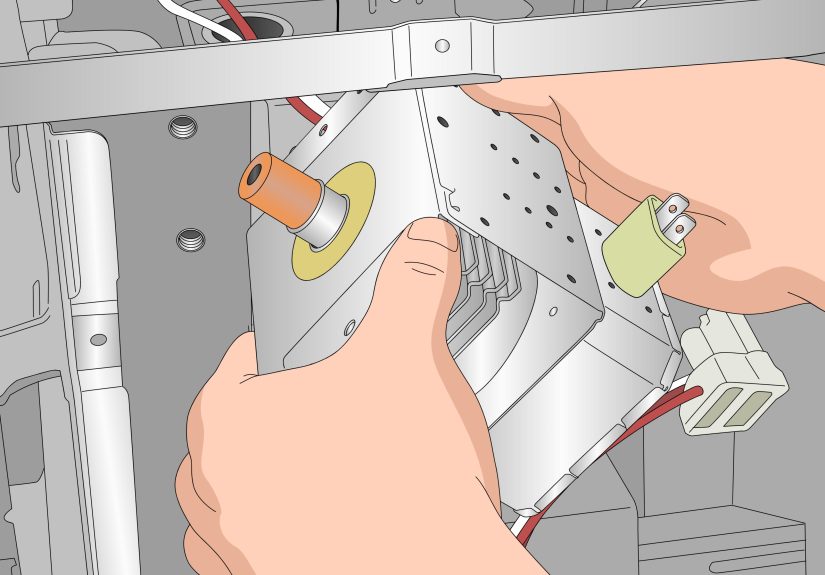
The magnetron is the heart of the heating system. If it fails, the microwave may still light up, count down, and spin the turntable, but it will not actually cook. A failing magnetron may also come with louder buzzing, odd smells, or intermittent heating before it quits completely.
High-voltage capacitor
The capacitor works with the high-voltage circuit. If it goes bad, heating can fail. It is also one of the reasons internal microwave repair is hazardous. Capacitors can retain a dangerous charge even after the appliance is unplugged.
Thermal fuse, thermostat, or control issue
If the unit overheats, a thermal protective part may open the circuit. Some control board failures can also mimic no-heat symptoms. If your microwave shuts off mid-cycle, blows fuses, resets randomly, or behaves inconsistently, those components move higher on the list.
What you can safely do yourself
- Verify the outlet and breaker are working.
- Cancel timer mode and test an actual cook cycle.
- Turn off control lock if it is active.
- Exit demo mode if your model supports it.
- Reset the microwave by disconnecting power temporarily.
- Clean the door seal, latch area, vents, and filters.
- Test heating with water on High power.
- Use correct microwave-safe cookware and smaller food loads.
That is the safe zone. Once the next step involves removing the cabinet, touching wires, or going anywhere near the capacitor or magnetron, it is time to let a qualified technician take over.
What not to do
Do not open the microwave cabinet unless you are trained and properly equipped. Internal microwave components can carry a serious shock hazard even after the plug is out of the wall. Also, do not keep running a microwave that smells burned, sparks, hums loudly, or repeatedly stops heating. That can worsen the damage and turn a repairable problem into a replacement conversation.
When to repair your GE microwave and when to replace it
If your GE microwave is fairly new, built-in, or over-the-range, repair is often worth considering. Door switches, latches, filters, and some external issues are usually more reasonable fixes. But if the magnetron, capacitor, or multiple major components are involved, the math changes quickly.
A smart rule of thumb is this: if the appliance is older, the repair estimate is high, and a comparable replacement is not much more, replacement may be the better move. If it is newer and the repair is clearly cheaper than buying a new unit, repair makes sense. Over-the-range and built-in models usually deserve a closer look before you send them to the appliance retirement village.
How to prevent the problem from happening again
- Keep vents and grease filters clean so the microwave can cool properly.
- Do not slam the door; repeated impact can wear latch and interlock parts.
- Use microwave-safe cookware and avoid oversized, dense loads.
- Use the correct power level for the food, but test on High if heating seems weak.
- Wipe spills quickly so splatter does not affect airflow or create arcing risks.
- Avoid running the microwave empty, which can stress internal parts.
Real-world experiences with a GE microwave not heating food
In real kitchens, this problem rarely shows up in a neat, textbook way. It usually starts with a tiny moment of doubt. Maybe the coffee comes out lukewarm instead of hot. Maybe last night’s pasta is blazing on the edges and icy in the center. Maybe the microwave sounds exactly the way it always has, but the food inside seems personally committed to staying cold. At first, most people assume they mis-set the timer, grabbed the wrong dish, or just did not heat the food long enough.
Then it happens again. And again. That is when the suspicion starts: “Is my GE microwave dying, or is this some weird setting I forgot existed?”
A very common experience is the microwave looking perfectly normal. The display works. The countdown works. The light comes on. The turntable spins. The fan hums. It is basically giving an Oscar-worthy performance of being a microwave. Yet the bowl of soup comes out as if it just got back from a snowstorm. That kind of fake-out often leads homeowners to waste a day blaming the food, the bowl, the leftovers, the laws of physics, and occasionally other members of the household before realizing the appliance is the real problem.
Another common experience is inconsistent heating. One day the GE microwave seems fine. The next day it takes twice as long. After that, it heats a mug of water but struggles with a plate of leftovers. This middle stage is frustrating because it does not feel broken enough to diagnose easily. People often describe it as the microwave “getting weak,” which is not technical language, but honestly, everyone understands exactly what it means.
Over-the-range GE models create their own special category of confusion. Many owners notice the unit getting hot around the top or shutting down after longer cooking sessions. They do not immediately think “airflow” or “overheating.” They think the microwave is haunted, tired, or maybe just offended by baked potatoes. In reality, dirty filters, blocked vents, or heat buildup can make the unit behave unpredictably.
There is also the control-panel experience: someone activates control lock by accident, or demo mode gets turned on during cleaning, and suddenly the microwave becomes a very expensive kitchen clock. Because the display still works, people often assume the heating system failed, when the fix is a key combination and a slightly embarrassed laugh.
The most stressful experience is when the microwave stops heating and starts making unusual noises at the same time. A louder buzz, a burnt smell, or repeated shutdowns change the mood fast. That is usually the moment people stop troubleshooting and start pricing service calls. It is also the right instinct. A microwave can be wonderfully convenient, but it is not the appliance for fearless improvisation with a screwdriver and good intentions.
The takeaway from all these experiences is simple: start with the obvious, test methodically, and do not confuse activity with actual heating. A GE microwave that looks alive is not always doing its job. Sometimes it needs a reset. Sometimes it needs a latch adjustment. And sometimes it needs a professional who knows the difference between a quick fix and a risky one.
Final takeaway
If your GE microwave is not heating food, do not jump straight to the worst-case scenario. Begin with the fast checks: timer mode, demo mode, control lock, door closure, power level, airflow, and a water test on High. If those steps do not solve it, the problem is more likely a failed internal component such as the door interlock, diode, capacitor, magnetron, or a protective thermal part.
That is the point where smart troubleshooting stops and smart safety begins. In other words: if the fix requires opening the cabinet, your microwave has officially left the DIY chat.