Table of Contents >> Show >> Hide
- What Is a QR Code, and Why Does It Matter?
- Step 1: Decide What Your QR Code Should Do
- Step 2: Choose Between a Static and Dynamic QR Code
- Step 3: Prepare the Link Before You Generate the Code
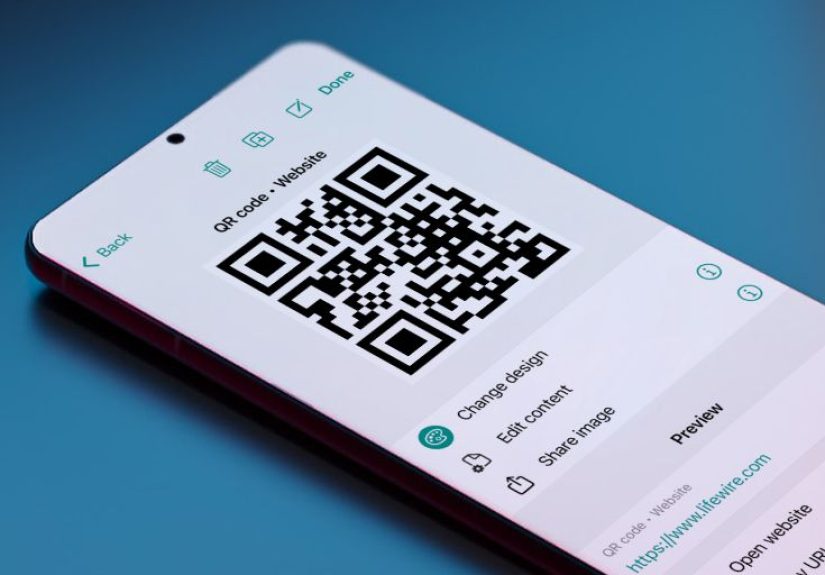
- Step 4: Generate the QR Code
- Step 5: Customize the QR Code Without Breaking It
- Step 6: Test the QR Code Like Your Reputation Depends on It
- Step 7: Download the Right File Type
- Best Uses for a DIY QR Code
- Common QR Code Mistakes to Avoid
- Security Tips: Make QR Codes Helpful, Not Sketchy
- Quick Example: Making a QR Code for a Bakery
- How to Know If Your QR Code Is Actually Working
- Experiences and Practical Lessons From Making Your Own QR Code
- Final Thoughts
If you have ever looked at a QR code and thought, “That weird little pixel maze seems important,” you were absolutely right. A QR code can turn a poster into a website, a business card into a lead generator, a menu into a touch-free ordering tool, or a product package into a shortcut to reviews, tutorials, or checkout. In other words, it is the overachiever of tiny squares.
The good news is that learning how to make your own QR code is not hard. You do not need a design degree, a software engineering badge, or a secret handshake from the internet. You just need the right destination, a reliable generator, a little design common sense, and a habit of testing before you unleash your masterpiece into the world.
In this guide, you will learn exactly how to create a QR code from scratch, when to use a static or dynamic code, how to make it easy to scan, which mistakes to avoid, and how to keep your audience safe. Whether you want a QR code for your business, event, classroom, restaurant, portfolio, or side hustle that still lives mostly in your head, this article will help you do it right.
What Is a QR Code, and Why Does It Matter?
A QR code, short for “Quick Response” code, is a two-dimensional barcode that stores information people can access by scanning it with a smartphone camera. Most commonly, that information is a URL, but QR codes can also point to contact details, text, SMS prompts, payment pages, app downloads, PDFs, Wi-Fi credentials, forms, maps, and more.
What makes QR codes so useful is speed. Nobody wants to type a 62-character link from a flyer while standing in line for coffee. A good QR code removes friction. One scan, one tap, and your audience lands exactly where you want them to go.
That is also why QR codes have become so popular in marketing, retail, events, hospitality, education, and internal business operations. They connect physical spaces to digital actions. A printed object suddenly becomes clickable, which is pretty magical for something that looks like a crossword puzzle designed by robots.
Step 1: Decide What Your QR Code Should Do
Before you generate anything, answer one simple question: What should happen after someone scans the code? If you skip this step, your QR code may be technically functional but strategically useless. And that is the digital equivalent of buying a treadmill to use as a coat rack.
Here are some of the most useful QR code destinations:
- Website URL: Great for landing pages, product pages, portfolios, or booking links.
- Contact page or vCard: Useful for networking, business cards, and sales reps.
- Google Form or signup form: Perfect for lead capture, RSVPs, surveys, or feedback.
- Menu or PDF: Common in restaurants, events, and printable materials.
- SMS or phone number: Good for service businesses that want fast inquiries.
- Payment page: Helpful for donations, mobile checkout, and quick transactions.
- App download or social profile: Ideal for creators, startups, and campaigns.
Your destination should be mobile-friendly, fast-loading, and clear. If someone scans your code and lands on a desktop-only page with tiny text, a broken button, and a five-paragraph welcome message, congratulations: you made a QR code that works and still loses conversions.
Step 2: Choose Between a Static and Dynamic QR Code
This is one of the most important decisions in the entire process.
Static QR Codes
A static QR code contains fixed information. Once created, the destination cannot be changed. If the URL changes later, the code is basically a decorative square with trust issues.
Best for: permanent links, simple personal use, one-time projects, or situations where you are sure the destination will never change.
Dynamic QR Codes
A dynamic QR code uses a short redirect link behind the scenes. That means you can update the destination later without reprinting the code. Many dynamic QR platforms also include analytics, so you can see scan counts, timing, and sometimes location or device data.
Best for: businesses, campaigns, print materials, packaging, menus, recurring promotions, and anything you may want to edit later.
If your QR code is going on something expensive to reprint, such as packaging, signage, brochures, or window decals, dynamic is usually the smarter choice. If it is just for a quick classroom handout or your cousin’s bake sale, static may be perfectly fine.
Step 3: Prepare the Link Before You Generate the Code
Your QR code is only as good as the destination behind it. Before you create the code, clean up the page it will open.
Make the destination mobile-first
Since most scans happen on phones, your page should load quickly, fit the screen, and present the next step immediately. No one should need to pinch, zoom, rotate, squint, or pray.
Keep the action obvious
If the code leads to a signup form, the form should be visible right away. If it leads to a restaurant menu, the menu should load instantly. If it leads to a payment page, the user should know where to tap within seconds.
Use a short, clean link when possible
Longer, more complex data can create denser QR codes, which may be harder to scan when printed small. A short destination often makes the code more practical and cleaner-looking.
Step 4: Generate the QR Code
Now for the fun part. Use a reputable QR code generator. Many tools allow you to create codes for URLs, text, phone numbers, SMS prompts, or payment links. Some design tools and website builders also include built-in QR code creation.
The general process looks like this:
- Open a trusted QR code generator or design platform.
- Select the content type you want to encode, such as a URL or phone number.
- Paste in your link or content.
- Choose static or dynamic, if the platform offers both.
- Customize the design carefully.
- Generate the code.
- Test it on multiple devices.
- Download the correct file format for web or print.
Some browsers and apps also create QR codes directly from a webpage, which is handy when you want a fast share option. That said, for branded campaigns or anything customer-facing, a dedicated QR platform usually gives you more control and better design options.
Step 5: Customize the QR Code Without Breaking It
Yes, you can customize a QR code. No, you should not treat it like abstract art after three espressos.
A customized QR code can look more polished and more on-brand, but it still has a job to do: scan quickly. Beauty is welcome. Confusion is not.
Smart customization choices
- Use brand colors with strong contrast.
- Add a frame or label such as “Scan to View Menu” or “Scan to Book Now.”
- Include a logo in the center if the tool supports it properly.
- Match the style to the design around it.
What to avoid
- Low contrast, like light gray on beige.
- Busy backgrounds behind the code.
- Overly tiny size.
- Distorting the square shape.
- Decorating over the functional patterns.
In plain English: a black code on a white background is still the gold standard. If you want to go fancy, do it carefully and test relentlessly.
Step 6: Test the QR Code Like Your Reputation Depends on It
Because sometimes it does.
Always test your QR code before publishing, printing, posting, mailing, laminating, framing, or adding it to 10,000 pizza boxes.
How to test it properly
- Scan with both iPhone and Android if possible.
- Test in bright light and normal indoor light.
- Test from the intended distance.
- Check the destination page speed.
- Confirm the link opens securely and correctly.
- Verify the page still makes sense on mobile.
If the code is going into print, print a sample first. A QR code that works perfectly on your laptop screen can become a blurry little gremlin when reduced, compressed, or placed on textured paper.
As a practical rule, many print applications work best when the code is at least around 1 x 1 inch, though the ideal size depends on viewing distance, material, and how dense the code is. A billboard-sized code and a business-card-sized code do not play by the same rules.
Step 7: Download the Right File Type
The format you export matters more than people think.
- PNG: Great for web, digital graphics, and many print uses.
- SVG: Best for high-quality scaling in design and print.
- PDF: Useful for print workflows and layout handoff.
If you are placing the QR code on large signs, banners, packaging, or professional print materials, vector formats like SVG are usually the safer choice because they scale cleanly. If you are adding it to a blog graphic or social post, PNG is often perfectly fine.
Best Uses for a DIY QR Code
Not every QR code has to be a marketing stunt. Some of the best ones simply make life easier.
For small businesses
Link to online ordering, booking, product pages, loyalty signup, customer reviews, or payment checkout.
For creators and freelancers
Send people to a portfolio, media kit, calendar booking page, or digital business card.
For events
Use QR codes for RSVPs, schedules, venue maps, speaker bios, donation pages, and feedback forms.
For restaurants and hospitality
Create codes for menus, specials, reservation pages, and guest information.
For education and training
Link printed handouts to videos, quizzes, assignment instructions, or resource libraries.
For personal projects
Add a QR code to wedding invitations, graduation announcements, photo albums, reunion pages, or house manuals for guests.
Common QR Code Mistakes to Avoid
Here is where many people go wrong:
- Linking to a homepage instead of a specific page. Make the code take people directly to the desired action.
- Using a dead or temporary link. If the page disappears, the QR code becomes an awkward monument to poor planning.
- Skipping a call to action. Tell people why they should scan.
- Printing too small. Tiny codes may look neat and scan terribly.
- Using weak contrast. Pretty is nice; readable is mandatory.
- Ignoring mobile usability. The scan is only step one.
- Failing to test after printing. This is the classic mistake that ruins otherwise smart campaigns.
Security Tips: Make QR Codes Helpful, Not Sketchy
QR codes are useful, but they also get abused by scammers. That means trust matters.
If you are creating a QR code for customers, students, guests, or event attendees, do these things:
- Link only to secure, legitimate destinations.
- Use your real brand name on the landing page.
- Add context near the code, such as “Scan to see our official menu.”
- Avoid sending users to suspicious redirects or confusing domains.
- Test that the preview link looks normal when scanned.
Users are increasingly cautious, and that is a good thing. A random unlabeled QR code taped to a wall is not “mysterious and modern.” It is “please let me get phished in style.” Give people context and build confidence.
Quick Example: Making a QR Code for a Bakery
Let’s say you run a local bakery and want people to place custom cake orders.
- Create a mobile-friendly landing page with cake photos, pricing, and a short inquiry form.
- Choose a dynamic QR code so you can update the page later for seasonal offerings.
- Generate the code and add your bakery logo in the center.
- Place a label underneath: Scan to Order a Custom Cake.
- Print a sample for your counter card, cake boxes, and window sign.
- Test the code with different phones and from customer standing distance.
- Track scans and refine the landing page if people scan but do not convert.
That is a solid QR strategy. It is simple, specific, measurable, and useful. Also, it leads to cake, which improves almost every business model.
How to Know If Your QR Code Is Actually Working
Creating the code is only half the job. The other half is figuring out whether it is doing anything valuable.
If you use a dynamic QR platform, review analytics such as scan volume, time of day, and campaign performance. If you use a static code, consider connecting the destination to trackable links or page analytics. That way, you can see whether your poster, package insert, table tent, or mailer is earning its keep.
Good QR code performance usually comes down to five things:
- The placement is easy to notice.
- The promise is clear.
- The page loads fast.
- The action is simple.
- The user trusts what happens next.
Experiences and Practical Lessons From Making Your Own QR Code
The first time many people make a QR code, they treat it like a technical task. Paste the link, click generate, done. But after creating QR codes for real-world use, you quickly learn that the code itself is the easy part. The hard part is everything around it: the destination, the placement, the context, the design, and the follow-through.
One of the most common experiences is realizing that a working QR code is not automatically a useful QR code. For example, someone might create a code for a flyer that links to a homepage packed with navigation, pop-ups, and ten competing offers. Technically, the scan succeeds. Practically, the user bounces. That experience teaches an important lesson: a QR code should reduce friction, not introduce a scavenger hunt.
Another practical lesson comes from print. On a computer screen, almost every QR code looks great. Then it gets printed too small, placed over a textured image, or squeezed into a corner like an afterthought. Suddenly the “smart” code becomes the one thing nobody can scan. People who make QR codes regularly learn to respect spacing, contrast, and scale. They test paper proofs. They check glare. They scan from realistic angles. They stop assuming and start verifying.
Branding is another area where experience changes your approach. At first, adding a logo and custom colors feels like a clever upgrade. Sometimes it is. Sometimes it is also the moment the code becomes moody and unreliable. Experienced creators know the trick is balance. A little branding can increase trust and recognition. Too much styling can hurt scannability. The best QR codes are not always the fanciest ones. They are the ones people actually use.
There is also a psychological side to QR code performance. People scan more often when they know exactly what they are getting. “Scan me” is vague. “Scan to see today’s menu” is useful. “Scan to get 15% off your first order” is persuasive. “Scan to open an unlabeled mystery portal” is how you end up being ignored by everyone except one extremely curious intern. Experience teaches that the call to action matters almost as much as the code itself.
Teams also learn that dynamic QR codes can save enormous headaches. A static code may seem fine until the destination changes, the product page moves, or the event details need updating. Reprinting everything is expensive and annoying. That is why people who work with packaging, signage, menus, or recurring promotions often become strong believers in dynamic codes. Flexibility is not glamorous, but it is beautiful when deadlines are real.
And then there is trust. In a world where QR-related scams exist, people are more cautious. That means context matters. Legitimate businesses label their codes, use recognizable branding, and send users to secure pages that make sense. Good QR code experiences feel seamless. Bad ones feel suspicious within seconds. That difference can shape whether people engage, leave, or decide your brand belongs in the “absolutely not” category.
The biggest takeaway from real experience is simple: a QR code is not a gimmick. It is a bridge. When that bridge is short, clear, mobile-friendly, and well-tested, it can quietly improve sales, signups, communication, and convenience. When it is sloppy, confusing, or poorly placed, it becomes another square thing people politely ignore. The best QR codes do not scream for attention. They make the next step so easy that scanning feels like the obvious thing to do.
Final Thoughts
If you want to make your own QR code, the process is simple: choose the right destination, decide between static and dynamic, generate the code with a trusted tool, customize it carefully, test it thoroughly, and place it where people can actually use it. That is the difference between a QR code that merely exists and one that genuinely performs.
Done well, a QR code can make your marketing more measurable, your print materials more interactive, your customer journey smoother, and your information easier to access. Done badly, it becomes a tiny square apology printed on 500 brochures.
So be strategic. Be helpful. Be slightly less dramatic with the color palette. And always, always test before you print.