Table of Contents >> Show >> Hide
- What Is a Tiny 3x3x3 SMD LED Cube?
- Why Choose SMD LEDs Instead of Through-Hole LEDs?
- How the Tiny 3x3x3 SMD LED Cube Works
- Core Parts You Will Need
- Design Decisions That Matter More Than You Think
- Building the Cube: A Practical Step-by-Step Approach
- Soldering Tips for SMD LED Cube Success
- Programming Animations for a Tiny LED Cube
- Common Problems and How to Fix Them
- Is a Tiny 3x3x3 SMD LED Cube Worth Building?
- Experiences From Building and Living With a Tiny 3x3x3 SMD LED Cube
A tiny 3x3x3 SMD LED cube is one of those projects that looks innocent right up until you’re hunched over a desk asking a grain-of-rice-sized LED why it suddenly launched itself into another dimension. It is small, flashy, a little fussy, and wildly satisfying. Better yet, it teaches several real electronics skills at once: current limiting, multiplexing, mechanical alignment, careful soldering, and the kind of debugging that turns “I think I wired it right” into “I now respect continuity mode with my whole heart.”
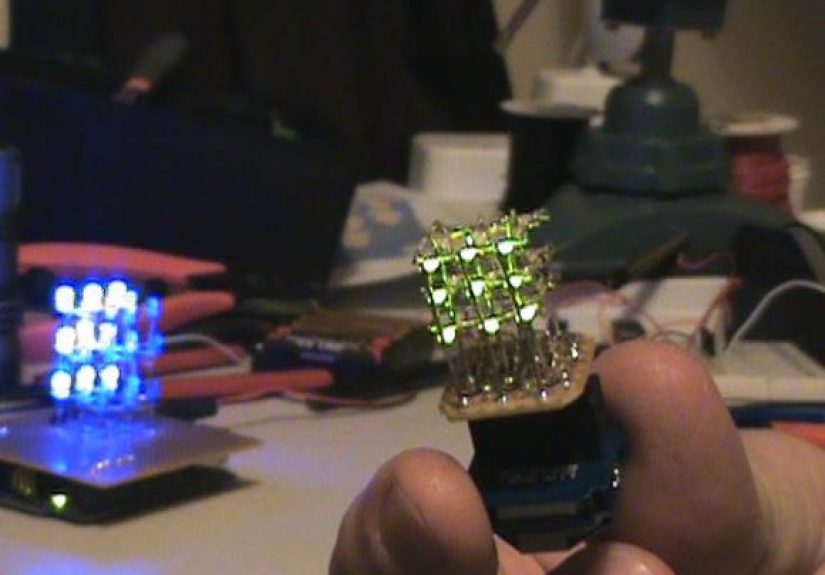
If you want a compact project that feels more impressive than its parts list suggests, this is it. A Tiny 3x3x3 SMD LED Cube uses 27 surface-mount LEDs arranged in three layers of three-by-three points. With the right wiring strategy, a microcontroller can animate all 27 LEDs using far fewer pins than you might expect. The result is a miniature 3D light sculpture that can sit on a desk, show off your soldering skills, and make visitors say, “Okay, that’s actually pretty cool.”
What Is a Tiny 3x3x3 SMD LED Cube?
A 3x3x3 LED cube is a three-dimensional array of 27 LEDs arranged as 9 columns and 3 layers. In a traditional through-hole version, builders use standard round LEDs with long leads that make the structure easier to form. In an SMD LED cube, the builder swaps those larger parts for surface-mount LEDs, which immediately changes the project’s personality. The cube becomes more compact and modern-looking, but the assembly becomes less forgiving. Tiny parts mean tiny margins for error.
That tradeoff is exactly why this project is so appealing. A tiny SMD LED cube looks cleaner, feels more advanced, and takes up less space than a bulky beginner build. It also forces you to think more carefully about the physical design. Where will the common layers go? How will the vertical columns stay straight? Will the LEDs be bright enough when multiplexed? Can your solder joints survive being looked at too hard? These are the glamorous questions of modern electronics.
Why Choose SMD LEDs Instead of Through-Hole LEDs?
The obvious answer is size. A surface-mount LED cube can be dramatically smaller than a classic cube built with 5 mm LEDs. That makes it perfect for desk displays, tiny enclosures, gifts, or just the joy of building something that looks far more expensive than it really is.
The second reason is aesthetics. SMD LEDs can create a sharper, more minimal visual style. Instead of a cube that looks like a science-fair project from the glory days of hot glue, you get something that feels closer to modern electronic art. If your goal is “maker project with a polished vibe,” SMD parts help.
There is also the skill-building factor. Working with tiny LEDs improves your control with tweezers, flux, fine solder, and heat management. You become more disciplined about polarity, alignment, and testing. In other words, the project does not just give you a neat display; it quietly upgrades your abilities.
The downside is that SMD LEDs do not magically make the electronics easier. In fact, they usually make them a bit trickier. Smaller packages can be harder to identify, easier to overheat, and less mechanically forgiving. So while a DIY LED cube with SMD parts is definitely cool, it is not the project to build while balancing a coffee mug in one hand and confidence in the other.
How the Tiny 3x3x3 SMD LED Cube Works
The heart of the project is LED cube multiplexing. Instead of controlling all 27 LEDs with 54 separate wires and a heroic amount of chaos, you group them into columns and layers. A common approach is to use 9 column lines and 3 layer lines. That means the microcontroller only needs to manage 12 control paths, not 27 independent LED channels.
Here is the basic idea: each LED sits at the intersection of one column and one layer. To light a specific LED, the controller activates the correct column and the correct layer at the same time. By scanning through the layers very quickly, the cube creates the illusion that multiple LEDs are glowing at once. Your eyes do the rest. Persistence of vision is basically the project’s unpaid intern.
This is why refresh timing matters. If you scan too slowly, the cube flickers. If you scan fast enough, animations look smooth and stable. A good Arduino LED cube sketch or microcontroller routine cycles through the layers rapidly while updating the columns for each frame. That is what turns a pile of tiny diodes into a moving 3D display.
Core Parts You Will Need
1. Twenty-Seven SMD LEDs
Choose one package size and stick with it. Many builders prefer small but manageable parts, such as 1206 or 0805 LEDs, because they are tiny enough to make the cube look sleek without becoming pure tweezers therapy. Pick LEDs with decent brightness because multiplexing reduces the apparent on-time of each LED.
2. A Microcontroller
An Arduino Nano, Arduino Uno, ATtiny, or another small MCU can handle a 3x3x3 LED cube project. For a tiny build, the Nano is a popular choice because it is compact and easy to program. If you want a more custom design, a small microcontroller on a dedicated PCB looks cleaner.
3. Current-Limiting Resistors
This is not the glamorous part, but it is the part that keeps your LEDs from turning into tiny regrets. Resistors are used to control current through the LEDs. A simple example: if your supply is 5 V, your LED forward voltage is about 2.8 V, and your target current is 10 mA, the resistor value is roughly (5 – 2.8) / 0.01 = 220 ohms. That is why values like 220 ohms or 330 ohms show up so often in hobby LED projects.
4. Driver Transistors or MOSFETs
Even though the cube is small, the layer lines can carry the combined current of multiple LEDs that are on at the same time. Using transistors for the layer switching is often the safer design choice. It reduces stress on the microcontroller pins and gives you more stable behavior.
5. A Rigid Base or PCB
The cube may be tiny, but it still needs a reliable foundation. Some builders hand-wire the cube above perfboard. Others design a custom PCB that holds the driver components and makes the finished project look far more professional. If you are going for a premium finish, the PCB route wins.
Design Decisions That Matter More Than You Think
Choose the Right Wiring Scheme
Most builders use either common-anode columns with common-cathode layers or the reverse. The exact choice matters less than being consistent through the whole design. Your code, transistor arrangement, and resistor placement all depend on this logic. Switching conventions halfway through the build is a fantastic way to invent new vocabulary.
Use One Resistor Per Controlled Path
Many newcomers ask whether they can save parts by using one resistor for a whole group of LEDs. In small cubes, that can create uneven brightness because LEDs do not share current perfectly. A cleaner design usually places the resistors so current is limited in a predictable way, often per column in a multiplexed arrangement. That keeps the display more uniform and saves you from one row looking like it had an espresso while the others did not.
Think About Brightness Early
Since each layer is only active part of the time, a multiplexed cube can look dimmer than expected. This is one reason bright LEDs matter. It is also why builders often tune both resistor values and refresh timing carefully. A tiny cube has less room for optical drama, so every brightness decision matters.
Building the Cube: A Practical Step-by-Step Approach
Make a Jig First
Do not skip the jig. Really. A simple alignment template made from scrap board, acrylic, or a 3D-printed guide keeps the LEDs in neat rows while you solder. Without a jig, your “cube” may become more of an avant-garde light shrub.
Test Every LED Before Assembly
Before the first permanent solder joint, test all 27 LEDs. This takes a few extra minutes and can save hours of troubleshooting later. Replacing one dead LED buried in the middle of a miniature cube is the sort of experience that builds character, but most people already have enough character.
Build the Layers
Construct each 3×3 layer separately. Keep the orientation consistent so polarity stays under control. This is especially important with SMD LEDs, where the polarity marking can be subtle. Use magnification if needed. Your ego may object, but your solder joints will be grateful.
Stack the Layers Carefully
Once the three flat layers are complete, connect them vertically into columns. This is where patience wins. A tiny SMD LED cube can look stunning when the columns are straight and evenly spaced. It can also look like a tiny electronic earthquake if you rush this step.
Connect the Base Electronics
After the physical cube is assembled, wire the columns and layers to the control circuitry. Keep the wiring short and logical. Labeling connections is not glamorous, but it beats wondering which wire is column 7 at midnight.
Soldering Tips for SMD LED Cube Success
Use flux. Then use a little more flux. Fine-pitch work becomes dramatically easier when solder flows where it should instead of inventing bridges for fun. A temperature-controlled soldering iron, fine-tip tweezers, magnification, and thin solder all help.
Do not overheat the LEDs. Touch, solder, and move on. If a joint looks ugly, let it cool before reworking it. Extended heat can damage small packages or weaken mechanical alignment.
Check polarity constantly. On many SMD LEDs, the cathode mark is a tiny notch, green line, triangle, or corner indicator. “I was pretty sure that was the cathode” is a sentence usually followed by rework.
Finally, inspect every joint under magnification. A cube can fail because of one cold joint or one tiny solder bridge. At this scale, small mistakes are not small in effect.
Programming Animations for a Tiny LED Cube
The software side is where the project goes from neat object to living display. Most LED cube animations are built around frames. Each frame defines which LEDs should appear on. The program then scans through the layers and updates the columns for each one.
Simple animations include rain, expanding boxes, rotating planes, wave patterns, and random sparkle effects. A beginner-friendly approach is to store each frame as a set of bit patterns, one for each layer. That makes the code easier to debug and lets you add new effects without rewriting the control logic from scratch.
One classic issue is ghosting, where LEDs faintly glow when they should be off. The fix is usually a mix of better timing and cleaner switching. Turn off the active layer before changing the column states, then activate the next layer. That small software habit makes a surprisingly big difference.
Common Problems and How to Fix Them
The Cube Looks Dim
Check LED brightness, resistor values, and refresh logic. A multiplexed cube is never going to behave exactly like a directly driven panel, so choose bright LEDs and verify the current path carefully.
One Column or Layer Does Not Work
That usually points to a wiring break, bad transistor connection, cold solder joint, or incorrect pin mapping in the code. Work methodically. Random poking is emotionally satisfying but electrically unconvincing.
The Structure Feels Fragile
That is common with tiny hand-built cubes. Reinforcing the base, shortening unsupported spans, or using a PCB anchor can make the build sturdier without hurting the look.
Animations Flicker
Increase refresh speed, clean up blocking delays, and confirm that the scan loop is stable. A tiny cube needs disciplined timing to look polished.
Is a Tiny 3x3x3 SMD LED Cube Worth Building?
Absolutely, especially if you want a project that combines electronics, craftsmanship, and visual payoff. It is small enough to finish without turning your workbench into a long-term archaeological site, but advanced enough to teach real design lessons. You learn how LEDs behave in arrays, why resistor strategy matters, how multiplexing saves pins, and why physical assembly is just as important as code.
It is also a great portfolio build. A tiny LED cube photographs well, demos well, and instantly signals that you can work on both hardware and embedded logic. It says, “Yes, I enjoy blinking lights, but in a structured and respectable way.”
Experiences From Building and Living With a Tiny 3x3x3 SMD LED Cube
The most memorable thing about a Tiny 3x3x3 SMD LED Cube is that the experience changes as the build progresses. At the start, it feels like a simple electronics project. Twenty-seven LEDs, a few resistors, a microcontroller, some code. No big deal. Then the first layer goes together and you realize this little cube is less about parts count and more about precision. Suddenly, alignment matters. Polarity matters. Solder volume matters. The distance between “that looks clean” and “why is this column leaning like a sleepy fence post?” is very small.
One of the best lessons builders report is how much patience affects the final result. When you rush the first layer, every layer above it inherits the mistake. A tiny skew at the bottom becomes obvious at the top. That makes the cube strangely educational. It teaches you that tiny mechanical errors stack just as quickly as electrical ones. You stop thinking in terms of individual solder joints and start thinking in systems.
Another common experience is discovering that brightness on paper and brightness in real life are not the same thing. A builder might choose LEDs that seem bright enough in the datasheet, only to find that the finished multiplexed cube looks softer than expected from across the room. That does not mean the project failed. It means the builder learned one of the core truths of display work: optical results depend on more than raw component specs. Viewing angle, diffusion, current, scan timing, and ambient light all shape what people actually see.
There is also a unique satisfaction in getting the first successful animation to run. A static LED test is reassuring, but a moving 3D pattern feels different. Once a plane sweeps upward or a rain effect falls through the cube, the project suddenly becomes more than a wiring exercise. It turns into an object with personality. That moment tends to erase a lot of the frustration from the build, including the hour you spent hunting a cold solder joint that was hiding in plain sight like a tiny metal prank.
Builders also learn that debugging a small LED cube improves discipline. You begin checking continuity more often. You read your own code more carefully. You label wires instead of trusting your memory. You test subsystems before sealing everything into a “finished” design. Those habits transfer beautifully into future projects, whether that is a larger RGB cube, a custom PCB, or another embedded display.
And then there is the long-term experience of actually keeping the cube on your desk. That may sound minor, but it matters. A tiny SMD LED cube is not just something you build and forget. It becomes a conversation starter, a small trophy, and sometimes a reminder that good projects do not need to be huge. The cube occupies very little physical space, yet it represents design choices, careful assembly, troubleshooting, and creativity. It is compact proof that detail-oriented work can produce something delightful.
In the end, the Tiny 3x3x3 SMD LED Cube feels like the ideal small serious project. It is playful without being trivial, technical without being overwhelming, and challenging without requiring a month of your life. You come away with a sharper eye, steadier hands, and a blinking little sculpture that quietly announces, “Yes, this was hard. Yes, it was worth it.”